Importing My Documents from External Hard Drive - XP to Win 7

The easiest way I found to get my Documents off XP and on Windows 7 was to copy the folder to a CD.... then open it (you may have to take 'ownership' to do that) and send it to the Library folder you want it placed in.

I think you can also copy/paste the folder from the CD to your desktop, then drag it where you want it.
 

My Computer My Computer

At a glance

Windows 7 Ultimate 32bit SP1Intel(R) Core(TM)2 Quad CPU @ 2.40GHz, 2400 MHz4 GBATI Radeon HD 2600 Pro
Computer type
PC/Desktop
Computer Manufacturer/Model Number
Bruce ... somewhere in his 40's
OS
Windows 7 Ultimate 32bit SP1
CPU
Intel(R) Core(TM)2 Quad CPU @ 2.40GHz, 2400 MHz
Motherboard
INTEL/D975XBX2
Memory
4 GB
Graphics Card(s)
ATI Radeon HD 2600 Pro
Monitor(s) Displays
Samsung SyncMaster 914v
Screen Resolution
1280 x 1024
Hard Drives
2/500GB each ... ST3500630AS ATA Device.
One is not connected
PSU
Rocketfish 700 W
Case
G.Skill Gigabyte Chassis
Keyboard
Standard PS/2 Keyboard
Mouse
Microsoft PS/2 Mouse
Internet Speed
DSL
Antivirus
Avira Internet Security
Browser
IE 11
Other Info
ATI HDMI Audio
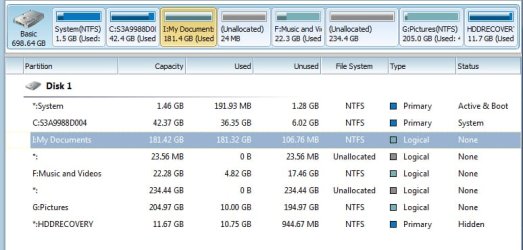
I'm going a little off topic here, but I see one of your partitions is the recovery partition from the OEM. Did your laptop come with discs, or a small utility to burn recovery discs? If so, do that. I wouldn't feel comfortable having my only recovery method tied to the hard drive. If you are able to burn discs, or have the discs already, the recovery partition can be deleted and then used as part of your data drive.
 

My Computer My Computer

At a glance

Windows 7 Ultimate x64 SP1Intel Core i7-260012 GB Patriot Extreme DDR3-1333Nvidia GTX 470
OS
Windows 7 Ultimate x64 SP1
CPU
Intel Core i7-2600
Motherboard
Gigabyte GA-P67A-UD3P-B3
Memory
12 GB Patriot Extreme DDR3-1333
Graphics Card(s)
Nvidia GTX 470
Monitor(s) Displays
Dell UltraSharp 2209WA
Hard Drives
OCZ Agility3 240 GB, WD5001AALS, WD7501AALS
PSU
OCZ ModStream 700W
Case
CoolerMaster HAF 912 Advanced
Cooling
CoolerMaster Hyper 212 Plus
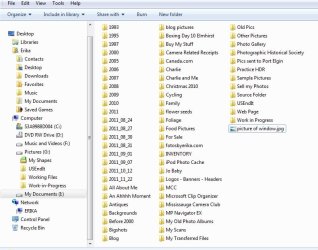
Thank you all for your comments and suggestions. I tried to follow one person's suggestion of having two partitions, one for C and the other for everything else and to have folders in them. I thought I was doing really well for a while. Then I ran into a snag. The pictures folder in My Documents does not have enough space. So, I tried to move the unallocated space but - how do you do that? I thought I'd attach pictures in the hope that it made more sense than me trying to explain.
 

Attachments

  • unallocated .jpg
    unallocated .jpg
    66.2 KB · Views: 3
  • files.jpg
    files.jpg
    90.2 KB · Views: 3

My Computer My Computer

At a glance

Windows 7 Home Premium 64 biti7-2630qm cpu @ 2.00GHz6Gintel HD Graphics Family, NVIDIA GeForce GT 540M
Computer Manufacturer/Model Number
Toshiba Satellite
OS
Windows 7 Home Premium 64 bit
CPU
i7-2630qm cpu @ 2.00GHz
Motherboard
Intel
Memory
6G
Graphics Card(s)
intel HD Graphics Family, NVIDIA GeForce GT 540M
Sound Card
Intel Display Audio, Realtek High Definition Audio
Monitor(s) Displays
Generic PnP Monitor
Hard Drives
Hitachi, Optiarc DVD
Back
Top