Can i install Win 7 from a System Image on an external hard drive

NED11WILS

New member
Local time
1:25 PM
Messages
24
IE use the image to make the installation on external drive. The 320GB internal drive on my Lenovo T410 has died. Cannot be accessed in any way including external SATA cable.

I happen to have System Image stored in a folder on an external drive that has many other data folders on it. The image was created by windows Backup And Restore "Create A System Image".

Rather than purchase a new internal drive for a computer that I plan to replace in several months I would like to use the system image to install the operating system and data on a second external hard drive that I have available.

In other words is it possible to run my computer normally by installing the Image on an external hard drive? How? Thank you for your time.
 

My Computer My Computer

At a glance

Windows 7 Starter x32Intel Atom N4702GB
Computer type
Laptop
Computer Manufacturer/Model Number
hp
OS
Windows 7 Starter x32
CPU
Intel Atom N470
Memory
2GB
Hard Drives
232GB
Antivirus
Norton 360
Browser
IE10
It is extremely hard to get Win 7 to boot from an external drive. Don't waste your time. Buy a new drive for the Lenovo.
 

My Computer My Computer

At a glance

Windows 10 22H2 ProIntel(R) Xeon W-10885M2x 32 GB DDR4 ECC memory (128 GB max)Intel onboard GPU 1080p - Quadro RTX 5000 Max...
Computer type
Laptop
Computer Manufacturer/Model Number
Dell Precision 15 7550 Workstation
OS
Windows 10 22H2 Pro
CPU
Intel(R) Xeon W-10885M
Motherboard
Dell
Memory
2x 32 GB DDR4 ECC memory (128 GB max)
Graphics Card(s)
Intel onboard GPU 1080p - Quadro RTX 5000 Max-Q GPU 4K
Hard Drives
1TB Samsung 9100 Pro main M2 SSD
2x 2TB Samsung 9100 Pro temp storage M2 SSD (6 TB max)
Mouse
Logitech MX-25 Bluetooth
Internet Speed
slow
Antivirus
MS
Browser
Pale Moon 34.x.x - x64 AVX2 build
Many thanks for your response but purchasing another drive is not a viable option considering my current financial condition. Mainly I want to get the system running again so that I can retrieve the key for MS Office that came with the computer. I can then use that on my desktop.
 

My Computer My Computer

At a glance

Windows 7 Starter x32Intel Atom N4702GB
Computer type
Laptop
Computer Manufacturer/Model Number
hp
OS
Windows 7 Starter x32
CPU
Intel Atom N470
Memory
2GB
Hard Drives
232GB
Antivirus
Norton 360
Browser
IE10
How would you retrieve the key?


if you burrow into the system image folder, you will find a large file with .vhd extension

That can be mounted in disk management on your working machine. It shows up like another disk. You may then be able to the key get in the same way you were planning.


System Image - Extract Files Using Disk Management
 

My Computers My Computers

  • At a glance

    7 X64i5 84002x8gb 3200mhz
    Computer type
    PC/Desktop
    OS
    7 X64
    CPU
    i5 8400
    Motherboard
    gigabyte b365m ds3h
    Memory
    2x8gb 3200mhz
    Hard Drives
    various
    PSU
    pure power 11 400w cm
    Case
    Coolermaster
    Cooling
    cryorig m9i
  • At a glance

    7x64g54008gb ddr4 2400
    Computer type
    PC/Desktop
    OS
    7x64
    CPU
    g5400
    Motherboard
    ga b365m ds3h
    Memory
    8gb ddr4 2400
    PSU
    xfx pro 450w
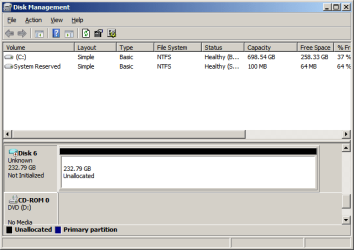
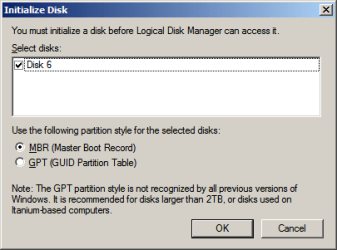
SIW2. Thank you much. I followed the procedure below and have a disk management screen that shows my new virtual disk drive with a blue icon designated as 'Disk 6'. However it is not initialized. The drive does not appear on Windows Explorer searches. The Initialize option is grayed-out when I right-click the blue drive in the Disk Management window.


How to mount a VHD file in Windows 7
Click on the Start Button and key in diskmgmt.msc and hit Enter.
Once in Disk Management, click on the Action in the menu bar and select Attach VHD.
Select the file location and check Read-only to prevent writes to the VHD file.
After you hit ok the drive will show up in Disk Management with a blue icon.
Access the drive in Explorer.


Also have tried the following but all options are grayed out:
In the Start menu, type diskmgmt.msc and click OK.
Right-click the disk to be initialized and then click Initialize Disk. ...
Select MBR (Master Boot Record) and click OK.
Right-click the unallocated space and click New Simple Volume.

If I go through Administrative Tools > Computer Management > Storage > Disk Management I do get an option to initialize Disk 6 but when I proceed there is the following error message "The request could not be performed because of an I/O Device Error.

Should I have not designated read only?

Please let me know if you have further suggestions. So far the education alone has made it worth the effort. Thanks again...


New Simple Volume is grayed out
 

Attachments

  • VHD- Disk 6.png
    VHD- Disk 6.png
    10.1 KB · Views: 11
  • DISK 6 Initialize Option.png
    DISK 6 Initialize Option.png
    6.3 KB · Views: 11

My Computer My Computer

At a glance

Windows 7 Starter x32Intel Atom N4702GB
Computer type
Laptop
Computer Manufacturer/Model Number
hp
OS
Windows 7 Starter x32
CPU
Intel Atom N470
Memory
2GB
Hard Drives
232GB
Antivirus
Norton 360
Browser
IE10

My Computers My Computers

  • At a glance

    7 X64i5 84002x8gb 3200mhz
    Computer type
    PC/Desktop
    OS
    7 X64
    CPU
    i5 8400
    Motherboard
    gigabyte b365m ds3h
    Memory
    2x8gb 3200mhz
    Hard Drives
    various
    PSU
    pure power 11 400w cm
    Case
    Coolermaster
    Cooling
    cryorig m9i
  • At a glance

    7x64g54008gb ddr4 2400
    Computer type
    PC/Desktop
    OS
    7x64
    CPU
    g5400
    Motherboard
    ga b365m ds3h
    Memory
    8gb ddr4 2400
    PSU
    xfx pro 450w
Is that a copy of the vhd file, or is it the orginal?
 

My Computers My Computers

  • At a glance

    7 X64i5 84002x8gb 3200mhz
    Computer type
    PC/Desktop
    OS
    7 X64
    CPU
    i5 8400
    Motherboard
    gigabyte b365m ds3h
    Memory
    2x8gb 3200mhz
    Hard Drives
    various
    PSU
    pure power 11 400w cm
    Case
    Coolermaster
    Cooling
    cryorig m9i
  • At a glance

    7x64g54008gb ddr4 2400
    Computer type
    PC/Desktop
    OS
    7x64
    CPU
    g5400
    Motherboard
    ga b365m ds3h
    Memory
    8gb ddr4 2400
    PSU
    xfx pro 450w
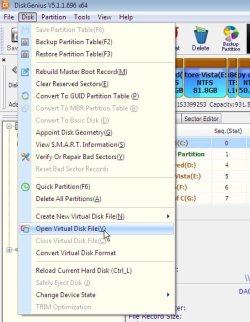
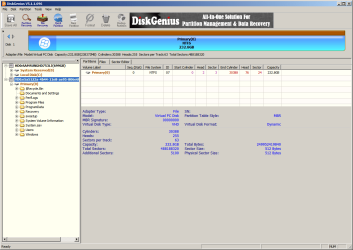
Results from using DiskGenius as suggested

SIW2,

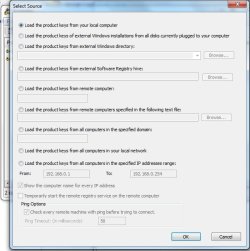
Thank you again. It looks like DiskGenius finds the vms file just fine. But it does not look at it as a drive I don't think. Is there a place to go looking for the key here? Magic Jellybean does not seem to be able to look into this- At least not with my limited experience with the program.

Possibly it would be best to delete the virtual drive rather than unloading it and then create a new one without Read Only.
 

Attachments

  • DiskGenius Virtual Disk Results.png
    DiskGenius Virtual Disk Results.png
    40 KB · Views: 0

My Computer My Computer

At a glance

Windows 7 Starter x32Intel Atom N4702GB
Computer type
Laptop
Computer Manufacturer/Model Number
hp
OS
Windows 7 Starter x32
CPU
Intel Atom N470
Memory
2GB
Hard Drives
232GB
Antivirus
Norton 360
Browser
IE10
I copied The VHD file over to my PC from the original System Image generated by the computer on an external hard drive. There were two VHD files:

This one was very large and I used it to generate the virtual drive: e5a5123a-4b44-11e8-ae95-806e6f6e6963.vhd

This one was also in the backup and only 47kb: e5a51239-4b44-11e8-ae95-806e6f6e6963.vhd
 

My Computer My Computer

At a glance

Windows 7 Starter x32Intel Atom N4702GB
Computer type
Laptop
Computer Manufacturer/Model Number
hp
OS
Windows 7 Starter x32
CPU
Intel Atom N470
Memory
2GB
Hard Drives
232GB
Antivirus
Norton 360
Browser
IE10
If it is a copy, you can see what diskgenius says when you load it-appears to be ok.?


1. First thing I would do:

Shrink your C partition and create another partition in the unallocated space - give it a letter, e.g. D or E.

From the loaded vhd in diskgenius, copy the windows folder onto that spare partition, then point at that partition with your key recovery program.


In your pic, you have highlighted the disk. If you click on the partition Primary 0, the contents should show up in the right pane under the FILES tab. You can then copy the entire windows folder to a spare partition.


2. another thought:
If you were to load in diskmgmt, maybe partition recovery is possible
It is also possible it got slightly damaged copying it over and diskmgmt is very fussy. Hopefully 1 above will do the job.


Possibly it would be best to delete the virtual drive

don't delete anything.
 

My Computers My Computers

  • At a glance

    7 X64i5 84002x8gb 3200mhz
    Computer type
    PC/Desktop
    OS
    7 X64
    CPU
    i5 8400
    Motherboard
    gigabyte b365m ds3h
    Memory
    2x8gb 3200mhz
    Hard Drives
    various
    PSU
    pure power 11 400w cm
    Case
    Coolermaster
    Cooling
    cryorig m9i
  • At a glance

    7x64g54008gb ddr4 2400
    Computer type
    PC/Desktop
    OS
    7x64
    CPU
    g5400
    Motherboard
    ga b365m ds3h
    Memory
    8gb ddr4 2400
    PSU
    xfx pro 450w
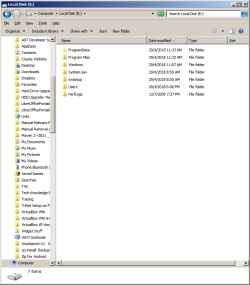
Have reloaded the virtual drive through diskmgmt.msc without specifying Read Only. It is now visible in Computer as local disk E:

I successfully locate E: with the keyfinder Browse button but then it returns the error that it cannot find the path.
 

Attachments

  • Virtual Local Disk E from T410 VHD.png
    Virtual Local Disk E from T410 VHD.png
    23.7 KB · Views: 0

My Computer My Computer

At a glance

Windows 7 Starter x32Intel Atom N4702GB
Computer type
Laptop
Computer Manufacturer/Model Number
hp
OS
Windows 7 Starter x32
CPU
Intel Atom N470
Memory
2GB
Hard Drives
232GB
Antivirus
Norton 360
Browser
IE10

My Computers My Computers

  • At a glance

    7 X64i5 84002x8gb 3200mhz
    Computer type
    PC/Desktop
    OS
    7 X64
    CPU
    i5 8400
    Motherboard
    gigabyte b365m ds3h
    Memory
    2x8gb 3200mhz
    Hard Drives
    various
    PSU
    pure power 11 400w cm
    Case
    Coolermaster
    Cooling
    cryorig m9i
  • At a glance

    7x64g54008gb ddr4 2400
    Computer type
    PC/Desktop
    OS
    7x64
    CPU
    g5400
    Motherboard
    ga b365m ds3h
    Memory
    8gb ddr4 2400
    PSU
    xfx pro 450w
I successfully locate E: with the keyfinder Browse button

maybe it wants you to point at E:\windows
 

My Computers My Computers

  • At a glance

    7 X64i5 84002x8gb 3200mhz
    Computer type
    PC/Desktop
    OS
    7 X64
    CPU
    i5 8400
    Motherboard
    gigabyte b365m ds3h
    Memory
    2x8gb 3200mhz
    Hard Drives
    various
    PSU
    pure power 11 400w cm
    Case
    Coolermaster
    Cooling
    cryorig m9i
  • At a glance

    7x64g54008gb ddr4 2400
    Computer type
    PC/Desktop
    OS
    7x64
    CPU
    g5400
    Motherboard
    ga b365m ds3h
    Memory
    8gb ddr4 2400
    PSU
    xfx pro 450w
SIW2. I may just have to wimp-out and get a cheap used disk for my notebook (or a decent one and use the computer for viewing movies). Will keep trying to figure out how to get keys out of virtual drives regardless. Learned some valuable tools today and I thank you.
 

My Computer My Computer

At a glance

Windows 7 Starter x32Intel Atom N4702GB
Computer type
Laptop
Computer Manufacturer/Model Number
hp
OS
Windows 7 Starter x32
CPU
Intel Atom N470
Memory
2GB
Hard Drives
232GB
Antivirus
Norton 360
Browser
IE10
Back
Top