Impossibly slow USB 3.0..

martinlest

New member
Power User
VIP
Local time
8:41 AM
Messages
661
Copying files of about 1MB each today (jpegs) from my laptop (an Asus X44H - has one USB 3.0 slot) to a Kingston USB 3.0 stick I am seeing rates of about 400kb/sec :mad:

I rebooted and things are a fraction faster, but still absurdly slow.

I spent a long time troubleshooting this a bout a year ago - going through various forum posts, installing drivers that were recommended.. uninstalling them (and using System Restore) when they didn't help or made things worse. I gave up. But I think it's time for another go. No idea really how to proceed differently this time. Can anyone advise?

I attach a screenshot of my Device Manager window,

Thanks,

Martin
 

Attachments

  • grab_032.jpg
    grab_032.jpg
    52 KB · Views: 4

My Computer

Computer type
PC/Desktop
Computer Manufacturer/Model Number
Custom Build
OS
Windows 7 Home Premium SP1 64-bit
CPU
Intel Core i7-4790K CPU @ 4.5GHz
Motherboard
Asus H97I-PLUS
Memory
16GB KINGSTON HYPER-X FURY DUAL-DDR3 1600MHz
Graphics Card(s)
8GB NVIDIA GEFORCE GTX 1070
Monitor(s) Displays
HannsG 28" & Dell 24"
Screen Resolution
1920x1200
Hard Drives
1 x 2TB Samsung Evo 860 SSD
2 x 500GB Samsung Evo 850 SSD
PSU
CORSAIR 650W CS SERIES
Case
Thermaltake Core V1 Mini ITX Cube
Cooling
NOCTUA NH-L12
Browser
Firefox
Other Info
Custom PC used for X-Plane 11
Have you tried running Crystal Disk Mark on the stick?

On my system I always use fsutil to get a bit more throughput. I turn off the file access update. Also set the behavior memoryusage to 2 to increase system file buffers. Not that it will make these transfers fast. If you copy one large file.. say a GB file, what speed does Explorer show? For USB 3.0 to a US 3.0 stick you should see better than 24 MB/s copy on a large file(and possibly much faster but below that would be trouble I would think.)

But transfer of lots of files at a shot typically drops the rate way down due to overhead.

The other factor is if the stick is set to Write Caching enabled.
 

My Computer

Computer Manufacturer/Model Number
HP Media Center
OS
Windows 7 32 bit
CPU
AMD 5200+ dual core
Memory
2 GB
Graphics Card(s)
NVidia GeForce 6150SE 128 MB
Monitor(s) Displays
CRT
Screen Resolution
1280x1024
Hard Drives
500 GB Sata internal :

SIIG USB 3.0 docking stations w/WD Caviar Black 6 Gb/s drives
Keyboard
PS/2
Mouse
PS/2 Wheel Mouse
Other Info
SIIG USB 3.0 PCIexpress card.

My Computer

Computer type
PC/Desktop
Computer Manufacturer/Model Number
Dell Inspiron 660
OS
Windows 7 Home Premium 64bit
CPU
Intel Core i3-3240
Motherboard
Dell 084J0R
Memory
8GB DDR3 SDRAM
Graphics Card(s)
EVGA GeForce GT 620
Sound Card
Intel Panther Point PCH High Definition Audio
Monitor(s) Displays
Acer G205HV
Screen Resolution
1600 x 900
Hard Drives
Sandisk SSD 64GB SDSSDP064G
Seagate HDD 1TB ST1000DM003-1CH162
PSU
Dell 300W
Case
Dell Inspiron
Keyboard
Logitech Wireless K320/B350
Mouse
Microsoft
Internet Speed
25Mbps/4Mbps
Antivirus
Avast
Browser
Mozilla Firefox
I tried Crystal Disk Mark on the USB stick. Read values were: 18.69;19.06; 2.88. Write values: 2.09; 2.32; 0.027. If I moved the stick to the USB2.0 port, there was little difference in the results.

I tried again with a WD USB3.0 external HDD: Read values were:67.13; 26.49; 0.322. Write values:67.06; 35.96; 0.888. Moving to the USB2.0 port, values were about 30% of USB3 for sequential, 50% for 512kb and about 80% for 4kb.

Thanks for the links. They are the same as I tried last year, in fact... I thought the ASMedia entry was the USB3. In any case, having installed the drivers, my Device Manager is exactly the same as before, as are speeds for the USB3 port.. I think I must have a USB3.0 driver or I wouldn't get a difference (with the WD HDD at least) between the USB3 & USB2 ports, no?
 

My Computer

Computer type
PC/Desktop
Computer Manufacturer/Model Number
Custom Build
OS
Windows 7 Home Premium SP1 64-bit
CPU
Intel Core i7-4790K CPU @ 4.5GHz
Motherboard
Asus H97I-PLUS
Memory
16GB KINGSTON HYPER-X FURY DUAL-DDR3 1600MHz
Graphics Card(s)
8GB NVIDIA GEFORCE GTX 1070
Monitor(s) Displays
HannsG 28" & Dell 24"
Screen Resolution
1920x1200
Hard Drives
1 x 2TB Samsung Evo 860 SSD
2 x 500GB Samsung Evo 850 SSD
PSU
CORSAIR 650W CS SERIES
Case
Thermaltake Core V1 Mini ITX Cube
Cooling
NOCTUA NH-L12
Browser
Firefox
Other Info
Custom PC used for X-Plane 11
Instead of us guessing it would be helpful if you posted screen shots of the difference with the HD in USB 2 vs USB 3. Also tech info on the drive so we have an idea the range of transfer to expect. We don't know what's in your head. only what you post.

Edit: Also you don't provide any info on the stick itself.
 

My Computer

Computer Manufacturer/Model Number
HP Media Center
OS
Windows 7 32 bit
CPU
AMD 5200+ dual core
Memory
2 GB
Graphics Card(s)
NVidia GeForce 6150SE 128 MB
Monitor(s) Displays
CRT
Screen Resolution
1280x1024
Hard Drives
500 GB Sata internal :

SIIG USB 3.0 docking stations w/WD Caviar Black 6 Gb/s drives
Keyboard
PS/2
Mouse
PS/2 Wheel Mouse
Other Info
SIIG USB 3.0 PCIexpress card.
Results for Kingston DataTraveler 101 Gen 2 32GB USB Pen Drive:

USB3.0 Port:
Read: 18.69 (seq); 19.06 (512k); 2.88 (4k)
Write: 2.09 (seq); 2.329 (512k); 0.027 (4k)

USB2.0 Port:
Read: 17.29 (seq); 17.62 (512k); 2.408 (4k)
Write: 2.144 (seq); 2.329 (512k); 0.098 (4k)

Results for http://www.amazon.co.uk/gp/product/B003MWR3QW/ref=oh_details_o00_s00_i00?ie=UTF8&psc=1[URL="http://www.amazon.co.uk/gp/product/B005A97A86/ref=oh_details_o09_s00_i00?ie=UTF8&psc=1"]WD Elements 500GB Portable Hard Drive USB 3.0/2.0:[/URL]

USB3.0 Port:
Read: 67.13 (seq); 26.49 (512k); 0.322 (4k)
Write: 67.06 (seq); 35.90 (512k); 0.098 (4k)

USB2.0 Port:
Read: 26.29 (seq); 16.55 (512k); 0.262 (4k)
Write: 20.63 (seq); 17.72 (512k); 0.502 (4k)
 

My Computer

Computer type
PC/Desktop
Computer Manufacturer/Model Number
Custom Build
OS
Windows 7 Home Premium SP1 64-bit
CPU
Intel Core i7-4790K CPU @ 4.5GHz
Motherboard
Asus H97I-PLUS
Memory
16GB KINGSTON HYPER-X FURY DUAL-DDR3 1600MHz
Graphics Card(s)
8GB NVIDIA GEFORCE GTX 1070
Monitor(s) Displays
HannsG 28" & Dell 24"
Screen Resolution
1920x1200
Hard Drives
1 x 2TB Samsung Evo 860 SSD
2 x 500GB Samsung Evo 850 SSD
PSU
CORSAIR 650W CS SERIES
Case
Thermaltake Core V1 Mini ITX Cube
Cooling
NOCTUA NH-L12
Browser
Firefox
Other Info
Custom PC used for X-Plane 11
Two other bits of information. First, if I plug a USB3 device into a USB2 port, I don't get a message saying 'this device can perform faster in a USB3.0 port..." (I do on my PC).

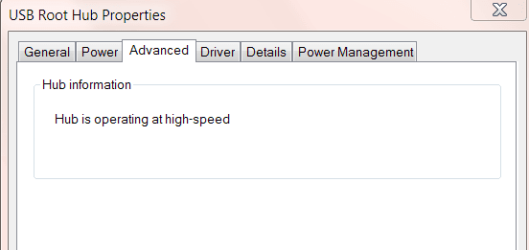
Also, if I go into Device Manager and look at the Properties box for the three Generic USB Hub and three USB Root Hub entries there, none of them says 'Hub is operating at super-speed', which I understand is the indication for USB3.0. All but one (the first of three entries for 'USB Root Hub' - which has no 'Advanced' tab) say high-speed.

The ASMedia XHCI Controller shows as Working Properly. The driver details show asmtxhci.sys in the System32/Drivers folder. Isn't that the USB3 driver?? If I use the Properties box to update the driver, it starts an online search and then says my driver is up to date.
 

Attachments

  • USB1.PNG
    USB1.PNG
    5.4 KB · Views: 15

My Computer

Computer type
PC/Desktop
Computer Manufacturer/Model Number
Custom Build
OS
Windows 7 Home Premium SP1 64-bit
CPU
Intel Core i7-4790K CPU @ 4.5GHz
Motherboard
Asus H97I-PLUS
Memory
16GB KINGSTON HYPER-X FURY DUAL-DDR3 1600MHz
Graphics Card(s)
8GB NVIDIA GEFORCE GTX 1070
Monitor(s) Displays
HannsG 28" & Dell 24"
Screen Resolution
1920x1200
Hard Drives
1 x 2TB Samsung Evo 860 SSD
2 x 500GB Samsung Evo 850 SSD
PSU
CORSAIR 650W CS SERIES
Case
Thermaltake Core V1 Mini ITX Cube
Cooling
NOCTUA NH-L12
Browser
Firefox
Other Info
Custom PC used for X-Plane 11
Search on the Kingston shows it as a USB 2.0 drive. To expect USB 3.0 speeds is wishful thinking.
 

My Computer

Computer Manufacturer/Model Number
HP Media Center
OS
Windows 7 32 bit
CPU
AMD 5200+ dual core
Memory
2 GB
Graphics Card(s)
NVidia GeForce 6150SE 128 MB
Monitor(s) Displays
CRT
Screen Resolution
1280x1024
Hard Drives
500 GB Sata internal :

SIIG USB 3.0 docking stations w/WD Caviar Black 6 Gb/s drives
Keyboard
PS/2
Mouse
PS/2 Wheel Mouse
Other Info
SIIG USB 3.0 PCIexpress card.
No, not wishful thinking (notwithstanding your sarcasm, I don't see that anything I wrote would lead you to conclude that I expect a USB2 drive to deliver the same speeds as a USB3 drive; would anybody?), just unfortunate misinformation.... Until recently I was living and working in Bangkok and bought the drive there. It says USB3.0 on it - I didn't check online (which I have done now). Clearly a fake (as so much of the stuff you buy there), though since it cost next to nothing for a 32GB USB2.0 drive, I am not too put out.

I don't have all that much else to test the USB3 port with, but from the WD drive it seems it must be working OK

M.
 

My Computer

Computer type
PC/Desktop
Computer Manufacturer/Model Number
Custom Build
OS
Windows 7 Home Premium SP1 64-bit
CPU
Intel Core i7-4790K CPU @ 4.5GHz
Motherboard
Asus H97I-PLUS
Memory
16GB KINGSTON HYPER-X FURY DUAL-DDR3 1600MHz
Graphics Card(s)
8GB NVIDIA GEFORCE GTX 1070
Monitor(s) Displays
HannsG 28" & Dell 24"
Screen Resolution
1920x1200
Hard Drives
1 x 2TB Samsung Evo 860 SSD
2 x 500GB Samsung Evo 850 SSD
PSU
CORSAIR 650W CS SERIES
Case
Thermaltake Core V1 Mini ITX Cube
Cooling
NOCTUA NH-L12
Browser
Firefox
Other Info
Custom PC used for X-Plane 11
There was no sarcasm intended. Many people have the imression plugging into USB 3.0 is going to deliver a massive speed increase. I did see about an 15% increase in sequential writes of large files on a Seagate 500 GB external Sata II drive. But that was unusual. For a USB stick it's improbable unless it was a top rated USB II device. A lot depends on how the drive is connected in the enclosure.
 

My Computer

Computer Manufacturer/Model Number
HP Media Center
OS
Windows 7 32 bit
CPU
AMD 5200+ dual core
Memory
2 GB
Graphics Card(s)
NVidia GeForce 6150SE 128 MB
Monitor(s) Displays
CRT
Screen Resolution
1280x1024
Hard Drives
500 GB Sata internal :

SIIG USB 3.0 docking stations w/WD Caviar Black 6 Gb/s drives
Keyboard
PS/2
Mouse
PS/2 Wheel Mouse
Other Info
SIIG USB 3.0 PCIexpress card.
No problem.. I just am sorry for 'wasting' people's time here complaining about what turns out to be a USB2.0 drive!! But as I say, it only cost me about $5 as far as I recall, and as a 32GB USB2.0 drive it functions perfectly, so I still got a great bargain. (I learned to be a bit more 'street wise' to this sort of thing though after I'd been living in Thailand a while!).

M.
 

My Computer

Computer type
PC/Desktop
Computer Manufacturer/Model Number
Custom Build
OS
Windows 7 Home Premium SP1 64-bit
CPU
Intel Core i7-4790K CPU @ 4.5GHz
Motherboard
Asus H97I-PLUS
Memory
16GB KINGSTON HYPER-X FURY DUAL-DDR3 1600MHz
Graphics Card(s)
8GB NVIDIA GEFORCE GTX 1070
Monitor(s) Displays
HannsG 28" & Dell 24"
Screen Resolution
1920x1200
Hard Drives
1 x 2TB Samsung Evo 860 SSD
2 x 500GB Samsung Evo 850 SSD
PSU
CORSAIR 650W CS SERIES
Case
Thermaltake Core V1 Mini ITX Cube
Cooling
NOCTUA NH-L12
Browser
Firefox
Other Info
Custom PC used for X-Plane 11
Sounds like you got a bargain. Not everything has to be fast to be good. Also please don't feel like you wasted our time. (But I'd be happy to bill you if it will make you feel better) I often overlook things plainly obvious to others. I play it off by saying it's a common failing of a genius. :)
 

My Computer

Computer Manufacturer/Model Number
HP Media Center
OS
Windows 7 32 bit
CPU
AMD 5200+ dual core
Memory
2 GB
Graphics Card(s)
NVidia GeForce 6150SE 128 MB
Monitor(s) Displays
CRT
Screen Resolution
1280x1024
Hard Drives
500 GB Sata internal :

SIIG USB 3.0 docking stations w/WD Caviar Black 6 Gb/s drives
Keyboard
PS/2
Mouse
PS/2 Wheel Mouse
Other Info
SIIG USB 3.0 PCIexpress card.
Back
Top