Improving airflow? More fans=higher temps

Surgikill

New member
Member
VIP
Local time
1:51 PM
Messages
143
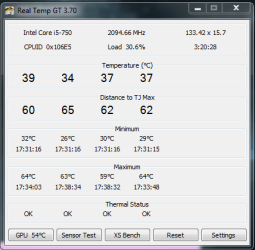
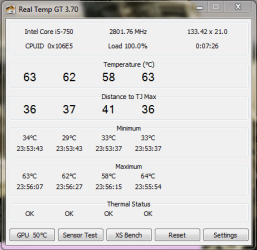
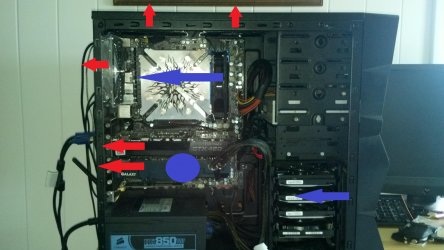
Hey guys I have a few questions. I want to improve temps in my case but everything i seem to do makes it worse. I routed all of my cables into the right side panel of the case and i added some more exhaust fans and a cpu fan. This has caused my temps to rise. I use realtemp to monitor my temps and it is consistent and accurate. I will include pictures of my case so you can understand my airflow

Blue is cold air intake and red is exhaust, the blue circle is a side panel fan.
Temps are under a small load and ambient case temp is 27c

EDIT: The max temps you see were under prime95
 

Attachments
  • 2012-06-12_17-24-05_162.jpg
    2012-06-12_17-24-05_162.jpg
    447.6 KB · Views: 45
  • .pyi.PNG
    .pyi.PNG
    11.7 KB · Views: 11

My Computer My Computer

Computer Manufacturer/Model Number
Custom built by me
OS
Windows 7 64 bit
CPU
Core i5 750
Motherboard
EVGA P55 SLI
Memory
G SKILL DDR3 1333 FC310666 8GB
Graphics Card(s)
GALAXY GTX 460 SUPER OC+EVGA GTX460 in SLI
Sound Card
none
Monitor(s) Displays
eMachines 21.5in. display+Viewsonic 19in. display
Screen Resolution
1920x1080
Hard Drives
Seagate Barracuda 500 gig C: drive
Hitachi 320 gig
WD Caviar Blue 2.5inch 320 gig
Seagate external 250 gig
Toshiba external esata 250 gig
Seagate Barracuda 160 gig
Seagate Barracuda 80 gig
PSU
Corsair 850hx
Case
NZXT M59
Cooling
Air
Mouse
Cyborg R.A.T. 7
How long did Prime95 run before the Max temps were reached? Are those the "stable" prime95 temps?

Reason I ask is I am going through the same exercise as you. And with an almost identical case/fan arrangement. I do not have SLI video cards. Just a sing MSI TF III GTX 570.

If the max temps you displayed are SUSTAINED temps, i.e. Prime95 running for a long period with the temps you listed, I don't believe they are excessive. You have not hit the dreaded 70C. Also Prime95 is meant to stress a system. It is not a "real world" usage statistic IMO.

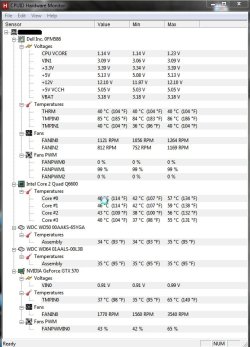
You don't list your GPU temps. You might want to check out CPUID HWMonitor which will give you more of the monitored temps and fan speeds.

As for me I am trying to keep temps UNDER LOAD (gaming) at CPUs <= 60C and Video Card <= 65C.

Biggest problem I have is keeping noise level reasonable under gaming load. I have installed the Sunbeam PL-RL-6 allowing me to switch all fans from PWM to Manual to OFF in an effort to test the noise/cooling benefit of each fan.

Just ordered a TY-140 fan to replace the top exhaust 120mm. Hope it helps with noise/cooling.

For some interesting test results on cooling see The Big Air Cooling Investigation | bit-tech.net

The jist is to stream the air flow over the hardware and THROUGH the case. Too many fan or too strong a fan in the wrong place will cause turbulence but not necessarily cooling.
 

My Computer My Computer

OS
XP Pro & Vista Home Premium (x86); Windows Ultimate 7600 x64 Retail
I believe gpu is around 60 to 65 under load, not sure in the different climate. I have a fan curve set up, only problem is it starts to sound like a jet engine with both of them going. I removed the cpu fan and obviously temps got higher, but I,m thinking of moving it to the top of the cooler in order to streamline the airflow more and not have it work against the natural current of heat rising, problem is space is limited. Will having it over my ram like that affect it at all? Im also going to have to blow dust bunnies out of the fins, should lower it a few C.
 

My Computer My Computer

Computer Manufacturer/Model Number
Custom built by me
OS
Windows 7 64 bit
CPU
Core i5 750
Motherboard
EVGA P55 SLI
Memory
G SKILL DDR3 1333 FC310666 8GB
Graphics Card(s)
GALAXY GTX 460 SUPER OC+EVGA GTX460 in SLI
Sound Card
none
Monitor(s) Displays
eMachines 21.5in. display+Viewsonic 19in. display
Screen Resolution
1920x1080
Hard Drives
Seagate Barracuda 500 gig C: drive
Hitachi 320 gig
WD Caviar Blue 2.5inch 320 gig
Seagate external 250 gig
Toshiba external esata 250 gig
Seagate Barracuda 160 gig
Seagate Barracuda 80 gig
PSU
Corsair 850hx
Case
NZXT M59
Cooling
Air
Mouse
Cyborg R.A.T. 7
Try lowering the speed of the top 2 exhaust fans. Run them at low, rear exhaust at Med or so, and the intake at high.
Essentially, try to make it so more is coming in than exhaust, or close to equal.

If possible, Try mounting one of the top exhusts fans a a second intake. Some cases are different, and do better with a Negative pressure setuip and others do better with a positive pressure setup.
Just experiement a bit.
 

My Computer My Computer

Computer Manufacturer/Model Number
Custom (Self Build)
OS
Windows 7 Home Premium 64bit
CPU
Intel Core i7 2700k
Motherboard
eVGA P67 SLI
Memory
8GB Mushkin Redline Ridgebacks @1866
Graphics Card(s)
EVGA GTX570 SC
Sound Card
XiFi Titanium HD
Monitor(s) Displays
LG W2453V
Screen Resolution
1920x1080
Hard Drives
Intel 320 80GB -- Intel X25-V 40GB --WD Black 1TB x2 -- WD Blue 640GB
PSU
Seasonic x750
Case
Corsair 600T SE White
Cooling
eVGA Superclocked CPU Cooler
Keyboard
Saitek Cyborg
Antivirus
Kaspersky
Browser
IE
Other Info
LG BD/DVD
Rearranged some stuff according to that article. Barely noticeable temp difference. Ambient case temp is 26C.


There is a cpu cooler fan there, the pic is just an older pic of the case. Wondering if I should make the top fan an intake and make the case positive pressure and just leave the other vent open for a convection current. I used to be able to keep this thing at 50 to 55c under load.

New Max temps have updated and are 64 63 59 and 65 respectively. So much for an improvement.


Just did a stress test with battlefield 3 and top gpu reached a max of 69c (lol) and a min of 51
gpu2, bottom gpu, had a max of 61 and a min of 45.
Ambient case temp was 29C

I want to keep these temps lower but am running out of options, may just have to stick the old ac into the window. Any tips on cooling down my gpus more? I think tomorrow I will make that top fan an intake and then a majority of the case will be positive pressure, which I understand works for better cooling with gpus.
 

Attachments

  • 2012-06-11_20-47-55_781.jpg
    2012-06-11_20-47-55_781.jpg
    430.3 KB · Views: 12
  • .pyxdupixb.PNG
    .pyxdupixb.PNG
    14.7 KB · Views: 1
Last edited:

My Computer My Computer

Computer Manufacturer/Model Number
Custom built by me
OS
Windows 7 64 bit
CPU
Core i5 750
Motherboard
EVGA P55 SLI
Memory
G SKILL DDR3 1333 FC310666 8GB
Graphics Card(s)
GALAXY GTX 460 SUPER OC+EVGA GTX460 in SLI
Sound Card
none
Monitor(s) Displays
eMachines 21.5in. display+Viewsonic 19in. display
Screen Resolution
1920x1080
Hard Drives
Seagate Barracuda 500 gig C: drive
Hitachi 320 gig
WD Caviar Blue 2.5inch 320 gig
Seagate external 250 gig
Toshiba external esata 250 gig
Seagate Barracuda 160 gig
Seagate Barracuda 80 gig
PSU
Corsair 850hx
Case
NZXT M59
Cooling
Air
Mouse
Cyborg R.A.T. 7
You might want to adjust the side panel fan speeds if you can. To much air flow could actually be starving the air intakes on the upper GPU due to turbulence and the narrow space for air flow between the two GPUs. If the flow is too strong the turbulence can create a negative pressure in that gap actually fighting against the GPU fans.

In tinkering with my setup I reset the GTX 570 fan profile back to the default and actually lowered the side panel fan speed from being PWM driven to a fixed RPM.

The results of a 15 minute Unigine Heaven test with the GTX 570 core OCed to 870:

Unigine Heaven 870 Core - 061312.jpg

The new TY-140 for the top exhaust and a second side panel 120mm I think will do the trick.

Having the fan controller has now made it very apparent in my case that under load the LOUDEST fan in my system is the CPU cooler. It is a 4 year old Arctic Freezer Pro Rev. 2. The fan at 1264 RPM sounds loud and rough. So... time to shop for deals on new CPU Cooler and better 120mm - one of my cheap ones has an annoying whine at higher RPM.
 

My Computer My Computer

OS
XP Pro & Vista Home Premium (x86); Windows Ultimate 7600 x64 Retail
Are those temperatures a problem? Those are well within the specs of the CPU, aren't they?

I run a single Nvidia GTX 570 and I run around 80C when running BF3...but as far as I know, that's also well within specs for that GPU.
 

My Computer My Computer

Computer Manufacturer/Model Number
Self-Built in July 2009
OS
Windows 7 Ultimate x64
CPU
Intel Q9550 2.83Ghz OC'd to 3.40Ghz
Motherboard
Gigabyte GA-EP45-UD3R rev. 1.1, F12 BIOS
Memory
8GB G.Skill PI DDR2-800, 4-4-4-12 timings
Graphics Card(s)
EVGA 1280MB Nvidia GeForce GTX570
Sound Card
Realtek ALC899A 8 channel onboard audio
Monitor(s) Displays
23" Acer x233H
Screen Resolution
1920x1080
Hard Drives
Intel X25-M 80GB Gen 2 SSD
Western Digital 1TB Caviar Black, 32MB cache. WD1001FALS
PSU
Corsair 620HX modular
Case
Antec P182
Cooling
stock
Keyboard
ABS M1 Mechanical
Mouse
Logitech G9 Laser Mouse
Internet Speed
15/2 cable modem
Other Info
Windows and Linux enthusiast. Logitech G35 Headset.
Its within spec but I know that heat is the enemy. I have a fan controller and it auto adjusts the fans in accordance with the case temp, I don't have the temperature sensors placed anywhere, they wont stick and its a big pain. I will try adjusting the side panel fan, I only have room for one. I am also running these cards oced to 810/1620/2000, so these temps may actually be good, but I don't know.
 

My Computer My Computer

Computer Manufacturer/Model Number
Custom built by me
OS
Windows 7 64 bit
CPU
Core i5 750
Motherboard
EVGA P55 SLI
Memory
G SKILL DDR3 1333 FC310666 8GB
Graphics Card(s)
GALAXY GTX 460 SUPER OC+EVGA GTX460 in SLI
Sound Card
none
Monitor(s) Displays
eMachines 21.5in. display+Viewsonic 19in. display
Screen Resolution
1920x1080
Hard Drives
Seagate Barracuda 500 gig C: drive
Hitachi 320 gig
WD Caviar Blue 2.5inch 320 gig
Seagate external 250 gig
Toshiba external esata 250 gig
Seagate Barracuda 160 gig
Seagate Barracuda 80 gig
PSU
Corsair 850hx
Case
NZXT M59
Cooling
Air
Mouse
Cyborg R.A.T. 7
Are you runing a raid set-up? If not try taking storage drives out and network / external case them. I wonder if all the extra fans are drawing some heat off your power supply.
 

My Computer My Computer

Computer type
PC/Desktop
Computer Manufacturer/Model Number
Self - Build | Asus K53e Laptop
OS
10 x64 | 7 x64
CPU
AMD FX-9590 Vishera 4.7 | i5 Sandy Bridge
Motherboard
MSI 990 FXA | K53e
Memory
16 gigs Crucial Ballistix | 8 gigs Adata ddr3 1600
Graphics Card(s)
RX-570 4gd5 | Intel HD 3000
Sound Card
Realtek HD OnBoard Audio
Monitor(s) Displays
Samsung 22" & 37" Toshiba | 15.6
Hard Drives
ADATA 240 ssd & 750 Caviar Black 7200 sata | 250 840 EVO ssd & samsung ssd
PSU
Thermaltake 700 | 65w
Case
CoolMaster Centurion 534+
Cooling
Corsair H60
Keyboard
Rosewill RK-800G PS/2 Gaming Keyboard | Asus Chiclet
Mouse
Ventus | MS w/side buttons
Internet Speed
RoadRunner
Other Info
I hate the smell of friggin corn chip butt breath snacks.
Its within spec but I know that heat is the enemy. I have a fan controller and it auto adjusts the fans in accordance with the case temp, I don't have the temperature sensors placed anywhere, they wont stick and its a big pain. I will try adjusting the side panel fan, I only have room for one. I am also running these cards oced to 810/1620/2000, so these temps may actually be good, but I don't know.

While heat can be an enemy, these devices are intended to run under a certain amount of heat and hold up. It's only really excessive heat that is reason for concern. For example, if your CPU temps hit say 65C, they might last 7 years. But if they are at 55C they might last 7 years and 2 months....but in the even, both lengths of time are probably longer than the desired use of the equipment anyway.
 

My Computer My Computer

Computer Manufacturer/Model Number
Self-Built in July 2009
OS
Windows 7 Ultimate x64
CPU
Intel Q9550 2.83Ghz OC'd to 3.40Ghz
Motherboard
Gigabyte GA-EP45-UD3R rev. 1.1, F12 BIOS
Memory
8GB G.Skill PI DDR2-800, 4-4-4-12 timings
Graphics Card(s)
EVGA 1280MB Nvidia GeForce GTX570
Sound Card
Realtek ALC899A 8 channel onboard audio
Monitor(s) Displays
23" Acer x233H
Screen Resolution
1920x1080
Hard Drives
Intel X25-M 80GB Gen 2 SSD
Western Digital 1TB Caviar Black, 32MB cache. WD1001FALS
PSU
Corsair 620HX modular
Case
Antec P182
Cooling
stock
Keyboard
ABS M1 Mechanical
Mouse
Logitech G9 Laser Mouse
Internet Speed
15/2 cable modem
Other Info
Windows and Linux enthusiast. Logitech G35 Headset.
I see what you mean about the fans drawing some more juice from the psu, but that seems to be on its own seperate circuit seeing as it is on the bottom. I would network them, but I don't have an accessible network that I can use where I am right now. On another note, how crucial is cooling for the power supply, theres an 80mm cutout in the bottom of my case, but it has a 140mm fan in the psu, should i cutout a 140mm hole and call it a day? How many fans should I have? I am running 6 right tow, not including grafx cards. I know sometimes that less is more.
 

My Computer My Computer

Computer Manufacturer/Model Number
Custom built by me
OS
Windows 7 64 bit
CPU
Core i5 750
Motherboard
EVGA P55 SLI
Memory
G SKILL DDR3 1333 FC310666 8GB
Graphics Card(s)
GALAXY GTX 460 SUPER OC+EVGA GTX460 in SLI
Sound Card
none
Monitor(s) Displays
eMachines 21.5in. display+Viewsonic 19in. display
Screen Resolution
1920x1080
Hard Drives
Seagate Barracuda 500 gig C: drive
Hitachi 320 gig
WD Caviar Blue 2.5inch 320 gig
Seagate external 250 gig
Toshiba external esata 250 gig
Seagate Barracuda 160 gig
Seagate Barracuda 80 gig
PSU
Corsair 850hx
Case
NZXT M59
Cooling
Air
Mouse
Cyborg R.A.T. 7
Are those temperatures a problem? Those are well within the specs of the CPU, aren't they?

I run a single Nvidia GTX 570 and I run around 80C when running BF3...but as far as I know, that's also well within specs for that GPU.

Short answer, yes. If those are the max temps when under sustained load both mine and Surgikil's temps are within spec. Especially the CPU temps.

For me the more important criteria is the noise level. Since I have a new fan controller to tinker with I am trying to maximize cooling while minimizing noise. If the MSI TF III GTX 570 fans hit ~>65% speed they become LOUD. As in REALLY loud.

Currently I can OC it to 870 core clock and stay under that temp/noise threshold during normal gameplay. Once I OC it to 880 core clock or higher it sounds like a jet engine (exaggerating a bit :geek:). Personally I like to keep the temps <= 70C. But that is just a pesonal thing.

P.S. Good to see you are still around Mr. Parks!

P.S. On a side note, what were the engineers thinking when they designed some SLI MOBOs and put the GPU PCI-EX slots adjacent to each other? Hmmm..... am I missing something? Air flow is obviously restricted....
 

My Computer My Computer

OS
XP Pro & Vista Home Premium (x86); Windows Ultimate 7600 x64 Retail
I agree with the pci slots, I have another pci slot but it is only x4 and not designed for sli .
 

My Computer My Computer

Computer Manufacturer/Model Number
Custom built by me
OS
Windows 7 64 bit
CPU
Core i5 750
Motherboard
EVGA P55 SLI
Memory
G SKILL DDR3 1333 FC310666 8GB
Graphics Card(s)
GALAXY GTX 460 SUPER OC+EVGA GTX460 in SLI
Sound Card
none
Monitor(s) Displays
eMachines 21.5in. display+Viewsonic 19in. display
Screen Resolution
1920x1080
Hard Drives
Seagate Barracuda 500 gig C: drive
Hitachi 320 gig
WD Caviar Blue 2.5inch 320 gig
Seagate external 250 gig
Toshiba external esata 250 gig
Seagate Barracuda 160 gig
Seagate Barracuda 80 gig
PSU
Corsair 850hx
Case
NZXT M59
Cooling
Air
Mouse
Cyborg R.A.T. 7
Back
Top