In dire need of assistance. USB problems!

Boyj90

New member
Local time
7:59 AM
Messages
5
I'm having problems with almost everything involving USB on my laptop. Devices such as my flash drives, and cameras won't recognize. How ever my mouse, ipod/iphone, and External Hard Drive will.

I've tried uninstalling and re-installing drivers for everything but I can't seem to find a fix.

I have an HP G70t-200
Processor: Intel(R) Core(TM)2 Duo CPU T6400 @2.00GHz 2.00GHz
3.00 GB of Ram
Running on 32-bit Windows 7 Ultimate.

I've been searching online for a fix for months and could not find anything, or anyone with the same problem as me.

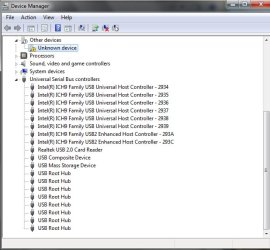
I honestly don't know too much about computers, but my serial bus controllers don't look too right.

Can someone please help me?
 

Attachments
  • helpmeplease.jpg
    helpmeplease.jpg
    69.5 KB · Views: 13

My Computer My Computer

At a glance

Windows 7
OS
Windows 7
Right off hand I would say that you need to fix the unknown device listed in Device manager. sometimes these things can cause funky things to happen to your machine. I have a device (video capture) that I had to disable because of driver issues.
Select the device
right click
click disable

reboot and see how your sys works.
Its worth a try
 

My Computer My Computer

At a glance

WinXP / Win 7 / Win 8.1 64bit Dual Booti7-4770K16 gb G.Skill Ripjawson board 4600
Computer type
PC/Desktop
Computer Manufacturer/Model Number
custom build
OS
WinXP / Win 7 / Win 8.1 64bit Dual Boot
CPU
i7-4770K
Motherboard
Asus Z87-A
Memory
16 gb G.Skill Ripjaws
Graphics Card(s)
on board 4600
Sound Card
On Board Soundmax HD
Monitor(s) Displays
Dell 19" Flat Panel
Screen Resolution
1280x1024
Hard Drives
Samsung 840 Pro 512gb SSD
WD1001 Caviar Win 7 Boot
WD500 Caviar Win XP Boot
2xWD500 Caviar (Raid 0)
WD750 Caviar (Backup)
PSU
Aerocool StrikeX 800w x2
Case
Aerocool Strike X
Cooling
Air
Keyboard
Microsoft Wireless
Mouse
Microsoft Wireless
Internet Speed
Cable
Other Info
Asus 12x Blu-ray writer
the unknown device is my flash drive. I tried disabling and enabling it, and still nothing :(
 

My Computer My Computer

At a glance

Windows 7
OS
Windows 7
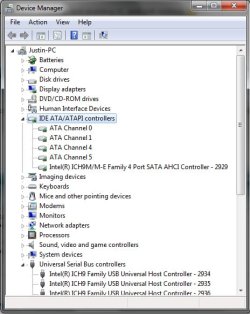
Can you post back a pic of what you have listed under IDE ATA/ATAPI Controllers when expanded please?
 

My Computer My Computer

At a glance

XP, Vista, W7 64bit Home PremiumIntel Core Duo 6850 3.0 ghz @ 3.7 ghz4GB Corsair DDR 2 PC-6400Ati 4870 1ghz
OS
XP, Vista, W7 64bit Home Premium
CPU
Intel Core Duo 6850 3.0 ghz @ 3.7 ghz
Motherboard
Asus P5E
Memory
4GB Corsair DDR 2 PC-6400
Graphics Card(s)
Ati 4870 1ghz
Sound Card
Supreme FX 11
Monitor(s) Displays
View Sonic VX1962wm
Screen Resolution
1680 X1050
Hard Drives
3 Seagate Sata Drives 160gb 250gb 500gb
PSU
Thermaltake 600 watt
Case
NZXT Alpha
Cooling
3X120cm Fans
Keyboard
Microsoft Digital Media Pro Keyboard
Mouse
Microsoft Wheel Mouse Optical
Internet Speed
1.5Mb to 8Mb/384k
Pull all USB items/leads out of laptop.
Pull the battery out of the laptop for 5 mins! Also make sure you are unplugged from mains!

Plug USB items/leads in one by one till re-found
Put flash drive in last and try not to boot with flash drive inserted!
 

My Computer My Computer

At a glance

WIN7 Ultimate 64bitAMD FX8150/Trinity A10-5700G-Skill 2400 x2 @ 1866 (both pc's)Sapphire (factory OC version) AMD 7770
Computer type
PC/Desktop
Computer Manufacturer/Model Number
D.I.Y.
OS
WIN7 Ultimate 64bit
CPU
AMD FX8150/Trinity A10-5700
Motherboard
Asus Sabertooth v.1 /Asus F2A85-M Pro
Memory
G-Skill 2400 x2 @ 1866 (both pc's)
Graphics Card(s)
Sapphire (factory OC version) AMD 7770
Sound Card
onboard
Monitor(s) Displays
T260 Samsung
Screen Resolution
1920x1080
Hard Drives
Western Digital Sata 2TB/1TB Caviar Blacks
Buffalo 1TB usb (excellent drive)
PSU
Be-Quiet 700W E-9/Be-Quiet 550W E-9(E-9 = built by FSP)
Case
Antec P183/Antec P180mini
Cooling
x2 Xigmatek SXHH7-U01 + C-Master R4-EXBB-20PK-R0 120mm Fans
Keyboard
Cherry
Mouse
MS Explorer 3.0
Other Info
LG Blu ray combo
Pioneer 207D/208 Blu ray burners
@ neo101 Ok I'll try it once I'm out of class.

@ whest Here's what's listed under IDE ATA/ATAPI Controllers.
 

Attachments

  • helpme2.jpg
    helpme2.jpg
    64 KB · Views: 9

My Computer My Computer

At a glance

Windows 7
OS
Windows 7
Have you tried installing the intel matrix storage manager - setup a restore point firstly - the original AHCI driver W7 installs automatically during installation can sometimes cause functionality problems.
Go here to download : Intel(R) Matrix Storage Manager

Or you could try the latest now called the Intel rapid storage manager :
Intel(R) Rapid Storage Technology
 

My Computer My Computer

At a glance

XP, Vista, W7 64bit Home PremiumIntel Core Duo 6850 3.0 ghz @ 3.7 ghz4GB Corsair DDR 2 PC-6400Ati 4870 1ghz
OS
XP, Vista, W7 64bit Home Premium
CPU
Intel Core Duo 6850 3.0 ghz @ 3.7 ghz
Motherboard
Asus P5E
Memory
4GB Corsair DDR 2 PC-6400
Graphics Card(s)
Ati 4870 1ghz
Sound Card
Supreme FX 11
Monitor(s) Displays
View Sonic VX1962wm
Screen Resolution
1680 X1050
Hard Drives
3 Seagate Sata Drives 160gb 250gb 500gb
PSU
Thermaltake 600 watt
Case
NZXT Alpha
Cooling
3X120cm Fans
Keyboard
Microsoft Digital Media Pro Keyboard
Mouse
Microsoft Wheel Mouse Optical
Internet Speed
1.5Mb to 8Mb/384k
Boyj90, was this an upgrade or clean install? The reason I ask is that some older hardware does not correctly set an upper limit on the operating system version used for driver installations and tries to install a "mass storage driver". This driver was required on some versions of Windows prior to Vista and can interfere with hardware detection. When XP is upgraded to Vista and again to 7, that driver remains. Really broken hardware installers can force the legacy driver into the system even in Vista. Not in 7 -- if this is a clean install please disregard this post.

If I'm right you just need to unplug all USB devices and start uninstalling their drivers in Programs and Features Control Panel UNLESS they are working! You said HID (Human Interface Devices) work but and I quote:

"Devices such as my flash drives, and cameras won't recognize."

Those are mass storage class, and I won't bore you with the details but the legacy "mass storage driver" stuff WILL make detection and installation of these devices fail. whest might be on the right track except those devices usually show up on the virtualized SCSI bus unless they are USB connected in which case my original assertion holds.

One other nasty little driver that shows up a lot in the shop is older U3 from Bring the power of portable software to your USB flash drive - make it a U3 smart drive!. It tries to install a driver that fools with almost everything and is somewhat hard to remove.

Please post back if any of this sounds promising...
 

My Computer My Computer

At a glance

El Capitan / Windows 10i7-4980HQ16GBIris 5200
Computer type
Laptop
Computer Manufacturer/Model Number
Apple
OS
El Capitan / Windows 10
CPU
i7-4980HQ
Memory
16GB
Graphics Card(s)
Iris 5200
That sounds about right. It was an upgrade, and I did have a U3 flash drive. I'm pretty sure I removed all of its components though.
 

My Computer My Computer

At a glance

Windows 7
OS
Windows 7
That sounds about right. It was an upgrade, and I did have a U3 flash drive. I'm pretty sure I removed all of its components though.

What problems are you still experiencing?
 

My Computer My Computer

At a glance

El Capitan / Windows 10i7-4980HQ16GBIris 5200
Computer type
Laptop
Computer Manufacturer/Model Number
Apple
OS
El Capitan / Windows 10
CPU
i7-4980HQ
Memory
16GB
Graphics Card(s)
Iris 5200
I'm still experiencing the same problems, nothings changed.
 

My Computer My Computer

At a glance

Windows 7
OS
Windows 7
Back
Top