
Hi
I have a Sony VAIO VPCSB3S9E/B Windows 7 64 bit. It has a 1366 x 768 display. It also has the stamina/speed button switch which I had almost permanently on Stamina. Today, however, I switched to Speed and the resolution is odd. It's stuck at 1078x768. On the resolution screen, there are two monitors 'sharing' one screen. Check it (sorry, it's in Czech):
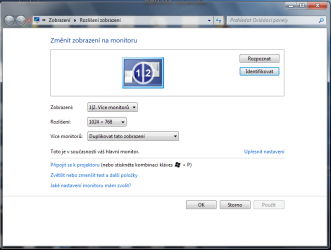
When I press Identify, I get the two numbers sharing the one screen with a border between the two.
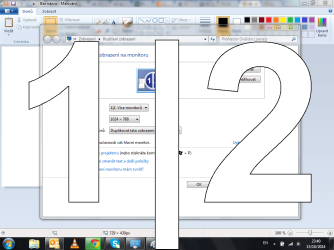
I tried to alter a few settings here but to no avail - could someone throw me a bone?
Thanks
David
I have a Sony VAIO VPCSB3S9E/B Windows 7 64 bit. It has a 1366 x 768 display. It also has the stamina/speed button switch which I had almost permanently on Stamina. Today, however, I switched to Speed and the resolution is odd. It's stuck at 1078x768. On the resolution screen, there are two monitors 'sharing' one screen. Check it (sorry, it's in Czech):
When I press Identify, I get the two numbers sharing the one screen with a border between the two.
I tried to alter a few settings here but to no avail - could someone throw me a bone?
Thanks
David
My Computer
At a glance
Milano
- Computer type
- PC/Desktop
- OS
- Milano


