
In game spiking with HoN

unrl

New member
Local time
1:32 AM
Messages
6
Hi guys,

I'm new around here so please forgive me if I do anything wrong.

First of all I would like to know if I've not done/upgraded anything for my Windows 7.

So far as everyone knows the Windows 7 installs all drivers for you, the only driver that I installed was the ATI Radeon 4800 series 64bit Windows 7 driver.

The game that I've been playing is Heroes of Newerth and I'm receiving constant spike during the game, basically from the start of the game till the end unfortunately.

Checked my connection if I've used up all the caps, but it seems that I haven't, 6/20 GB left.

Here's the details on my system.
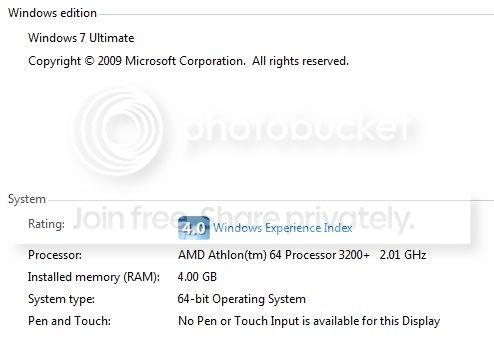
system.jpg


Searched a couple of forums to solve my problem, some people say its bottlenecking the system due to my older motherboard, but am confused as far as I know bottlenecking is only limitations towards the system itself, maybe causing lower FPS etc but no spiking as I've tried playing this game in Practice mode and there were no spikes or lags.

Please help me out guys!:cry:
 

My Computer My Computer

OS
Windows 7
Hi guys,

I'm new around here so please forgive me if I do anything wrong.

First of all I would like to know if I've not done/upgraded anything for my Windows 7.

So far as everyone knows the Windows 7 installs all drivers for you, the only driver that I installed was the ATI Radeon 4800 series 64bit Windows 7 driver.

The game that I've been playing is Heroes of Newerth and I'm receiving constant spike during the game, basically from the start of the game till the end unfortunately.

Checked my connection if I've used up all the caps, but it seems that I haven't, 6/20 GB left.

Here's the details on my system.

system.jpg


Searched a couple of forums to solve my problem, some people say its bottlenecking the system due to my older motherboard, but am confused as far as I know bottlenecking is only limitations towards the system itself, maybe causing lower FPS etc but no spiking as I've tried playing this game in Practice mode and there were no spikes or lags.

Please help me out guys!:cry:


Hi and welcome

We would love to but need some info on exactly what the problem is. Can you try to explain


Thanks

Ken
 

My Computer My Computer

Computer Manufacturer/Model Number
HP Pavillion dv-7 1005 Tx
OS
Win 8 Release candidate 8400
CPU
[email protected]
Memory
4 gigs
Graphics Card(s)
Nvidia 9600M
Sound Card
HD built-in
Monitor(s) Displays
17" Wxga
Screen Resolution
1440x900
Cooling
none
Internet Speed
45Mb down 5Mb up
So far as everyone knows the Windows 7 installs all drivers for you, the only driver that I installed was the ATI Radeon 4800 series 64bit Windows 7 driver.

The game that I've been playing is Heroes of Newerth and I'm receiving constant spike during the game, basically from the start of the game till the end unfortunately.

ZigZag...in bold is his problem.

unrl - Get the Maker of your Motherboard (eg. Asus, Gigabyte etc). Go to their website and navigate to driver downloads. Find your motherboard model from the list and download the network adapter drivers. Install them, reboot and imo that should fix it.

Using Win7's drivers will make your hardware 'work' but it wont make it work nearly as well as the manufacturor's drivers.
 

My Computer My Computer

Computer Manufacturer/Model Number
Home made
OS
Windows 7 RC 7100 x64
CPU
Intel E8400 @ 3.0GHz
Motherboard
GA EP35-DS3
Memory
2 x 2GB DDR2 800MHz Corsair
Graphics Card(s)
1GB GigaByte ATi Radeon HD4870 PCI-e
Sound Card
Creative Sound Blaster XF-i XtremeGamer
Monitor(s) Displays
AOC 22" LCD
Screen Resolution
1650*1080
Hard Drives
1 x WD 200GB sata I (primary)
1 x Seagate 200GB IDE
1 x WD 500GB sata II
PSU
500watt Basiq
Case
iCute - 0408SL Series
Cooling
1 x 12cm front intake fan, 1 x 8cm side intake fan
Keyboard
Logitech G15 (blue)
Mouse
Logitech MX518
Internet Speed
Cable (12MB down <--good!, 256k up <--sucks!)
Hi Sleek,

I downloaded the nForce drivers for my network updated it and still does not work.

When Windows 7 installed the drivers for me, do I need to remove them? If so, how do i do it?
 

My Computer My Computer

OS
Windows 7
OK, unrl, I just found this thread, and I believe I may have mis-diagnosed your problem in my thread (in my defense you didn't give me all this information).

Does this lag go away if you disable your audio device? If it does, go here and disable network throttling: The Bits 2.0 Disabling/Tweaking Vista’s Multimedia Class Scheduler. Note that I believe the actual value you want to enter is: FFFFFFFF (thats 8 Fs). There will be a hex number that looks something like 0x00FFFFFF, make sure all the 0s to the right of the x are Fs. After this change, reboot. And remember to re-enable your audio device.
 

My Computer My Computer

OS
Windows 7 x64 Professional
CPU
AMD Athlon 64 3800+
Motherboard
Chaintech VNF4 Ultra
Memory
Corsair DDR1 2GB
Graphics Card(s)
Radeon x1800xt 256mb
Sound Card
Creative Audigy 2 ZS
Hi Sleek,

I downloaded the nForce drivers for my network updated it and still does not work.

When Windows 7 installed the drivers for me, do I need to remove them? If so, how do i do it?
No, you wont need to remove the windows drivers.

What OS were you using prior to Windows 7 when you were playing HoN? I have HoN installed on my machine and I get about 200 ping when I play cos the servers are all overseas for me. THAT and the game still is in beta.

Tried turning off all firewalls and anything that could interfere with the flow of network traffic? I didnt have to forward any ports to play but maybe its needed with some routers?
 

My Computer My Computer

Computer Manufacturer/Model Number
Home made
OS
Windows 7 RC 7100 x64
CPU
Intel E8400 @ 3.0GHz
Motherboard
GA EP35-DS3
Memory
2 x 2GB DDR2 800MHz Corsair
Graphics Card(s)
1GB GigaByte ATi Radeon HD4870 PCI-e
Sound Card
Creative Sound Blaster XF-i XtremeGamer
Monitor(s) Displays
AOC 22" LCD
Screen Resolution
1650*1080
Hard Drives
1 x WD 200GB sata I (primary)
1 x Seagate 200GB IDE
1 x WD 500GB sata II
PSU
500watt Basiq
Case
iCute - 0408SL Series
Cooling
1 x 12cm front intake fan, 1 x 8cm side intake fan
Keyboard
Logitech G15 (blue)
Mouse
Logitech MX518
Internet Speed
Cable (12MB down <--good!, 256k up <--sucks!)
Back
Top