In need of simplified install instructions for SSD (please read).

Congratulations, you did a fine job. Now that you are nearly done, I like to answer 2 questions you had earlier (I just now saw the whole thread)

1. to get rid of your hibernation file, open an elevated Command Prompt (run as admin) and type or paste this command:

powercfg -h off

Then hit Enter. That will save you as much space on your SSD as the size of your RAM. If you ever want to get the hibernation file back, the command is powercfg -h on.

2. The user data you should keep on the HDD and not the SSD. But rather than moving the standard user folders (Documents, Music, Videos, etc.), I suggest you define a partition on your HDD and define new user folders (Documents, Music, etc.). And then you move your own data into there. Then you right click on each of those folders and click on "Include in Library" and select the library where they belong.

The advantage of this approach is that those folders will really only contain your own files and the standard user folders which stay on the SSD will be used by various programs for program files that are required to run those programs. So there is no mix up. The said program files are not very big and can be easily accomodated by your SSD.

3. There are a lot of "experts" who recommend all kinds of tweaks for the SSD. I recommend to stay away from those tweaks. If any, they are usually of very little advantage and sometimes they are even counterproductive (e.g. disabling Superfetch). It is also not true that your SSD will suffer from many write operations. This SSD will survive your system any time - so do not worry. I have 5 SSDs on 5 different systems and my oldest is 3 years old. In that time it has not suffered at all.

PS: Steve (essenbe) is a good man. He sure gave you good guidance. You were lucky to have found him.

Ahh yes, hibernation. Man it's getting late here, and this has been a stressful day with this computer. I'll go through this in detail tomorrow and sort this out! Thanks for the help buddy :)
 

My Computer My Computer

At a glance

Windows 7 Home Premium 64bit.Intel i5 2500kG Skill Ripjaws X 8GBEVGA GTX 580
OS
Windows 7 Home Premium 64bit.
CPU
Intel i5 2500k
Motherboard
ASRock Z68 Extreme4
Memory
G Skill Ripjaws X 8GB
Graphics Card(s)
EVGA GTX 580
Hard Drives
OCZ Vertex 2 60GB SSD
Samsung Spinpoint F3 1TB HDD
PSU
Seasonic X Series 760W
Case
Cooler Master HAF X
Cooling
Noctua NH-D14
I'm glad I was able to help a little, and I'm glad to see you are already playing games. :D Must mean you are fairly well set up. And thank you.
 

My Computers My Computers

  • At a glance

    Windows 11 ProRyzen 9 5900X32GB G Skill DDR4-3600EVGA RTX 3080 FTW 3 Ultra
    Computer type
    PC/Desktop
    Computer Manufacturer/Model Number
    ALWAYS UNDER CONSTRUCTION
    OS
    Windows 11 Pro
    CPU
    Ryzen 9 5900X
    Motherboard
    Asus X570 Crosshair Viii Hero
    Memory
    32GB G Skill DDR4-3600
    Graphics Card(s)
    EVGA RTX 3080 FTW 3 Ultra
    Sound Card
    On Board/Sennheiser PC37X Headset
    Monitor(s) Displays
    3 X Asus 27"
    Screen Resolution
    2560x1440
    Hard Drives
    2 X 1 TB NVME drives
    PSU
    EVGA 850
    Case
    Phanteks Eclipse P400A
    Cooling
    EVGA 280 AIO
    Keyboard
    Logitech G510s/ Logitech G13
    Mouse
    Logitech G502
    Internet Speed
    24/1
    Antivirus
    ESET/MBAM Pro/SAS Pro
    Browser
    Chrome/ Firefox/ Edge
  • At a glance

    Windows 11 ProIntel Ultra 9 288V32 GB LPDDR5X 8533
    Computer type
    Laptop
    System Manufacturer/Model Number
    Dell 16 Plus
    OS
    Windows 11 Pro
    CPU
    Intel Ultra 9 288V
    Memory
    32 GB LPDDR5X 8533
    Monitor(s) Displays
    16" Mini-LED HDR600 Touch 90 Hz
    Screen Resolution
    2560X1600
    Hard Drives
    1 TB NVME
WHS, Thanks for the vote of confidence.
 

My Computers My Computers

  • At a glance

    Windows 11 ProRyzen 9 5900X32GB G Skill DDR4-3600EVGA RTX 3080 FTW 3 Ultra
    Computer type
    PC/Desktop
    Computer Manufacturer/Model Number
    ALWAYS UNDER CONSTRUCTION
    OS
    Windows 11 Pro
    CPU
    Ryzen 9 5900X
    Motherboard
    Asus X570 Crosshair Viii Hero
    Memory
    32GB G Skill DDR4-3600
    Graphics Card(s)
    EVGA RTX 3080 FTW 3 Ultra
    Sound Card
    On Board/Sennheiser PC37X Headset
    Monitor(s) Displays
    3 X Asus 27"
    Screen Resolution
    2560x1440
    Hard Drives
    2 X 1 TB NVME drives
    PSU
    EVGA 850
    Case
    Phanteks Eclipse P400A
    Cooling
    EVGA 280 AIO
    Keyboard
    Logitech G510s/ Logitech G13
    Mouse
    Logitech G502
    Internet Speed
    24/1
    Antivirus
    ESET/MBAM Pro/SAS Pro
    Browser
    Chrome/ Firefox/ Edge
  • At a glance

    Windows 11 ProIntel Ultra 9 288V32 GB LPDDR5X 8533
    Computer type
    Laptop
    System Manufacturer/Model Number
    Dell 16 Plus
    OS
    Windows 11 Pro
    CPU
    Intel Ultra 9 288V
    Memory
    32 GB LPDDR5X 8533
    Monitor(s) Displays
    16" Mini-LED HDR600 Touch 90 Hz
    Screen Resolution
    2560X1600
    Hard Drives
    1 TB NVME
WHS, Thanks for the vote of confidence.
Steve, you desserve it. Have to give you virtual reps because I have to first turn around another 15.
 

My Computer My Computer

At a glance

Vista, Windows7, Mint Mate, Zorin, Windows 8from 1.6GHz Duo to i7
Computer Manufacturer/Model Number
HP, Dell, Gateway, Toshiba - 4 laptops and 2 desktops
OS
Vista, Windows7, Mint Mate, Zorin, Windows 8
CPU
from 1.6GHz Duo to i7
Monitor(s) Displays
2x HP w2207
Hard Drives
5x HDD, 7x SSD, 12x Externals
Keyboard
with trackball - no mices
Mouse
Trackball mice
Internet Speed
DSL 6000
Congratulations, you did a fine job. Now that you are nearly done, I like to answer 2 questions you had earlier (I just now saw the whole thread)

1. to get rid of your hibernation file, open an elevated Command Prompt (run as admin) and type or paste this command:

powercfg -h off

Then hit Enter. That will save you as much space on your SSD as the size of your RAM. If you ever want to get the hibernation file back, the command is powercfg -h on.

2. The user data you should keep on the HDD and not the SSD. But rather than moving the standard user folders (Documents, Music, Videos, etc.), I suggest you define a partition on your HDD and define new user folders (Documents, Music, etc.). And then you move your own data into there. Then you right click on each of those folders and click on "Include in Library" and select the library where they belong.

The advantage of this approach is that those folders will really only contain your own files and the standard user folders which stay on the SSD will be used by various programs for program files that are required to run those programs. So there is no mix up. The said program files are not very big and can be easily accomodated by your SSD.

3. There are a lot of "experts" who recommend all kinds of tweaks for the SSD. I recommend to stay away from those tweaks. If any, they are usually of very little advantage and sometimes they are even counterproductive (e.g. disabling Superfetch). It is also not true that your SSD will suffer from many write operations. This SSD will survive your system any time - so do not worry. I have 5 SSDs on 5 different systems and my oldest is 3 years old. In that time it has not suffered at all.

PS: Steve (essenbe) is a good man. He sure gave you good guidance. You were lucky to have found him.

Okay, sorry to quote to again. But I'm ready to give all this a go now. I turned hibernation off (though I didn't see anything happen, don't know if I should have?)

Now onto creating a partition on the HDD and giving it folders. How's the best way to go about doing this? and when I'm there, how big of a parition do you recommend I create?

One step at a time, so I won't ask anymore questions yet! :)

(And yes, essenbe/Steve was a big help - thanks again Steve! :D)

EDIT: Also, I don't know if I can yet, or at all, but if I can somehow give you good 'rep,' (both of you) point me in the right direction to do so ;)
 

My Computer My Computer

At a glance

Windows 7 Home Premium 64bit.Intel i5 2500kG Skill Ripjaws X 8GBEVGA GTX 580
OS
Windows 7 Home Premium 64bit.
CPU
Intel i5 2500k
Motherboard
ASRock Z68 Extreme4
Memory
G Skill Ripjaws X 8GB
Graphics Card(s)
EVGA GTX 580
Hard Drives
OCZ Vertex 2 60GB SSD
Samsung Spinpoint F3 1TB HDD
PSU
Seasonic X Series 760W
Case
Cooler Master HAF X
Cooling
Noctua NH-D14
1. There are 2 easy ways to check whether the hiberfile is gone:
a) press start and then the little arrow on the bottom right. For the rest see the picture1 below.
b) run this program - it will show you everything that is on your SSD (you have to highlight the SSD before you OK it). The hiberfile would be a big colored blip on the colored part (if you click on it it tells you what it is). The other big blip would be your pagefile which you should not touch.

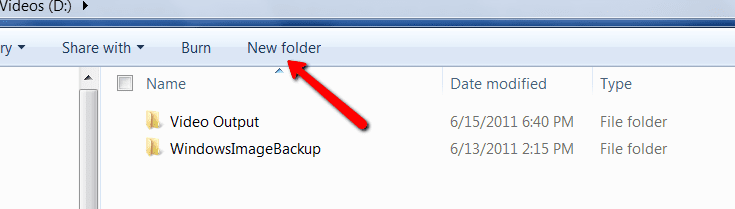
2. For the folders create a partition on the HDD (use Disk Management). Then open that partition and create the folders you need (see picture2). The size will depend on the amount of data you plan to store there. I would think that 100GB is a good start. But if you have a lot of HD movies, that may not suffice.

3. Don't worry about the reps. A "thank you" makes me happy.
 

Attachments

  • 2011-06-15_2030.png
    2011-06-15_2030.png
    13.2 KB · Views: 0
  • 2011-06-17_1330.png
    2011-06-17_1330.png
    9.3 KB · Views: 1

My Computer My Computer

At a glance

Vista, Windows7, Mint Mate, Zorin, Windows 8from 1.6GHz Duo to i7
Computer Manufacturer/Model Number
HP, Dell, Gateway, Toshiba - 4 laptops and 2 desktops
OS
Vista, Windows7, Mint Mate, Zorin, Windows 8
CPU
from 1.6GHz Duo to i7
Monitor(s) Displays
2x HP w2207
Hard Drives
5x HDD, 7x SSD, 12x Externals
Keyboard
with trackball - no mices
Mouse
Trackball mice
Internet Speed
DSL 6000
1. There are 2 easy ways to check whether the hiberfile is gone:
a) press start and then the little arrow on the bottom right. For the rest see the picture1 below.
b) run this program - it will show you everything that is on your SSD (you have to highlight the SSD before you OK it). The hiberfile would be a big colored blip on the colored part (if you click on it it tells you what it is). The other big blip would be your pagefile which you should not touch.

2. For the folders create a partition on the HDD (use Disk Management). Then open that partition and create the folders you need (see picture2). The size will depend on the amount of data you plan to store there. I would think that 100GB is a good start. But if you have a lot of HD movies, that may not suffice.

3. Don't worry about the reps. A "thank you" makes me happy.

Okay, Hibernate is gone, so that's done.

As for creating folders, I knew how to do that, but how do I create the actual partition? And this is primarily a gaming PC, so the only thing I'm going to be installing is games. I probably won't bother with movies or music. That said, how much space do you recommend? and can the partitions be changed at a later date to be made bigger or smaller?

Thanks again :)
 

My Computer My Computer

At a glance

Windows 7 Home Premium 64bit.Intel i5 2500kG Skill Ripjaws X 8GBEVGA GTX 580
OS
Windows 7 Home Premium 64bit.
CPU
Intel i5 2500k
Motherboard
ASRock Z68 Extreme4
Memory
G Skill Ripjaws X 8GB
Graphics Card(s)
EVGA GTX 580
Hard Drives
OCZ Vertex 2 60GB SSD
Samsung Spinpoint F3 1TB HDD
PSU
Seasonic X Series 760W
Case
Cooler Master HAF X
Cooling
Noctua NH-D14
I don't know how much space to tell you, as I do it different than WHS. But, he is an expert. But to create a partition, go to disk management, right click on the C drive and select shrink. It will determine the maximum you can shrink it. In the box you select how much you want to shrink it (has to be equal to or less than the max.). Or put another way to look at it, the size you want the new partition to be. Put in the size in as MB (1024MB=1GB). then click ok all the way through. When finished the extra space will be unallocated. In the new unallocated space, right click and Select new simple partition, and create a primary partition, assign it a drive letter (DM will do that for you. When finished, you will have your new partition. During the process you will have the opportunity to give it a name. I always give it a descriptive name so that when you add other hard drives and partitions and look at it in windows explorer you know which is which. In explorer partitions will show up as seperate disks. So it is possible to have 3 disks and 7 partitions, which can be confusing in explorer.
 

My Computers My Computers

  • At a glance

    Windows 11 ProRyzen 9 5900X32GB G Skill DDR4-3600EVGA RTX 3080 FTW 3 Ultra
    Computer type
    PC/Desktop
    Computer Manufacturer/Model Number
    ALWAYS UNDER CONSTRUCTION
    OS
    Windows 11 Pro
    CPU
    Ryzen 9 5900X
    Motherboard
    Asus X570 Crosshair Viii Hero
    Memory
    32GB G Skill DDR4-3600
    Graphics Card(s)
    EVGA RTX 3080 FTW 3 Ultra
    Sound Card
    On Board/Sennheiser PC37X Headset
    Monitor(s) Displays
    3 X Asus 27"
    Screen Resolution
    2560x1440
    Hard Drives
    2 X 1 TB NVME drives
    PSU
    EVGA 850
    Case
    Phanteks Eclipse P400A
    Cooling
    EVGA 280 AIO
    Keyboard
    Logitech G510s/ Logitech G13
    Mouse
    Logitech G502
    Internet Speed
    24/1
    Antivirus
    ESET/MBAM Pro/SAS Pro
    Browser
    Chrome/ Firefox/ Edge
  • At a glance

    Windows 11 ProIntel Ultra 9 288V32 GB LPDDR5X 8533
    Computer type
    Laptop
    System Manufacturer/Model Number
    Dell 16 Plus
    OS
    Windows 11 Pro
    CPU
    Intel Ultra 9 288V
    Memory
    32 GB LPDDR5X 8533
    Monitor(s) Displays
    16" Mini-LED HDR600 Touch 90 Hz
    Screen Resolution
    2560X1600
    Hard Drives
    1 TB NVME
I don't know how much space to tell you, as I do it different than WHS. But, he is an expert. But to create a partition, go to disk management, right click on the C drive and select shrink. It will determine the maximum you can shrink it. In the box you select how much you want to shrink it (has to be equal to or less than the max.). Or put another way to look at it, the size you want the new partition to be. Put in the size in as MB (1024MB=1GB). then click ok all the way through. When finished the extra space will be unallocated. In the new unallocated space, right click and Select new simple partition, and create a primary partition, assign it a drive letter (DM will do that for you. When finished, you will have your new partition.

Can I ask, what's the partition for? Would there be issues if I were to just leave the whole space open without partitions?

Thanks for the reply.
 

My Computer My Computer

At a glance

Windows 7 Home Premium 64bit.Intel i5 2500kG Skill Ripjaws X 8GBEVGA GTX 580
OS
Windows 7 Home Premium 64bit.
CPU
Intel i5 2500k
Motherboard
ASRock Z68 Extreme4
Memory
G Skill Ripjaws X 8GB
Graphics Card(s)
EVGA GTX 580
Hard Drives
OCZ Vertex 2 60GB SSD
Samsung Spinpoint F3 1TB HDD
PSU
Seasonic X Series 760W
Case
Cooler Master HAF X
Cooling
Noctua NH-D14
The partition is for user folders as WHS desctibed how to do it. I do it this way. The whole idea is, if anything goes wrong, it is most likeky to be the OS partition causing you to reinstall. If all of your data is on another partition somewhere else, you don't lose your data in the process. Tou can reinstall the OS and programs ( although it is a pita) easily. But you can't replace many documents, family pictures music and such. If they were on the C partition you would. I learned the hard way.
 

My Computers My Computers

  • At a glance

    Windows 11 ProRyzen 9 5900X32GB G Skill DDR4-3600EVGA RTX 3080 FTW 3 Ultra
    Computer type
    PC/Desktop
    Computer Manufacturer/Model Number
    ALWAYS UNDER CONSTRUCTION
    OS
    Windows 11 Pro
    CPU
    Ryzen 9 5900X
    Motherboard
    Asus X570 Crosshair Viii Hero
    Memory
    32GB G Skill DDR4-3600
    Graphics Card(s)
    EVGA RTX 3080 FTW 3 Ultra
    Sound Card
    On Board/Sennheiser PC37X Headset
    Monitor(s) Displays
    3 X Asus 27"
    Screen Resolution
    2560x1440
    Hard Drives
    2 X 1 TB NVME drives
    PSU
    EVGA 850
    Case
    Phanteks Eclipse P400A
    Cooling
    EVGA 280 AIO
    Keyboard
    Logitech G510s/ Logitech G13
    Mouse
    Logitech G502
    Internet Speed
    24/1
    Antivirus
    ESET/MBAM Pro/SAS Pro
    Browser
    Chrome/ Firefox/ Edge
  • At a glance

    Windows 11 ProIntel Ultra 9 288V32 GB LPDDR5X 8533
    Computer type
    Laptop
    System Manufacturer/Model Number
    Dell 16 Plus
    OS
    Windows 11 Pro
    CPU
    Intel Ultra 9 288V
    Memory
    32 GB LPDDR5X 8533
    Monitor(s) Displays
    16" Mini-LED HDR600 Touch 90 Hz
    Screen Resolution
    2560X1600
    Hard Drives
    1 TB NVME
Let me give you an explanation of what WHS was talking about. I have a password manager that stores and encrypts my passwords and automatically inserts them into a login page when I get there. It's default location to store my passwords is C/Users/my Documents. If I move my documents to another drive, it dosen't have a place to store the passwords. I go into settings and change the default location to E/Users?my Documents. WHS was avoiding having to do that.
 

My Computers My Computers

  • At a glance

    Windows 11 ProRyzen 9 5900X32GB G Skill DDR4-3600EVGA RTX 3080 FTW 3 Ultra
    Computer type
    PC/Desktop
    Computer Manufacturer/Model Number
    ALWAYS UNDER CONSTRUCTION
    OS
    Windows 11 Pro
    CPU
    Ryzen 9 5900X
    Motherboard
    Asus X570 Crosshair Viii Hero
    Memory
    32GB G Skill DDR4-3600
    Graphics Card(s)
    EVGA RTX 3080 FTW 3 Ultra
    Sound Card
    On Board/Sennheiser PC37X Headset
    Monitor(s) Displays
    3 X Asus 27"
    Screen Resolution
    2560x1440
    Hard Drives
    2 X 1 TB NVME drives
    PSU
    EVGA 850
    Case
    Phanteks Eclipse P400A
    Cooling
    EVGA 280 AIO
    Keyboard
    Logitech G510s/ Logitech G13
    Mouse
    Logitech G502
    Internet Speed
    24/1
    Antivirus
    ESET/MBAM Pro/SAS Pro
    Browser
    Chrome/ Firefox/ Edge
  • At a glance

    Windows 11 ProIntel Ultra 9 288V32 GB LPDDR5X 8533
    Computer type
    Laptop
    System Manufacturer/Model Number
    Dell 16 Plus
    OS
    Windows 11 Pro
    CPU
    Intel Ultra 9 288V
    Memory
    32 GB LPDDR5X 8533
    Monitor(s) Displays
    16" Mini-LED HDR600 Touch 90 Hz
    Screen Resolution
    2560X1600
    Hard Drives
    1 TB NVME
Okay, so I'm a little confused now.

I have the partition made. Went for a hearty 300GB as I'll be using Fraps a lot when I get up and running which records videos continuously while playing a game, and that can take quite a bit of space.

Now I need to define folders? I looked at the tutorial you posted a link to and got confused almost instantly. Basically, I need the commonly used folders like Program Files, Program Files (x86), Documents, Music etc. I'm assuming there's an easy way to populate the partition with these folders, or do they have to be made manually?

I'll take another look at the tutorial. But they tend to raise too many questions that would probably take a while to answer. Here, I feel the help is more direct, and I can process the information better. I hope you don't mind :)
 

My Computer My Computer

At a glance

Windows 7 Home Premium 64bit.Intel i5 2500kG Skill Ripjaws X 8GBEVGA GTX 580
OS
Windows 7 Home Premium 64bit.
CPU
Intel i5 2500k
Motherboard
ASRock Z68 Extreme4
Memory
G Skill Ripjaws X 8GB
Graphics Card(s)
EVGA GTX 580
Hard Drives
OCZ Vertex 2 60GB SSD
Samsung Spinpoint F3 1TB HDD
PSU
Seasonic X Series 760W
Case
Cooler Master HAF X
Cooling
Noctua NH-D14
All program files and program files X86 need to be on C drive, leave them alone. Create a folder on the new partiton, name it users, go to C/ Users, open it highlight and copy the contents and paste them into the file you created on the new partition. Next, go back to your desktop, click start, go up to your username can click on your username. You wil see your user files ie. my documents , my music . Take those one at a time highlight them, right click and select properties. In properties there will be a location tab, click that. It shows you the location of the file which will be c/users, beneath that is a button named move, click that, it will open up a box, in that box navigate to your new user file on the other disk or partition and find the file of the same name. Select it and click apply, when the dialog box comes up asking to move the files you have to click yes. If you don't click yes you will have user files in both locations. Do that for each file that has a location tab in properties. Some will not. Leave them alone, those are junction points. After you are finished moving files you can always check that it was successful bu going to my music or my documents in explorer and click properties, it should show you the location you just moved them to. ie. D/Users/your name/my music, or for documents D/ users/your name/my documents. It really sounds more complicated than it is. When you open explorer you will see Documents, music ect. open those (those are the files you could not move) inside you will see for example if you click documents, inside you will see my documents just as normal, but they will actually reside on the new disk or partition. That is the way I do it. WHS does it a little different. To do it his way read his explanation.

In case this is not clear, you are simply moving user files from C/Users/Your name/ my documents to E/ users/your name/my documents. If E is the disk or partition you are relocating them to. If your data HD or partition is F then you are moving them to F/users/your name/my music or F/users/ your name/my documents.
 

My Computers My Computers

  • At a glance

    Windows 11 ProRyzen 9 5900X32GB G Skill DDR4-3600EVGA RTX 3080 FTW 3 Ultra
    Computer type
    PC/Desktop
    Computer Manufacturer/Model Number
    ALWAYS UNDER CONSTRUCTION
    OS
    Windows 11 Pro
    CPU
    Ryzen 9 5900X
    Motherboard
    Asus X570 Crosshair Viii Hero
    Memory
    32GB G Skill DDR4-3600
    Graphics Card(s)
    EVGA RTX 3080 FTW 3 Ultra
    Sound Card
    On Board/Sennheiser PC37X Headset
    Monitor(s) Displays
    3 X Asus 27"
    Screen Resolution
    2560x1440
    Hard Drives
    2 X 1 TB NVME drives
    PSU
    EVGA 850
    Case
    Phanteks Eclipse P400A
    Cooling
    EVGA 280 AIO
    Keyboard
    Logitech G510s/ Logitech G13
    Mouse
    Logitech G502
    Internet Speed
    24/1
    Antivirus
    ESET/MBAM Pro/SAS Pro
    Browser
    Chrome/ Firefox/ Edge
  • At a glance

    Windows 11 ProIntel Ultra 9 288V32 GB LPDDR5X 8533
    Computer type
    Laptop
    System Manufacturer/Model Number
    Dell 16 Plus
    OS
    Windows 11 Pro
    CPU
    Intel Ultra 9 288V
    Memory
    32 GB LPDDR5X 8533
    Monitor(s) Displays
    16" Mini-LED HDR600 Touch 90 Hz
    Screen Resolution
    2560X1600
    Hard Drives
    1 TB NVME
All program files and program files X86 need to be on C drive, leave them alone. Create a folder on the new partiton, name it users, go to C/ Users, open it highlight and copy the contents and paste them into the file you created on the new partition.

AAARRGH! Stuck already. I get this far and while copying, I get:

The action can't be completed because the file is open in System

Close the file and try again

NTUSER.DAT


That file, and maybe more after it doesn't want to copy over because it's apparently in use elsewhere. Any ideas?

EDIT: With these problems I'm getting, would it be easier to do a clean install of Windows? or is that too drastic?
 

My Computer My Computer

At a glance

Windows 7 Home Premium 64bit.Intel i5 2500kG Skill Ripjaws X 8GBEVGA GTX 580
OS
Windows 7 Home Premium 64bit.
CPU
Intel i5 2500k
Motherboard
ASRock Z68 Extreme4
Memory
G Skill Ripjaws X 8GB
Graphics Card(s)
EVGA GTX 580
Hard Drives
OCZ Vertex 2 60GB SSD
Samsung Spinpoint F3 1TB HDD
PSU
Seasonic X Series 760W
Case
Cooler Master HAF X
Cooling
Noctua NH-D14
Only a guess. Create another admin account. shut down, restart and login under the new admin account. navigate to C/users/your otigional user name/and try to move the files. If that works, shut down, restart login under your original user account, verify they were moved, and delete the second user account you created. or you can change it to a regular user account if you would like. But, the second account you create must be an administrator account. You do not have to assign it a password.
 

My Computers My Computers

  • At a glance

    Windows 11 ProRyzen 9 5900X32GB G Skill DDR4-3600EVGA RTX 3080 FTW 3 Ultra
    Computer type
    PC/Desktop
    Computer Manufacturer/Model Number
    ALWAYS UNDER CONSTRUCTION
    OS
    Windows 11 Pro
    CPU
    Ryzen 9 5900X
    Motherboard
    Asus X570 Crosshair Viii Hero
    Memory
    32GB G Skill DDR4-3600
    Graphics Card(s)
    EVGA RTX 3080 FTW 3 Ultra
    Sound Card
    On Board/Sennheiser PC37X Headset
    Monitor(s) Displays
    3 X Asus 27"
    Screen Resolution
    2560x1440
    Hard Drives
    2 X 1 TB NVME drives
    PSU
    EVGA 850
    Case
    Phanteks Eclipse P400A
    Cooling
    EVGA 280 AIO
    Keyboard
    Logitech G510s/ Logitech G13
    Mouse
    Logitech G502
    Internet Speed
    24/1
    Antivirus
    ESET/MBAM Pro/SAS Pro
    Browser
    Chrome/ Firefox/ Edge
  • At a glance

    Windows 11 ProIntel Ultra 9 288V32 GB LPDDR5X 8533
    Computer type
    Laptop
    System Manufacturer/Model Number
    Dell 16 Plus
    OS
    Windows 11 Pro
    CPU
    Intel Ultra 9 288V
    Memory
    32 GB LPDDR5X 8533
    Monitor(s) Displays
    16" Mini-LED HDR600 Touch 90 Hz
    Screen Resolution
    2560X1600
    Hard Drives
    1 TB NVME
Also, you asked earlier about hibernation. when you run that command, you are supposed to see nothing happen. Like WHS told you, if hibernation is not one of the shutdown options then you know it worked and there is no hibernation file.
 

My Computers My Computers

  • At a glance

    Windows 11 ProRyzen 9 5900X32GB G Skill DDR4-3600EVGA RTX 3080 FTW 3 Ultra
    Computer type
    PC/Desktop
    Computer Manufacturer/Model Number
    ALWAYS UNDER CONSTRUCTION
    OS
    Windows 11 Pro
    CPU
    Ryzen 9 5900X
    Motherboard
    Asus X570 Crosshair Viii Hero
    Memory
    32GB G Skill DDR4-3600
    Graphics Card(s)
    EVGA RTX 3080 FTW 3 Ultra
    Sound Card
    On Board/Sennheiser PC37X Headset
    Monitor(s) Displays
    3 X Asus 27"
    Screen Resolution
    2560x1440
    Hard Drives
    2 X 1 TB NVME drives
    PSU
    EVGA 850
    Case
    Phanteks Eclipse P400A
    Cooling
    EVGA 280 AIO
    Keyboard
    Logitech G510s/ Logitech G13
    Mouse
    Logitech G502
    Internet Speed
    24/1
    Antivirus
    ESET/MBAM Pro/SAS Pro
    Browser
    Chrome/ Firefox/ Edge
  • At a glance

    Windows 11 ProIntel Ultra 9 288V32 GB LPDDR5X 8533
    Computer type
    Laptop
    System Manufacturer/Model Number
    Dell 16 Plus
    OS
    Windows 11 Pro
    CPU
    Intel Ultra 9 288V
    Memory
    32 GB LPDDR5X 8533
    Monitor(s) Displays
    16" Mini-LED HDR600 Touch 90 Hz
    Screen Resolution
    2560X1600
    Hard Drives
    1 TB NVME
Also, you may want to re-read WHS's instructions. He teaches computers and knows more than me. I understand his concepy but only sort of. I have all mu uer files on another HD and have no user files on my SSDs, only OS and programs. Keeps it small and offers protection for the user files. Whatever way you do it. Set up a backup program. I use at least 2 imaging programs and backup to a dedicated internal hard drive and 2 external hard drives. (rule #1- never trust a hard drive.) I use Microsoft Synctoy to backup my user files the same way. As soon as you have the system set up the way you want it, make system Images of it and keep them. That way you can simply reimage and never have to reinstall again.
 

My Computers My Computers

  • At a glance

    Windows 11 ProRyzen 9 5900X32GB G Skill DDR4-3600EVGA RTX 3080 FTW 3 Ultra
    Computer type
    PC/Desktop
    Computer Manufacturer/Model Number
    ALWAYS UNDER CONSTRUCTION
    OS
    Windows 11 Pro
    CPU
    Ryzen 9 5900X
    Motherboard
    Asus X570 Crosshair Viii Hero
    Memory
    32GB G Skill DDR4-3600
    Graphics Card(s)
    EVGA RTX 3080 FTW 3 Ultra
    Sound Card
    On Board/Sennheiser PC37X Headset
    Monitor(s) Displays
    3 X Asus 27"
    Screen Resolution
    2560x1440
    Hard Drives
    2 X 1 TB NVME drives
    PSU
    EVGA 850
    Case
    Phanteks Eclipse P400A
    Cooling
    EVGA 280 AIO
    Keyboard
    Logitech G510s/ Logitech G13
    Mouse
    Logitech G502
    Internet Speed
    24/1
    Antivirus
    ESET/MBAM Pro/SAS Pro
    Browser
    Chrome/ Firefox/ Edge
  • At a glance

    Windows 11 ProIntel Ultra 9 288V32 GB LPDDR5X 8533
    Computer type
    Laptop
    System Manufacturer/Model Number
    Dell 16 Plus
    OS
    Windows 11 Pro
    CPU
    Intel Ultra 9 288V
    Memory
    32 GB LPDDR5X 8533
    Monitor(s) Displays
    16" Mini-LED HDR600 Touch 90 Hz
    Screen Resolution
    2560X1600
    Hard Drives
    1 TB NVME

My Computers My Computers

  • At a glance

    Windows 11 ProRyzen 9 5900X32GB G Skill DDR4-3600EVGA RTX 3080 FTW 3 Ultra
    Computer type
    PC/Desktop
    Computer Manufacturer/Model Number
    ALWAYS UNDER CONSTRUCTION
    OS
    Windows 11 Pro
    CPU
    Ryzen 9 5900X
    Motherboard
    Asus X570 Crosshair Viii Hero
    Memory
    32GB G Skill DDR4-3600
    Graphics Card(s)
    EVGA RTX 3080 FTW 3 Ultra
    Sound Card
    On Board/Sennheiser PC37X Headset
    Monitor(s) Displays
    3 X Asus 27"
    Screen Resolution
    2560x1440
    Hard Drives
    2 X 1 TB NVME drives
    PSU
    EVGA 850
    Case
    Phanteks Eclipse P400A
    Cooling
    EVGA 280 AIO
    Keyboard
    Logitech G510s/ Logitech G13
    Mouse
    Logitech G502
    Internet Speed
    24/1
    Antivirus
    ESET/MBAM Pro/SAS Pro
    Browser
    Chrome/ Firefox/ Edge
  • At a glance

    Windows 11 ProIntel Ultra 9 288V32 GB LPDDR5X 8533
    Computer type
    Laptop
    System Manufacturer/Model Number
    Dell 16 Plus
    OS
    Windows 11 Pro
    CPU
    Intel Ultra 9 288V
    Memory
    32 GB LPDDR5X 8533
    Monitor(s) Displays
    16" Mini-LED HDR600 Touch 90 Hz
    Screen Resolution
    2560X1600
    Hard Drives
    1 TB NVME
Only a guess. Create another admin account. shut down, restart and login under the new admin account. navigate to C/users/your otigional user name/and try to move the files. If that works, shut down, restart login under your original user account, verify they were moved, and delete the second user account you created. or you can change it to a regular user account if you would like. But, the second account you create must be an administrator account. You do not have to assign it a password.

Okay, I done this. But the copy still didn't go smoothly. It was saying did I want to copy and replace other files, did I want to merge folders etc. I just said yes to it all :P

I think everything else was moved from C to E as explained. But I am so beyond confused at this point, I really don't know why I'm doing any of this to be honest. Even when it's explained, it just goes straight over my head. And I'd feel much better starting from scratch, as I can't guarantee things were done right on my end.

So I'll ask this: is there an easy way to completely wipe both the SSD and HDD of data/OS/files etc. so I can do a clean install of Windows 7? If not, I'll try to sort out what feels like the mess I've made of things.

Thanks for all the help so far, I just wish I was a bit more knowledgeable with all this so everyone's explainations made complete sense to me.
 

My Computer My Computer

At a glance

Windows 7 Home Premium 64bit.Intel i5 2500kG Skill Ripjaws X 8GBEVGA GTX 580
OS
Windows 7 Home Premium 64bit.
CPU
Intel i5 2500k
Motherboard
ASRock Z68 Extreme4
Memory
G Skill Ripjaws X 8GB
Graphics Card(s)
EVGA GTX 580
Hard Drives
OCZ Vertex 2 60GB SSD
Samsung Spinpoint F3 1TB HDD
PSU
Seasonic X Series 760W
Case
Cooler Master HAF X
Cooling
Noctua NH-D14
What makes you think you have made a mess of things? Are all user files on the Spinning hard drive?
Do they show up on the c drive - when you click computer, in the left column are your libraries. If you click on documents do you see them, if you click on my music do you see it?
Tell me why you think you have messed thinks up.
 

My Computers My Computers

  • At a glance

    Windows 11 ProRyzen 9 5900X32GB G Skill DDR4-3600EVGA RTX 3080 FTW 3 Ultra
    Computer type
    PC/Desktop
    Computer Manufacturer/Model Number
    ALWAYS UNDER CONSTRUCTION
    OS
    Windows 11 Pro
    CPU
    Ryzen 9 5900X
    Motherboard
    Asus X570 Crosshair Viii Hero
    Memory
    32GB G Skill DDR4-3600
    Graphics Card(s)
    EVGA RTX 3080 FTW 3 Ultra
    Sound Card
    On Board/Sennheiser PC37X Headset
    Monitor(s) Displays
    3 X Asus 27"
    Screen Resolution
    2560x1440
    Hard Drives
    2 X 1 TB NVME drives
    PSU
    EVGA 850
    Case
    Phanteks Eclipse P400A
    Cooling
    EVGA 280 AIO
    Keyboard
    Logitech G510s/ Logitech G13
    Mouse
    Logitech G502
    Internet Speed
    24/1
    Antivirus
    ESET/MBAM Pro/SAS Pro
    Browser
    Chrome/ Firefox/ Edge
  • At a glance

    Windows 11 ProIntel Ultra 9 288V32 GB LPDDR5X 8533
    Computer type
    Laptop
    System Manufacturer/Model Number
    Dell 16 Plus
    OS
    Windows 11 Pro
    CPU
    Intel Ultra 9 288V
    Memory
    32 GB LPDDR5X 8533
    Monitor(s) Displays
    16" Mini-LED HDR600 Touch 90 Hz
    Screen Resolution
    2560X1600
    Hard Drives
    1 TB NVME
Back
Top