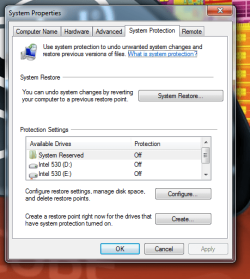
I need help on how to remove the (system reserved) folder under Available Drives in protection settings. On all my other computers it is not shown. Not sure why it is there as it does not show anywhere else on computer as a drive. I guess it just bugs the hell out of me not knowing why it's there. Any help would be appreciated.
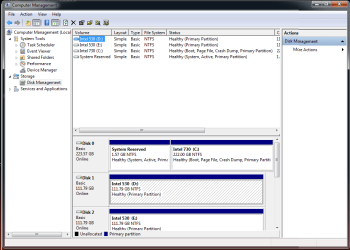
I knew some one would ask that lol. No drive letter on the system reserved partition. It is a 1.57 GB partition on Disk 0. The other partition is the c: drive at 222.00 GB's.
1.57 GB is an "unusual" size for a System Reserved partition, they are usually 350 MB or less.
I need help on how to remove the (system reserved)folder under Available Drives in protection settings. On all my other computers it is not shown. Not sure why it is there as it does not show anywhere else on computer as a drive. I guess it just bugs the hell out of me not knowing why it's there. Any help would be appreciated.
Gyration wireless, Logitech wireless, Dell USB wired
Mouse
Gyration wireless, Logitech wireless, V7 USB wired
Internet Speed
Spectrum - 100Mbps D / 10Mbps U
Antivirus
Avast, MBAM3, EMET, WinPatrol
Browser
Pale Moon, Firefox, IE
Other Info
2 multi-boot PC's
Mainly HTPC/Office/Gen purpose (no gaming).
Trendnet USB KVM.
LG DVD burner/Blue Ray Player.
Tray system for removable SATA backup drives.
Not currently OCd, under-volted.
I use Hybrid sleep, rarely re-boot or shutdown.
Hauppauge HD-PVR, Avermedia PCIe TV Tuner, Hauppauge PCI TV Tuner.
Gyration wireless, Logitech wireless, Dell USB wired
Mouse
Gyration wireless, Logitech wireless, V7 USB wired
Internet Speed
Spectrum - 100Mbps D / 10Mbps U
Antivirus
Avast, MBAM3, EMET, WinPatrol
Browser
Pale Moon, Firefox, IE
Other Info
2 multi-boot PC's
Mainly HTPC/Office/Gen purpose (no gaming).
Trendnet USB KVM.
LG DVD burner/Blue Ray Player.
Tray system for removable SATA backup drives.
Not currently OCd, under-volted.
I use Hybrid sleep, rarely re-boot or shutdown.
Hauppauge HD-PVR, Avermedia PCIe TV Tuner, Hauppauge PCI TV Tuner.
Thanks for the help David, yes all my other machines have a system reserved partition on disk 0 but no drive letter. I just can't figure out why the system reserved folder is in available drives under system protection. I have never seen it before. Thanks Much
I don't have System Reserved, but imho there is something unusual with the 1.57 GB size.
You may need to post a screen print of the folders/files contents of that partition.
Someone that has a System Reserved partition may be able to explain why it works differently on that PC.
Gyration wireless, Logitech wireless, Dell USB wired
Mouse
Gyration wireless, Logitech wireless, V7 USB wired
Internet Speed
Spectrum - 100Mbps D / 10Mbps U
Antivirus
Avast, MBAM3, EMET, WinPatrol
Browser
Pale Moon, Firefox, IE
Other Info
2 multi-boot PC's
Mainly HTPC/Office/Gen purpose (no gaming).
Trendnet USB KVM.
LG DVD burner/Blue Ray Player.
Tray system for removable SATA backup drives.
Not currently OCd, under-volted.
I use Hybrid sleep, rarely re-boot or shutdown.
Hauppauge HD-PVR, Avermedia PCIe TV Tuner, Hauppauge PCI TV Tuner.
Thx David, I just went and did what sir George posted. Deleted the partition and everything good now. After I deleted the partition it was unallocated space so I had to resize the C: drive. I used EaseUS to resize the drive but then had startup errors. After the second Startup Repair with the Windows 7 Disk, EaseUS finally resized the drive (out of the windows environment while in the startup process) and everything good now. I gained almost 2 GB on the C: drive, no system reserved partition anywhere now and running good.
The only thing I can think as to why the 1.57 GB size could be is maybe because this was the third or fourth time this Windows 7 install has been cloned to a new drive since the first install. I hate reformatting system drives and having to reinstall everything. Think I have gone from an old conventional drive through at least 2 ssd's with this install and it still runs well. I know my registry has to be overloaded. lol Anyway guys thx for the help!!



 . Think I have gone from an old conventional drive through at least 2 ssd's with this install and it still runs well. I know my registry has to be overloaded. lol
 Anyway guys thx for the help!!