In Virtual XP Wrong Soundcard

Cheemag

New member
The one programme I particularly want to run under V-XP needs to use the soundcard.

However, the soundcard shown in that programme and others is not the onboard soundcard used by Windows 7. V-XP gives only a Soundblaster which is definitely not fitted. The onboard one, which works well in straight Windows-7 is a AC-97 clone.

Any ideas why XP is behaving in this way? I have Windows-7 Professional.
 
Last edited:

My Computer

Computer Manufacturer/Model Number
Gigabyte
OS
Windows 7 Professional 64-bit
CPU
Intel Core 2 Duo
Motherboard
EP41T-UD3L
Memory
4 GB
Graphics Card(s)
Nvidia GE Force 9500GT
Sound Card
On-board
Monitor(s) Displays
Acer V203H
Hard Drives
Two Samsung HD103SJ 1TB
PSU
?
Case
?
Cooling
Fan
First, welcome to the Seven Forums, Cheemag.

All virtual machines, including XP Mode, use their own emulated hardware. For XP Mode and other Virtual PC machines, this means for instance a very limited S3 Trio GPU and a SoundBlaster 16 compatible sound card. You can not use the hardware components of your host system, nor can you change, upgrade, the emulated hardware.

Think XP Mode as any other computer in your network. Each machine can only use the hardware installed on that machine. Computer A can not use the audio hardware of computer B.

Sorry to tell you this, but if the program you are trying to run on XP Mode does not recognize SoundBlaster, there's not much you can do.

Kari
 

My Computer

Computer type
Laptop
Computer Manufacturer/Model Number
HP ENVY 17-1150eg
OS
Windows 10 Pro x64 EN-GB
CPU
1.6 GHz Intel Core i7-720QM Processor
Memory
6 GB
Graphics Card(s)
ATI Mobility Radeon HD 5850 Graphics
Sound Card
Beats sound system with integrated subwoofer
Monitor(s) Displays
17" laptop display, 22" LED and 32" Full HD TV through HDMI
Screen Resolution
1600*900 (1), 1920*1080 (2&3)
Hard Drives
Internal: 2 x 500 GB SATA Hard Disk Drive 7200 rpm
External: 2TB for backups, 3TB USB3 network drive for media
Cooling
As Envy runs a bit warm, I have it on a Cooler Master pad
Keyboard
Logitech diNovo Media Desktop Laser (bluetooth)
Mouse
Logitech Performance Mouse MX
Internet Speed
50/10 Mbps VDSL
Antivirus
Windows Defender 4.3.9431.0
Browser
Maxthon 3.5.2., IE11
First, welcome to the Seven Forums, Cheemag.

All virtual machines, including XP Mode, use their own emulated hardware. For XP Mode and other Virtual PC machines, this means for instance a very limited S3 Trio GPU and a SoundBlaster 16 compatible sound card. You can not use the hardware components of your host system, nor can you change, upgrade, the emulated hardware.

Think XP Mode as any other computer in your network. Each machine can only use the hardware installed on that machine. Computer A can not use the audio hardware of computer B.

Sorry to tell you this, but if the program you are trying to run on XP Mode does not recognize SoundBlaster, there's not much you can do.

Kari

:( Thank you.
 

My Computer

Computer Manufacturer/Model Number
Gigabyte
OS
Windows 7 Professional 64-bit
CPU
Intel Core 2 Duo
Motherboard
EP41T-UD3L
Memory
4 GB
Graphics Card(s)
Nvidia GE Force 9500GT
Sound Card
On-board
Monitor(s) Displays
Acer V203H
Hard Drives
Two Samsung HD103SJ 1TB
PSU
?
Case
?
Cooling
Fan
How to start a new thread?

How can I start a new thread. Don't see where to do it. Seems like it should be obvious, but I've searched hi and lo for a link...
Sorry to post in your thread, but couldn't think of another way to be "heard":(
 

My Computer

OS
Win 7
Hi Rosiermaryr, welcome to the Seven Forums.

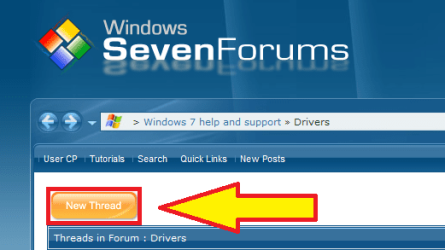
From forums front page, choose the section, sub-forum you want to (News, General Discussion, Drivers, Graphic Cards and so on). Click the New Thread button to start a thread in that forum.

SF_New_ thread.png

Kari

@Cheemag, please don't shoot the messenger... ;)
 

My Computer

Computer type
Laptop
Computer Manufacturer/Model Number
HP ENVY 17-1150eg
OS
Windows 10 Pro x64 EN-GB
CPU
1.6 GHz Intel Core i7-720QM Processor
Memory
6 GB
Graphics Card(s)
ATI Mobility Radeon HD 5850 Graphics
Sound Card
Beats sound system with integrated subwoofer
Monitor(s) Displays
17" laptop display, 22" LED and 32" Full HD TV through HDMI
Screen Resolution
1600*900 (1), 1920*1080 (2&3)
Hard Drives
Internal: 2 x 500 GB SATA Hard Disk Drive 7200 rpm
External: 2TB for backups, 3TB USB3 network drive for media
Cooling
As Envy runs a bit warm, I have it on a Cooler Master pad
Keyboard
Logitech diNovo Media Desktop Laser (bluetooth)
Mouse
Logitech Performance Mouse MX
Internet Speed
50/10 Mbps VDSL
Antivirus
Windows Defender 4.3.9431.0
Browser
Maxthon 3.5.2., IE11
Hi Rosiermaryr, welcome to the Seven Forums.

From forums front page, choose the section, sub-forum you want to (News, General Discussion, Drivers, Graphic Cards and so on). Click the New Thread button to start a thread in that forum.

View attachment 85847

Kari

@Cheemag, please don't shoot the messenger... ;)

I don't follow. The smiley was to express disappointment.

Further to this: if I were to install a Soundblaster and deactivate the internal Realtek card, would it work then?
 

My Computer

Computer Manufacturer/Model Number
Gigabyte
OS
Windows 7 Professional 64-bit
CPU
Intel Core 2 Duo
Motherboard
EP41T-UD3L
Memory
4 GB
Graphics Card(s)
Nvidia GE Force 9500GT
Sound Card
On-board
Monitor(s) Displays
Acer V203H
Hard Drives
Two Samsung HD103SJ 1TB
PSU
?
Case
?
Cooling
Fan
Cheemag, I understood you OK. My response was just for fun, nothing else, which I tried to tell with the wink smiley. Please forgive me if you thought that to be anything else.
:thumbsup:
 

My Computer

Computer type
Laptop
Computer Manufacturer/Model Number
HP ENVY 17-1150eg
OS
Windows 10 Pro x64 EN-GB
CPU
1.6 GHz Intel Core i7-720QM Processor
Memory
6 GB
Graphics Card(s)
ATI Mobility Radeon HD 5850 Graphics
Sound Card
Beats sound system with integrated subwoofer
Monitor(s) Displays
17" laptop display, 22" LED and 32" Full HD TV through HDMI
Screen Resolution
1600*900 (1), 1920*1080 (2&3)
Hard Drives
Internal: 2 x 500 GB SATA Hard Disk Drive 7200 rpm
External: 2TB for backups, 3TB USB3 network drive for media
Cooling
As Envy runs a bit warm, I have it on a Cooler Master pad
Keyboard
Logitech diNovo Media Desktop Laser (bluetooth)
Mouse
Logitech Performance Mouse MX
Internet Speed
50/10 Mbps VDSL
Antivirus
Windows Defender 4.3.9431.0
Browser
Maxthon 3.5.2., IE11
Cheemag, I understood you OK. My response was just for fun, nothing else, which I tried to tell with the wink smiley. Please forgive me if you thought that to be anything else.
:thumbsup:

:) No problem. You are forgiven!

What about the second part of my last post?

If I were to install a Soundblaster in the physical (host) machine, would that be recognised and used by the virtual OS?
 

My Computer

Computer Manufacturer/Model Number
Gigabyte
OS
Windows 7 Professional 64-bit
CPU
Intel Core 2 Duo
Motherboard
EP41T-UD3L
Memory
4 GB
Graphics Card(s)
Nvidia GE Force 9500GT
Sound Card
On-board
Monitor(s) Displays
Acer V203H
Hard Drives
Two Samsung HD103SJ 1TB
PSU
?
Case
?
Cooling
Fan
What about the second part of my last post?

If I were to install a Soundblaster in the physical (host) machine, would that be recognised and used by the virtual OS?

I answered that before you asked the question ;)
All virtual machines, including XP Mode, use their own emulated hardware. For XP Mode and other Virtual PC machines, this means for instance a very limited S3 Trio GPU and a SoundBlaster 16 compatible sound card. You can not use the hardware components of your host system, nor can you change, upgrade, the emulated hardware.

Think XP Mode as any other computer in your network. Each machine can only use the hardware installed on that machine. Computer A can not use the audio hardware of computer B.
In this context, XP Mode i.e. a virtual machine is really like any other computer in your network. A computer can not use the soundcard of another computer.

Sorry, again...
 

My Computer

Computer type
Laptop
Computer Manufacturer/Model Number
HP ENVY 17-1150eg
OS
Windows 10 Pro x64 EN-GB
CPU
1.6 GHz Intel Core i7-720QM Processor
Memory
6 GB
Graphics Card(s)
ATI Mobility Radeon HD 5850 Graphics
Sound Card
Beats sound system with integrated subwoofer
Monitor(s) Displays
17" laptop display, 22" LED and 32" Full HD TV through HDMI
Screen Resolution
1600*900 (1), 1920*1080 (2&3)
Hard Drives
Internal: 2 x 500 GB SATA Hard Disk Drive 7200 rpm
External: 2TB for backups, 3TB USB3 network drive for media
Cooling
As Envy runs a bit warm, I have it on a Cooler Master pad
Keyboard
Logitech diNovo Media Desktop Laser (bluetooth)
Mouse
Logitech Performance Mouse MX
Internet Speed
50/10 Mbps VDSL
Antivirus
Windows Defender 4.3.9431.0
Browser
Maxthon 3.5.2., IE11
What about the second part of my last post?

If I were to install a Soundblaster in the physical (host) machine, would that be recognised and used by the virtual OS?

I answered that before you asked the question ;)
All virtual machines, including XP Mode, use their own emulated hardware. For XP Mode and other Virtual PC machines, this means for instance a very limited S3 Trio GPU and a SoundBlaster 16 compatible sound card. You can not use the hardware components of your host system, nor can you change, upgrade, the emulated hardware.

Think XP Mode as any other computer in your network. Each machine can only use the hardware installed on that machine. Computer A can not use the audio hardware of computer B.
In this context, XP Mode i.e. a virtual machine is really like any other computer in your network. A computer can not use the soundcard of another computer.

It can use the hard disc !

Sorry, again...
So the XP virtual machine has an emulated Soundblaster ... to what end if you cannot use it? Where do you input the sound to this virtual soundcard?
 

My Computer

Computer Manufacturer/Model Number
Gigabyte
OS
Windows 7 Professional 64-bit
CPU
Intel Core 2 Duo
Motherboard
EP41T-UD3L
Memory
4 GB
Graphics Card(s)
Nvidia GE Force 9500GT
Sound Card
On-board
Monitor(s) Displays
Acer V203H
Hard Drives
Two Samsung HD103SJ 1TB
PSU
?
Case
?
Cooling
Fan
Ok, you are right. Virtual machine can use some of the host's hardware, the drives. Nothing else.

I play some old DOS games on XP Mode, sound comes quite nicely using XP Mode's emulated SoundBlaster. Virtual machines are thought to be mostly for business use, I think playing older games is not very high on the priority lists of Virtual PC coding people.
 

My Computer

Computer type
Laptop
Computer Manufacturer/Model Number
HP ENVY 17-1150eg
OS
Windows 10 Pro x64 EN-GB
CPU
1.6 GHz Intel Core i7-720QM Processor
Memory
6 GB
Graphics Card(s)
ATI Mobility Radeon HD 5850 Graphics
Sound Card
Beats sound system with integrated subwoofer
Monitor(s) Displays
17" laptop display, 22" LED and 32" Full HD TV through HDMI
Screen Resolution
1600*900 (1), 1920*1080 (2&3)
Hard Drives
Internal: 2 x 500 GB SATA Hard Disk Drive 7200 rpm
External: 2TB for backups, 3TB USB3 network drive for media
Cooling
As Envy runs a bit warm, I have it on a Cooler Master pad
Keyboard
Logitech diNovo Media Desktop Laser (bluetooth)
Mouse
Logitech Performance Mouse MX
Internet Speed
50/10 Mbps VDSL
Antivirus
Windows Defender 4.3.9431.0
Browser
Maxthon 3.5.2., IE11
cheemag, kari knows what he's talking about - listen to him.

are you trying to record sound?

you won't be able to record sound inside your virtual machine no matter what hardware you have in your real machine.

if your app only works in xp, then i'm afraid you'll have to use a real xp installation. it is quite easy to have a dual-boot 7/xp system. naturally, you'll need an xp install disc and a valid serial key. a tutorial is here if you need it.

what is the particular app/problem you have? maybe we can help suggest alternatives?
 

My Computer

Computer Manufacturer/Model Number
mickey megabyte 1234
OS
ultimate 64 sp1
CPU
i5 2500K [email protected]
Motherboard
MSI P67A-GD53
Memory
8 gigs GSkill Ripjaws 1600
Graphics Card(s)
amd hd6950
Sound Card
creative x-fi gamer
Monitor(s) Displays
samsung 24"
Screen Resolution
1920x1080
Hard Drives
ocz vertex 2e 60 gig, samsung f3 1tb, buffalo 2tb ext
PSU
antec 550
Case
antec three hundred
Cooling
i'm a cooling fan
Keyboard
saitek eclipse ii
Mouse
logitech g3
Internet Speed
about 4 Mbps
Other Info
i love win7
cheemag, kari knows what he's talking about - listen to him.

are you trying to record sound?

you won't be able to record sound inside your virtual machine no matter what hardware you have in your real machine.

if your app only works in xp, then i'm afraid you'll have to use a real xp installation. it is quite easy to have a dual-boot 7/xp system. naturally, you'll need an xp install disc and a valid serial key. a tutorial is here if you need it.

what is the particular app/problem you have? maybe we can help suggest alternatives?

I'm not saying he doesn't know what he is talking about - it's just that his contention that the emulation doesn't use host hardware doesn't hold water.

I am trying to run a programme which uses the DSP functions of a soundcard, not specifically to record sound.

I have at least two genuine XP install discs, one from a defunct computer and one from a rather old machine which is to be scrapped. I don't think their licences would allow them to be installed on this machine as a dual boot with Windows-7. (?)

Thanks for the link to the tutorial. I'll have a look at it later.
 

My Computer

Computer Manufacturer/Model Number
Gigabyte
OS
Windows 7 Professional 64-bit
CPU
Intel Core 2 Duo
Motherboard
EP41T-UD3L
Memory
4 GB
Graphics Card(s)
Nvidia GE Force 9500GT
Sound Card
On-board
Monitor(s) Displays
Acer V203H
Hard Drives
Two Samsung HD103SJ 1TB
PSU
?
Case
?
Cooling
Fan
...
I'm not saying he doesn't know what he is talking about - it's just that his contention that the emulation doesn't use host hardware doesn't hold water.

do a google - 7 xp mode hardware drivers - or whatever terms you like.

yes, emulation will use your host hardware, otherwise you'll never see anything, or be able to use your mouse etc - but it can only emulate very simple basic hardware - in this case, the good old soundblaster.

wikipedia said:
Virtual PC emulates the following environments:
  • Intel Pentium II (32-bit) processor (but virtualizes the host processor on Windows versions) with an Intel 440BX chipset.
  • Standard SVGA VESA graphics card (S3 Trio 32 PCI with 4 MB video RAM, adjustable in later versions up to 16 MB by manually editing a virtual machine's settings file).
  • System BIOS from American Megatrends (AMI).
  • Creative Labs Sound Blaster 16 ISA PnP. (When Vista is installed as both the host (main) and guest (virtual) operating systems, settings are synchronized with the host and audio configuration is not required.)
  • DEC 21041 (DEC 21140 in newer versions) Ethernet network card.
  • Microsoft Virtual PC 2007 and earlier do not have the ability to redirect USB devices to the guest machine, although devices connected to the host OS via USB can be used as normal by Virtual PC.
  • Programs using undocumented features of hardware, exotic timings, or unsupported opcodes may not work.

i'm not sure about your license situation with xp.
 

My Computer

Computer Manufacturer/Model Number
mickey megabyte 1234
OS
ultimate 64 sp1
CPU
i5 2500K [email protected]
Motherboard
MSI P67A-GD53
Memory
8 gigs GSkill Ripjaws 1600
Graphics Card(s)
amd hd6950
Sound Card
creative x-fi gamer
Monitor(s) Displays
samsung 24"
Screen Resolution
1920x1080
Hard Drives
ocz vertex 2e 60 gig, samsung f3 1tb, buffalo 2tb ext
PSU
antec 550
Case
antec three hundred
Cooling
i'm a cooling fan
Keyboard
saitek eclipse ii
Mouse
logitech g3
Internet Speed
about 4 Mbps
Other Info
i love win7
I'm not saying he doesn't know what he is talking about - it's just that his contention that the emulation doesn't use host hardware doesn't hold water.

Cheemag, yes it holds the water. Your critic doesn't. Other than drives, all hardware is emulated and XP Mode can not use host's hardware. If it couldn't use the drives, it would be impossible to install and use.

Installing normal XP from your own install media is not going to solve your issue. As I have already mentioned (post #2), this issue, using emulated hardware, is not just an XP Mode issue. All virtual machines use emulated hardware, and they can not use hardware of the host (exception: drives, which are naturally needed for virtual machine to run).

IMO only solution is to install XP on a dual boot system, as Mickey already suggested.

Kari

do a google - 7 xp mode hardware drivers - or whatever terms you like.

yes, emulation will use your host hardware, otherwise you'll never see anything, or be able to use your mouse etc - but it can only emulate very simple basic hardware - in this case, the good old soundblaster.
Mickey, it is not possible to change the emulated hardware components of a virtual machine. You have to play with you have, or not to play at all. That's what I mean when I say you can not use host's hardware.

Of course the emulated SoundBlaster uses host's soundcard to produce sound, and emulated S3 Trio GPU uses host's GPU to show the virtual machine. But that's it. It's common, accepted way to explain this saying that a virtual machine has it's own emulated hardware setup, where individual hardware components can not be changed (again, exeption the drives of the host).
 
Last edited:

My Computer

Computer type
Laptop
Computer Manufacturer/Model Number
HP ENVY 17-1150eg
OS
Windows 10 Pro x64 EN-GB
CPU
1.6 GHz Intel Core i7-720QM Processor
Memory
6 GB
Graphics Card(s)
ATI Mobility Radeon HD 5850 Graphics
Sound Card
Beats sound system with integrated subwoofer
Monitor(s) Displays
17" laptop display, 22" LED and 32" Full HD TV through HDMI
Screen Resolution
1600*900 (1), 1920*1080 (2&3)
Hard Drives
Internal: 2 x 500 GB SATA Hard Disk Drive 7200 rpm
External: 2TB for backups, 3TB USB3 network drive for media
Cooling
As Envy runs a bit warm, I have it on a Cooler Master pad
Keyboard
Logitech diNovo Media Desktop Laser (bluetooth)
Mouse
Logitech Performance Mouse MX
Internet Speed
50/10 Mbps VDSL
Antivirus
Windows Defender 4.3.9431.0
Browser
Maxthon 3.5.2., IE11
...
I'm not saying he doesn't know what he is talking about - it's just that his contention that the emulation doesn't use host hardware doesn't hold water.

do a google - 7 xp mode hardware drivers - or whatever terms you like.

yes, emulation will use your host hardware, otherwise you'll never see anything, or be able to use your mouse etc - but it can only emulate very simple basic hardware - in this case, the good old soundblaster.

wikipedia said:
Virtual PC emulates the following environments:
  • Intel Pentium II (32-bit) processor (but virtualizes the host processor on Windows versions) with an Intel 440BX chipset.
  • Standard SVGA VESA graphics card (S3 Trio 32 PCI with 4 MB video RAM, adjustable in later versions up to 16 MB by manually editing a virtual machine's settings file).
  • System BIOS from American Megatrends (AMI).
  • Creative Labs Sound Blaster 16 ISA PnP. (When Vista is installed as both the host (main) and guest (virtual) operating systems, settings are synchronized with the host and audio configuration is not required.)
  • DEC 21041 (DEC 21140 in newer versions) Ethernet network card.
  • Microsoft Virtual PC 2007 and earlier do not have the ability to redirect USB devices to the guest machine, although devices connected to the host OS via USB can be used as normal by Virtual PC.
  • Programs using undocumented features of hardware, exotic timings, or unsupported opcodes may not work.

Thank you ... so it CAN and does use host hardware. :D
Except that, in the case of the sound card it cannot use external inputs such as LineIn and Mic.

i'm not sure about your license situation with xp.
The usual. You can only use that system disc on the machine it was originally tied to, even if that machine is defunct and the OS out-of-date. Would have thought the UK/EU's Unfair Terms in Contracts legislation would have outlawed that.

Might be able to get round it though ... ;)
 

My Computer

Computer Manufacturer/Model Number
Gigabyte
OS
Windows 7 Professional 64-bit
CPU
Intel Core 2 Duo
Motherboard
EP41T-UD3L
Memory
4 GB
Graphics Card(s)
Nvidia GE Force 9500GT
Sound Card
On-board
Monitor(s) Displays
Acer V203H
Hard Drives
Two Samsung HD103SJ 1TB
PSU
?
Case
?
Cooling
Fan
Absurd.

Last time:

All virtual machines installed on Virtual PC use emulated hardware devices. A virtual machine can not use hardware devices (exception: drives) of the host computer. Virtual machine uses resources of the host's devices for the emulation, for instance emulated SoundBlaster audio device directs the output to the sound device of the host computer, but virtual machine is not able to use that device directly.

It's very clear you don't like what I'm saying. Nevertheless, that is how a virtual machine works, and it isn't my fault. There is absolutely no way to use other audio device on virtual XP, be it XP Mode or any other virtual XP installation.

10-7, bailing out.

Kari
 

My Computer

Computer type
Laptop
Computer Manufacturer/Model Number
HP ENVY 17-1150eg
OS
Windows 10 Pro x64 EN-GB
CPU
1.6 GHz Intel Core i7-720QM Processor
Memory
6 GB
Graphics Card(s)
ATI Mobility Radeon HD 5850 Graphics
Sound Card
Beats sound system with integrated subwoofer
Monitor(s) Displays
17" laptop display, 22" LED and 32" Full HD TV through HDMI
Screen Resolution
1600*900 (1), 1920*1080 (2&3)
Hard Drives
Internal: 2 x 500 GB SATA Hard Disk Drive 7200 rpm
External: 2TB for backups, 3TB USB3 network drive for media
Cooling
As Envy runs a bit warm, I have it on a Cooler Master pad
Keyboard
Logitech diNovo Media Desktop Laser (bluetooth)
Mouse
Logitech Performance Mouse MX
Internet Speed
50/10 Mbps VDSL
Antivirus
Windows Defender 4.3.9431.0
Browser
Maxthon 3.5.2., IE11
This is untried by me, and therefore for reference only

The only way of getting around the virtual hardware in a VM that I am aware of is the use of USB devices which should transparently work as designed within the VM. There are available USB sound cards which may enable functions within the VM that are not normally available - this would of course depend on the hardware involved.

In a last resort scenario where functions are required and a native XP is not an option this may be worth checking out :)
 

My Computers

System One System Two

  • Computer type
    PC/Desktop
    Computer Manufacturer/Model Number
    ChillBlast - Custom to my design
    OS
    Windows 11 Pro x64 [Latest Release and Release Preview]
    CPU
    Ryzen 9 5950X, 3.8 - 5.2 MHz
    Motherboard
    Asus Prime X570-Pro
    Memory
    64GB [2 x 32GB] DDR4 3200MHz
    Graphics Card(s)
    4GB NVIDIA GEFORCE GTX 1650 Ti
    Sound Card
    On-board SPDIF to 5.1 System + HDMI [5.1 system]
    Monitor(s) Displays
    32" UHD 32 Bit HDR Monitor + 43" UHD 4K 32Bit HDR TV
    Screen Resolution
    2 x 3840 x 2160 @60Hz
    Hard Drives
    1TB M2 SSD OS, 500GB Fast Access SSD, 2 x 8TB Data + Various Externals from 1TB to 4TB, 10TB NAS
    PSU
    NZXT C750 80 PLUS Gold 750W Modular PSU
    Case
    Workstation Case [Matt Black]
    Cooling
    NZXT Kraken X63 280mm CPU Cooler +2x Quiet Case fans
    Keyboard
    Logitech Wireless MX Keys & K400 + others
    Mouse
    Logitech Wireless MX Master 3S
    Internet Speed
    920 MB Down 50 MB Up
    Antivirus
    BitDefender Total Security Pro
    Browser
    Chrome (always run latest Non-Beta)
    Other Info
    Also run ...
    Laptop - Quad 8GB - Windows 10 Pro x64
    Nexus 7 Android tablet x2
    Samsung 10.2" tablet
    Blackview TAB 8 4G Android Tablet c/w Keyboard
    Wacom Intuos Pro Medium Pen Pad
    Wacom Intuos Pro Small Pen Pad
    Wacom Expresskeys Remote
    Loopdeck+ Graphics Controller
    Shuttle Pro v2 Control
  • Computer type
    Laptop
    System Manufacturer/Model Number
    Dell XPS 17 10750H
    OS
    Windows 11 Pro x64 Latest RP
    CPU
    Intel I7 10750H 5.0GHz
    Motherboard
    Dell XPS
    Memory
    32GB [2x16GB] DDR4 2933 MHz
    Graphics Card(s)
    nVidia GTX1650Ti 4 GB GDDR6
    Sound Card
    Stock [Realtek] 4 Speaker
    Monitor(s) Displays
    17" IPS UHD+ Infinity Edge Touchscreen
    Screen Resolution
    3840 x 2400
    Hard Drives
    2TB M2 NVMe, 4TB External + various 500GB & 1TB External NVMe (also have access to spinner HDD from
    PSU
    Stock
    Case
    Stock XPS Aluminium & Carbon Fibre
    Cooling
    Stock - Active Fan Control
    Keyboard
    Backlit + Various Logitech
    Mouse
    Stock Track Pad + Logitech MX Trackball
    Internet Speed
    72 MB Down 18MB Up
    Browser
    Chrome
    Other Info
    Also run ...
    Laptop - Quad 8GB - Windows 10 Pro x64
    Nexus 7 Android tablet x2
    10.2" tablet
    Sony Z3 Android Smartphone
    Wacom Intuos Pro Medium Pen Pad
    Wacom Intuos Pro Small Pen Pad
    Wacom Expresskeys Remote
    Loopdeck+ Graphics Controller
    Shuttle Pro v2 Control Pad
    10TB NAS
Back
Top