
Inaccurate "These files might be harmful to your computer" message

miloshapiro

New member
Member
Local time
12:10 PM
Messages
43
Inaccurate "These files might be harmful to your computer" message

From time to time, Win 7 will give me an error message that "These files might be harmful to your computer" and that "Your internet security settings suggest that one or more files may be harmful. Do you want to use it anyway?" when I try to move files. I know quite well there's nothing wrong with these files. Today's problem in moving a folder was just a folder with three pictures of a dog and a photoshop file I created from one of them. It's complaining about moving several folders like this.
~
But here's the real oddity:

All of the help I've found this morning by Googling talks about this error message coming up when moving files across internet, LAN, etc. This is from one folder on my computer to another just down one level! There's no internet movement happening here!
~
As per the attached image, I'm attempting to drag the folder with Julia's name in it at:
C:\Users\milo\Documents\aaa-milo\Photoshop\aa-freshen-your-photo\clients-friends-a4a\general
into another one at the same level folder one level lower:
C:\Users\milo\Documents\aaa-milo\Photoshop\aa-freshen-your-photo\clients-friends-a4a\general\2019
~
So all of it is right on my C drive. Any suggestions? This pops up intermittently and is quite frustrating.
 

Attachments
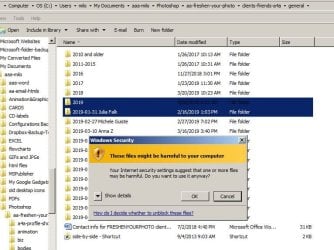
  • temp6.jpg
    temp6.jpg
    75.8 KB · Views: 0

My Computer My Computer

At a glance

Microsoft Windows 7 Home Premium 64-bit 7601 ...AMD Phenom(tm) II X4 945 Processor8.00 GBATI Radeon HD 5450
Computer type
PC/Desktop
Computer Manufacturer/Model Number
HP
OS
Microsoft Windows 7 Home Premium 64-bit 7601 Multiprocessor Free Service Pack 1
CPU
AMD Phenom(tm) II X4 945 Processor
Motherboard
FOXCONN 2AB1
Memory
8.00 GB
Graphics Card(s)
ATI Radeon HD 5450
Sound Card
(1) Realtek High Definition Audio (2) Logitech Microphone
Screen Resolution
1920 x 1080 x 32 bits (4294967296 colors) @ 60 Hz
Hard Drives
(1) Hitachi HDS721010CLA332 SATA Disk Device (2) Generic- Compact Flash USB Device (3) Generic- MS/MS-Pro USB Device (4) Generic- SD/MMC USB Device (5) Generic- SM/xD-Picture USB Device (6) Iomega E xternal HD USB Device (7) Seagate Backu
All files that you download from the internet May be harmful, Windows is just reminding you of this. If you check the properties of the files concerned you should see a button stating "Unlock" or similar, simply click on this button and you should not see the warning for that file again. Of course that you should scan the file to check it's safe before this but it's probably not needed.

I am assuming that you still use IE to download files - this is the main reason for this marker being set, you could edit the internal "zones" that IE used to decide which are unsafe areas, but the properties change is a lot less hassle.
 

My Computers My Computers

  • At a glance

    Windows 11 Pro x64 [Latest Release and Releas...Ryzen 9 5950X, 3.8 - 5.2 MHz64GB [2 x 32GB] DDR4 3200MHz4GB NVIDIA GEFORCE GTX 1650 Ti
    Computer type
    PC/Desktop
    Computer Manufacturer/Model Number
    ChillBlast - Custom to my design
    OS
    Windows 11 Pro x64 [Latest Release and Release Preview]
    CPU
    Ryzen 9 5950X, 3.8 - 5.2 MHz
    Motherboard
    Asus Prime X570-Pro
    Memory
    64GB [2 x 32GB] DDR4 3200MHz
    Graphics Card(s)
    4GB NVIDIA GEFORCE GTX 1650 Ti
    Sound Card
    On-board SPDIF to 5.1 System + HDMI [5.1 system]
    Monitor(s) Displays
    32" UHD 32 Bit HDR Monitor + 43" UHD 4K 32Bit HDR TV
    Screen Resolution
    2 x 3840 x 2160 @60Hz
    Hard Drives
    1TB M2 SSD OS, 500GB Fast Access SSD, 2 x 8TB Data + Various Externals from 1TB to 4TB, 10TB NAS
    PSU
    NZXT C750 80 PLUS Gold 750W Modular PSU
    Case
    Workstation Case [Matt Black]
    Cooling
    NZXT Kraken X63 280mm CPU Cooler +2x Quiet Case fans
    Keyboard
    Logitech Wireless MX Keys & K400 + others
    Mouse
    Logitech Wireless MX Master 3S
    Internet Speed
    920 MB Down 50 MB Up
    Antivirus
    BitDefender Total Security Pro
    Browser
    Chrome (always run latest Non-Beta)
    Other Info
    Also run ...
    Laptop - Quad 8GB - Windows 10 Pro x64
    Nexus 7 Android tablet x2
    Samsung 10.2" tablet
    Blackview TAB 8 4G Android Tablet c/w Keyboard
    Wacom Intuos Pro Medium Pen Pad
    Wacom Intuos Pro Small Pen Pad
    Wacom Expresskeys Remote
    Loopdeck+ Graphics Controller
    Shuttle Pro v2 Control
  • At a glance

    Windows 11 Pro x64 Latest RPIntel I7 10750H 5.0GHz32GB [2x16GB] DDR4 2933 MHznVidia GTX1650Ti 4 GB GDDR6
    Computer type
    Laptop
    System Manufacturer/Model Number
    Dell XPS 17 10750H
    OS
    Windows 11 Pro x64 Latest RP
    CPU
    Intel I7 10750H 5.0GHz
    Motherboard
    Dell XPS
    Memory
    32GB [2x16GB] DDR4 2933 MHz
    Graphics Card(s)
    nVidia GTX1650Ti 4 GB GDDR6
    Sound Card
    Stock [Realtek] 4 Speaker
    Monitor(s) Displays
    17" IPS UHD+ Infinity Edge Touchscreen
    Screen Resolution
    3840 x 2400
    Hard Drives
    2TB M2 NVMe, 4TB External + various 500GB & 1TB External NVMe (also have access to spinner HDD from
    PSU
    Stock
    Case
    Stock XPS Aluminium & Carbon Fibre
    Cooling
    Stock - Active Fan Control
    Keyboard
    Backlit + Various Logitech
    Mouse
    Stock Track Pad + Logitech MX Trackball
    Internet Speed
    72 MB Down 18MB Up
    Browser
    Chrome
    Other Info
    Also run ...
    Laptop - Quad 8GB - Windows 10 Pro x64
    Nexus 7 Android tablet x2
    10.2" tablet
    Sony Z3 Android Smartphone
    Wacom Intuos Pro Medium Pen Pad
    Wacom Intuos Pro Small Pen Pad
    Wacom Expresskeys Remote
    Loopdeck+ Graphics Controller
    Shuttle Pro v2 Control Pad
    10TB NAS
Hi Barman. The photos were not from the internet. They were images that a client scanned of a photo and emailed to me. I then took them from my own email and put them in the first folder. They were never "from the internet" unless you count emailing as being such. Internet Explorer certainly had nothing to do with my processing of these files. I was using the basic "Windows Explorer" to try to move the files from one spot on my C: drive to another on my C: drive, but that's not Internet Explorer.
~
Tried looking at the properties of one of the photos and see nothing about locking on any of the four tabs: General, Security, Details, or PreviousVersions.
~
So I'm still at a loss.
 

My Computer My Computer

At a glance

Microsoft Windows 7 Home Premium 64-bit 7601 ...AMD Phenom(tm) II X4 945 Processor8.00 GBATI Radeon HD 5450
Computer type
PC/Desktop
Computer Manufacturer/Model Number
HP
OS
Microsoft Windows 7 Home Premium 64-bit 7601 Multiprocessor Free Service Pack 1
CPU
AMD Phenom(tm) II X4 945 Processor
Motherboard
FOXCONN 2AB1
Memory
8.00 GB
Graphics Card(s)
ATI Radeon HD 5450
Sound Card
(1) Realtek High Definition Audio (2) Logitech Microphone
Screen Resolution
1920 x 1080 x 32 bits (4294967296 colors) @ 60 Hz
Hard Drives
(1) Hitachi HDS721010CLA332 SATA Disk Device (2) Generic- Compact Flash USB Device (3) Generic- MS/MS-Pro USB Device (4) Generic- SD/MMC USB Device (5) Generic- SM/xD-Picture USB Device (6) Iomega E xternal HD USB Device (7) Seagate Backu
Addendum: Discovered something odd this morning. If I cut and paste those files, there's no warning. I only get the warning if I drag the folder to where I want it. Seems strange that Windows Exploring would differentiate between those to things in any way!
 

My Computer My Computer

At a glance

Microsoft Windows 7 Home Premium 64-bit 7601 ...AMD Phenom(tm) II X4 945 Processor8.00 GBATI Radeon HD 5450
Computer type
PC/Desktop
Computer Manufacturer/Model Number
HP
OS
Microsoft Windows 7 Home Premium 64-bit 7601 Multiprocessor Free Service Pack 1
CPU
AMD Phenom(tm) II X4 945 Processor
Motherboard
FOXCONN 2AB1
Memory
8.00 GB
Graphics Card(s)
ATI Radeon HD 5450
Sound Card
(1) Realtek High Definition Audio (2) Logitech Microphone
Screen Resolution
1920 x 1080 x 32 bits (4294967296 colors) @ 60 Hz
Hard Drives
(1) Hitachi HDS721010CLA332 SATA Disk Device (2) Generic- Compact Flash USB Device (3) Generic- MS/MS-Pro USB Device (4) Generic- SD/MMC USB Device (5) Generic- SM/xD-Picture USB Device (6) Iomega E xternal HD USB Device (7) Seagate Backu
Back
Top