
Inactive taskbar & icons

alecsio

New member
Local time
9:13 PM
Messages
43
Yesterday i was watching a movie on VLC media player and i pause the film to check something and i noticed that i couldn t click the taskbar nor the icons on my desktop. Right click also didn t work. Also TAB didn t work but when i pressed CTRL+ALT+DEL things solved. There was no message of Not Responding window or Not Responding Windows Explorer. And the funny thigs is the click worked in the player. Well, i thought i solved the problem so i got back to my movie. When the movie ended i closed the player and again happened :shock:. Again CTRL+ALT+DEL :shock:. And today happened AGAIN. I don t get any explorer error or Not Responding error. i just can`t click anything on my desktop or taskbar except the current application i m running (today i was running traktor dj studio, yesterday VLC media player) until i press CTRL+ALT+DEL.

Did this happenen to any of you? What could be the problem?:(
 

My Computer My Computer

At a glance

Windows 7 RTM x64Intel Core2Duo E6550 @ 3.2 Ghz (1.38 vCore)2x1 GB DDR2 Kingston HyperX CL5Gainward GeForce 250 GTS 512 MB
OS
Windows 7 RTM x64
CPU
Intel Core2Duo E6550 @ 3.2 Ghz (1.38 vCore)
Motherboard
Gigabyte GA-650I-DS4L
Memory
2x1 GB DDR2 Kingston HyperX CL5
Graphics Card(s)
Gainward GeForce 250 GTS 512 MB
Sound Card
N/A
Monitor(s) Displays
LG L1942S 19"
Hard Drives
1xSeagate Barracuda 250 GB 7200 RPM SATA3
1xMaxtor Diamond Max 80 GB 7200 RPM IDE
PSU
Thermaltake 470 W
Case
Thermaltake Mambo
Cooling
1x120 mm front fan + 1x120 mm exhaust fan
Did this happenen to any of you? What could be the problem?:(

Yes. The explorer freezes. Haven't quite figured it out yet. Sometimes it happens after a reboot. Explorer freezes but everything else works.

I once tried to sit it out, to see if it would exit the loop it was in. It did, but as soon as i clicked again it went into deepfreeze again. Even the 3finger salute didn't work.

Weirdly enough the processor idles, so the explorer is really just frozen.
I guess it waits for a response it doesn't get and the time-out is enormous.

I have not the faintest clue, it's some internal conflict. Videodriver comes to mind; Do you a nvidia graphics card?
 

My Computer My Computer

At a glance

vista x64/ win 7 x64phenom 9950 BE8 gbnvidia gts 250
Computer Manufacturer/Model Number
me and myself
OS
vista x64/ win 7 x64
CPU
phenom 9950 BE
Motherboard
ASUS M2A-VM HDMI
Memory
8 gb
Graphics Card(s)
nvidia gts 250
Sound Card
realtek HD onboard
Monitor(s) Displays
dual hd 19" tft
Screen Resolution
1440x900
Hard Drives
2 x 500 gb WDC
1 x 500 gb Seagate
1 x 1000 gb Seagate
1 80 gb raptor
1 usb 160 gb
Cooling
standard issue
Keyboard
logitech g11
Mouse
usb wireless MS laser 6000
Internet Speed
18 mb (according to my provider :)
Weirdly enough the processor idles, so the explorer is really just frozen.
I guess it waits for a response it doesn't get and the time-out is enormous.

I have not the faintest clue, it's some internal conflict. Videodriver comes to mind; Do you a nvidia graphics card?

I forgot to tell that the CPU idles... Yes i do have a nvidia GTS 250 why? I recently installed nvidia ION drivers (says that supports win 7). Maybe driver problems? The old ones were good.
 

My Computer My Computer

At a glance

Windows 7 RTM x64Intel Core2Duo E6550 @ 3.2 Ghz (1.38 vCore)2x1 GB DDR2 Kingston HyperX CL5Gainward GeForce 250 GTS 512 MB
OS
Windows 7 RTM x64
CPU
Intel Core2Duo E6550 @ 3.2 Ghz (1.38 vCore)
Motherboard
Gigabyte GA-650I-DS4L
Memory
2x1 GB DDR2 Kingston HyperX CL5
Graphics Card(s)
Gainward GeForce 250 GTS 512 MB
Sound Card
N/A
Monitor(s) Displays
LG L1942S 19"
Hard Drives
1xSeagate Barracuda 250 GB 7200 RPM SATA3
1xMaxtor Diamond Max 80 GB 7200 RPM IDE
PSU
Thermaltake 470 W
Case
Thermaltake Mambo
Cooling
1x120 mm front fan + 1x120 mm exhaust fan
I forgot to tell that the CPU idles... Yes i do have a nvidia GTS 250 why? I recently installed nvidia ION drivers (says that supports win 7). Maybe driver problems? The old ones were good.

f*k me blind, i have gts 250 too. Since i have driver 190.40 installed didn't happen yet, but that was just yesterday. which version do you have?
 

My Computer My Computer

At a glance

vista x64/ win 7 x64phenom 9950 BE8 gbnvidia gts 250
Computer Manufacturer/Model Number
me and myself
OS
vista x64/ win 7 x64
CPU
phenom 9950 BE
Motherboard
ASUS M2A-VM HDMI
Memory
8 gb
Graphics Card(s)
nvidia gts 250
Sound Card
realtek HD onboard
Monitor(s) Displays
dual hd 19" tft
Screen Resolution
1440x900
Hard Drives
2 x 500 gb WDC
1 x 500 gb Seagate
1 x 1000 gb Seagate
1 80 gb raptor
1 usb 160 gb
Cooling
standard issue
Keyboard
logitech g11
Mouse
usb wireless MS laser 6000
Internet Speed
18 mb (according to my provider :)
Could be in the power option, your disk is set to off after a period of time.

The computer can't tell the difference between idle and watching a movie.

If you don't know where to find the option I'll post a screenshot, but at the moment my mui is dutch so I would need to change language, and I don't want to if it's not necessary. :D

good luck
 

My Computer My Computer

At a glance

Win7 Build 7600 x86Pentium II 300MHz32mb EDO RAMDiamond Viper
OS
Win7 Build 7600 x86
CPU
Pentium II 300MHz
Motherboard
Asus
Memory
32mb EDO RAM
Graphics Card(s)
Diamond Viper
Sound Card
Soundblaster 16
Monitor(s) Displays
14" AOC CRT 16K color
Screen Resolution
800x600
Hard Drives
300mb Quantum fireball
PSU
110 Watts
Cooling
Passive
Keyboard
Trust Ergonomic
Mouse
Generic
Internet Speed
256K u 128K d
Could be in the power option, your disk is set to off after a period of time.

The computer can't tell the difference between idle and watching a movie.

If you don't know where to find the option I'll post a screenshot, but at the moment my mui is dutch so I would need to change language, and I don't want to if it's not necessary. :D

good luck

first thing i do after installation is set power the highperformance. Plants need their CO²
 

My Computer My Computer

At a glance

vista x64/ win 7 x64phenom 9950 BE8 gbnvidia gts 250
Computer Manufacturer/Model Number
me and myself
OS
vista x64/ win 7 x64
CPU
phenom 9950 BE
Motherboard
ASUS M2A-VM HDMI
Memory
8 gb
Graphics Card(s)
nvidia gts 250
Sound Card
realtek HD onboard
Monitor(s) Displays
dual hd 19" tft
Screen Resolution
1440x900
Hard Drives
2 x 500 gb WDC
1 x 500 gb Seagate
1 x 1000 gb Seagate
1 80 gb raptor
1 usb 160 gb
Cooling
standard issue
Keyboard
logitech g11
Mouse
usb wireless MS laser 6000
Internet Speed
18 mb (according to my provider :)
first thing i do after installation is set power the highperformance. Plants need their CO²

Ok, but did you check specifically if the power off of the disks is set to unabled when you selected high performance?

Just to be sure check it out, at least we could rule it out then.

greetz
 
Last edited:

My Computer My Computer

At a glance

Win7 Build 7600 x86Pentium II 300MHz32mb EDO RAMDiamond Viper
OS
Win7 Build 7600 x86
CPU
Pentium II 300MHz
Motherboard
Asus
Memory
32mb EDO RAM
Graphics Card(s)
Diamond Viper
Sound Card
Soundblaster 16
Monitor(s) Displays
14" AOC CRT 16K color
Screen Resolution
800x600
Hard Drives
300mb Quantum fireball
PSU
110 Watts
Cooling
Passive
Keyboard
Trust Ergonomic
Mouse
Generic
Internet Speed
256K u 128K d
i also set it to high performance but there s no difference :|. no i m reinstalling the drivers and i m having a hard lilfe here.

@squonksc: what dou you mean by setting of the disk? hard drive disk? because i have an IDE one which is use it for install kits and other things like that and i hear sometimes a funny noise in the case.
 

My Computer My Computer

At a glance

Windows 7 RTM x64Intel Core2Duo E6550 @ 3.2 Ghz (1.38 vCore)2x1 GB DDR2 Kingston HyperX CL5Gainward GeForce 250 GTS 512 MB
OS
Windows 7 RTM x64
CPU
Intel Core2Duo E6550 @ 3.2 Ghz (1.38 vCore)
Motherboard
Gigabyte GA-650I-DS4L
Memory
2x1 GB DDR2 Kingston HyperX CL5
Graphics Card(s)
Gainward GeForce 250 GTS 512 MB
Sound Card
N/A
Monitor(s) Displays
LG L1942S 19"
Hard Drives
1xSeagate Barracuda 250 GB 7200 RPM SATA3
1xMaxtor Diamond Max 80 GB 7200 RPM IDE
PSU
Thermaltake 470 W
Case
Thermaltake Mambo
Cooling
1x120 mm front fan + 1x120 mm exhaust fan
i also set it to high performance but there s no difference :|. no i m reinstalling the drivers and i m having a hard lilfe here.

@squonksc: what dou you mean by setting of the disk? hard drive disk? because i have an IDE one which is use it for install kits and other things like that and i hear sometimes a funny noise in the case.

Ok, I'll set my mui from dutch to english and post a screenshot.

Have to log off for a few minutes to do it.

Be right back.
 

My Computer My Computer

At a glance

Win7 Build 7600 x86Pentium II 300MHz32mb EDO RAMDiamond Viper
OS
Win7 Build 7600 x86
CPU
Pentium II 300MHz
Motherboard
Asus
Memory
32mb EDO RAM
Graphics Card(s)
Diamond Viper
Sound Card
Soundblaster 16
Monitor(s) Displays
14" AOC CRT 16K color
Screen Resolution
800x600
Hard Drives
300mb Quantum fireball
PSU
110 Watts
Cooling
Passive
Keyboard
Trust Ergonomic
Mouse
Generic
Internet Speed
256K u 128K d
Ok, but did you check specifically if the power off of the disks is set to unabled when you selected high performance?

Just to be sure check it out, at least we could rule it out then.

greetz

yes i have, i always make a point of it because to my mind keeping them spinning causes less wear and tear on the heads and platters.

No i'm sure now that it's the drivers because Al has the same card and the same problems.
 

My Computer My Computer

At a glance

vista x64/ win 7 x64phenom 9950 BE8 gbnvidia gts 250
Computer Manufacturer/Model Number
me and myself
OS
vista x64/ win 7 x64
CPU
phenom 9950 BE
Motherboard
ASUS M2A-VM HDMI
Memory
8 gb
Graphics Card(s)
nvidia gts 250
Sound Card
realtek HD onboard
Monitor(s) Displays
dual hd 19" tft
Screen Resolution
1440x900
Hard Drives
2 x 500 gb WDC
1 x 500 gb Seagate
1 x 1000 gb Seagate
1 80 gb raptor
1 usb 160 gb
Cooling
standard issue
Keyboard
logitech g11
Mouse
usb wireless MS laser 6000
Internet Speed
18 mb (according to my provider :)
I'm back.

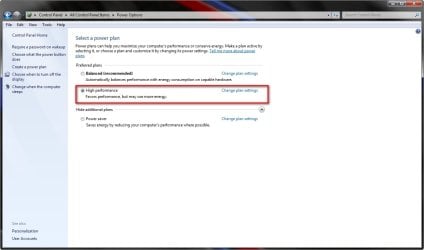
In this screenshot you see high performance selected as scheme and yet the disks are set to go out after 20 minutes.

Set it to off. (0)

@petrossa, I read you already checked so this is only for Alecsio.
PowerCapture.PNG
 

My Computer My Computer

At a glance

Win7 Build 7600 x86Pentium II 300MHz32mb EDO RAMDiamond Viper
OS
Win7 Build 7600 x86
CPU
Pentium II 300MHz
Motherboard
Asus
Memory
32mb EDO RAM
Graphics Card(s)
Diamond Viper
Sound Card
Soundblaster 16
Monitor(s) Displays
14" AOC CRT 16K color
Screen Resolution
800x600
Hard Drives
300mb Quantum fireball
PSU
110 Watts
Cooling
Passive
Keyboard
Trust Ergonomic
Mouse
Generic
Internet Speed
256K u 128K d
Further more,

1. what are your machine's specs and setup?

2. Do you have AMD cool n quiet installed, or Intel's equivalent?

3. what are your systems temperatures? CPU? Mainboard?

4. does this ever happen while you are actively working on the computer or only when you do nothing for a while?
 

My Computer My Computer

At a glance

Win7 Build 7600 x86Pentium II 300MHz32mb EDO RAMDiamond Viper
OS
Win7 Build 7600 x86
CPU
Pentium II 300MHz
Motherboard
Asus
Memory
32mb EDO RAM
Graphics Card(s)
Diamond Viper
Sound Card
Soundblaster 16
Monitor(s) Displays
14" AOC CRT 16K color
Screen Resolution
800x600
Hard Drives
300mb Quantum fireball
PSU
110 Watts
Cooling
Passive
Keyboard
Trust Ergonomic
Mouse
Generic
Internet Speed
256K u 128K d
I'm back.

In this screenshot you see high performance selected as scheme and yet the disks are set to go out after 20 minutes.

Set it to off. (0)

@petrossa, I read you already checked so this is only for Alecsio.
View attachment 20906

When you apply changes to power options on that screen they will still not be applicable unless you also change your plan on the main screen here.

2009-08-01_193531.jpg
 

My Computer My Computer

At a glance

Windows 7 Ultimate Vista Ultimate x64Core 2 Duo E8500 3.16Ghz @ 3.8Ghz2x2Gigs Patriot PC2-6400 LLInno3D GeForce GTX260 216 SP
Computer Manufacturer/Model Number
Home Brew
OS
Windows 7 Ultimate Vista Ultimate x64
CPU
Core 2 Duo E8500 3.16Ghz @ 3.8Ghz
Motherboard
eVGA 750i FTW
Memory
2x2Gigs Patriot PC2-6400 LL
Graphics Card(s)
Inno3D GeForce GTX260 216 SP
Monitor(s) Displays
ASUS VW222U 22" 2ms Response time
Screen Resolution
1680x1050
Hard Drives
SATA 150GB
SATA II 250GB
USB IDE 750GB Ext.
PSU
HYTEC 600W & Thermaltake 650W Toughpower Power Exp
Case
Thermaltake Armor LCS (Liquid Cooling System)
Cooling
Liquid Cooling System
Keyboard
Logitech G15 Gaming Keyboard
Mouse
Logitech G9 Gaming Mouse
Further more,

1. what are your machine's specs and setup?

2. Do you have AMD cool n quiet installed, or Intel's equivalent?

3. what are your systems temperatures? CPU? Mainboard?

4. does this ever happen while you are actively working on the computer or only when you do nothing for a while?


check my system specs on the button below my avatar. and no it s not happening on system load. for example now i reinstalled video drivers and after the desktop appeared it happened again.

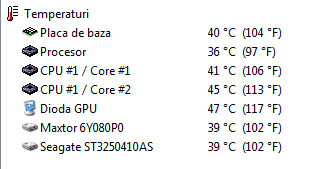
so in this pic: Placa de baza = Mobo

and i checked the power plan and the hard drive sets off after 20 min. could that be the problem? i said i restarted and it happened again right after the desktop appeared.
 

Attachments

  • temps.png
    temps.png
    3.5 KB · Views: 9

My Computer My Computer

At a glance

Windows 7 RTM x64Intel Core2Duo E6550 @ 3.2 Ghz (1.38 vCore)2x1 GB DDR2 Kingston HyperX CL5Gainward GeForce 250 GTS 512 MB
OS
Windows 7 RTM x64
CPU
Intel Core2Duo E6550 @ 3.2 Ghz (1.38 vCore)
Motherboard
Gigabyte GA-650I-DS4L
Memory
2x1 GB DDR2 Kingston HyperX CL5
Graphics Card(s)
Gainward GeForce 250 GTS 512 MB
Sound Card
N/A
Monitor(s) Displays
LG L1942S 19"
Hard Drives
1xSeagate Barracuda 250 GB 7200 RPM SATA3
1xMaxtor Diamond Max 80 GB 7200 RPM IDE
PSU
Thermaltake 470 W
Case
Thermaltake Mambo
Cooling
1x120 mm front fan + 1x120 mm exhaust fan
it s not happening on system load. for example now i reinstalled video drivers and after the desktop appeared it happened again.

You mean right after login?

And what brand CPU? AMD or Intel?
 

My Computer My Computer

At a glance

Win7 Build 7600 x86Pentium II 300MHz32mb EDO RAMDiamond Viper
OS
Win7 Build 7600 x86
CPU
Pentium II 300MHz
Motherboard
Asus
Memory
32mb EDO RAM
Graphics Card(s)
Diamond Viper
Sound Card
Soundblaster 16
Monitor(s) Displays
14" AOC CRT 16K color
Screen Resolution
800x600
Hard Drives
300mb Quantum fireball
PSU
110 Watts
Cooling
Passive
Keyboard
Trust Ergonomic
Mouse
Generic
Internet Speed
256K u 128K d
You mean right after login?

And what brand CPU? AMD or Intel?

yes after login. i have an Intel CPU

look all specs lol if you need them:

OS Windows 7 RC 7100 x64
CPU Intel Core2Duo E6550 @ 3.2 Ghz (1.38 vCore)
Motherboard Gigabyte GA-650I-DS4L
Memory 2x1 GB DDR2 Kingston HyperX CL5
Graphics Card Gainward GeForce 250 GTS 512 MB
Sound Card N/A
Monitor(s) Displays LG L1942S 19"

PSU Thermaltake 470 W
Case Thermaltake Mambo
Cooling 1x120 mm front fan + 1x120 mm exhaust fan
Hard Drives 1xSeagate Barracuda 250 GB 7200 RPM SATA3 1xMaxtor Diamond Max 80 GB 7200 RPM IDE
 

My Computer My Computer

At a glance

Windows 7 RTM x64Intel Core2Duo E6550 @ 3.2 Ghz (1.38 vCore)2x1 GB DDR2 Kingston HyperX CL5Gainward GeForce 250 GTS 512 MB
OS
Windows 7 RTM x64
CPU
Intel Core2Duo E6550 @ 3.2 Ghz (1.38 vCore)
Motherboard
Gigabyte GA-650I-DS4L
Memory
2x1 GB DDR2 Kingston HyperX CL5
Graphics Card(s)
Gainward GeForce 250 GTS 512 MB
Sound Card
N/A
Monitor(s) Displays
LG L1942S 19"
Hard Drives
1xSeagate Barracuda 250 GB 7200 RPM SATA3
1xMaxtor Diamond Max 80 GB 7200 RPM IDE
PSU
Thermaltake 470 W
Case
Thermaltake Mambo
Cooling
1x120 mm front fan + 1x120 mm exhaust fan
I suspect your harddisk.

For someone highly skilled I would suggest SpinRite 6.0 to check the disk for defects.
  Home of Gibson Research Corporation  

But I wouldn't recommend it to anyone with less than high skill.

Maybe find another diskchecker that can check your smart output.

When you have smart enabled in bios, there are some tools that can read the info.

Then you can see if your disk is performing as it should.

For the rest, it could be anything from driver to hardware issue. Hard one.
 

My Computer My Computer

At a glance

Win7 Build 7600 x86Pentium II 300MHz32mb EDO RAMDiamond Viper
OS
Win7 Build 7600 x86
CPU
Pentium II 300MHz
Motherboard
Asus
Memory
32mb EDO RAM
Graphics Card(s)
Diamond Viper
Sound Card
Soundblaster 16
Monitor(s) Displays
14" AOC CRT 16K color
Screen Resolution
800x600
Hard Drives
300mb Quantum fireball
PSU
110 Watts
Cooling
Passive
Keyboard
Trust Ergonomic
Mouse
Generic
Internet Speed
256K u 128K d
so this is how it is: i uninstall the drivers and i reboot the computer. after login the desktop is huge (low resolution) but explorer isn t frozen. i install new drivers and reboot. after login explorer freezes...
 

My Computer My Computer

At a glance

Windows 7 RTM x64Intel Core2Duo E6550 @ 3.2 Ghz (1.38 vCore)2x1 GB DDR2 Kingston HyperX CL5Gainward GeForce 250 GTS 512 MB
OS
Windows 7 RTM x64
CPU
Intel Core2Duo E6550 @ 3.2 Ghz (1.38 vCore)
Motherboard
Gigabyte GA-650I-DS4L
Memory
2x1 GB DDR2 Kingston HyperX CL5
Graphics Card(s)
Gainward GeForce 250 GTS 512 MB
Sound Card
N/A
Monitor(s) Displays
LG L1942S 19"
Hard Drives
1xSeagate Barracuda 250 GB 7200 RPM SATA3
1xMaxtor Diamond Max 80 GB 7200 RPM IDE
PSU
Thermaltake 470 W
Case
Thermaltake Mambo
Cooling
1x120 mm front fan + 1x120 mm exhaust fan
so this is how it is: i uninstall the drivers and i reboot the computer. after login the desktop is huge (low resolution) but explorer isn t frozen. i install new drivers and reboot. after login explorer freezes...

which version? did you try to backtrack? v186 worked for me on windows 7

GTS 250 has firmware issues i believe. I had other graphic related issues also. But i must admit that with 190.40 it seems to work now. But this can be just a fluke.

When installed 190.34 Windowblinds went on the blink. I had to uninstall and reinstall WB before it worked again.
 

My Computer My Computer

At a glance

vista x64/ win 7 x64phenom 9950 BE8 gbnvidia gts 250
Computer Manufacturer/Model Number
me and myself
OS
vista x64/ win 7 x64
CPU
phenom 9950 BE
Motherboard
ASUS M2A-VM HDMI
Memory
8 gb
Graphics Card(s)
nvidia gts 250
Sound Card
realtek HD onboard
Monitor(s) Displays
dual hd 19" tft
Screen Resolution
1440x900
Hard Drives
2 x 500 gb WDC
1 x 500 gb Seagate
1 x 1000 gb Seagate
1 80 gb raptor
1 usb 160 gb
Cooling
standard issue
Keyboard
logitech g11
Mouse
usb wireless MS laser 6000
Internet Speed
18 mb (according to my provider :)
so this is how it is: i uninstall the drivers and i reboot the computer. after login the desktop is huge (low resolution) but explorer isn t frozen. i install new drivers and reboot. after login explorer freezes...

so reinstalling was a good thing. you now know the graphic drivers are the culprit.

Good luck
 

My Computer My Computer

At a glance

Win7 Build 7600 x86Pentium II 300MHz32mb EDO RAMDiamond Viper
OS
Win7 Build 7600 x86
CPU
Pentium II 300MHz
Motherboard
Asus
Memory
32mb EDO RAM
Graphics Card(s)
Diamond Viper
Sound Card
Soundblaster 16
Monitor(s) Displays
14" AOC CRT 16K color
Screen Resolution
800x600
Hard Drives
300mb Quantum fireball
PSU
110 Watts
Cooling
Passive
Keyboard
Trust Ergonomic
Mouse
Generic
Internet Speed
256K u 128K d
Back
Top