increase factory image partition

stuartrozier

New member
Member
VIP
Local time
7:08 PM
Messages
113
Hello,
as the title states, im wanting to increase the factory image partition.

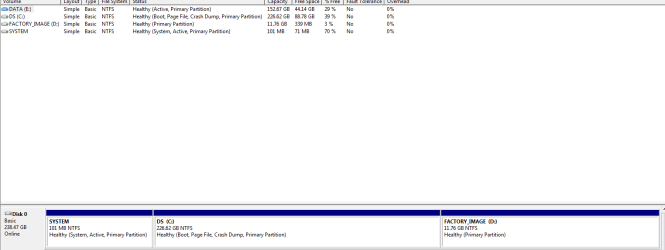
the pc came with one drive, partitioned into 2.

one the system files etc, second the factory image which i belkive is what is used for system resotres, and factory recoveries.

just recently the factory image partition has become red, and ona few mb left.

ive been into disk mng, right-clicked on the partion to extend it. BUT, the 'extend partition' link is greyed out :(

any help is definately much appreciated,
thanks
stuart
 

My Computer

Computer Manufacturer/Model Number
HP
OS
Windows 7 Home Pre 64bit
CPU
i7 intel core 2.93GHZ
Motherboard
MSI
Memory
16.00GB
Graphics Card(s)
nVidia GT 220
Post a screen shot of that Disk Management.


That partition is likely used to restore your PC to its factory state. I wouldn't expect it to change in size and become "red" unless you are somehow saving stuff to it.
 

My Computer

Computer type
PC/Desktop
Computer Manufacturer/Model Number
Ignatz Special; 4 speed manual gearbox; factory air conditioning; one of one
OS
Windows 7 Home Premium SP1, 64-bit
CPU
Intel Skylake i5-6600K, not overclocked
Motherboard
AsRock Z170M Extreme 4, micro ATX
Memory
8 GB HyperX DDR4-2666 (2 x 4 GB)
Graphics Card(s)
none; graphics are integrated on CPU
Sound Card
onboard: Realtek ALC1150; external: USB Behringer UF0-202
Monitor(s) Displays
Dell S2340M 23 inch IPS
Screen Resolution
1600 x 900
Hard Drives
System: Crucial MX100 series SSD, 128 GB;
Data: Samsung Spinpoint 103SJ, 1 TB;
Backup: WD Caviar Green WD30EZRX-00D8PB0, 3 TB
PSU
Rosewill SilentNight 500 watt fanless, semi-modular
Case
Antec Solo II
Cooling
Noctua NH-U12S; Noctua F12 intake, Noctua S12A exhaust
Keyboard
Microsoft 200 6JH-00001 USB
Mouse
Dell or Microsoft optical wired; USB
Antivirus
Microsoft Security Essentials and Malwarebytes Premium
Browser
Pale Moon
Other Info
All fans PWM; speeds at idle: CPU circa 500 rpm; intake circa 600 rpm; exhaust circa 600 rpm; CPU temps 27 idle and 47 C load in a warm room (27 C/81 F) when running Intel Extreme Tuning Utility stress test.
sure thing...
Capture.PNG
it never used to be red ,
just all of a sudden,
 

My Computer

Computer Manufacturer/Model Number
HP
OS
Windows 7 Home Pre 64bit
CPU
i7 intel core 2.93GHZ
Motherboard
MSI
Memory
16.00GB
Graphics Card(s)
nVidia GT 220
i was going to use some of the other drives space - if this is possible
 

My Computer

Computer Manufacturer/Model Number
HP
OS
Windows 7 Home Pre 64bit
CPU
i7 intel core 2.93GHZ
Motherboard
MSI
Memory
16.00GB
Graphics Card(s)
nVidia GT 220
   Information
We always assume you have made your Recovery Disks using the OEM manufacturer's Recovery Media Creator app the first day you had your new PC.
& made the Startup Repair CD.
startup repair disc-create


Did you make the OEM manufacturer's Recovery Disks?

Warning: Do not add DATA to the Recovery Partition, doing so, will make the Recovery Partition unusable.

Can you post a screen shot of Disk management?
http://www.sevenforums.com/tutorials/9733-how-post-screenshot-seven-forums.html

Screenshot tools.
http://www.sevenforums.com/general-...ed-method-uploading-posting-screen-shots.html
How to Use the Snipping Tool in Vista - Vista Forums
Snipping Tool - Windows 7 features - Microsoft Windows
Use Snipping Tool to capture screen shots
http://www.sevenforums.com/tutorials/9717-screenshot-paint.html
http://www.sevenforums.com/tutorials/51160-screenshot-upload-using-mwsnap.html
fscapture free download

Use Snipping Tool to capture screen shots
 

My Computer

OS
ME/XP/Vista/Win7
im sure i did yes, when i first brought the pc - took four cds, haha. I may do this again and see if i can get it all on one dvd maybe.
how comes?
 

My Computer

Computer Manufacturer/Model Number
HP
OS
Windows 7 Home Pre 64bit
CPU
i7 intel core 2.93GHZ
Motherboard
MSI
Memory
16.00GB
Graphics Card(s)
nVidia GT 220
Can you post a picture of Disk Management???
 

My Computer

Computer type
PC/Desktop
Computer Manufacturer/Model Number
Ignatz Special; 4 speed manual gearbox; factory air conditioning; one of one
OS
Windows 7 Home Premium SP1, 64-bit
CPU
Intel Skylake i5-6600K, not overclocked
Motherboard
AsRock Z170M Extreme 4, micro ATX
Memory
8 GB HyperX DDR4-2666 (2 x 4 GB)
Graphics Card(s)
none; graphics are integrated on CPU
Sound Card
onboard: Realtek ALC1150; external: USB Behringer UF0-202
Monitor(s) Displays
Dell S2340M 23 inch IPS
Screen Resolution
1600 x 900
Hard Drives
System: Crucial MX100 series SSD, 128 GB;
Data: Samsung Spinpoint 103SJ, 1 TB;
Backup: WD Caviar Green WD30EZRX-00D8PB0, 3 TB
PSU
Rosewill SilentNight 500 watt fanless, semi-modular
Case
Antec Solo II
Cooling
Noctua NH-U12S; Noctua F12 intake, Noctua S12A exhaust
Keyboard
Microsoft 200 6JH-00001 USB
Mouse
Dell or Microsoft optical wired; USB
Antivirus
Microsoft Security Essentials and Malwarebytes Premium
Browser
Pale Moon
Other Info
All fans PWM; speeds at idle: CPU circa 500 rpm; intake circa 600 rpm; exhaust circa 600 rpm; CPU temps 27 idle and 47 C load in a warm room (27 C/81 F) when running Intel Extreme Tuning Utility stress test.
sure, here you go ...
Capture2.PNG
 

My Computer

Computer Manufacturer/Model Number
HP
OS
Windows 7 Home Pre 64bit
CPU
i7 intel core 2.93GHZ
Motherboard
MSI
Memory
16.00GB
Graphics Card(s)
nVidia GT 220
Rather than trying to borrow space from C, I would want to know why the image partition has grown. That's not normal.

What appears to be on it?
 

My Computer

Computer type
PC/Desktop
Computer Manufacturer/Model Number
Ignatz Special; 4 speed manual gearbox; factory air conditioning; one of one
OS
Windows 7 Home Premium SP1, 64-bit
CPU
Intel Skylake i5-6600K, not overclocked
Motherboard
AsRock Z170M Extreme 4, micro ATX
Memory
8 GB HyperX DDR4-2666 (2 x 4 GB)
Graphics Card(s)
none; graphics are integrated on CPU
Sound Card
onboard: Realtek ALC1150; external: USB Behringer UF0-202
Monitor(s) Displays
Dell S2340M 23 inch IPS
Screen Resolution
1600 x 900
Hard Drives
System: Crucial MX100 series SSD, 128 GB;
Data: Samsung Spinpoint 103SJ, 1 TB;
Backup: WD Caviar Green WD30EZRX-00D8PB0, 3 TB
PSU
Rosewill SilentNight 500 watt fanless, semi-modular
Case
Antec Solo II
Cooling
Noctua NH-U12S; Noctua F12 intake, Noctua S12A exhaust
Keyboard
Microsoft 200 6JH-00001 USB
Mouse
Dell or Microsoft optical wired; USB
Antivirus
Microsoft Security Essentials and Malwarebytes Premium
Browser
Pale Moon
Other Info
All fans PWM; speeds at idle: CPU circa 500 rpm; intake circa 600 rpm; exhaust circa 600 rpm; CPU temps 27 idle and 47 C load in a warm room (27 C/81 F) when running Intel Extreme Tuning Utility stress test.
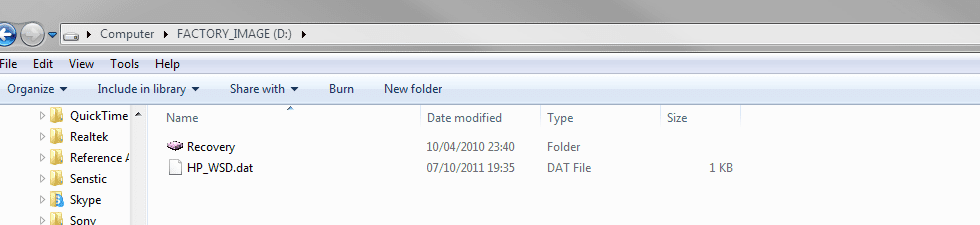
just these two files...
ill paste an image, is it something i can hide, or delete do you think?
Capture3.PNG
 

My Computer

Computer Manufacturer/Model Number
HP
OS
Windows 7 Home Pre 64bit
CPU
i7 intel core 2.93GHZ
Motherboard
MSI
Memory
16.00GB
Graphics Card(s)
nVidia GT 220
I'm guessing you don't really know if it has grown?

Right now, you can't read the sizes of that recovery folder or tell what is in it.

I'd probably download WinDirStat to get a better look at what is in that partition.

As far as I know, that partition will still function as advertised even though you have the red flag.

You could probably add to it, but that would not resolve the issue of why a red flag all of a sudden.

To the extent you are willing to forego ever restoring to factory specs, you don't need that partition. When in doubt, keep it.
 

My Computer

Computer type
PC/Desktop
Computer Manufacturer/Model Number
Ignatz Special; 4 speed manual gearbox; factory air conditioning; one of one
OS
Windows 7 Home Premium SP1, 64-bit
CPU
Intel Skylake i5-6600K, not overclocked
Motherboard
AsRock Z170M Extreme 4, micro ATX
Memory
8 GB HyperX DDR4-2666 (2 x 4 GB)
Graphics Card(s)
none; graphics are integrated on CPU
Sound Card
onboard: Realtek ALC1150; external: USB Behringer UF0-202
Monitor(s) Displays
Dell S2340M 23 inch IPS
Screen Resolution
1600 x 900
Hard Drives
System: Crucial MX100 series SSD, 128 GB;
Data: Samsung Spinpoint 103SJ, 1 TB;
Backup: WD Caviar Green WD30EZRX-00D8PB0, 3 TB
PSU
Rosewill SilentNight 500 watt fanless, semi-modular
Case
Antec Solo II
Cooling
Noctua NH-U12S; Noctua F12 intake, Noctua S12A exhaust
Keyboard
Microsoft 200 6JH-00001 USB
Mouse
Dell or Microsoft optical wired; USB
Antivirus
Microsoft Security Essentials and Malwarebytes Premium
Browser
Pale Moon
Other Info
All fans PWM; speeds at idle: CPU circa 500 rpm; intake circa 600 rpm; exhaust circa 600 rpm; CPU temps 27 idle and 47 C load in a warm room (27 C/81 F) when running Intel Extreme Tuning Utility stress test.
okey doke, i'll hang onto it.
erm, dont suppose theres any way of hiding it in my computer? just a little off putting seeing a huge red bar in my computer?
 

My Computer

Computer Manufacturer/Model Number
HP
OS
Windows 7 Home Pre 64bit
CPU
i7 intel core 2.93GHZ
Motherboard
MSI
Memory
16.00GB
Graphics Card(s)
nVidia GT 220
- Google Search

As far as I know, you have to edit the registry to hide a drive.
 

My Computer

Computer type
PC/Desktop
Computer Manufacturer/Model Number
Ignatz Special; 4 speed manual gearbox; factory air conditioning; one of one
OS
Windows 7 Home Premium SP1, 64-bit
CPU
Intel Skylake i5-6600K, not overclocked
Motherboard
AsRock Z170M Extreme 4, micro ATX
Memory
8 GB HyperX DDR4-2666 (2 x 4 GB)
Graphics Card(s)
none; graphics are integrated on CPU
Sound Card
onboard: Realtek ALC1150; external: USB Behringer UF0-202
Monitor(s) Displays
Dell S2340M 23 inch IPS
Screen Resolution
1600 x 900
Hard Drives
System: Crucial MX100 series SSD, 128 GB;
Data: Samsung Spinpoint 103SJ, 1 TB;
Backup: WD Caviar Green WD30EZRX-00D8PB0, 3 TB
PSU
Rosewill SilentNight 500 watt fanless, semi-modular
Case
Antec Solo II
Cooling
Noctua NH-U12S; Noctua F12 intake, Noctua S12A exhaust
Keyboard
Microsoft 200 6JH-00001 USB
Mouse
Dell or Microsoft optical wired; USB
Antivirus
Microsoft Security Essentials and Malwarebytes Premium
Browser
Pale Moon
Other Info
All fans PWM; speeds at idle: CPU circa 500 rpm; intake circa 600 rpm; exhaust circa 600 rpm; CPU temps 27 idle and 47 C load in a warm room (27 C/81 F) when running Intel Extreme Tuning Utility stress test.
Back
Top