
Solved Incredibly SLOW download & High Ping!!

BaYdee

New member
Local time
3:14 PM
Messages
7
I just purchased a new Asus netbook a few days ago and I am very disappointed in the extremely slow download speeds and incredibly high ping.

I have been looking all over the net and I have tried a bunch of things to fix the issue but to no prevail. I was hoping someone on this forum could help me before I end up returning this thing :(.

Here is my speedtest with my netbook with a WIRED connection... Notice the download and upload speeds are where they should be, but the ping is still high.


Now here is my speed test on WIRELESS... Notice the upload speed is where it should be, but the download speed and ping are WAY off....
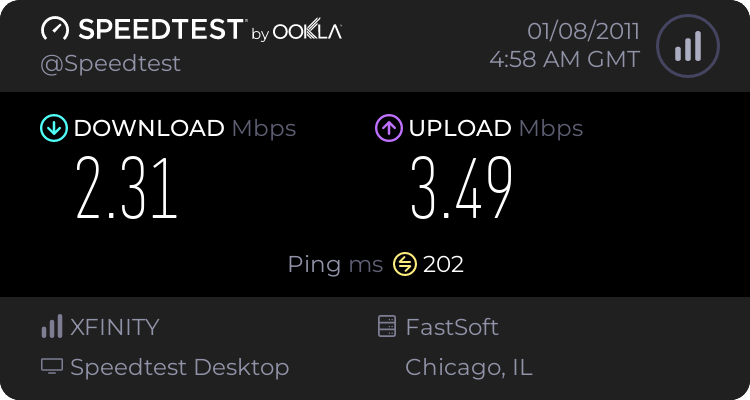


SOMEONE PLEASE HELP ME :cry: I get normal ping and download speeds on other PCs and laptops hooked up to the same network!

Asus Eee PC 1015PEM
Intel Atom n550 Dual-Core 1.5 ghz processor
2 Gigs Ram
Windows 7 Starter
 

My Computer My Computer

Computer Manufacturer/Model Number
Asus Eee PC 1015PEM
OS
Windows 7 Starter 32-bit
CPU
1.5ghz dual core
Memory
2 gigs ram
The netbook has a Broadcom 802.11n Network Adapter, when I goto status is says it runs at 72.0mbps

The network is on a Linksys Router WRT150N Wireless-N.

I never had a problem with my old laptop that ran windows XP, download speeds were fine.

I hope this is the information you were asking for, if you need anything else let me know.
Thanks for the attempt :)
 

My Computer My Computer

Computer Manufacturer/Model Number
Asus Eee PC 1015PEM
OS
Windows 7 Starter 32-bit
CPU
1.5ghz dual core
Memory
2 gigs ram
I looked it up, and the 802.11n specs. Seems to me that your wireless router has some sort of problem.

But I am still checking something............

Regards....Mike Connor
 

My Computer My Computer

OS
Several, including Windows 7 x64 Ultimate
Your netbook supports 802.11n but your router does not, see the review here;

Linksys WRT150N Wireless-N Home Router Review - Routers - CNET Reviews

<http://reviews.cnet.com/routers/linksys-wrt150n-wireless-n/4505-3319_7-32327689.html?tag=content;get-selector#reviewPage1>

It only supports 802.11g.

QUOTE
The Linksys WRT150N Wireless-N Home Router goes against the grain of new routers providing faster throughput, and for good reason. Linksys designed this router for those home users who want improved range over standard 802.11g routers, but don't want to pony up the cash for one of the new Draft N routers, either because of sticker shock, or because they simply don't need the speed and bandwidth that 11N products provide.
UNQUOTE


I would think that is your problem.

Regards....Mike Connor
 

My Computer My Computer

OS
Several, including Windows 7 x64 Ultimate
Thanks for the info Mike....

I am currently in contact with Linksys support to see if the issue can be resolved.

Update coming soon.
 

My Computer My Computer

Computer Manufacturer/Model Number
Asus Eee PC 1015PEM
OS
Windows 7 Starter 32-bit
CPU
1.5ghz dual core
Memory
2 gigs ram
My pleasure.

Regards....Mike Connor
 

My Computer My Computer

OS
Several, including Windows 7 x64 Ultimate
Lol damn,

I got denied by linksys live support because my router is out of warranty? Kinda bull but I am trying to find SOME kind of fix for this... if you have any ideas lay em on me

Thanks again.
 

My Computer My Computer

Computer Manufacturer/Model Number
Asus Eee PC 1015PEM
OS
Windows 7 Starter 32-bit
CPU
1.5ghz dual core
Memory
2 gigs ram
I found this in an update I am receiving... does this mean that it will support 802.11n?

Updated to Draft 802.11n version 2.0
 

My Computer My Computer

Computer Manufacturer/Model Number
Asus Eee PC 1015PEM
OS
Windows 7 Starter 32-bit
CPU
1.5ghz dual core
Memory
2 gigs ram
Looks like it. Install the update and try it.

It wont work properly unless it meets the "11n" standards, if the update provides them then you should have no more problems.

Regards....Mike Connor
 

My Computer My Computer

OS
Several, including Windows 7 x64 Ultimate
Well the update didnt work, could you maybe tell me my options?

Because the only 1 i see is buying a new router that supports 802.11n?

Im also confused because when I scroll over my internet connection in the bottom right it says im connected to a 802.11n connection.
But when I goto the surrounding networks(neighbors) they are listed as 802.11g connections. what does this mean?

Thanks in advance .
 

My Computer My Computer

Computer Manufacturer/Model Number
Asus Eee PC 1015PEM
OS
Windows 7 Starter 32-bit
CPU
1.5ghz dual core
Memory
2 gigs ram
The only option to get your netbook wireless connection running at a reasonable speed is to have a wireless router that supports 802.11n

If you can not update your present router to those standards it wont work properly.

QUOTE
Im also confused because when I scroll over my internet connection in the bottom right it says im connected to a 802.11n connection.
But when I goto the surrounding networks(neighbors) they are listed as 802.11g connections. what does this mean?
UNQUOTE

It probably means that the information is wrong! :) The netbook supports the 802.11n , but your router does not.

If you were actually connected to an 802.11n connection, then you would not be having any problems.

Your present router does not support 802.11n so it can not possibly be providing such a connection.

How did you try the update? Maybe we can figure something out?

Regards....Mike Connor
 

My Computer My Computer

OS
Several, including Windows 7 x64 Ultimate
The update was a firmware update for the router, it seemed like a newer updated ( because the date was more recent) but it was actually the current firmware I was using. I figure I can buy a USB wireless adapter and use that for the time being?

Side note...
The connection has gotten somewhat better with the little windows 7 tweaks I have been looking up all day. Here is an updated speedtest, The ping is still high but the download speed is good enough.


Thanks for all your help because you ultimately resolved my problem, Im just going to have to hope this connection is faster at school or I will have to buy a new wireless adapter.

Thanks again you were a lot of help.
 

My Computer My Computer

Computer Manufacturer/Model Number
Asus Eee PC 1015PEM
OS
Windows 7 Starter 32-bit
CPU
1.5ghz dual core
Memory
2 gigs ram
The update was a firmware update for the router, it seemed like a newer updated ( because the date was more recent) but it was actually the current firmware I was using. I figure I can buy a USB wireless adapter and use that for the time being?

Side note...
The connection has gotten somewhat better with the little windows 7 tweaks I have been looking up all day. Here is an updated speedtest, The ping is still high but the download speed is good enough.


Thanks for all your help because you ultimately resolved my problem, Im just going to have to hope this connection is faster at school or I will have to buy a new wireless adapter.

Thanks again you were a lot of help.

My pleasure, always glad to help if I can.

Regards....Mike Connor
 

My Computer My Computer

OS
Several, including Windows 7 x64 Ultimate
Back
Top