Index - Add or Remove File Types

How to Add or Remove a File Type from the Index in Windows 7 and Windows 8


   Information
The Index keeps track of the files on your computer and stores information about the files, including the file name, date modified, and properties like author, tags, and rating. The index is used to make searching for files in Windows much faster. Instead of looking through your entire hard disk for a file name or file property, Windows scans the index, which allows most results to appear in a small fraction of the time that a search without the index would take.

This will show you how to add or remove a file extension type from the index, for the included folder locations, to be included or not in the search results in Windows 7 and Windows 8.


   Note
When you add a file type, you have the option to have the file indexed by one of the options below.
  • Index Properties Only - The metadata for that file will be included in the index. For example, file name, date modified, author, etc... It will basically be what you see when you right click on the file and click on Properties and the Details tab.
  • Index Properties and File Contents - The above will be inlcuded as well as the contents of the file itself if available. For example, all text in a Notepad .txt file. Not all file types contain text though.


Here's How:

1. Open the Control Panel (icons view) in Windows 7 or Windows 8, and click/tap on Indexing Options icon.

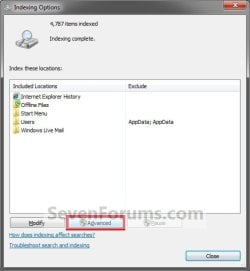
2. Click/tap on the Advanced button. (See screenshot below)
Step1.jpg
3. If prompted by UAC, then click/tap on Yes.

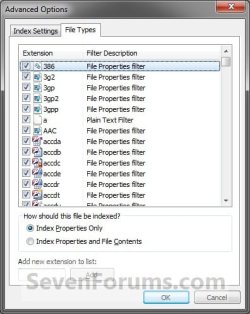
4. Click/tap on the File Types tab. (See screenshot below)
Step2A.jpg
5. To Add a File Type to the Index
A) Select and check the box for the listed file extension that you want to add. (See screenshot above)
   Tip
If the file extension is not listed, then in the Add new extension to list box, type in the file name extension (ex: txt) and click on the Add button.

B) Select (dot) if you want this file to be indexed using Index Properties Only or Index Properties and File Contents. (See screenshot below step 4)
NOTE: See the note box at the top of the tutorial for more on this.

C) Go to step 7.
6. To Remove a File Type from the Index
A) Select and uncheck the box for the listed file extension that you want to remove. (See screenshot below step 4)
7. Repeat steps 5 and 6 if you want to add or remove anymore file extention types.

8. When finished, click/tap on OK. (See screenshot below step 4)

9. Click/tap on OK. (See screenshot below)

Step3.jpg
10. After a moment, you will notice the index being rebuilt. Click/tap on Close. (See screenshot below step 2)


That's it,
Shawn


Last edited:
Nice post!

Could you advise if there is a way of removing an extension that you have added from the list of file types entirely?

I wanted to add the file type 'LIB' but inadvertently added 'lib'. The searches appear to be case sensitive as regards file extensions, so my *.LIB files are not included in searches. However, I can't add the 'LIB' extension to the list of file types as 'lib' is now in the list.

I seem to have snookered myself! Is there a way around this? I can't see a restore defaults option.

Any help much appreciated
 

My Computer

OS
7x64 Enterprise
Hello 31djpar, and welcome to Seven Forums.

Searching is not case sensitive, so that would be odd for it to not find *.LIB vs *.lib results. By default, it is .lib in the registry, so that's how it's listed here as well.

Do you have the folder locations that the .lib files are in included in the index as well?

http://www.sevenforums.com/tutorials/17854-index-locations-add-remove.html
 

My Computer

Computer type
PC/Desktop
Computer Manufacturer/Model Number
Self built custom
OS
64-bit Windows 11 Pro for Workstations
CPU
Intel i7-8700K OC'd to 5 GHz
Motherboard
ASUS ROG Maximus XI Formula Z390
Memory
64 GB (4x16GB) G.SKILL TridentZ RGB DDR4 3600 MHz
Graphics Card(s)
ASUS ROG-STRIX-GTX1080TI-O11G-GAMING
Sound Card
Integrated
Monitor(s) Displays
2 x Samsung Odyssey G7 27"
Screen Resolution
2560x1440
Hard Drives
1TB Samsung 990 PRO M.2,
4TB Samsung 990 PRO PRO M.2,
TerraMaster F8 SSD Plus NAS
PSU
Seasonic Prime Titanium 850W
Case
Thermaltake Core P3
Cooling
Corsair Hydro H115i
Keyboard
Logitech wireless K800
Mouse
Logitech MX Master 4
Internet Speed
2 Gb/s Download and 100 Mb/s Upload
Antivirus
Malwarebyte Anti-Malware Premium
Browser
Google Chrome
Other Info
Logitech Z625 speaker system,
Logitech BRIO 4K Pro webcam,
HP Color LaserJet Pro MFP M477fdn,
APC SMART-UPS RT 1000 XL - SURT1000XLI,
Galaxy S23 Plus phone
Hi Brink,

Thanks for taking your time on this.

Just to answer the point you raised:

Yes, the folder is included in the index locations.

If I rename the files from *.LIB to *.lib then the contents of the files are searched and I can locate the pattern that I am searching for. If I don't make the name change then the search always returns nothing.

So, I have a work around in that I can rename the files before and after I run a search, but obviously this is a bit of a pain.

Cheers
 

My Computer

OS
7x64 Enterprise
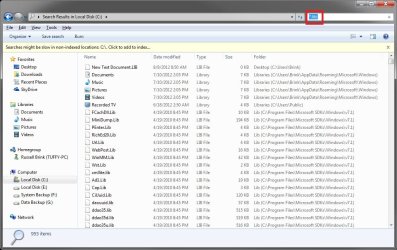
Odd. This is the same search results I get below when I search C using *.lib and *.LIB. Notice in the search results how the file extension's case varies.
search-lib.jpg
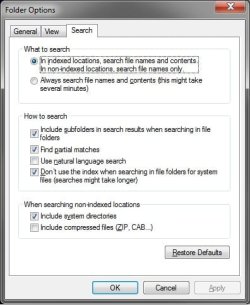
This is how I have my search options set in Folder Options. You might test with yours set as the same.
Folder_Options.jpg
 

My Computer

Computer type
PC/Desktop
Computer Manufacturer/Model Number
Self built custom
OS
64-bit Windows 11 Pro for Workstations
CPU
Intel i7-8700K OC'd to 5 GHz
Motherboard
ASUS ROG Maximus XI Formula Z390
Memory
64 GB (4x16GB) G.SKILL TridentZ RGB DDR4 3600 MHz
Graphics Card(s)
ASUS ROG-STRIX-GTX1080TI-O11G-GAMING
Sound Card
Integrated
Monitor(s) Displays
2 x Samsung Odyssey G7 27"
Screen Resolution
2560x1440
Hard Drives
1TB Samsung 990 PRO M.2,
4TB Samsung 990 PRO PRO M.2,
TerraMaster F8 SSD Plus NAS
PSU
Seasonic Prime Titanium 850W
Case
Thermaltake Core P3
Cooling
Corsair Hydro H115i
Keyboard
Logitech wireless K800
Mouse
Logitech MX Master 4
Internet Speed
2 Gb/s Download and 100 Mb/s Upload
Antivirus
Malwarebyte Anti-Malware Premium
Browser
Google Chrome
Other Info
Logitech Z625 speaker system,
Logitech BRIO 4K Pro webcam,
HP Color LaserJet Pro MFP M477fdn,
APC SMART-UPS RT 1000 XL - SURT1000XLI,
Galaxy S23 Plus phone
Hi Brink,

I've just tried it again and teh searches are working on the contents of files with both the 'lib' and 'LIB' extensions.
I don't know what I was doing wrong first time round!

Many thanks for your help and sorry to have wasted your time on a false alarm.
 

My Computer

OS
7x64 Enterprise
That's great news. I'm happy to hear that it's working now. :)
 

My Computer

Computer type
PC/Desktop
Computer Manufacturer/Model Number
Self built custom
OS
64-bit Windows 11 Pro for Workstations
CPU
Intel i7-8700K OC'd to 5 GHz
Motherboard
ASUS ROG Maximus XI Formula Z390
Memory
64 GB (4x16GB) G.SKILL TridentZ RGB DDR4 3600 MHz
Graphics Card(s)
ASUS ROG-STRIX-GTX1080TI-O11G-GAMING
Sound Card
Integrated
Monitor(s) Displays
2 x Samsung Odyssey G7 27"
Screen Resolution
2560x1440
Hard Drives
1TB Samsung 990 PRO M.2,
4TB Samsung 990 PRO PRO M.2,
TerraMaster F8 SSD Plus NAS
PSU
Seasonic Prime Titanium 850W
Case
Thermaltake Core P3
Cooling
Corsair Hydro H115i
Keyboard
Logitech wireless K800
Mouse
Logitech MX Master 4
Internet Speed
2 Gb/s Download and 100 Mb/s Upload
Antivirus
Malwarebyte Anti-Malware Premium
Browser
Google Chrome
Other Info
Logitech Z625 speaker system,
Logitech BRIO 4K Pro webcam,
HP Color LaserJet Pro MFP M477fdn,
APC SMART-UPS RT 1000 XL - SURT1000XLI,
Galaxy S23 Plus phone
adding a file type to the set associations list

In the explanation of how to do this in the forum, it says to click add file type at the bottom of the list.
It has a screen shot of the list and the button, below the list
Unfortunately on my computer there is no add file type button visible.
Any suggestions?
 

My Computer

OS
windows 7 64 bit
Hello Shayneval, and welcome to Seven Forums.

Could you post a screenshot showing this to see if it may help ID the cause? :)
 

My Computer

Computer type
PC/Desktop
Computer Manufacturer/Model Number
Self built custom
OS
64-bit Windows 11 Pro for Workstations
CPU
Intel i7-8700K OC'd to 5 GHz
Motherboard
ASUS ROG Maximus XI Formula Z390
Memory
64 GB (4x16GB) G.SKILL TridentZ RGB DDR4 3600 MHz
Graphics Card(s)
ASUS ROG-STRIX-GTX1080TI-O11G-GAMING
Sound Card
Integrated
Monitor(s) Displays
2 x Samsung Odyssey G7 27"
Screen Resolution
2560x1440
Hard Drives
1TB Samsung 990 PRO M.2,
4TB Samsung 990 PRO PRO M.2,
TerraMaster F8 SSD Plus NAS
PSU
Seasonic Prime Titanium 850W
Case
Thermaltake Core P3
Cooling
Corsair Hydro H115i
Keyboard
Logitech wireless K800
Mouse
Logitech MX Master 4
Internet Speed
2 Gb/s Download and 100 Mb/s Upload
Antivirus
Malwarebyte Anti-Malware Premium
Browser
Google Chrome
Other Info
Logitech Z625 speaker system,
Logitech BRIO 4K Pro webcam,
HP Color LaserJet Pro MFP M477fdn,
APC SMART-UPS RT 1000 XL - SURT1000XLI,
Galaxy S23 Plus phone
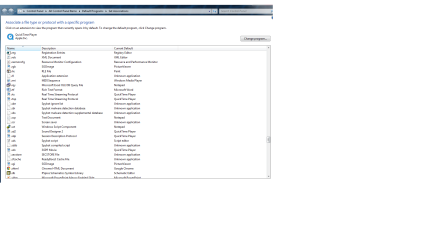
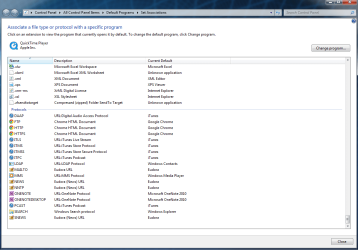
As requested, screen shots re the set associations list. As I mentioned in my last post, there is no add file type button at the bottom of the list. We want to add the .sch extension and link it with schematics, but there is no buttons or other method visible, above or below the list, for adding an extension which is isn't already there.
Thanks

As requested, I have attached views of the set associations list. As I mentioned in my last post, there are no buttons to add extensions visible above or below the list. We want to add .sch for use by schematics.
Thanks!
 

Attachments

  • re sch extension.png
    re sch extension.png
    45.4 KB · Views: 2,055
  • end of list.png
    end of list.png
    43.5 KB · Views: 2,037

My Computer

OS
windows 7 64 bit

My Computer

Computer type
PC/Desktop
Computer Manufacturer/Model Number
Self built custom
OS
64-bit Windows 11 Pro for Workstations
CPU
Intel i7-8700K OC'd to 5 GHz
Motherboard
ASUS ROG Maximus XI Formula Z390
Memory
64 GB (4x16GB) G.SKILL TridentZ RGB DDR4 3600 MHz
Graphics Card(s)
ASUS ROG-STRIX-GTX1080TI-O11G-GAMING
Sound Card
Integrated
Monitor(s) Displays
2 x Samsung Odyssey G7 27"
Screen Resolution
2560x1440
Hard Drives
1TB Samsung 990 PRO M.2,
4TB Samsung 990 PRO PRO M.2,
TerraMaster F8 SSD Plus NAS
PSU
Seasonic Prime Titanium 850W
Case
Thermaltake Core P3
Cooling
Corsair Hydro H115i
Keyboard
Logitech wireless K800
Mouse
Logitech MX Master 4
Internet Speed
2 Gb/s Download and 100 Mb/s Upload
Antivirus
Malwarebyte Anti-Malware Premium
Browser
Google Chrome
Other Info
Logitech Z625 speaker system,
Logitech BRIO 4K Pro webcam,
HP Color LaserJet Pro MFP M477fdn,
APC SMART-UPS RT 1000 XL - SURT1000XLI,
Galaxy S23 Plus phone
How do I remove a file type from the list located under the File Type tab in the Advanced Options window?

Justin
 

My Computer

Computer type
PC/Desktop
OS
Windows 7 Professional 64 Bit
Hello Justin, and welcome to Seven Forums.

What file type is this for?

It would involve deleting it in the registry, and causing the file extension to no long be associated to open with any program.

It would be safer to just leave it unchecked if you just didn't want them included in the index.
 

My Computer

Computer type
PC/Desktop
Computer Manufacturer/Model Number
Self built custom
OS
64-bit Windows 11 Pro for Workstations
CPU
Intel i7-8700K OC'd to 5 GHz
Motherboard
ASUS ROG Maximus XI Formula Z390
Memory
64 GB (4x16GB) G.SKILL TridentZ RGB DDR4 3600 MHz
Graphics Card(s)
ASUS ROG-STRIX-GTX1080TI-O11G-GAMING
Sound Card
Integrated
Monitor(s) Displays
2 x Samsung Odyssey G7 27"
Screen Resolution
2560x1440
Hard Drives
1TB Samsung 990 PRO M.2,
4TB Samsung 990 PRO PRO M.2,
TerraMaster F8 SSD Plus NAS
PSU
Seasonic Prime Titanium 850W
Case
Thermaltake Core P3
Cooling
Corsair Hydro H115i
Keyboard
Logitech wireless K800
Mouse
Logitech MX Master 4
Internet Speed
2 Gb/s Download and 100 Mb/s Upload
Antivirus
Malwarebyte Anti-Malware Premium
Browser
Google Chrome
Other Info
Logitech Z625 speaker system,
Logitech BRIO 4K Pro webcam,
HP Color LaserJet Pro MFP M477fdn,
APC SMART-UPS RT 1000 XL - SURT1000XLI,
Galaxy S23 Plus phone
Thanks Brink!

The file type is .14) and I'm not sure how it got created. I like to name my files in this convention - Document Name (MM.DD.YR).

That means a document would be named - Windows Seven Forums (10.14.14), but they get saved as Windows Seven Forums (10.14 [the .14) gets removed as it's identified as a file type].

It's HIGHLY annoying and I'm not about to change my naming convention to satisfy Microsoft. If I have to modify the registry, so be it. Can you help?
 

My Computer

Computer type
PC/Desktop
OS
Windows 7 Professional 64 Bit

My Computer

Computer type
PC/Desktop
Computer Manufacturer/Model Number
Self built custom
OS
64-bit Windows 11 Pro for Workstations
CPU
Intel i7-8700K OC'd to 5 GHz
Motherboard
ASUS ROG Maximus XI Formula Z390
Memory
64 GB (4x16GB) G.SKILL TridentZ RGB DDR4 3600 MHz
Graphics Card(s)
ASUS ROG-STRIX-GTX1080TI-O11G-GAMING
Sound Card
Integrated
Monitor(s) Displays
2 x Samsung Odyssey G7 27"
Screen Resolution
2560x1440
Hard Drives
1TB Samsung 990 PRO M.2,
4TB Samsung 990 PRO PRO M.2,
TerraMaster F8 SSD Plus NAS
PSU
Seasonic Prime Titanium 850W
Case
Thermaltake Core P3
Cooling
Corsair Hydro H115i
Keyboard
Logitech wireless K800
Mouse
Logitech MX Master 4
Internet Speed
2 Gb/s Download and 100 Mb/s Upload
Antivirus
Malwarebyte Anti-Malware Premium
Browser
Google Chrome
Other Info
Logitech Z625 speaker system,
Logitech BRIO 4K Pro webcam,
HP Color LaserJet Pro MFP M477fdn,
APC SMART-UPS RT 1000 XL - SURT1000XLI,
Galaxy S23 Plus phone
Thanks for the prompt response!

Is there a way that I can delete or rename it so I can use my usual file naming convention?
 

My Computer

Computer type
PC/Desktop
OS
Windows 7 Professional 64 Bit
You'll always have to have the correct file extension for it to be properly associated with the default program you use to open it with.
 

My Computer

Computer type
PC/Desktop
Computer Manufacturer/Model Number
Self built custom
OS
64-bit Windows 11 Pro for Workstations
CPU
Intel i7-8700K OC'd to 5 GHz
Motherboard
ASUS ROG Maximus XI Formula Z390
Memory
64 GB (4x16GB) G.SKILL TridentZ RGB DDR4 3600 MHz
Graphics Card(s)
ASUS ROG-STRIX-GTX1080TI-O11G-GAMING
Sound Card
Integrated
Monitor(s) Displays
2 x Samsung Odyssey G7 27"
Screen Resolution
2560x1440
Hard Drives
1TB Samsung 990 PRO M.2,
4TB Samsung 990 PRO PRO M.2,
TerraMaster F8 SSD Plus NAS
PSU
Seasonic Prime Titanium 850W
Case
Thermaltake Core P3
Cooling
Corsair Hydro H115i
Keyboard
Logitech wireless K800
Mouse
Logitech MX Master 4
Internet Speed
2 Gb/s Download and 100 Mb/s Upload
Antivirus
Malwarebyte Anti-Malware Premium
Browser
Google Chrome
Other Info
Logitech Z625 speaker system,
Logitech BRIO 4K Pro webcam,
HP Color LaserJet Pro MFP M477fdn,
APC SMART-UPS RT 1000 XL - SURT1000XLI,
Galaxy S23 Plus phone
As I don't know what the file extension was and you're (apparently) telling me there is nothing I can do to get rid of it, I guess my only option is to reinstall Windows?

Again, I just want it gone so I can name my files the way I desire.
 

My Computer

Computer type
PC/Desktop
OS
Windows 7 Professional 64 Bit
You can rename your files anything you like, but you will need to keep the file extension at the end what it should be for that file type to be able to have it's default program open it.

Reinstalling Windows will not change that since it's by design.
 

My Computer

Computer type
PC/Desktop
Computer Manufacturer/Model Number
Self built custom
OS
64-bit Windows 11 Pro for Workstations
CPU
Intel i7-8700K OC'd to 5 GHz
Motherboard
ASUS ROG Maximus XI Formula Z390
Memory
64 GB (4x16GB) G.SKILL TridentZ RGB DDR4 3600 MHz
Graphics Card(s)
ASUS ROG-STRIX-GTX1080TI-O11G-GAMING
Sound Card
Integrated
Monitor(s) Displays
2 x Samsung Odyssey G7 27"
Screen Resolution
2560x1440
Hard Drives
1TB Samsung 990 PRO M.2,
4TB Samsung 990 PRO PRO M.2,
TerraMaster F8 SSD Plus NAS
PSU
Seasonic Prime Titanium 850W
Case
Thermaltake Core P3
Cooling
Corsair Hydro H115i
Keyboard
Logitech wireless K800
Mouse
Logitech MX Master 4
Internet Speed
2 Gb/s Download and 100 Mb/s Upload
Antivirus
Malwarebyte Anti-Malware Premium
Browser
Google Chrome
Other Info
Logitech Z625 speaker system,
Logitech BRIO 4K Pro webcam,
HP Color LaserJet Pro MFP M477fdn,
APC SMART-UPS RT 1000 XL - SURT1000XLI,
Galaxy S23 Plus phone
I think we're not communicating clearly and maybe it's my fault, so please bear with me:

1. I somehow managed to rename an unknown file type to - .14)
2. This file type is NOT standard to Windows
3. I like to name my files with this naming convention - Document (10.20.14)
4. This causes issues as Windows believes the end of that naming convention is a file type.
5. I'd like to remove or rename that file type so I don't have to change my naming convention
6. It's apparently really difficult to remove a file type completely
7. I can't rename the file type as I don't know what it was originally
8. Reinstalling Windows will apparently STILL contain the non-standard file type of .14)
How this is possible is beyond me as it's not on ANY other Windows machine unless someone accidentally did the same
9. Associating a file tyoe with a default program to open it is NOT an issue.

Does that make more sense now?
 

My Computer

Computer type
PC/Desktop
OS
Windows 7 Professional 64 Bit
Back
Top