Index - Rebuild

How to Rebuild the Index in Windows 7 and Windows 8

   Information
The Index keeps track of the files on your computer and stores information about the files, including the file name, date modified, and properties like author, tags, and rating. The index is used to make searching for files in Windows much faster. Instead of looking through your entire hard disk for a file name or file property, Windows scans the index, which allows most results to appear in a small fraction of the time that a search without the index would take.

If the index cannot find a file in it's seach results that you know exists or not exists in an indexed location, then this will show you how to manually rebuild and update the index to have accurate search results from changes to the included locations since the last rebuild or update.

   Note
The index will often run (indexing) automatically in the background to rebuild and update for changes made to the included index locations since the last index rebuild to increase search result accuracy.

By defaut, the indexing speed is reduced due to user activity. If the computer is running idle, then the indexing speed will be at full speed instead to finish indexing faster.

   Warning
Rebuilding the index can take several hours, and searches might be incomplete until the index is fully rebuilt.


Here's How:
1. Open the Control Panel (icons view) in Windows 7 or Windows 8, and click/tap on Indexing Options icon.

2. Click/tap on the Advanced button. (See screenshot below)
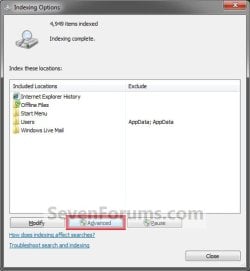
Step1.jpg
3. If prompted by UAC, then click/tap on Yes.

4. Click/tap on the Rebuild button. (See screenshot below)
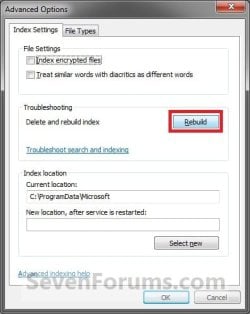
Step2.jpg
5. Click/tap on OK. (See screenshot below)
Step3.jpg
6. After a moment, you will notice the index being rebuilt. Click/tap on Close. (See screenshot below)
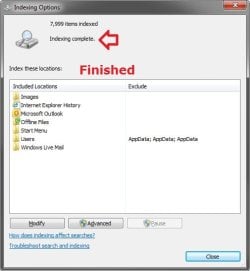
NOTE: When the index is finished being rebuilt, you will see Indexing complete.
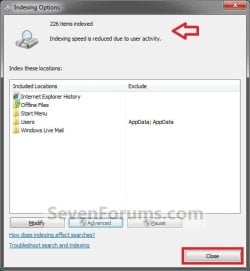
Step4.jpgFinished.jpg
That's it,
Shawn


Last edited:
Hi Shawn

In Vista there was a button in the Indexing Advanced Settings to "Restore Defaults" which would restore your index to it's original settings.

This option seems to be missing from the W7 settings? Do you know of any other way to restore the default settings in W7?

Thanks

RJV
 

My Computer

OS
Vista Ultimate 64bit
Hello RJV,

Yeah, the restore defaults option for the Index is no longer available. However, all of the Index tutorials here (see also related links) have the default settings in the screenshots to help restore them manually if needed.

Hope this helps,
Shawn
 

My Computer

Computer type
PC/Desktop
Computer Manufacturer/Model Number
Self built custom
OS
64-bit Windows 11 Pro for Workstations
CPU
Intel i7-8700K OC'd to 5 GHz
Motherboard
ASUS ROG Maximus XI Formula Z390
Memory
64 GB (4x16GB) G.SKILL TridentZ RGB DDR4 3600 MHz
Graphics Card(s)
ASUS ROG-STRIX-GTX1080TI-O11G-GAMING
Sound Card
Integrated
Monitor(s) Displays
2 x Samsung Odyssey G7 27"
Screen Resolution
2560x1440
Hard Drives
1TB Samsung 990 PRO M.2,
4TB Samsung 990 PRO PRO M.2,
TerraMaster F8 SSD Plus NAS
PSU
Seasonic Prime Titanium 850W
Case
Thermaltake Core P3
Cooling
Corsair Hydro H115i
Keyboard
Logitech wireless K800
Mouse
Logitech MX Master 4
Internet Speed
2 Gb/s Download and 100 Mb/s Upload
Antivirus
Malwarebyte Anti-Malware Premium
Browser
Google Chrome
Other Info
Logitech Z625 speaker system,
Logitech BRIO 4K Pro webcam,
HP Color LaserJet Pro MFP M477fdn,
APC SMART-UPS RT 1000 XL - SURT1000XLI,
Galaxy S23 Plus phone
Hello everybody.
Recently my index has been corrupted and I had to rebuild it. I have noticed that the Index Option window, after incresing the item counter for a while (up to 1400 or so) seems to stop, showing the message "Indexing Complete". Thus I closed it but soon discovered that the indexing was not done at all.
Starting again I have seen that the item counter does not update continuously and automatically but only if I start an application (e.g. Outlook), use it for a while and then return to the indexing. In this case the message 'Indexing speed reduced' appears and the counter jump to a higher number.
The fact that no advancement bar, nor other icons are shown to indicate the indexing progress, is dangerously misguiding!
Silvio
 

My Computer

Computer Manufacturer/Model Number
Dell Studio 1555
OS
Wondows 7 Home Premium
CPU
Centrino 2
Memory
4 GB
Hard Drives
200 GB
I had a problem with the Windows Search function - it produced no results at all, not even at the Start-button.
The Troubleshooter gave the message: : Indexing not running.
The Indexing Locations were greyed out, there were no indexing locations specified and it was not possible to add a location.
So the official method to rebuild the index as explained above was not possible.

In "Services" where I tried to start Windows Search service, it started and stopped right away, giving the message: The Windows Search service on local computer started and then stopped. Some services stop automatically if they are not in use by other services or programs"

I have been googling for days and I finally found how to fix this / rebuild the index if you get the message "indexing is not running" or you get search results that look corrupted:

Essential first step: disable Window Search service (not stop, but disable, otherwise Windows Search keeps running and will interfere with/block your actions).
Reboot
Delete all files in C:\ProgramData\Microsoft\Search\Data\Applications\Windows
Delete all files in C:\ProgramData\Microsoft\Search\Data\Temp
(these are hidden files, so be sure that hidden files are made visible)
Reboot
Start Window Search service (delayed start).
Reboot
(I'm not sure if the last reboots are really necessary, but I did it just in case).
 

My Computer

OS
Windows 7 Home Premium 64 bit
Windows Updates empties contents of my index GRR

um... hi Shawn.

This has been happening for over a year now. I am assiduous about keeping my Windows Updates up to date. But the next time I go to search for something I find the contents of the index to be 0... nothing indexed and so I have to rebuild from scratch.

I use the search feature a LOT and this is so annoying... cannot determine why this happens after every set of Windows Updates.... any idea?

btw I scan clean; am running Microsoft Security Essentials and MBAM (both updated and run daily).

thanks in advance :)
Bootsmom
 

My Computer

Computer Manufacturer/Model Number
Dell Vostro 220
OS
Windows 7 Pro 64-bit
CPU
Intel Pentium III Xeon, 2600 MHz (7.5 x
Motherboard
Intel Eaglelake
Memory
3036 MB
Graphics Card(s)
Intel
Sound Card
Realtek High Definition Audio
Monitor(s) Displays
ASUS VH1920 (April 2011)
Screen Resolution
1366 x 768(recommended)
Hard Drives
WDC WD3200AAKS-75L9A0 (298 GB, IDE)
Case
Dell desktop
Cooling
unknown
Keyboard
Microsoft
Mouse
Logitech rollerball
Other Info
Classic Theme
Hello Bootsmom,

I must admit that I'm not sure why Windows Updates would reset your index causing you to have to rebuild it. :confused:
 

My Computer

Computer type
PC/Desktop
Computer Manufacturer/Model Number
Self built custom
OS
64-bit Windows 11 Pro for Workstations
CPU
Intel i7-8700K OC'd to 5 GHz
Motherboard
ASUS ROG Maximus XI Formula Z390
Memory
64 GB (4x16GB) G.SKILL TridentZ RGB DDR4 3600 MHz
Graphics Card(s)
ASUS ROG-STRIX-GTX1080TI-O11G-GAMING
Sound Card
Integrated
Monitor(s) Displays
2 x Samsung Odyssey G7 27"
Screen Resolution
2560x1440
Hard Drives
1TB Samsung 990 PRO M.2,
4TB Samsung 990 PRO PRO M.2,
TerraMaster F8 SSD Plus NAS
PSU
Seasonic Prime Titanium 850W
Case
Thermaltake Core P3
Cooling
Corsair Hydro H115i
Keyboard
Logitech wireless K800
Mouse
Logitech MX Master 4
Internet Speed
2 Gb/s Download and 100 Mb/s Upload
Antivirus
Malwarebyte Anti-Malware Premium
Browser
Google Chrome
Other Info
Logitech Z625 speaker system,
Logitech BRIO 4K Pro webcam,
HP Color LaserJet Pro MFP M477fdn,
APC SMART-UPS RT 1000 XL - SURT1000XLI,
Galaxy S23 Plus phone
rats !! well thanks for your time... just have to keep digging I guess :)

Merry Christmas to you and yourn.

''Mom''
 

My Computer

Computer Manufacturer/Model Number
Dell Vostro 220
OS
Windows 7 Pro 64-bit
CPU
Intel Pentium III Xeon, 2600 MHz (7.5 x
Motherboard
Intel Eaglelake
Memory
3036 MB
Graphics Card(s)
Intel
Sound Card
Realtek High Definition Audio
Monitor(s) Displays
ASUS VH1920 (April 2011)
Screen Resolution
1366 x 768(recommended)
Hard Drives
WDC WD3200AAKS-75L9A0 (298 GB, IDE)
Case
Dell desktop
Cooling
unknown
Keyboard
Microsoft
Mouse
Logitech rollerball
Other Info
Classic Theme
Merry Christmas to you and your family as well. :)
 

My Computer

Computer type
PC/Desktop
Computer Manufacturer/Model Number
Self built custom
OS
64-bit Windows 11 Pro for Workstations
CPU
Intel i7-8700K OC'd to 5 GHz
Motherboard
ASUS ROG Maximus XI Formula Z390
Memory
64 GB (4x16GB) G.SKILL TridentZ RGB DDR4 3600 MHz
Graphics Card(s)
ASUS ROG-STRIX-GTX1080TI-O11G-GAMING
Sound Card
Integrated
Monitor(s) Displays
2 x Samsung Odyssey G7 27"
Screen Resolution
2560x1440
Hard Drives
1TB Samsung 990 PRO M.2,
4TB Samsung 990 PRO PRO M.2,
TerraMaster F8 SSD Plus NAS
PSU
Seasonic Prime Titanium 850W
Case
Thermaltake Core P3
Cooling
Corsair Hydro H115i
Keyboard
Logitech wireless K800
Mouse
Logitech MX Master 4
Internet Speed
2 Gb/s Download and 100 Mb/s Upload
Antivirus
Malwarebyte Anti-Malware Premium
Browser
Google Chrome
Other Info
Logitech Z625 speaker system,
Logitech BRIO 4K Pro webcam,
HP Color LaserJet Pro MFP M477fdn,
APC SMART-UPS RT 1000 XL - SURT1000XLI,
Galaxy S23 Plus phone
Hi again Shawn. I do believe I've found the problem: saw it online somewhere. I use CCleaner regularly, and on the applications tab down at the bottom in the "Windows" section, I removed the checkmark for "MS Search". Apparently that will now stop wiping out my index.... "we hope". I shall report back in a couple weeks, see if it did !
 

My Computer

Computer Manufacturer/Model Number
Dell Vostro 220
OS
Windows 7 Pro 64-bit
CPU
Intel Pentium III Xeon, 2600 MHz (7.5 x
Motherboard
Intel Eaglelake
Memory
3036 MB
Graphics Card(s)
Intel
Sound Card
Realtek High Definition Audio
Monitor(s) Displays
ASUS VH1920 (April 2011)
Screen Resolution
1366 x 768(recommended)
Hard Drives
WDC WD3200AAKS-75L9A0 (298 GB, IDE)
Case
Dell desktop
Cooling
unknown
Keyboard
Microsoft
Mouse
Logitech rollerball
Other Info
Classic Theme
Hi again Shawn. I do believe I've found the problem: saw it online somewhere. I use CCleaner regularly, and on the applications tab down at the bottom in the "Windows" section, I removed the checkmark for "MS Search". Apparently that will now stop wiping out my index.... "we hope". I shall report back in a couple weeks, see if it did !

Hello bootsmom,

Ah, yep that would wipe the index with "MS Search" checked in CCleaner. Thank you for posting back with your findings. :)
 
Last edited:

My Computer

Computer type
PC/Desktop
Computer Manufacturer/Model Number
Self built custom
OS
64-bit Windows 11 Pro for Workstations
CPU
Intel i7-8700K OC'd to 5 GHz
Motherboard
ASUS ROG Maximus XI Formula Z390
Memory
64 GB (4x16GB) G.SKILL TridentZ RGB DDR4 3600 MHz
Graphics Card(s)
ASUS ROG-STRIX-GTX1080TI-O11G-GAMING
Sound Card
Integrated
Monitor(s) Displays
2 x Samsung Odyssey G7 27"
Screen Resolution
2560x1440
Hard Drives
1TB Samsung 990 PRO M.2,
4TB Samsung 990 PRO PRO M.2,
TerraMaster F8 SSD Plus NAS
PSU
Seasonic Prime Titanium 850W
Case
Thermaltake Core P3
Cooling
Corsair Hydro H115i
Keyboard
Logitech wireless K800
Mouse
Logitech MX Master 4
Internet Speed
2 Gb/s Download and 100 Mb/s Upload
Antivirus
Malwarebyte Anti-Malware Premium
Browser
Google Chrome
Other Info
Logitech Z625 speaker system,
Logitech BRIO 4K Pro webcam,
HP Color LaserJet Pro MFP M477fdn,
APC SMART-UPS RT 1000 XL - SURT1000XLI,
Galaxy S23 Plus phone
:) I just updated CCleaner and found that 'MS Search' was NOT selected, so that's good news. In the posting I found online recently, the poster suggested that 'MS Search' might be ticked by default... that has not been my experience anyway. so : YAY ! :D

thanks Shawn

'Mom'
 

My Computer

Computer Manufacturer/Model Number
Dell Vostro 220
OS
Windows 7 Pro 64-bit
CPU
Intel Pentium III Xeon, 2600 MHz (7.5 x
Motherboard
Intel Eaglelake
Memory
3036 MB
Graphics Card(s)
Intel
Sound Card
Realtek High Definition Audio
Monitor(s) Displays
ASUS VH1920 (April 2011)
Screen Resolution
1366 x 768(recommended)
Hard Drives
WDC WD3200AAKS-75L9A0 (298 GB, IDE)
Case
Dell desktop
Cooling
unknown
Keyboard
Microsoft
Mouse
Logitech rollerball
Other Info
Classic Theme
Well this is very disconcerting :( I do browse the log on occasion & noticed the index corrupted on my Win 7 laptop & rebuilding, mostly after restart. Perhaps because I usually run CCleaner before shutdown/restart. Both on Win 7 desktop & laptop the "MS Search" option was ticked by default. Have been running CCleaner for years, wonder why I never noticed this before. Could be it has been rebuilding all this time?

Think I would have noticed it as did today. A search found microsoft technet thread but I couldn't really believe CCleaner was at fault so headed straight over to sevenforums & here it is.
Wonder if there's any other landmines in CCleaner I'm unaware of? Probably.

On another note:
Hi Shawn,
what about the Modify option. Would I want to select any of the other locations? Local Disk (C), backup (D), etc.

Thanks
 
Last edited:

My Computer

Computer type
PC/Desktop
Computer Manufacturer/Model Number
Dell XPS 435MT
OS
Windows 7 Ultimate x64
CPU
Intel Core i7-950
Motherboard
Dell 0R849J
Memory
Elpida DDR3 12 Gb 1066
Graphics Card(s)
EVGA nVidia GeForce GTX 760 2GB GDDR5
Sound Card
Syba PCI-e VIA VT1723 Envy24DT
Monitor(s) Displays
Dell 3007WFP-HC, Nixeus Vue 30
Screen Resolution
1920 x 1200
Hard Drives
Crucial M500 240GB
1TB Seagate Barracuda
PSU
Corsair CX500M
Keyboard
Logitech MX 5500 combo
Mouse
Logitech MX 5500
Internet Speed
300Mbps
Antivirus
MSE
Browser
IE11 & Chrome
Other Info
MBAM Premium
Hello newpgm,

If you like. The "Modify" section is for what locations (folders/drives) you want included in the index. :)
 

My Computer

Computer type
PC/Desktop
Computer Manufacturer/Model Number
Self built custom
OS
64-bit Windows 11 Pro for Workstations
CPU
Intel i7-8700K OC'd to 5 GHz
Motherboard
ASUS ROG Maximus XI Formula Z390
Memory
64 GB (4x16GB) G.SKILL TridentZ RGB DDR4 3600 MHz
Graphics Card(s)
ASUS ROG-STRIX-GTX1080TI-O11G-GAMING
Sound Card
Integrated
Monitor(s) Displays
2 x Samsung Odyssey G7 27"
Screen Resolution
2560x1440
Hard Drives
1TB Samsung 990 PRO M.2,
4TB Samsung 990 PRO PRO M.2,
TerraMaster F8 SSD Plus NAS
PSU
Seasonic Prime Titanium 850W
Case
Thermaltake Core P3
Cooling
Corsair Hydro H115i
Keyboard
Logitech wireless K800
Mouse
Logitech MX Master 4
Internet Speed
2 Gb/s Download and 100 Mb/s Upload
Antivirus
Malwarebyte Anti-Malware Premium
Browser
Google Chrome
Other Info
Logitech Z625 speaker system,
Logitech BRIO 4K Pro webcam,
HP Color LaserJet Pro MFP M477fdn,
APC SMART-UPS RT 1000 XL - SURT1000XLI,
Galaxy S23 Plus phone
Hi, Brink, be in brink of health
Is this indexing the same, while checking with chkdsk command. It found some corrupted indexing file, it auto post those as recovering orphaned etc etc before completing the indexing part.
Is it the same indexing done outside, if you do indexing thro computer panel.
 

My Computer

Computer type
PC/Desktop
Computer Manufacturer/Model Number
custom build
OS
Microsoft Windows 7 Ultimate 64-bit 7601 Multiprocessor Free Service Pack 1
CPU
Intel(R) Core(TM)2 Duo CPU E7200 @ 2.53GHz
Motherboard
To be filled by O.E.M. To be filled by O.E.M.
Memory
4.00 GB
Graphics Card(s)
NVIDIA GeForce 210
Sound Card
(1) NVIDIA High Definition Audio (2) Realtek High Definiti
Screen Resolution
1920 x 1080 x 32 bits (4294967296 colors) @ 60 Hz
Hard Drives
ST3500312CS ATA Device
Back
Top