Infected with adware? dota2game.org?

Skulluxies

New member
Local time
10:31 PM
Messages
4
Occasionally my internet browser, Firefox, opens up a new tab and a website called dota2game comes up. I have googled it and I have found it to be Adware, but I cant remove it! I have scanned with Adw Cleaner, Avast, Malwarebytes, nothing can pick it up and remove it? I have reset all my browsers to default settings and the website still carrys on popping up. Can I please have some help?
 

My Computer My Computer

Computer type
PC/Desktop
Computer Manufacturer/Model Number
Custom
OS
Windows 7
CPU
AMD Phenom II X6 1055T
Graphics Card(s)
AMD Radeon HD 6670
Hard Drives
1TB HDD
Antivirus
Avast and Malwarebytes Premium
Browser
Firefox
This is very fustrating...
 

My Computer My Computer

Computer type
PC/Desktop
Computer Manufacturer/Model Number
Custom
OS
Windows 7
CPU
AMD Phenom II X6 1055T
Graphics Card(s)
AMD Radeon HD 6670
Hard Drives
1TB HDD
Antivirus
Avast and Malwarebytes Premium
Browser
Firefox
I just found an exe called Au_ in the Process Explorer 16, I removed it, I still don't think its gone though.
 

My Computer My Computer

Computer type
PC/Desktop
Computer Manufacturer/Model Number
Custom
OS
Windows 7
CPU
AMD Phenom II X6 1055T
Graphics Card(s)
AMD Radeon HD 6670
Hard Drives
1TB HDD
Antivirus
Avast and Malwarebytes Premium
Browser
Firefox
Website just popped up again, tried another Malwarebytes scan nothing.
 

My Computer My Computer

Computer type
PC/Desktop
Computer Manufacturer/Model Number
Custom
OS
Windows 7
CPU
AMD Phenom II X6 1055T
Graphics Card(s)
AMD Radeon HD 6670
Hard Drives
1TB HDD
Antivirus
Avast and Malwarebytes Premium
Browser
Firefox
Hi:

The malware could be hiding on your system or it could be respawning from something that's installed or even from cloud sync settings, or the full removal require the use of additional tools.

In any event:
Malware cleanup can be tedious and lengthy, often requiring the use of multiple specialized tools and scanners, in the correct sequence, to provide complete cleanup without damaging the system.
This is explained here: The complexity of finding, preventing, and cleanup from malware

As none of the "local" malware experts here has yet picked up your thread, you might want to head over to one of the several reputable computer disinfection fora for a bit of free, expert, guided help.
A couple of examples are bleepingcomputer.com and forums.malwarebytes.org and malwaretips.com (but there are others, too).

Hope this helps,
MM
 

My Computer My Computer

Computer type
PC/Desktop
Computer Manufacturer/Model Number
Dell Studio XPS 8500
OS
OEM Windows 7 Ult (x64) SP1
CPU
Intel Core-i7 3770 @ 3.4 GHz
Motherboard
"Dell" branded
Memory
16 GB DDR3 SDRAM @ 1333 MHz
Graphics Card(s)
NVidia GeForce GT620 1 GB
Sound Card
THX TruStudio PC
Monitor(s) Displays
Dell U2410 Full HD
Hard Drives
2.0 TB SATA2 @ 7200 RPM
PSU
350W
Keyboard
MS 4000 Ergon - Wired
Mouse
Logitech Anywhere MX
Internet Speed
Cable HSI w/Turbo (router)
Antivirus
KIS-MBAM Premium-MBAE Premium
Browser
Fx (current version); IE
Other Info
And a Win7/64 Pro laptop; And a Win10/64 Pro desktop.
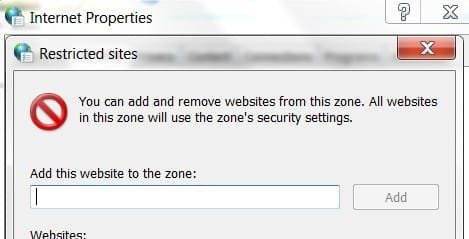
The IP for dota2game.org site is 37.48.81.151 .... block it
 

Attachments

  • block website.jpg
    block website.jpg
    15.4 KB · Views: 19

My Computer My Computer

Computer type
PC/Desktop
Computer Manufacturer/Model Number
Bruce ... somewhere in his 40's
OS
Windows 7 Ultimate 32bit SP1
CPU
Intel(R) Core(TM)2 Quad CPU @ 2.40GHz, 2400 MHz
Motherboard
INTEL/D975XBX2
Memory
4 GB
Graphics Card(s)
ATI Radeon HD 2600 Pro
Monitor(s) Displays
Samsung SyncMaster 914v
Screen Resolution
1280 x 1024
Hard Drives
2/500GB each ... ST3500630AS ATA Device.
One is not connected
PSU
Rocketfish 700 W
Case
G.Skill Gigabyte Chassis
Keyboard
Standard PS/2 Keyboard
Mouse
Microsoft PS/2 Mouse
Internet Speed
DSL
Antivirus
Avira Internet Security
Browser
IE 11
Other Info
ATI HDMI Audio
Also flush the DNS cache and restore MS's Hosts file. Copy and paste these lines in Note pad.

@Echo on
pushd\windows\system32\drivers\etc
attrib -h -s -r hosts
echo 127.0.0.1 localhost>HOSTS
attrib +r +h +s hosts
popd
ipconfig /release
ipconfig /renew
ipconfig /flushdns
netsh winsock reset all
netsh int ip reset all
shutdown -r -t 1
del %0


Save as flush.bat to your desktop. Right click to run as Administrator. Your computer will reboot itself.

Let us know if that worked.
 

My Computer My Computer

Computer type
PC/Desktop
Computer Manufacturer/Model Number
Bruce ... somewhere in his 40's
OS
Windows 7 Ultimate 32bit SP1
CPU
Intel(R) Core(TM)2 Quad CPU @ 2.40GHz, 2400 MHz
Motherboard
INTEL/D975XBX2
Memory
4 GB
Graphics Card(s)
ATI Radeon HD 2600 Pro
Monitor(s) Displays
Samsung SyncMaster 914v
Screen Resolution
1280 x 1024
Hard Drives
2/500GB each ... ST3500630AS ATA Device.
One is not connected
PSU
Rocketfish 700 W
Case
G.Skill Gigabyte Chassis
Keyboard
Standard PS/2 Keyboard
Mouse
Microsoft PS/2 Mouse
Internet Speed
DSL
Antivirus
Avira Internet Security
Browser
IE 11
Other Info
ATI HDMI Audio
Hello,

Try to use free removal tools like:

  1. Wipersoft
  2. Adwcleaner
Or use manual removal:

  1. Click the Start button.
  2. Go to Control Panel.
  3. Navigate to System and Maintenance.
  4. Press Administrative Tools.
  5. Double-click the Task Scheduler.
  6. Delete Dota2game.org task.
Screen + more info
 

My Computer My Computer

Computer type
PC/Desktop
Computer Manufacturer/Model Number
Dell
OS
Windows 8
Antivirus
Kaspersky , Wipersoft
Browser
Chrome
Back
Top