
Win Live POP3 Mail RSS Error
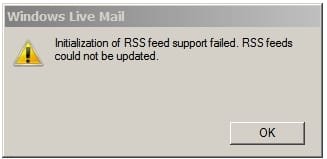
"Initalization of RSS feed support failed. RSS feeds could not be updated."
This RSS feed error just started popping up when I access Win Live POP3 Mail.
I have no interest in RSS feeds & never enabled them, How do I stop this pop-up?
Please see images below.
Any suggestions will be greatly appreciated.
And I thank this forum for all the past help you have given me.
cheers,
klxdrt
"Initalization of RSS feed support failed. RSS feeds could not be updated."
This RSS feed error just started popping up when I access Win Live POP3 Mail.
I have no interest in RSS feeds & never enabled them, How do I stop this pop-up?
Please see images below.
Any suggestions will be greatly appreciated.
And I thank this forum for all the past help you have given me.
cheers,
klxdrt
Attachments

My Computer
At a glance
w7 pro 32 bit w/XP virt enabled.AMD A6-36504 GB DDR3 RAMNVIDIA GeForce 210
- Computer type
- PC/Desktop
- Computer Manufacturer/Model Number
- locally made
- OS
- w7 pro 32 bit w/XP virt enabled.
- CPU
- AMD A6-3650
- Motherboard
- ASUS F1A55-M CSM
- Memory
- 4 GB DDR3 RAM
- Graphics Card(s)
- NVIDIA GeForce 210
- Sound Card
- NVIDIA High Definition Audio
- Monitor(s) Displays
- 28" HD monitor
- Screen Resolution
- 1680 x 1050 x 32 bits (4294967296 colors) @ 59 Hz
- Hard Drives
- 2 x 500 GB Western Digital Blue Hard Drive
- PSU
- ?
- Case
- ?
- Cooling
- 3-4 fans
- Keyboard
- big yellow keys
- Mouse
- logitec
- Internet Speed
- 60 mb
- Antivirus
- panda
- Browser
- ff
- Other Info
- scanner, webcam, bw printer, fax modem, cd/dvd burner, PC usb ports: 2 usb3, 6 usb2 plus 7 port usb hub, 2 tb usb3, 1 Tb usb3, 500Mb usb2, 120Mb USB2 portable drives, asst of flash drives 250 Mb to 32 Gb. backup PC, office

