Inordinate time connecting to the internet

pushticat

New member
Local time
8:15 PM
Messages
7
Until recently my wife and I had identical HP computers, both with Windows Vista Home Premium connected to the internet via a wireless network provided by a Cisco router. Connecting to the internet was a snap-click on the IE icon and you were there. Foolishly I 'upgraded ' to Windows 7 Home Premium. Now she still connects instantly whereas it can take me up to 20 seconds or more.Can anyone suggest a reason and/or solution? Thanks, Alan:(
 

My Computer My Computer

OS
Vista 64 bit
Compare the Network connection details panels on both systems before your system makes a connection

Could be that your Win7 system doesn't get its IP address until you try to connect, usually that's done as the system starts but on wireless networks I think it can be configured to happen when a connection is attempted.

pjd
 

My Computer My Computer

Computer type
PC/Desktop
Computer Manufacturer/Model Number
generic - made to spec
OS
Win 7 Professional 64bit
CPU
I5 650 @ 3.2GHz
Motherboard
Gigabyte H55M-UD2H
Memory
6G
Graphics Card(s)
AMD Radeon R7 200 Series
Sound Card
whatever is on mobo
Monitor(s) Displays
1 x 24" Samsung
Screen Resolution
1920x1200
Hard Drives
Internal 1x256GB Toshiba SSD
Internal 1x2TB
External 2 slot USB 3.0 dock (various drives)
External 1 500GB USB 2.0 drive
PSU
850W Antech Modular
Case
Shiny Black Aluminium
Cooling
extra fans - sucker in front, blower at back - noisy & cool
Keyboard
Microsoft USB Dual Receiver Wireless Keyboard
Mouse
Microsoft USB Dual Receiver Wireless Mouse
Internet Speed
20/1Mbps down/up
Antivirus
MSE
Browser
Firefox and Chrome
Other Info
Hitachi USB 3.0 adapter
Thanks for your reply. I am still trying to find out how to act on your suggestion. However yesterday I went out and bought a laptop with Windows 7 installed, set it up and the same thing happened. Click on Internet Explorer and it takes an age to connect - 65 sec this am. Meanwhile my wife, on the same network, cheerfully connects immediately. Thanks again.
 

My Computer My Computer

OS
Vista 64 bit

My Computer My Computer

Computer type
PC/Desktop
Computer Manufacturer/Model Number
Custom Built
OS
Windows 7 Professional x64 SP1 ; Windows Server 2012 R2 Standard
CPU
Intel Core i5 2400 @ 3.10GHz
Motherboard
Foxconn H67MP-S/-V/H67MP
Memory
8.0GB DDR3 @ 665MHz (2GBx4)
Graphics Card(s)
AMD Radeon HD 6870
Sound Card
Realtek High Definition Audio
Monitor(s) Displays
AOC 2243W & SMB1930NW
Screen Resolution
1440x900 & 1920x1080
Hard Drives
977GB Seagate ST31000524AS ATA Drive (SATA)
250GB WD iSCSI attached Drive
PSU
750W Gaming PSU
Case
Novatech Night
Cooling
Fan
Keyboard
Dell Standard PS/2 Keyboard
Mouse
R.A.T 07 Gaming Mouse
Internet Speed
Download: 10 Mbps Ping: 30ms Upload: 0.81 Mbps
Browser
Google Chrome
Other Info
Optiarc DVD RW AD-5260S ATA Device
Until recently my wife and I had identical HP computers, both with Windows Vista Home Premium connected to the internet via a wireless network provided by a Cisco router. Connecting to the internet was a snap-click on the IE icon and you were there. Foolishly I 'upgraded ' to Windows 7 Home Premium. Now she still connects instantly whereas it can take me up to 20 seconds or more.Can anyone suggest a reason and/or solution? Thanks, Alan:(

Blaming this problem on Windows 7 is like blaming the Sun for being bright.

Upgrading can be problematic with any Windows installation. Back up everything and perform a clean installation of Windows 7 and most likely your problems will be solved. :)

http://www.sevenforums.com/tutorials/1649-clean-install-windows-7-a.html
 

My Computer My Computer

Computer type
PC/Desktop
Computer Manufacturer/Model Number
Home built
OS
Windows 7 Ult, Windows 8.1 Pro,
CPU
Q9650-4.275GHz, E8600 4.5GHz, E6750-3.8GHz
Motherboard
Evga 780i FTW
Memory
G.Skill PC2 9600 1200Mhz 5 5 5 15 2T
Graphics Card(s)
GTX480
Sound Card
Asus Xonar D2
Monitor(s) Displays
HannsG
Screen Resolution
1680X1050
Hard Drives
GSkill Phoenix Pro 120GB SSD
PSU
ThermalTake Toughpower 1000Watt modular
Case
ThermalTake XaserV
Cooling
Xigmatek S1283
Keyboard
Logitech G15
Mouse
Logitech G9
Internet Speed
T1
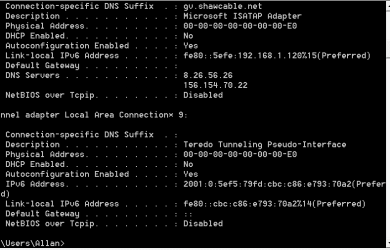
Hope this is what you want Josh.
 

Attachments

  • Capture.PNG
    Capture.PNG
    8.1 KB · Views: 6

My Computer My Computer

OS
Vista 64 bit
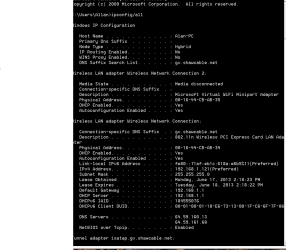
The first picture is ipconfig/all when the computer was connected to the internet via a LAN. These two are from the same computer connected by my wireless router. Both methods give that extra long time in connecting to the internet. I hope this does help. Thanks.Alan
 

Attachments

  • 2.PNG
    2.PNG
    16 KB · Views: 4
  • 3.PNG
    3.PNG
    10.6 KB · Views: 3

My Computer My Computer

OS
Vista 64 bit
I have noticed that the first screenshot is set a static IP address. Did you set this?

Also have you tried booting Windows into safe mode with networking? This will decide whether or not there is a program or service causing the issue

Follow this tutorial on finding out how - http://www.sevenforums.com/tutorials/69585-safe-mode.html

Please replace 'Safe mode' with 'Safe mode with networking'

Please post back your results

Many Thanks,
Josh! :)
 

My Computer My Computer

Computer type
PC/Desktop
Computer Manufacturer/Model Number
Custom Built
OS
Windows 7 Professional x64 SP1 ; Windows Server 2012 R2 Standard
CPU
Intel Core i5 2400 @ 3.10GHz
Motherboard
Foxconn H67MP-S/-V/H67MP
Memory
8.0GB DDR3 @ 665MHz (2GBx4)
Graphics Card(s)
AMD Radeon HD 6870
Sound Card
Realtek High Definition Audio
Monitor(s) Displays
AOC 2243W & SMB1930NW
Screen Resolution
1440x900 & 1920x1080
Hard Drives
977GB Seagate ST31000524AS ATA Drive (SATA)
250GB WD iSCSI attached Drive
PSU
750W Gaming PSU
Case
Novatech Night
Cooling
Fan
Keyboard
Dell Standard PS/2 Keyboard
Mouse
R.A.T 07 Gaming Mouse
Internet Speed
Download: 10 Mbps Ping: 30ms Upload: 0.81 Mbps
Browser
Google Chrome
Other Info
Optiarc DVD RW AD-5260S ATA Device
Safe mode with networking" does not show any apparent programme interference and I did not set the static IP address.
 

My Computer My Computer

OS
Vista 64 bit
Since the safe mode with networking did not yield any benefit then my best judgement would be the router itself causing an issue. Have you tried resetting it to factory conditions? This will reset any custom settings that you may have made and will need to be reapplied after resetting it...

If you can provide the exact make/model of your router then I can possible offer a tutorial on how to complete such task

Hope This Helps,
Josh! :)
 

My Computer My Computer

Computer type
PC/Desktop
Computer Manufacturer/Model Number
Custom Built
OS
Windows 7 Professional x64 SP1 ; Windows Server 2012 R2 Standard
CPU
Intel Core i5 2400 @ 3.10GHz
Motherboard
Foxconn H67MP-S/-V/H67MP
Memory
8.0GB DDR3 @ 665MHz (2GBx4)
Graphics Card(s)
AMD Radeon HD 6870
Sound Card
Realtek High Definition Audio
Monitor(s) Displays
AOC 2243W & SMB1930NW
Screen Resolution
1440x900 & 1920x1080
Hard Drives
977GB Seagate ST31000524AS ATA Drive (SATA)
250GB WD iSCSI attached Drive
PSU
750W Gaming PSU
Case
Novatech Night
Cooling
Fan
Keyboard
Dell Standard PS/2 Keyboard
Mouse
R.A.T 07 Gaming Mouse
Internet Speed
Download: 10 Mbps Ping: 30ms Upload: 0.81 Mbps
Browser
Google Chrome
Other Info
Optiarc DVD RW AD-5260S ATA Device
Inordinate time to connect to internet

Sorry I've been away on holiday. Now the latest! I have done a complete recovery of Windows 7 and restored the Linksys WRT20N router to its original specs. And still it takes forever to connect to Yahoo, my hoe web page. 13 minutes just now. I think the problem might be in the router as the computer functions "internally" like greased lightning. The router was one refurbished by Linksys.
 

My Computer My Computer

OS
Vista 64 bit
Sorry I've been away on holiday. Now the latest! I have done a complete recovery of Windows 7 and restored the Linksys WRT20N router to its original specs. And still it takes forever to connect to Yahoo, my hoe web page. 13 minutes just now. I think the problem might be in the router as the computer functions "internally" like greased lightning. The router was one refurbished by Linksys.

Can you temporarily change your homepage to google and then test connection speed. Also possibly try a different browser as your issue could be plugin related.

Lastly if you can try to connect to another network and test connectivity speed. Possibly a friend or relatives Internet?

Please post back your results and we will do our best

Josh :)
 

My Computer My Computer

Computer type
PC/Desktop
Computer Manufacturer/Model Number
Custom Built
OS
Windows 7 Professional x64 SP1 ; Windows Server 2012 R2 Standard
CPU
Intel Core i5 2400 @ 3.10GHz
Motherboard
Foxconn H67MP-S/-V/H67MP
Memory
8.0GB DDR3 @ 665MHz (2GBx4)
Graphics Card(s)
AMD Radeon HD 6870
Sound Card
Realtek High Definition Audio
Monitor(s) Displays
AOC 2243W & SMB1930NW
Screen Resolution
1440x900 & 1920x1080
Hard Drives
977GB Seagate ST31000524AS ATA Drive (SATA)
250GB WD iSCSI attached Drive
PSU
750W Gaming PSU
Case
Novatech Night
Cooling
Fan
Keyboard
Dell Standard PS/2 Keyboard
Mouse
R.A.T 07 Gaming Mouse
Internet Speed
Download: 10 Mbps Ping: 30ms Upload: 0.81 Mbps
Browser
Google Chrome
Other Info
Optiarc DVD RW AD-5260S ATA Device
Back
Top