"INSERT REMOVABLE MEDIA ERROR"

genhartsg

New member
Local time
2:50 PM
Messages
24
zzz.png


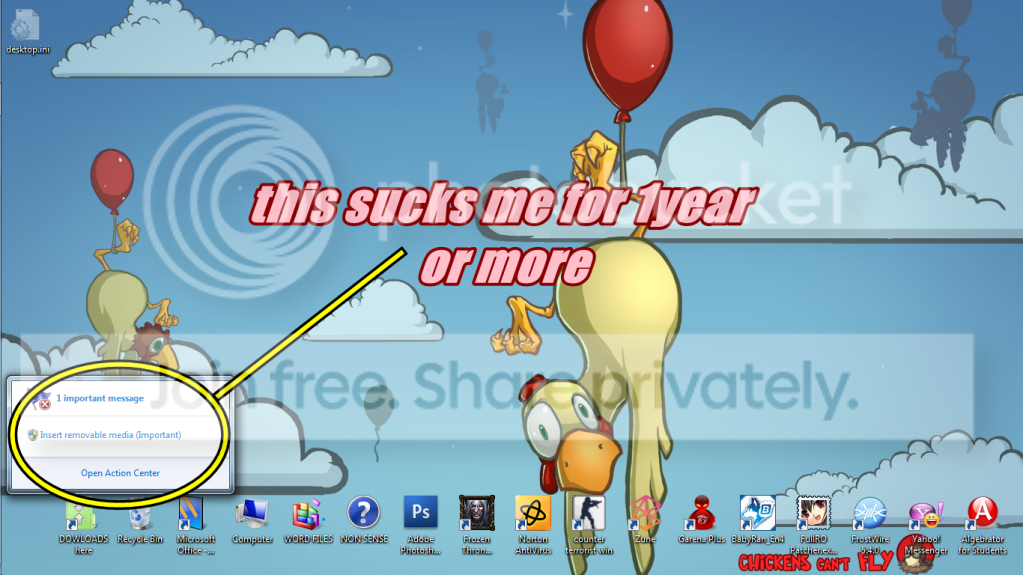
Hi admin , Im Gerald from the phil's

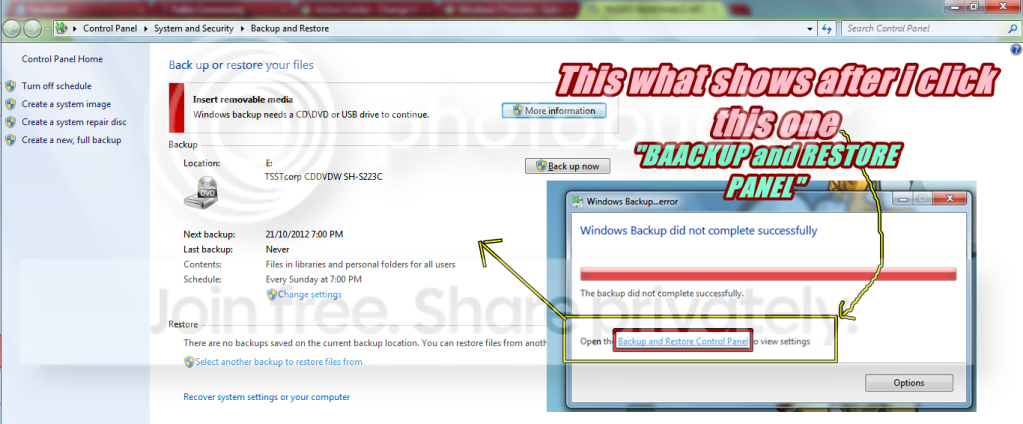
I got this annoying problem. please help me to fix this "INSERT REMOVABLE MEDIA ERROR"
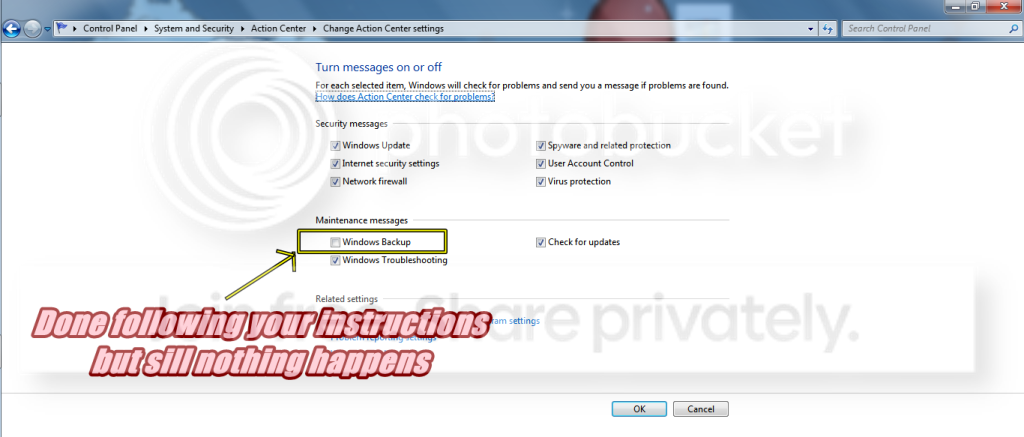
BTW, here's another picture ..

da.png


PLEASE HELP me . thanks in advance god blessyou sir :cool:
 
Last edited:

My Computer

OS
Windows 7 Ultimate x64, Windows 7 Home Premium 32bit.
Hello Gerald, and welcome to Seven Forums. :)

Unfortunately, turning off the "Windows Backup" message is only to stop the message to remind you about setting up or creating a backup. It's not going to stop this error message.

What is the full message when you click on the "INSERT REMOVABLE MEDIA ERROR" link from the notification area?

If this is for Windows Backup, then you'll need to either turn off the automatic backup schedule and create one manually when you have you removable media connected, or leave the removable media connected.

Hope this helps for now,
Shawn
 

My Computer

Computer type
PC/Desktop
Computer Manufacturer/Model Number
Self built custom
OS
64-bit Windows 11 Pro for Workstations
CPU
Intel i7-8700K OC'd to 5 GHz
Motherboard
ASUS ROG Maximus XI Formula Z390
Memory
64 GB (4x16GB) G.SKILL TridentZ RGB DDR4 3600 MHz
Graphics Card(s)
ASUS ROG-STRIX-GTX1080TI-O11G-GAMING
Sound Card
Integrated
Monitor(s) Displays
2 x Samsung Odyssey G7 27"
Screen Resolution
2560x1440
Hard Drives
1TB Samsung 990 PRO M.2,
4TB Samsung 990 PRO PRO M.2,
TerraMaster F8 SSD Plus NAS
PSU
Seasonic Prime Titanium 850W
Case
Thermaltake Core P3
Cooling
Corsair Hydro H115i
Keyboard
Logitech wireless K800
Mouse
Logitech MX Master 4
Internet Speed
2 Gb/s Download and 100 Mb/s Upload
Antivirus
Malwarebyte Anti-Malware Premium
Browser
Google Chrome
Other Info
Logitech Z625 speaker system,
Logitech BRIO 4K Pro webcam,
HP Color LaserJet Pro MFP M477fdn,
APC SMART-UPS RT 1000 XL - SURT1000XLI,
Galaxy S23 Plus phone
Hi shawn ,

thank you for your help but im worried that im too stupid in TROUBLESHOOTING about
my COMPUTER. hahaha . so to be honest i dont know how to follow your next instruction :D ahahahaha.

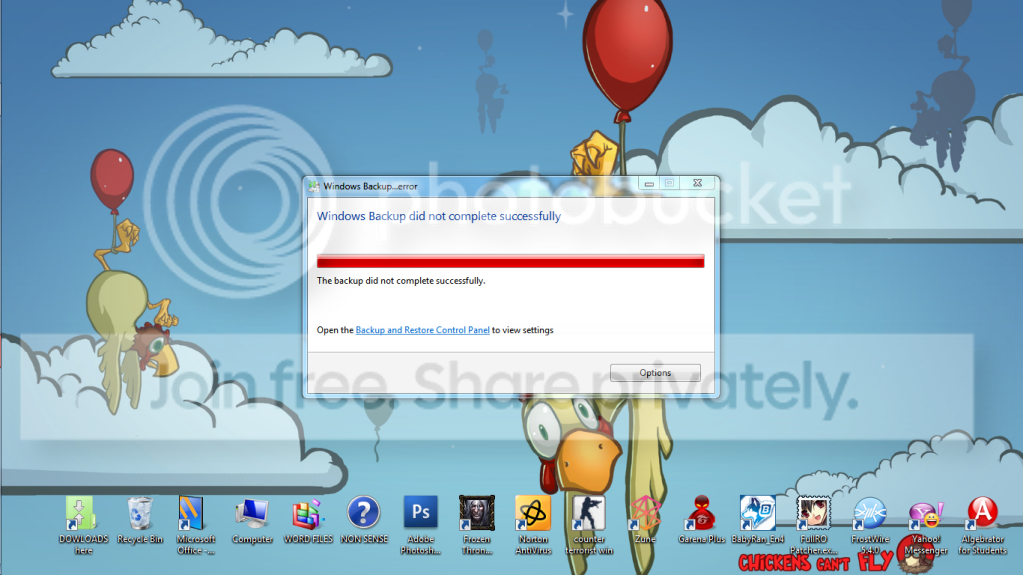
here it is ..

dz.png


Thank you for your patience.
Please help me what to do with this. GODBLESS :)
 

My Computer

OS
Windows 7 Ultimate x64, Windows 7 Home Premium 32bit.
Gerald,

It seems like either the drive letter may have been changed or you do not have the correct removable media connected that you set your backup to be saved to when it runs automatically on a schedule. When the backup runs, it seems that it can't find the drive that you set it to be saved to, and giving you this error.

What is the full message when you click on the Insert removable media (Important) link from the notification area on your taskbar?

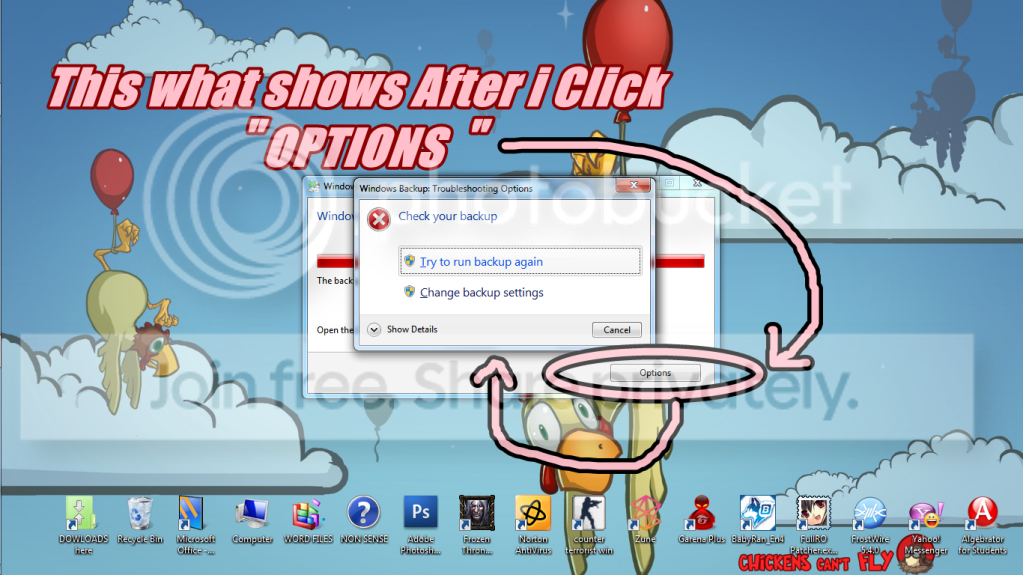
What does it say when you click on the Options button?

Do you have the drive that you set to save your backups to connected, and turned on if it's an external HDD?

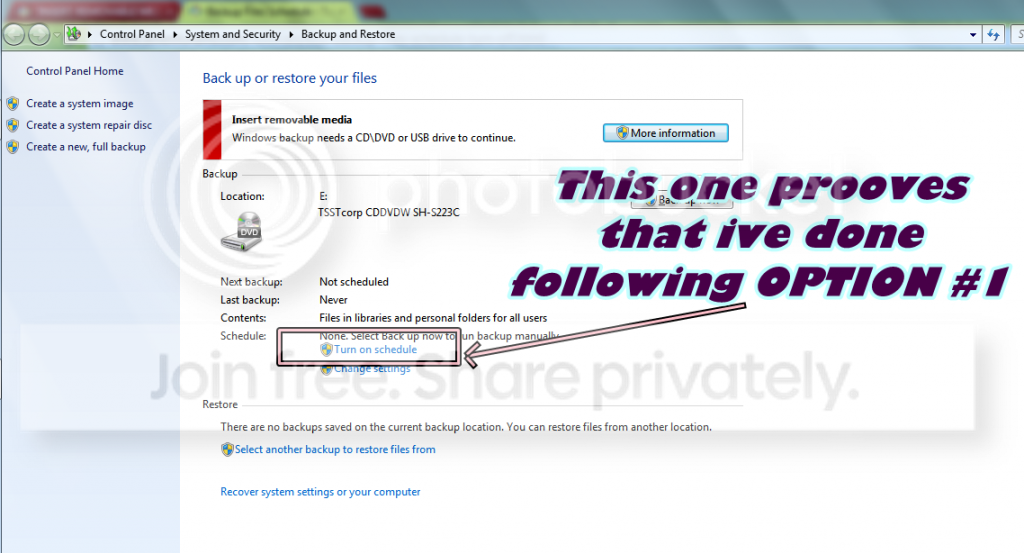
Look in your Backup and Restore window like below to see what drive letter it is set to save the backup to, then check to see if the drive letter for the drive you have connected to save it to is the same or not. For example, mine is set for my Test D: drive.

backup.jpg
 

My Computer

Computer type
PC/Desktop
Computer Manufacturer/Model Number
Self built custom
OS
64-bit Windows 11 Pro for Workstations
CPU
Intel i7-8700K OC'd to 5 GHz
Motherboard
ASUS ROG Maximus XI Formula Z390
Memory
64 GB (4x16GB) G.SKILL TridentZ RGB DDR4 3600 MHz
Graphics Card(s)
ASUS ROG-STRIX-GTX1080TI-O11G-GAMING
Sound Card
Integrated
Monitor(s) Displays
2 x Samsung Odyssey G7 27"
Screen Resolution
2560x1440
Hard Drives
1TB Samsung 990 PRO M.2,
4TB Samsung 990 PRO PRO M.2,
TerraMaster F8 SSD Plus NAS
PSU
Seasonic Prime Titanium 850W
Case
Thermaltake Core P3
Cooling
Corsair Hydro H115i
Keyboard
Logitech wireless K800
Mouse
Logitech MX Master 4
Internet Speed
2 Gb/s Download and 100 Mb/s Upload
Antivirus
Malwarebyte Anti-Malware Premium
Browser
Google Chrome
Other Info
Logitech Z625 speaker system,
Logitech BRIO 4K Pro webcam,
HP Color LaserJet Pro MFP M477fdn,
APC SMART-UPS RT 1000 XL - SURT1000XLI,
Galaxy S23 Plus phone
Actually sir . i Dont have any plans to BACKUP anything ..
it was just a MISS CLICK meaning a stupid mistake . i was just too curious that
i click each of one POP UPS and i guess i messed up :o

Here's your request . I hope this will CLEAR any questions from you . Thanks for helping..


zzz23.png


....


zzz-1.png


i just want this BACKUP shit problem to stop . Please help me to do that.
BTW, i thnk this problem made my DVD WRITER/READER broken. Its not
functioning anymore. Zzz.
 

My Computer

OS
Windows 7 Ultimate x64, Windows 7 Home Premium 32bit.
Yep, that was the issue. You had backups set to run automatically on a schedule and be saved to a CD/DVD drive. Since the CD/DVD drive is empty when the scheduled time to run the backup approached, that's why you are getting the "Insert removable media" error. It was just wanting you to insert a blank unformatted CD/DVD so it could do the backup.


No problem. Doing this below will stop all of this for you. :)

You can click on the Turn off schedule link to stop backups from being automatically created. The tutorial below can help show you more on how to if needed.

http://www.sevenforums.com/tutorials/618-backup-files-schedule-turn-off.html
 

My Computer

Computer type
PC/Desktop
Computer Manufacturer/Model Number
Self built custom
OS
64-bit Windows 11 Pro for Workstations
CPU
Intel i7-8700K OC'd to 5 GHz
Motherboard
ASUS ROG Maximus XI Formula Z390
Memory
64 GB (4x16GB) G.SKILL TridentZ RGB DDR4 3600 MHz
Graphics Card(s)
ASUS ROG-STRIX-GTX1080TI-O11G-GAMING
Sound Card
Integrated
Monitor(s) Displays
2 x Samsung Odyssey G7 27"
Screen Resolution
2560x1440
Hard Drives
1TB Samsung 990 PRO M.2,
4TB Samsung 990 PRO PRO M.2,
TerraMaster F8 SSD Plus NAS
PSU
Seasonic Prime Titanium 850W
Case
Thermaltake Core P3
Cooling
Corsair Hydro H115i
Keyboard
Logitech wireless K800
Mouse
Logitech MX Master 4
Internet Speed
2 Gb/s Download and 100 Mb/s Upload
Antivirus
Malwarebyte Anti-Malware Premium
Browser
Google Chrome
Other Info
Logitech Z625 speaker system,
Logitech BRIO 4K Pro webcam,
HP Color LaserJet Pro MFP M477fdn,
APC SMART-UPS RT 1000 XL - SURT1000XLI,
Galaxy S23 Plus phone
Hi mr shawn ! Good day ! This tutorial didn't work . My computer still have the same problem ..
is there any other Option .?

BTW , i didnt follow the OPTION #2 because i really dont want to BACKUP FILES . as ive said before it was just a miss click
I want to cancel the process , please help me :(

THANKS !!! :D
 

My Computer

OS
Windows 7 Ultimate x64, Windows 7 Home Premium 32bit.
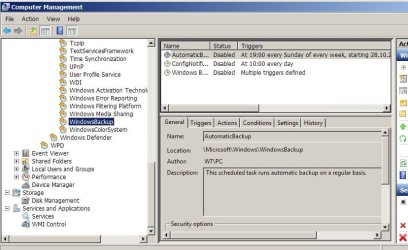
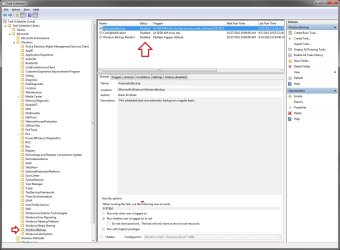
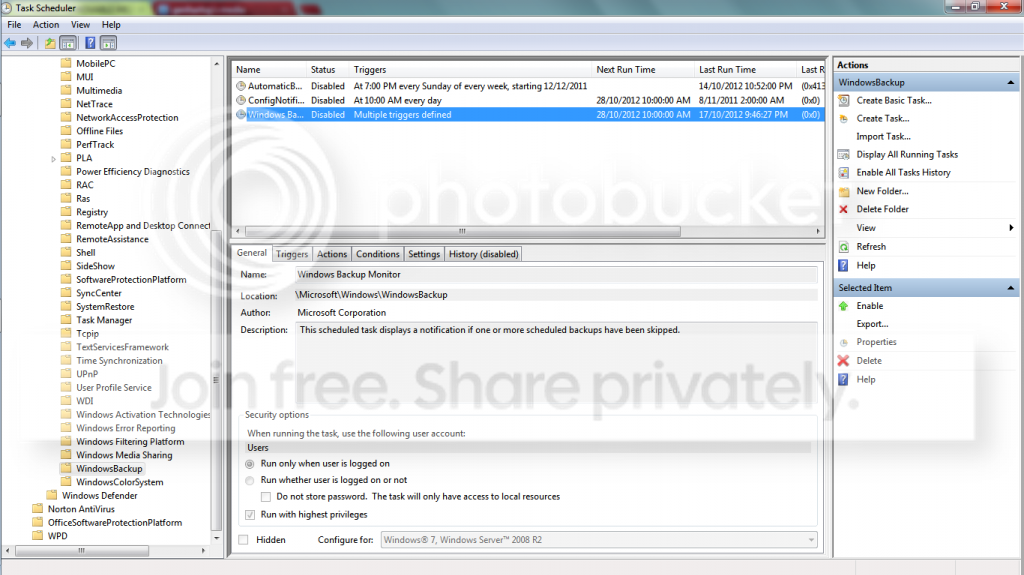
Maybe worth a look in Task Scheduler > Microsoft > Windows > Windowsbackup
All set to disabled?
 

Attachments

  • back.jpg
    back.jpg
    65 KB · Views: 44

My Computer

Computer type
Laptop
Computer Manufacturer/Model Number
Dell \ Lenovo\ HP \ Toshiba
OS
W7, W8.1
Antivirus
MSE, Malwarebytes
Browser
FF

My Computer

Computer type
PC/Desktop
Computer Manufacturer/Model Number
Self built custom
OS
64-bit Windows 11 Pro for Workstations
CPU
Intel i7-8700K OC'd to 5 GHz
Motherboard
ASUS ROG Maximus XI Formula Z390
Memory
64 GB (4x16GB) G.SKILL TridentZ RGB DDR4 3600 MHz
Graphics Card(s)
ASUS ROG-STRIX-GTX1080TI-O11G-GAMING
Sound Card
Integrated
Monitor(s) Displays
2 x Samsung Odyssey G7 27"
Screen Resolution
2560x1440
Hard Drives
1TB Samsung 990 PRO M.2,
4TB Samsung 990 PRO PRO M.2,
TerraMaster F8 SSD Plus NAS
PSU
Seasonic Prime Titanium 850W
Case
Thermaltake Core P3
Cooling
Corsair Hydro H115i
Keyboard
Logitech wireless K800
Mouse
Logitech MX Master 4
Internet Speed
2 Gb/s Download and 100 Mb/s Upload
Antivirus
Malwarebyte Anti-Malware Premium
Browser
Google Chrome
Other Info
Logitech Z625 speaker system,
Logitech BRIO 4K Pro webcam,
HP Color LaserJet Pro MFP M477fdn,
APC SMART-UPS RT 1000 XL - SURT1000XLI,
Galaxy S23 Plus phone
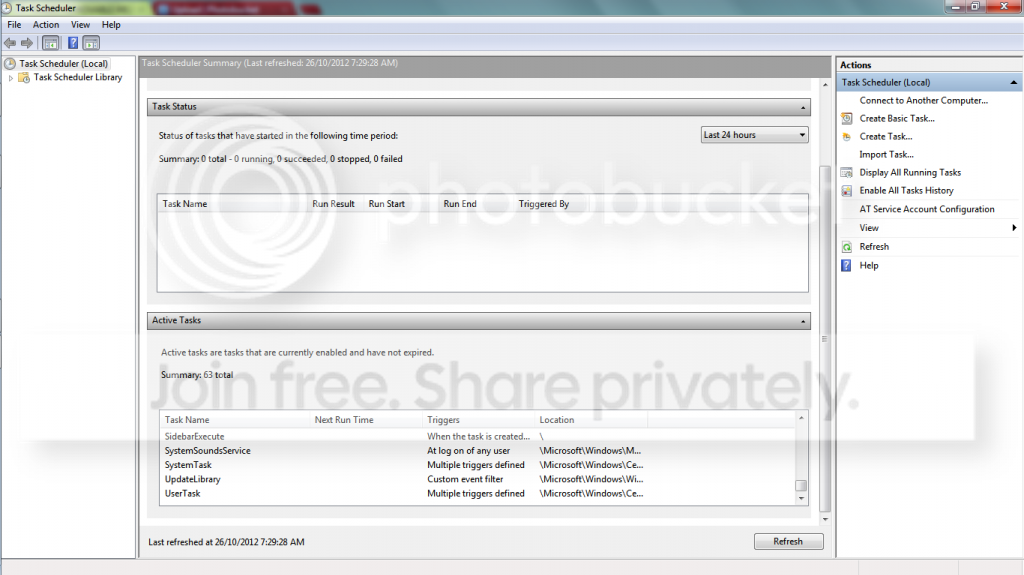
Here my SCREEN SHOTS ..


zzz-2.png


Hi , 4wd . I cant find Microsoft from the Task scheduer :((
Thanks for you patience guys ..


btw, Heres my screenie ..

wow.png
 

My Computer

OS
Windows 7 Ultimate x64, Windows 7 Home Premium 32bit.
Gerald,

In the far left pane of Task scheduler, you will need to expand the folders below first.
Task Scheduler Library > Microsoft > Windows > Windowsbackup
Next, disable the tasks listed In the top middle pane of the opened Windowsbackup folder, like in 4wd's screenshot above. :)
 

My Computer

Computer type
PC/Desktop
Computer Manufacturer/Model Number
Self built custom
OS
64-bit Windows 11 Pro for Workstations
CPU
Intel i7-8700K OC'd to 5 GHz
Motherboard
ASUS ROG Maximus XI Formula Z390
Memory
64 GB (4x16GB) G.SKILL TridentZ RGB DDR4 3600 MHz
Graphics Card(s)
ASUS ROG-STRIX-GTX1080TI-O11G-GAMING
Sound Card
Integrated
Monitor(s) Displays
2 x Samsung Odyssey G7 27"
Screen Resolution
2560x1440
Hard Drives
1TB Samsung 990 PRO M.2,
4TB Samsung 990 PRO PRO M.2,
TerraMaster F8 SSD Plus NAS
PSU
Seasonic Prime Titanium 850W
Case
Thermaltake Core P3
Cooling
Corsair Hydro H115i
Keyboard
Logitech wireless K800
Mouse
Logitech MX Master 4
Internet Speed
2 Gb/s Download and 100 Mb/s Upload
Antivirus
Malwarebyte Anti-Malware Premium
Browser
Google Chrome
Other Info
Logitech Z625 speaker system,
Logitech BRIO 4K Pro webcam,
HP Color LaserJet Pro MFP M477fdn,
APC SMART-UPS RT 1000 XL - SURT1000XLI,
Galaxy S23 Plus phone
Hello mr shawn .. I think it was already DISABLED . look at my screenies .


wow.png


i didnt configure anything . Its already disabled when i saw it.
 

My Computer

OS
Windows 7 Ultimate x64, Windows 7 Home Premium 32bit.
Sorry, but your screenshot doesn't show anything since you do not have anything opened in the left pane.

In the far left side pane, you will need to open those folders first as posted above before you will see the tasks in the upper middle pane like below.


tasks.jpg
 

My Computer

Computer type
PC/Desktop
Computer Manufacturer/Model Number
Self built custom
OS
64-bit Windows 11 Pro for Workstations
CPU
Intel i7-8700K OC'd to 5 GHz
Motherboard
ASUS ROG Maximus XI Formula Z390
Memory
64 GB (4x16GB) G.SKILL TridentZ RGB DDR4 3600 MHz
Graphics Card(s)
ASUS ROG-STRIX-GTX1080TI-O11G-GAMING
Sound Card
Integrated
Monitor(s) Displays
2 x Samsung Odyssey G7 27"
Screen Resolution
2560x1440
Hard Drives
1TB Samsung 990 PRO M.2,
4TB Samsung 990 PRO PRO M.2,
TerraMaster F8 SSD Plus NAS
PSU
Seasonic Prime Titanium 850W
Case
Thermaltake Core P3
Cooling
Corsair Hydro H115i
Keyboard
Logitech wireless K800
Mouse
Logitech MX Master 4
Internet Speed
2 Gb/s Download and 100 Mb/s Upload
Antivirus
Malwarebyte Anti-Malware Premium
Browser
Google Chrome
Other Info
Logitech Z625 speaker system,
Logitech BRIO 4K Pro webcam,
HP Color LaserJet Pro MFP M477fdn,
APC SMART-UPS RT 1000 XL - SURT1000XLI,
Galaxy S23 Plus phone
OOPS . I posted the WRONG ONE . sorry for that . Here it is ..


a.png
 

My Computer

OS
Windows 7 Ultimate x64, Windows 7 Home Premium 32bit.

My Computer

Computer type
PC/Desktop
Computer Manufacturer/Model Number
Self built custom
OS
64-bit Windows 11 Pro for Workstations
CPU
Intel i7-8700K OC'd to 5 GHz
Motherboard
ASUS ROG Maximus XI Formula Z390
Memory
64 GB (4x16GB) G.SKILL TridentZ RGB DDR4 3600 MHz
Graphics Card(s)
ASUS ROG-STRIX-GTX1080TI-O11G-GAMING
Sound Card
Integrated
Monitor(s) Displays
2 x Samsung Odyssey G7 27"
Screen Resolution
2560x1440
Hard Drives
1TB Samsung 990 PRO M.2,
4TB Samsung 990 PRO PRO M.2,
TerraMaster F8 SSD Plus NAS
PSU
Seasonic Prime Titanium 850W
Case
Thermaltake Core P3
Cooling
Corsair Hydro H115i
Keyboard
Logitech wireless K800
Mouse
Logitech MX Master 4
Internet Speed
2 Gb/s Download and 100 Mb/s Upload
Antivirus
Malwarebyte Anti-Malware Premium
Browser
Google Chrome
Other Info
Logitech Z625 speaker system,
Logitech BRIO 4K Pro webcam,
HP Color LaserJet Pro MFP M477fdn,
APC SMART-UPS RT 1000 XL - SURT1000XLI,
Galaxy S23 Plus phone
shawn
thanks for working this. I am working on a machine that has this disease.
I turned off everything I could find associated with backup scheduling, execution, whatever. still had the red flag message on the task bar.
[after several reboots, retries].

followed your link to your tutorial and did the reg fix.
the registry on this system, after deleting the several keys per your advice, does not look like the one in your illustration. I'm attaching a screenshot.
after completing the task and logging out, and rebooting, the error message remains unfazed. still have the annoying error red-x on the control panel, and in opening Action Center Settings [which, btw, is set to NOT BUG the user about Backup] the annoying message is still there, front & center under "MAINTENANCE" : "Insert Removable media (Important) Windows backup needs a CD\DVD or USB drive to continue".

this is beyond exasperating. where on earth did this aggravation come from? this is the first system I have seen it on and unfortunately the user is one of those who ALWAYS installs whatever updates MS pushes on tuesdays... so I dunno when the bug began.

thx

 

Attachments

  • reg.jpg
    reg.jpg
    98.9 KB · Views: 16

My Computer

Computer Manufacturer/Model Number
HP DC7600, HP DC7600[2], HP DC7100, Samsung NC10
OS
Windows XP Pro SP3, Windows 7 Pro 32-bit, Windows 7 Ultimate 64bit, Windows XP Home SP3
CPU
Pentium 4 3.2GHz, Pentium 4 3.4GHz 64bit, Atom,
Motherboard
Dunno
Memory
4GB matched, 1GB, 2.5GB, 4.0 GB
Graphics Card(s)
Geforce 8400 GS and others
Sound Card
RealteK ALC260 and others
Monitor(s) Displays
Asus HD
Screen Resolution
1920x1080
Hard Drives
WD Caviar 640gb SATA
Cooling
We Be Cool
Hello Claude,

I must admit that I'm a bit stomped by this. I would think that resetting Windows Backup would stop these messages as well.

You might see if connecting a USB drive to let it continue the backup, and see if there's an option to cancel it.
 

My Computer

Computer type
PC/Desktop
Computer Manufacturer/Model Number
Self built custom
OS
64-bit Windows 11 Pro for Workstations
CPU
Intel i7-8700K OC'd to 5 GHz
Motherboard
ASUS ROG Maximus XI Formula Z390
Memory
64 GB (4x16GB) G.SKILL TridentZ RGB DDR4 3600 MHz
Graphics Card(s)
ASUS ROG-STRIX-GTX1080TI-O11G-GAMING
Sound Card
Integrated
Monitor(s) Displays
2 x Samsung Odyssey G7 27"
Screen Resolution
2560x1440
Hard Drives
1TB Samsung 990 PRO M.2,
4TB Samsung 990 PRO PRO M.2,
TerraMaster F8 SSD Plus NAS
PSU
Seasonic Prime Titanium 850W
Case
Thermaltake Core P3
Cooling
Corsair Hydro H115i
Keyboard
Logitech wireless K800
Mouse
Logitech MX Master 4
Internet Speed
2 Gb/s Download and 100 Mb/s Upload
Antivirus
Malwarebyte Anti-Malware Premium
Browser
Google Chrome
Other Info
Logitech Z625 speaker system,
Logitech BRIO 4K Pro webcam,
HP Color LaserJet Pro MFP M477fdn,
APC SMART-UPS RT 1000 XL - SURT1000XLI,
Galaxy S23 Plus phone
Just to be clear, on this system's "Action Center" I have "turned off" notification/messaging about Backup tasks.
Though this has been done, I still have notification of the issue.
Could it be that everything related to Backup Tasks, per se, is correct, and rather what we are dealing with is a Notification issue, not a Backup issue?
Where in the registry is control of the simple routine of 'lighting' that Notice in the Taskbar or in the Action Center notification window?

EDIT: So, for other fellow travelers, I acted on this idea of clearing the notice, with the understanding that the Backup service has been neutered: there is no point in viewing the 'flag'.
I took two tips from http://www.sevenforums.com/general-...tion-center-icon-when-no-issues-detected.html
This ended my quest successfully: clearing via ccleaner and the task [bat file] to restart explorer, and the tip about altering the taskbar properties/customization. As the thread responses indicate, it may be that the Ccleaner/bat-file steps actually do not resolve the flag, but that plus changing the alerts on the taskbar stop the irritation!
SOLVED. in my view.
 
Last edited:

My Computer

Computer Manufacturer/Model Number
HP DC7600, HP DC7600[2], HP DC7100, Samsung NC10
OS
Windows XP Pro SP3, Windows 7 Pro 32-bit, Windows 7 Ultimate 64bit, Windows XP Home SP3
CPU
Pentium 4 3.2GHz, Pentium 4 3.4GHz 64bit, Atom,
Motherboard
Dunno
Memory
4GB matched, 1GB, 2.5GB, 4.0 GB
Graphics Card(s)
Geforce 8400 GS and others
Sound Card
RealteK ALC260 and others
Monitor(s) Displays
Asus HD
Screen Resolution
1920x1080
Hard Drives
WD Caviar 640gb SATA
Cooling
We Be Cool

My Computer

Computer type
PC/Desktop
Computer Manufacturer/Model Number
Self built custom
OS
64-bit Windows 11 Pro for Workstations
CPU
Intel i7-8700K OC'd to 5 GHz
Motherboard
ASUS ROG Maximus XI Formula Z390
Memory
64 GB (4x16GB) G.SKILL TridentZ RGB DDR4 3600 MHz
Graphics Card(s)
ASUS ROG-STRIX-GTX1080TI-O11G-GAMING
Sound Card
Integrated
Monitor(s) Displays
2 x Samsung Odyssey G7 27"
Screen Resolution
2560x1440
Hard Drives
1TB Samsung 990 PRO M.2,
4TB Samsung 990 PRO PRO M.2,
TerraMaster F8 SSD Plus NAS
PSU
Seasonic Prime Titanium 850W
Case
Thermaltake Core P3
Cooling
Corsair Hydro H115i
Keyboard
Logitech wireless K800
Mouse
Logitech MX Master 4
Internet Speed
2 Gb/s Download and 100 Mb/s Upload
Antivirus
Malwarebyte Anti-Malware Premium
Browser
Google Chrome
Other Info
Logitech Z625 speaker system,
Logitech BRIO 4K Pro webcam,
HP Color LaserJet Pro MFP M477fdn,
APC SMART-UPS RT 1000 XL - SURT1000XLI,
Galaxy S23 Plus phone
Had this same problem, ran through all the same steps.

Here's what I did - Turn the schedule back on. Click "Back Up Now". Immediately go into the backup options and cancel the backup. Turn the schedule back off.

tada.
 

My Computer

Computer type
PC/Desktop
OS
Windows 7/8/8.1
Back
Top