Install failure on new system, running out of ideas

vivlock

New member
Local time
11:37 AM
Messages
8
I have recently (last Wednesday) built myself a shiny new computer. Here's what's inside:

MB: ASRock M3A770DE AM3 AMD 770 ATX AMD Motherboard

Processor: AMD Phenom II X4 965 Black Edition Deneb 3.4GHz Socket AM3 125W Quad-Core Processor HDZ965FBGMBOX

RAM: GeIL Value PLUS 4GB (2 x 2GB) 240-Pin DDR3 SDRAM DDR3 1600 (PC3 12800) Desktop Memory Model GVP34GB1600C9DC

Harddrive: SAMSUNG Spinpoint F3R HE103SJ 1TB 7200 RPM SATA 3.0Gb/s 3.5" Internal Hard Drive -Bare Drive

Graphics: XFX HD-687A-ZDFC Radeon HD 6870 1GB 256-bit GDDR5 PCI Express 2.1 x16 HDCP Ready CrossFireX Support Video Card with Eyefinity

PSU: Thermaltake Toughpower XT TPX-775M 775W


On trying to install Windows 7, I reach some percent before I:
"Windows cannot install required files error 0x80070570
The file may be corrupt or missing.. Make sure all files required for installation are available and restart installation."

Here are the things I've done about it:

-I have removed all but one stick of RAM. I can't remove much else, my motherboard has no integrated graphics, so I'm stuck with my graphics card, only one hard drive, etc...
-I have burned 2 different install disks and made a bootable USB drive, no dice. I do not believe it is my install file (downloaded twice and my boyfriend checked it with some utility called Febooti fileTweak Hash and CRC as per the recommendation of someone on the internet).
-I have run memory tests, everything appears to be fine in the memory department.
-I have reformatted the drive at least 3 times, from different utilities (from Windows 7 install, from Ubuntu install, from GParted) because I had been told that Windows 7 sometimes formats drives too quickly and also because I'm getting desperate.
-I have clocked up my RAM (to 1600), clocked down my RAM (to Auto and 1333), and stared at every setting in BIOS that I could think might make a difference.

I'm about to go run some hard drive tests. I don't expect this to tell me anything.
I'm running out of ideas. Please help me.
 

My Computer My Computer

At a glance

Windows 7 Professional 32bit
OS
Windows 7 Professional 32bit
All of your hardware sounds fine. Where did you download the win7 ? Which version and is it 32bit or 64 bit ?
 

My Computer My Computer

At a glance

Win7 Enterprise, Win7 x86 (Ult 7600), Win7 x6...AMD fx8350 4ghz, AMD-32 2400mhz, AMD-64 3200m...2gb, 4gb on the Ult 7600, 4gb on Technet RTM,...Draw my own Graphics, several nVidia cards
Computer type
PC/Desktop
Computer Manufacturer/Model Number
Built them myself, Science Experiments !
OS
Win7 Enterprise, Win7 x86 (Ult 7600), Win7 x64 Ult 7600, TechNet RTM on AMD x64 (2.8Ghz)
CPU
AMD fx8350 4ghz, AMD-32 2400mhz, AMD-64 3200mhz, AMDx64 2.8G
Motherboard
SIS 755, ECS-K8M890M-M (Ult 7600), GigaByte & others
Memory
2gb, 4gb on the Ult 7600, 4gb on Technet RTM, 32gb on FX8350
Graphics Card(s)
Draw my own Graphics, several nVidia cards
Sound Card
on motherboard
Monitor(s) Displays
19" flat scr, 28" I-Inc widescr,22" Emprex Widescr, 23" Acer
Screen Resolution
1280 x 1024, 1440 x 900, 1920 x 1080
Hard Drives
6 pata Ide HD's & 2 Sata HD's
added 80gb external on Ult 7600 computer,
numerous extra 1tb, 2TB, 3Tb SATA HD's
A collection of ext HD Docks w/ HDs
PSU
430w, 550w, 600w, 700, 800, etc
Case
All Generic Full Towers
Cooling
Open Air & a few fans, some w/ colored LEDs
Keyboard
Compaq & Dell recycled from GoodWill
Mouse
Made in China Optical Wired Mouse
Internet Speed
Fast Cable InterNet
Antivirus
AVG Free on 24 different Desktops, NO Problems!
Browser
IE 8 is preferred, but use FireFox sometimes
Other Info
Linksys Routers, switches, & Hubs
Too Many USB Flash Drives to count, Biggest is 64GB !
Eight computers in my home network.
Sixteen computers at my business network.
Linked via TeamViewer !
Lots of old used spare computer parts everywhere!
Hi, welcome to the forums :)

Try This as it has been known to work for others.


OS
 

My Computer My Computer

At a glance

Windows 7 Ultimate x64AMD Sempron Dual Core3GBNVIDIA GeForce 6150SE nForce 430
Computer Manufacturer/Model Number
Compaq Desktop
OS
Windows 7 Ultimate x64
CPU
AMD Sempron Dual Core
Memory
3GB
Graphics Card(s)
NVIDIA GeForce 6150SE nForce 430
Screen Resolution
1024x768
Hard Drives
150GB Sata
I downloaded it from my school, we get a free license from an academic alliance page. I have successfully installed from this ISO before and had no issues.

Also, my apologies, I forgot to mention it was Professional 32 bit. :)
 

My Computer My Computer

At a glance

Windows 7 Professional 32bit
OS
Windows 7 Professional 32bit
Orbital Shark:

Thanks, I just tried it, but unfortunately it did not work.
 

My Computer My Computer

At a glance

Windows 7 Professional 32bit
OS
Windows 7 Professional 32bit
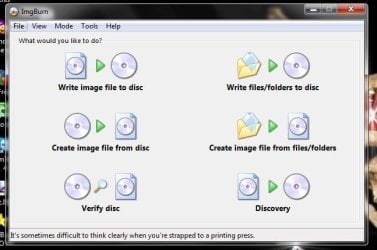
You have some fine 64 bit hardware there. I would try downloading the 64 bit , Burn with ImgBurn (Freeware) at 4x speed with verify ON ;)
 

Attachments

  • ImgBurn.JPG
    ImgBurn.JPG
    40.3 KB · Views: 4
  • ImgBurn_Verify.JPG
    ImgBurn_Verify.JPG
    54.5 KB · Views: 3

My Computer My Computer

At a glance

Win7 Enterprise, Win7 x86 (Ult 7600), Win7 x6...AMD fx8350 4ghz, AMD-32 2400mhz, AMD-64 3200m...2gb, 4gb on the Ult 7600, 4gb on Technet RTM,...Draw my own Graphics, several nVidia cards
Computer type
PC/Desktop
Computer Manufacturer/Model Number
Built them myself, Science Experiments !
OS
Win7 Enterprise, Win7 x86 (Ult 7600), Win7 x64 Ult 7600, TechNet RTM on AMD x64 (2.8Ghz)
CPU
AMD fx8350 4ghz, AMD-32 2400mhz, AMD-64 3200mhz, AMDx64 2.8G
Motherboard
SIS 755, ECS-K8M890M-M (Ult 7600), GigaByte & others
Memory
2gb, 4gb on the Ult 7600, 4gb on Technet RTM, 32gb on FX8350
Graphics Card(s)
Draw my own Graphics, several nVidia cards
Sound Card
on motherboard
Monitor(s) Displays
19" flat scr, 28" I-Inc widescr,22" Emprex Widescr, 23" Acer
Screen Resolution
1280 x 1024, 1440 x 900, 1920 x 1080
Hard Drives
6 pata Ide HD's & 2 Sata HD's
added 80gb external on Ult 7600 computer,
numerous extra 1tb, 2TB, 3Tb SATA HD's
A collection of ext HD Docks w/ HDs
PSU
430w, 550w, 600w, 700, 800, etc
Case
All Generic Full Towers
Cooling
Open Air & a few fans, some w/ colored LEDs
Keyboard
Compaq & Dell recycled from GoodWill
Mouse
Made in China Optical Wired Mouse
Internet Speed
Fast Cable InterNet
Antivirus
AVG Free on 24 different Desktops, NO Problems!
Browser
IE 8 is preferred, but use FireFox sometimes
Other Info
Linksys Routers, switches, & Hubs
Too Many USB Flash Drives to count, Biggest is 64GB !
Eight computers in my home network.
Sixteen computers at my business network.
Linked via TeamViewer !
Lots of old used spare computer parts everywhere!
Formatting the HD isn't sufficient and really does nothing. You need to wipe all boot code with DISKPART from DVD command line: http://www.sevenforums.com/tutorials/52129-disk-clean-clean-all-diskpart-command.html
http://www.sevenforums.com/tutorials/119713-diskpart-pc-startup.html?ltr=D

Make sure you have the latest BIOS update. If so, reset the CMOS: Clear CMOS - 3 Ways To Clear the CMOS - Reset BIOS

While in BIOS setup, set SATA controller to AHCI to try install.

If these steps fail, use Step 2.2 here to pre-partition and mark Active: http://www.sevenforums.com/tutorials/91339-ssd-hdd-optimize-windows-reinstallation.html

Check your ISO HASH against official HASH here: Windows 7 RTM SHA-1 hash / checksums

Try writing the confirmed ISO to flash stick using UltraISO trial version: On File tab Open ISO, on Bootable tab Write Disk Image, Format, Write. Boot under USB or HD using BIOS Boot Menu key.
 
“Windows cannot install required files error 0x80070570”

I think it could be that your install DVD disc is not perfect. I recommend you download the Windows 7 ISO 64 bit image again and burn it on a machine known to make good disks. Ideally you want to drop the burn speed down to as low as possible.

Since you have been able to run GParted from the Ubuntu install disk in life CD mode, that indicates that most or all of your hardware is probably good. I checked the reviews for your RAM on Newegg and the RAM looks excellent.

For the motherboard and BIOS I would take out the battery for 30 minutes and put it back in. That will reset the BIOS. Leave the BIOS settings at the failsafe settings.

I have the same hard drive that you have. For some reason the regular hard drive utility doesn’t work on this particular model drive. The tool that Samsung does offer is available at the link below. I know this because I called them. I believe it has both a diagnostic utility and what they call a low-level format utility which is actually just a program the rights ones and zeros to the hard disk. In other words it’s an eraser program. It takes about three hours to run the eraser program. Utility program is a lot faster.

ESTOOL301v_CDROM.zip:
http://www.samsung.com/global/business/hdd/support/downloads/support_in_es.html

As a test of the hardware you might try installing Ubuntu to the hard drive. If you can get Ubuntu loaded and start Firefox and hit the Internet that should verify that the hardware works. Then boot into live CD mode and delete all the partitions.

Then try the Windows 7 install again.
 
Last edited:

My Computer My Computer

At a glance

windows 7 64
OS
windows 7 64
Alright, so I ran some tests on my hard drive (Samsung's hard drive diagnostics), everything was cool. As expected. 'Cause nothing's ever that simple. Tried 64-bit, had same problem, also as expected (although I'll probably continue trying with 64, I don't know why I wasn't before). Did a clean all with DISKPART as recommended, then reset the BIOS and changed the hard drive controller to AHCI, also as recommended.

Still nothing. I'm going to continue my way down gregrocker's list here, at least to try the pre-partitioning. I've already verified the HASH, I'll try yet another USB I suppose.
 

My Computer My Computer

At a glance

Windows 7 Professional 32bit
OS
Windows 7 Professional 32bit
Hello vivlock, welcome to Seven Forums!


Have you tried the wipe that was suggested earlier, have a look at this information below and be sure to post back with any further questions you may have and to keep us informed.


After you have copied out or made back-ups of the data you need to save to external media, use Step One of this tutorial at the link below to do a wipe (secure erase) to the entire Hard Disk Drive / Solid State Drive.
  • Then if you do not want to create the new Windows 7 "System Reserved" partition use the outline in Step Two #2 to create, format and mark Active a single 100GB partition to do the installation to.
  • If you do want to create the "System Reserved" partition use the outline in Step Two #3 to create, format and mark Active the System Reserved partition and then create and format the 100GB partition to do the installation to.
Either way, running the "clean all" then creating and formatting the partition(s) using diskpart will get you the best possible space to do a clean install of Windows 7 to; you can always extend the Windows partition to include the remaining unallocated space on the HDD / SSD or create additional partitions after the installation completes if you choose.

SSD / HDD : Optimize for Windows Reinstallation

DISKPART : At PC Startup

Do a Clean Install with a Upgrade Windows 7 Version
 

My Computer My Computer

At a glance

W 7 64-bit UltimateIntel Q9550 Yorkfield8GB Dominator 8500C5DATI : XFX 5870
Computer Manufacturer/Model Number
* BFK Customs *
OS
W 7 64-bit Ultimate
CPU
Intel Q9550 Yorkfield
Motherboard
ASUS P5Q Pro
Memory
8GB Dominator 8500C5D
Graphics Card(s)
ATI : XFX 5870
Sound Card
Realtek HD Audio 7-1
Monitor(s) Displays
1x 47" LCD HDMI & 3x 26" LCD HDMI
Screen Resolution
1920x1080P & 1920x1200
Hard Drives
1x 80GB Intel X25-M G2 SSD : 1x 500GB & 1x 640GB WD Caviar Black(s)
PSU
Corsair 620HX
Case
Cooler Master RC-690
Cooling
Tuniq Tower 120, 2x 140mm and 3x 120mm case fans
Keyboard
Microsoft 500
Mouse
Razer Diamondback 3G
Internet Speed
14 Mb/s
Other Info
1x Koutech 3Gb/s SATA HDD Hot Swap Rack
vivlock,

have you tried setting the BIOS to the default settings and installing Ubuntu to the hard drive?
 

My Computer My Computer

At a glance

windows 7 64
OS
windows 7 64
Well, that was weird.

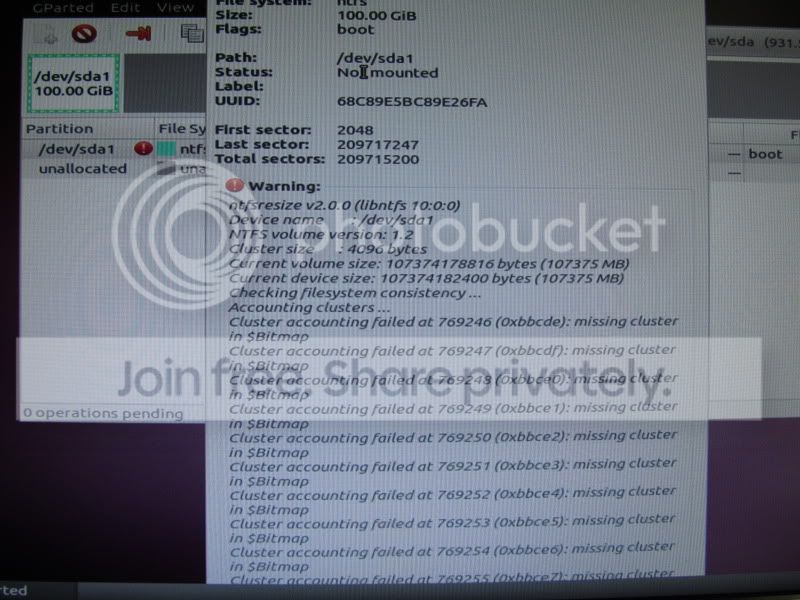
I just tried pre-partitioning and tried the install again (from the DVD). Failed, and I was going to give it another go from the USB drive I just prepared, and was told that I couldn't install to that partition. Went in via Ubuntu USB stick to look at the partitions, and have all sorts of weird errors on that partition. Lots of "Cluster accounting failed at...(number)". You know, just in case that means anything to anyone. Otherwise I'll be deleting the partition and trying again.

NGC: I reset the BIOS, haven't tried installing Ubuntu yet.

IMG_0218.jpg
 
Last edited:

My Computer My Computer

At a glance

Windows 7 Professional 32bit
OS
Windows 7 Professional 32bit
Run your HD diagnostics extended CD scan again.

Use free Partition Wizard bootable CD which is best for Win7. After creating Primary NTFS install partition and giving it a letter, rightclick modify>Set to Active, then run File System check on it.

If you use Diskpart to partition and mark Active, run Disk Check from Command Line on partition you set up: http://www.sevenforums.com/tutorials/433-disk-check.html
 
delete duplicate post.
 
Last edited:

My Computer My Computer

At a glance

windows 7 64
OS
windows 7 64
vivlock,

have you tried setting the BIOS to the default settings and installing Ubuntu to the hard drive?


“Cluster accounting failed at...(number)"

OK. From what you have mentioned it sounds like you may have a problem with the hard drive.

If you run the same Samsung utility I mentioned earlier, the first 2 Options are “drive diagnostic” and “low-level format”. If you believe you have bad clusters you want to run the low-level format option. That will check and Mark any bad clusters as bad.

Regarding pre formatting the hard drive before installing Windows 7 I don’t see why it would be necessary. It could be why you can get Windows 7 install.

Generally the best procedure is to start with a clean hard drive and allow Windows 7 to do it’s own partitioning. Select custom advanced. Then click drive options advanced. Click new, click and hold the forward delete key. Then enter the desired number of megabytes for the partition. All you need to do is select a single partition of say 50 GB or more. Windows 7 will automatically create a boot partition formatted NTFS in front of the partition that you are trying to make. This boot partition is were the boot files for Windows 7 will go.

With the current setup you have shown a picture of you only have one partition for Windows 7. This is probably why your installation has failed. If you want to try to manually create partitions before installing Windows 7, I recommend you make a 100 MB NTFS partition at the front of the drive, followed by a much larger partition to hold Windows 7.
 

My Computer My Computer

At a glance

windows 7 64
OS
windows 7 64
NGC: Still haven't tried Ubuntu, but I think I'm doing that next.

I've tried partitioning the drives a lot of ways, from leaving it completely alone and letting Windows 7 do all the partitioning, to what you saw in the picture, to what I did just now, specifying it 100gb and letting it add its own system partition. I've tested my hard drive with the utility you recommended and came up with no problems.

So, for the attempt at Ubuntu. I'd like to dual boot it at some point, I'm a comp sci student and have my uses for linux, but I've heard Windows should be installed first for that, since it sometimes likes to overwrite other OS's boot information. But I guess I can worry about that later, and just see if I can get it to install for the moment.
 

My Computer My Computer

At a glance

Windows 7 Professional 32bit
OS
Windows 7 Professional 32bit
And Ubuntu installed without the slightest hitch. I'm running it right now. I don't understand why Windows 7 refuses to be installed.

What now? :/
 

My Computer My Computer

At a glance

Windows 7 Professional 32bit
OS
Windows 7 Professional 32bit
If you have the BIOS still set at default, do another wipe of the entire HDD running the clean all command using diskpart and create, format and mark active a single 100GB partition as outlined in Step Two #2 of this tutorial at the link below to install Windows 7 to.

Then do not format using the Windows installer, just select the partition to install to and click next.

SSD / HDD : Optimize for Windows Reinstallation

DISKPART : At PC Startup
 

My Computer My Computer

At a glance

W 7 64-bit UltimateIntel Q9550 Yorkfield8GB Dominator 8500C5DATI : XFX 5870
Computer Manufacturer/Model Number
* BFK Customs *
OS
W 7 64-bit Ultimate
CPU
Intel Q9550 Yorkfield
Motherboard
ASUS P5Q Pro
Memory
8GB Dominator 8500C5D
Graphics Card(s)
ATI : XFX 5870
Sound Card
Realtek HD Audio 7-1
Monitor(s) Displays
1x 47" LCD HDMI & 3x 26" LCD HDMI
Screen Resolution
1920x1080P & 1920x1200
Hard Drives
1x 80GB Intel X25-M G2 SSD : 1x 500GB & 1x 640GB WD Caviar Black(s)
PSU
Corsair 620HX
Case
Cooler Master RC-690
Cooling
Tuniq Tower 120, 2x 140mm and 3x 120mm case fans
Keyboard
Microsoft 500
Mouse
Razer Diamondback 3G
Internet Speed
14 Mb/s
Other Info
1x Koutech 3Gb/s SATA HDD Hot Swap Rack
vivlock,

“I downloaded it from my school, we get a free license from an academic alliance page. I have successfully installed from this ISO before and had no issues.”

I still think that the install media may be bad. Is there anyway you can talk to an IT person at school? Perhaps they can make you a disk or test the one that you have on a test system to see if the install starts.
 

My Computer My Computer

At a glance

windows 7 64
OS
windows 7 64
When I don't want to waste any more time troubleshooting install failure, I put my HD in another computer and install using bootable installer, then after install run SysPrep which removes all drivers, disk Identification and activation to prepare it to start on new hardware.

After SysPrep move the HD back to the problem machine and it should start up after swapping out all drivers and requesting several restarts. Click the drivers loading balloon which will appear in SysTray to monitor its progress.

http://www.sevenforums.com/tutorial...lation-transfer-new-computer.html#post1161038
 
Back
Top