Solved Install Linux on old laptop

Sven1458

New member
Member
VIP
Local time
1:14 PM
Messages
137
Hi all
I got my hands on an old Dell Vostro 1000.
It has XP on it and was retired because of it. Also it was not the fastest machine ever built.
I would like to install Linux on it, but I have no idea what flavor.
What would be a good flavor to put on here? Nothing to complicated, because I don’t know much about Linux.
Any recommendations?

Thanks
Sven
 

My Computer My Computer

Computer type
PC/Desktop
Computer Manufacturer/Model Number
Custom Build
OS
windows 7 ultimate x64
CPU
AMD FX 6 CORE PROCESSOR
Memory
16 GB
Graphics Card(s)
on MB
Sound Card
on MB
Monitor(s) Displays
Acer
Screen Resolution
1920x1080
Hard Drives
Seagate ( C:\)
Case
mini tower
Keyboard
Logitech wireless
Mouse
Logitech wireless
Antivirus
MSE
Browser
IE11
Hey,

Ubuntu is really good and its free, here are the requirements;

Ubuntu Desktop Edition
700 MHz processor (about Intel Celeron or better)
512 MiB RAM (system memory)
5 GB of hard-drive space (or USB stick, memory card or external drive but see LiveCD for an alternative approach)
VGA capable of 1024x768 screen resolution
Either a CD/DVD drive or a USB port for the installer media
Internet access is helpful

Thank you for your contribution | Ubuntu
 

My Computer My Computer

Computer type
PC/Desktop
Computer Manufacturer/Model Number
Custom Build
OS
Windows 7 Ultimate 64-bit
CPU
Intel G3420 3.2GHZ Dual Core
Motherboard
Gigabyte H87-HD3
Memory
Kingson 8GB 1600mhz
Graphics Card(s)
MSI R7970 TF 3GD5/OC BE
Monitor(s) Displays
21" LG & "19 Vertical Samsung
Hard Drives
120GB SSD - Boot
1TB WD
350GB External
2TB External (Wireless)
PSU
Corsair CX 500 modular
Case
Zalman Z11 Plus (modified)
Cooling
Corsair H55, 2x 120mm SP Corsair, 1x 140 Coolermaster
Keyboard
Corsair K50
Mouse
CSL Gaming
Internet Speed
164Mbps
Antivirus
Avast, Malwarebytes
Browser
Google Chrome, IE, Firefox
Hi Harribo2014

Sounds like I need pretty basic hardware.
Thanks for your help
Sven
 

My Computer My Computer

Computer type
PC/Desktop
Computer Manufacturer/Model Number
Custom Build
OS
windows 7 ultimate x64
CPU
AMD FX 6 CORE PROCESSOR
Memory
16 GB
Graphics Card(s)
on MB
Sound Card
on MB
Monitor(s) Displays
Acer
Screen Resolution
1920x1080
Hard Drives
Seagate ( C:\)
Case
mini tower
Keyboard
Logitech wireless
Mouse
Logitech wireless
Antivirus
MSE
Browser
IE11
No worries.
 

My Computer My Computer

Computer type
PC/Desktop
Computer Manufacturer/Model Number
Custom Build
OS
Windows 7 Ultimate 64-bit
CPU
Intel G3420 3.2GHZ Dual Core
Motherboard
Gigabyte H87-HD3
Memory
Kingson 8GB 1600mhz
Graphics Card(s)
MSI R7970 TF 3GD5/OC BE
Monitor(s) Displays
21" LG & "19 Vertical Samsung
Hard Drives
120GB SSD - Boot
1TB WD
350GB External
2TB External (Wireless)
PSU
Corsair CX 500 modular
Case
Zalman Z11 Plus (modified)
Cooling
Corsair H55, 2x 120mm SP Corsair, 1x 140 Coolermaster
Keyboard
Corsair K50
Mouse
CSL Gaming
Internet Speed
164Mbps
Antivirus
Avast, Malwarebytes
Browser
Google Chrome, IE, Firefox
Take a look at Zorin Linux as well. It's Ubuntu based but has more of a Windows look and feel.
It has a light version (6.0) and a regular version (8.0) with both 32 and 64 bit versions.
 

My Computer My Computer

Computer type
PC/Desktop
Computer Manufacturer/Model Number
Lenovo IdeaCenter 450
OS
Windows 10 Pro X64
CPU
Intel Quad Core i7-4770 @ 3.4Ghz
Memory
16.0GB PC3-12800 DDR3 SDRAM 1600 MHz
Graphics Card(s)
Intel Integrated HD Graphics
Sound Card
Realtek HD Audio
Monitor(s) Displays
HP 22" LCD
Screen Resolution
1680 x 1050
Hard Drives
250GB Samsung EVO SATA-3 SSD
2TB Seagate ST2000DM001 SATA-2
1.5TB Seagate ST3150041AS SATA
Keyboard
Dell USB
Mouse
Lenovo USB
Internet Speed
Cable via Road Runner 3MB Upload, 30MB Download
Antivirus
Windows Defender, MBAM Pro, MBAE
Browser
Seamonkey
Other Info
UEFI/GPT
PLDS DVD-RW DH16AERSH
Thanks, I check it out

Sven
 

My Computer My Computer

Computer type
PC/Desktop
Computer Manufacturer/Model Number
Custom Build
OS
windows 7 ultimate x64
CPU
AMD FX 6 CORE PROCESSOR
Memory
16 GB
Graphics Card(s)
on MB
Sound Card
on MB
Monitor(s) Displays
Acer
Screen Resolution
1920x1080
Hard Drives
Seagate ( C:\)
Case
mini tower
Keyboard
Logitech wireless
Mouse
Logitech wireless
Antivirus
MSE
Browser
IE11
Ztruker,

I downloaded the software and I was able to use the live version on my home PC. I was able to start a few programs that do not need to be installed, like CBid and cquz. I also was able to start siw, but it complained that it was running in compatibility mode. But it run. gave me no data, because Zorin was not installed, or it was unable to do it like that.
My question is: can I just install any software, either DOS or Windows to the hard drive, or am I limited to what Zorin has to offer?

Thanks
Sven
 

My Computer My Computer

Computer type
PC/Desktop
Computer Manufacturer/Model Number
Custom Build
OS
windows 7 ultimate x64
CPU
AMD FX 6 CORE PROCESSOR
Memory
16 GB
Graphics Card(s)
on MB
Sound Card
on MB
Monitor(s) Displays
Acer
Screen Resolution
1920x1080
Hard Drives
Seagate ( C:\)
Case
mini tower
Keyboard
Logitech wireless
Mouse
Logitech wireless
Antivirus
MSE
Browser
IE11
Zorin is one of the distros I also run - in a virtual partition. I find it a bit buggy and it does not have a lot of facilities. A much better option is Mint Mate. That is a beautiful system. Try it in Virtual - here is how.

Note: there is also a 32bit version from the site I linked in the tutorial - if that is what you need.

Here is a little Mint Mate demo I made.

This was made from an installation on a flash drive. The setup tutorial for that is here.
 

My Computer My Computer

Computer Manufacturer/Model Number
HP, Dell, Gateway, Toshiba - 4 laptops and 2 desktops
OS
Vista, Windows7, Mint Mate, Zorin, Windows 8
CPU
from 1.6GHz Duo to i7
Monitor(s) Displays
2x HP w2207
Hard Drives
5x HDD, 7x SSD, 12x Externals
Keyboard
with trackball - no mices
Mouse
Trackball mice
Internet Speed
DSL 6000
Very nice demo on UTube.
I will download this also and try it out.
Thanks
Sven
 

My Computer My Computer

Computer type
PC/Desktop
Computer Manufacturer/Model Number
Custom Build
OS
windows 7 ultimate x64
CPU
AMD FX 6 CORE PROCESSOR
Memory
16 GB
Graphics Card(s)
on MB
Sound Card
on MB
Monitor(s) Displays
Acer
Screen Resolution
1920x1080
Hard Drives
Seagate ( C:\)
Case
mini tower
Keyboard
Logitech wireless
Mouse
Logitech wireless
Antivirus
MSE
Browser
IE11
You are welcome. If you have questions, post back.
 

My Computer My Computer

Computer Manufacturer/Model Number
HP, Dell, Gateway, Toshiba - 4 laptops and 2 desktops
OS
Vista, Windows7, Mint Mate, Zorin, Windows 8
CPU
from 1.6GHz Duo to i7
Monitor(s) Displays
2x HP w2207
Hard Drives
5x HDD, 7x SSD, 12x Externals
Keyboard
with trackball - no mices
Mouse
Trackball mice
Internet Speed
DSL 6000
My question is: can I just install any software, either DOS or Windows to the hard drive, or am I limited to what Zorin has to offer?

I can't answer that at the moment. I can't even figure out how to install Firefox on Zorin, so maybe I'll go back to playing with Mint Mate as whs suggested. I've got that running in a Virtual machine as well.

What I liked about Zorin is that it doers look a lot like Windows 7.
 

My Computer My Computer

Computer type
PC/Desktop
Computer Manufacturer/Model Number
Lenovo IdeaCenter 450
OS
Windows 10 Pro X64
CPU
Intel Quad Core i7-4770 @ 3.4Ghz
Memory
16.0GB PC3-12800 DDR3 SDRAM 1600 MHz
Graphics Card(s)
Intel Integrated HD Graphics
Sound Card
Realtek HD Audio
Monitor(s) Displays
HP 22" LCD
Screen Resolution
1680 x 1050
Hard Drives
250GB Samsung EVO SATA-3 SSD
2TB Seagate ST2000DM001 SATA-2
1.5TB Seagate ST3150041AS SATA
Keyboard
Dell USB
Mouse
Lenovo USB
Internet Speed
Cable via Road Runner 3MB Upload, 30MB Download
Antivirus
Windows Defender, MBAM Pro, MBAE
Browser
Seamonkey
Other Info
UEFI/GPT
PLDS DVD-RW DH16AERSH
I can't even figure out how to install Firefox on Zorin
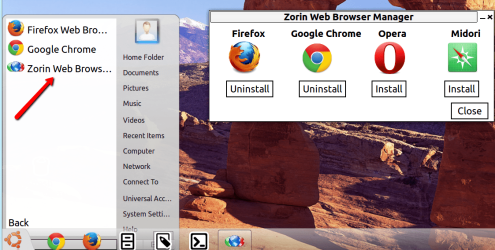
LOL, Go to Start > Internet > Zorin web browser. Then the window on the right opens from where you can install it. Opera did not work for me but the other 3 do work.
 

Attachments

  • 2014-04-15_2111.png
    2014-04-15_2111.png
    194.4 KB · Views: 0

My Computer My Computer

Computer Manufacturer/Model Number
HP, Dell, Gateway, Toshiba - 4 laptops and 2 desktops
OS
Vista, Windows7, Mint Mate, Zorin, Windows 8
CPU
from 1.6GHz Duo to i7
Monitor(s) Displays
2x HP w2207
Hard Drives
5x HDD, 7x SSD, 12x Externals
Keyboard
with trackball - no mices
Mouse
Trackball mice
Internet Speed
DSL 6000
Great demo. I'll be using it tomorrow to try Mint Mate again. Thanks
 

My Computer My Computer

Computer type
PC/Desktop
Computer Manufacturer/Model Number
Lenovo IdeaCenter 450
OS
Windows 10 Pro X64
CPU
Intel Quad Core i7-4770 @ 3.4Ghz
Memory
16.0GB PC3-12800 DDR3 SDRAM 1600 MHz
Graphics Card(s)
Intel Integrated HD Graphics
Sound Card
Realtek HD Audio
Monitor(s) Displays
HP 22" LCD
Screen Resolution
1680 x 1050
Hard Drives
250GB Samsung EVO SATA-3 SSD
2TB Seagate ST2000DM001 SATA-2
1.5TB Seagate ST3150041AS SATA
Keyboard
Dell USB
Mouse
Lenovo USB
Internet Speed
Cable via Road Runner 3MB Upload, 30MB Download
Antivirus
Windows Defender, MBAM Pro, MBAE
Browser
Seamonkey
Other Info
UEFI/GPT
PLDS DVD-RW DH16AERSH
Speaking of demo - here is some fun I had with Zorin:


My Computer My Computer

Computer Manufacturer/Model Number
HP, Dell, Gateway, Toshiba - 4 laptops and 2 desktops
OS
Vista, Windows7, Mint Mate, Zorin, Windows 8
CPU
from 1.6GHz Duo to i7
Monitor(s) Displays
2x HP w2207
Hard Drives
5x HDD, 7x SSD, 12x Externals
Keyboard
with trackball - no mices
Mouse
Trackball mice
Internet Speed
DSL 6000
Zorin is flaky, or at least it was when I tried it.

Mint has been rock solid so far.
 

My Computer My Computer

Computer type
PC/Desktop
Computer Manufacturer/Model Number
Lenovo IdeaCenter 450
OS
Windows 10 Pro X64
CPU
Intel Quad Core i7-4770 @ 3.4Ghz
Memory
16.0GB PC3-12800 DDR3 SDRAM 1600 MHz
Graphics Card(s)
Intel Integrated HD Graphics
Sound Card
Realtek HD Audio
Monitor(s) Displays
HP 22" LCD
Screen Resolution
1680 x 1050
Hard Drives
250GB Samsung EVO SATA-3 SSD
2TB Seagate ST2000DM001 SATA-2
1.5TB Seagate ST3150041AS SATA
Keyboard
Dell USB
Mouse
Lenovo USB
Internet Speed
Cable via Road Runner 3MB Upload, 30MB Download
Antivirus
Windows Defender, MBAM Pro, MBAE
Browser
Seamonkey
Other Info
UEFI/GPT
PLDS DVD-RW DH16AERSH
I agree. For a day to day operation, Mint Mate is the way to go. But Zorin is nice as a study object and maybe over time they can get the bugs out.
 

My Computer My Computer

Computer Manufacturer/Model Number
HP, Dell, Gateway, Toshiba - 4 laptops and 2 desktops
OS
Vista, Windows7, Mint Mate, Zorin, Windows 8
CPU
from 1.6GHz Duo to i7
Monitor(s) Displays
2x HP w2207
Hard Drives
5x HDD, 7x SSD, 12x Externals
Keyboard
with trackball - no mices
Mouse
Trackball mice
Internet Speed
DSL 6000
Hi all,

I have installed ( separately ) all 3 of the above Linux flavors.

Every one installed just fine and had no problem finding my internet connection.

Also my printer was found and after downloading Thunderbird I was able to access my e-mail.

So far so good.

Installing Windows programs are a little tricky if not impossible.

I downloaded “ Wine ”, that is supposed to make windows programs run.

I was able to get the installer going within Wine and it started to install, but eventually the program is looking for a specific .dll file in System32 and cannot find it, because the folder does not exist. The supplied office suite LibreOffice has a “Base” program, but cannot read .mdb files from MSOffice. Spreadsheets and text documents are fine.

So as a test I installed windows 7 ultimate and to my surprise it runs better then XP.

Now I have to decide if I want to spend the money and buy awin 7 key.

Regardless, thanks for all the input.

Sven
 

My Computer My Computer

Computer type
PC/Desktop
Computer Manufacturer/Model Number
Custom Build
OS
windows 7 ultimate x64
CPU
AMD FX 6 CORE PROCESSOR
Memory
16 GB
Graphics Card(s)
on MB
Sound Card
on MB
Monitor(s) Displays
Acer
Screen Resolution
1920x1080
Hard Drives
Seagate ( C:\)
Case
mini tower
Keyboard
Logitech wireless
Mouse
Logitech wireless
Antivirus
MSE
Browser
IE11
If you need Windows programs, you need Windows. I never had a lot of luck with the Wine either.

If you go with Linux, you are in another world. Then you have to use the Linux programs. Those are different but many of them are quite good. But I understand - for a seasoned Windows user, the switch to Linux is not easy.

That's why I run it in virtual and from the stick and use it mainly for internet access (is safer).
 

My Computer My Computer

Computer Manufacturer/Model Number
HP, Dell, Gateway, Toshiba - 4 laptops and 2 desktops
OS
Vista, Windows7, Mint Mate, Zorin, Windows 8
CPU
from 1.6GHz Duo to i7
Monitor(s) Displays
2x HP w2207
Hard Drives
5x HDD, 7x SSD, 12x Externals
Keyboard
with trackball - no mices
Mouse
Trackball mice
Internet Speed
DSL 6000
You might want to see if your YouTube videos will work. I tried installing Ubuntu 10.04 or 12.04 and YouTube would not work at all. Something about the chip being too old to accept the Adobe Flashplayer. Shockplayer would not work at all. Something about SSE2 in the chip. I still have it installed in my old desktop computer, but without YouTube functioning. Matter of fact, the only video that works is from the DVD player. No videos on Websites pages will work along with YouTube.
 

My Computer My Computer

Computer type
PC/Desktop
Computer Manufacturer/Model Number
Built Online @ AvaDirect
OS
Windows 7 Home Premium 64-Bit
CPU
E8500 Duel core
Motherboard
Asus P5ND
Memory
8 GB G Skill
Graphics Card(s)
XFX GeForce9600 GSO
Sound Card
Intergated
Monitor(s) Displays
Samsung 23"
Hard Drives
WD 320GB SATAII (2ea); 1TB WD SATA II
PSU
PC Power & Cooling 610 W
Case
NZXT Tempest Black
Cooling
Cooler Master Hyper 212 EVO
Keyboard
Logitech K520
Mouse
Logitech M310 Laser
Internet Speed
3 Mbps
Antivirus
McAFee
Browser
Firefox
Back
Top