Solved install on GPT HD partition impossible (multiboot Linux)

osenon

New member
Local time
1:35 PM
Messages
14
Presently using Window 7 – last version available from MS website - in a VM ( Oracle ) I would install it on a dedicated partition , but I can’t : when the computer reboot ( first reboot ) before the last step "installation end » , computer reboot on the USB but it’ comes at each time time at the origine of the installation ( langage selection ,partitionselect ,, ) ...etc It run into a continuous loop !
Install data are : iso 64 bit , usb done with rufus : mode gpt , uefi -no csm (automatic sélection) .
HD : gpt partition as détail with 3 distro :Mint with Windows7 in VM , MX et Arch

sda1 :swap -sda2 :/Mint -sda3 :home Mint -sda4 :/Mx 19 -sda5:/Arch20 - sda6 :efi , boot ,esp -sda7 :win7 ( 48 Go partition)
Bios settings : UEFI et legacy ( with EFI no start possible : « no bootable system ,,,,, » ! )
If someone have an idea to fix this matter ....
I suppose the matter is the presence of Linux distro before Windows install and/or also bios settings ( during Linux install ) or is it the presence of a Windows7 in VM ?my aim is to remove this Win7 in VM after installing it on a the dedicated partition.( and after perhaps to upgrade to WIn10).


Notes:
1)same matter with Window 10 .
2) for windows 7 install in VM , none problems occured (Win7 presently activated and working with no problems)

3)When I remove the USB before reboot during install , the computer propose its standard grub menu ( selection between 3 linux distro only , Windows menu appears but not working ) , but never Windows install program is continuing and then Windows install never ends ! Also Windows items ( Window efi manager ,,,, ) of grub menu are not working at all .


p { margin-bottom: 0.25cm; line-height: 115% }
 

My Computer My Computer

Computer type
PC/Desktop
Computer Manufacturer/Model Number
custom build
OS
windows 7 64 bit home premium
CPU
Intel G3220 3Ghz
Motherboard
Gigabyte GA-H81M-HD3
Memory
8 Go
Graphics Card(s)
Intel Xeon E3-1200
Hard Drives
500 Go Samsumg
Antivirus
none
Browser
Firefox
Other Info
mutliboot Linux + WIndows
Welcome to the Forum.

If I understood well, after Win 7 installation copies the the files to the partition and it boots from the installation drive again.

- After it has copied the files, remove the installation drive (USB or DVD).
- During post, launch the boot menu (F12) and choose Windows boot manager. It will continue to install Win 7.
 
Last edited:

My Computers My Computers

System One System Two

  • Computer type
    PC/Desktop
    Computer Manufacturer/Model Number
    custom build
    OS
    Windows 7 HP 64
    CPU
    i5 6600K - 800MHz to 4200MHz
    Motherboard
    GA-Z170-HD3P
    Memory
    4+4G GSkill DDR4 3000
    Graphics Card(s)
    IG - Intel 530
    Monitor(s) Displays
    Samsung 226BW
    Screen Resolution
    1680x1050
    Hard Drives
    (1) -1 SM951 – 128GB M.2 AHCI PCIe SSD drive for Windows 7 and Lubuntu
    (2) -1 WD SATA 3 - 1T for Data
    (3) -1 WD SATA 3 - 1T for backup
    PSU
    Thermaltake 450W TR2 gold
    Keyboard
    Old and good Chicony mechanical keyboard
    Mouse
    Logitech mX performance - 9 buttons (had to disable some)
    Internet Speed
    500Mb/s
    Browser
    Firefox 64
    Other Info
    TinyWall firewall
  • Computer type
    Laptop
    System Manufacturer/Model Number
    Asus Q550LF
    OS
    Windows 7 Pro
    CPU
    i7-4500U 800MHz to 3.0GHz
    Motherboard
    Asus Q550LF
    Memory
    (4+4)G DDR3 1600
    Graphics Card(s)
    IG intel 4400 + NVIDIA GeForce GT 745M
    Sound Card
    Realtek
    Monitor(s) Displays
    LG Display LP156WF4-SPH1
    Screen Resolution
    1920 x 1080
    Hard Drives
    BX500 120G SSD for Windows and programs +
    1T HDD for data
    Internet Speed
    500 Mb/s
    Browser
    Firefox
    Other Info
    TinyWall firewall
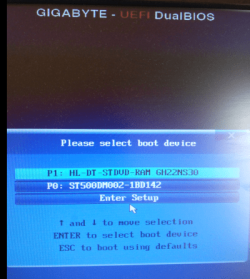
F12 did not clear the matter

F12 during give 3 possibilities :
- p1 : boot HD and lead to existing grub menu

-p2 : boot on CDROM : not relevant
- system set -up

Then still no possibility to finalise win7 installation ...
 

Attachments

  • f12dataprtsc.png
    f12dataprtsc.png
    71.9 KB · Views: 33

My Computer My Computer

Computer type
PC/Desktop
Computer Manufacturer/Model Number
custom build
OS
windows 7 64 bit home premium
CPU
Intel G3220 3Ghz
Motherboard
Gigabyte GA-H81M-HD3
Memory
8 Go
Graphics Card(s)
Intel Xeon E3-1200
Hard Drives
500 Go Samsumg
Antivirus
none
Browser
Firefox
Other Info
mutliboot Linux + WIndows
Is your disk a GPT or MBR?
Enter Linux and update grub (sudo update-grub)
 

My Computers My Computers

System One System Two

  • Computer type
    PC/Desktop
    Computer Manufacturer/Model Number
    custom build
    OS
    Windows 7 HP 64
    CPU
    i5 6600K - 800MHz to 4200MHz
    Motherboard
    GA-Z170-HD3P
    Memory
    4+4G GSkill DDR4 3000
    Graphics Card(s)
    IG - Intel 530
    Monitor(s) Displays
    Samsung 226BW
    Screen Resolution
    1680x1050
    Hard Drives
    (1) -1 SM951 – 128GB M.2 AHCI PCIe SSD drive for Windows 7 and Lubuntu
    (2) -1 WD SATA 3 - 1T for Data
    (3) -1 WD SATA 3 - 1T for backup
    PSU
    Thermaltake 450W TR2 gold
    Keyboard
    Old and good Chicony mechanical keyboard
    Mouse
    Logitech mX performance - 9 buttons (had to disable some)
    Internet Speed
    500Mb/s
    Browser
    Firefox 64
    Other Info
    TinyWall firewall
  • Computer type
    Laptop
    System Manufacturer/Model Number
    Asus Q550LF
    OS
    Windows 7 Pro
    CPU
    i7-4500U 800MHz to 3.0GHz
    Motherboard
    Asus Q550LF
    Memory
    (4+4)G DDR3 1600
    Graphics Card(s)
    IG intel 4400 + NVIDIA GeForce GT 745M
    Sound Card
    Realtek
    Monitor(s) Displays
    LG Display LP156WF4-SPH1
    Screen Resolution
    1920 x 1080
    Hard Drives
    BX500 120G SSD for Windows and programs +
    1T HDD for data
    Internet Speed
    500 Mb/s
    Browser
    Firefox
    Other Info
    TinyWall firewall
HD is GPT type as indicated in my first post

the problem is not to install or reinstall the loader , the problem is to complete the Win 7 installation by reentering in the install process after the first reboot .

A solution would be probably to format the entire HD and to install Window first and after Linux , but it's too much work ( and specially due to virtual machine already with win7 and sofware . Without solution I will do that when I replace my motherboard or my computer ; also I am quite sure install on a separated HD ( or SSD ) would work ,but ......Windows is not "open" to others systems , it seems ... and documentation also .
I still wait for a person having clear this matter .
 

My Computer My Computer

Computer type
PC/Desktop
Computer Manufacturer/Model Number
custom build
OS
windows 7 64 bit home premium
CPU
Intel G3220 3Ghz
Motherboard
Gigabyte GA-H81M-HD3
Memory
8 Go
Graphics Card(s)
Intel Xeon E3-1200
Hard Drives
500 Go Samsumg
Antivirus
none
Browser
Firefox
Other Info
mutliboot Linux + WIndows

My Computers My Computers

System One System Two

  • Computer type
    PC/Desktop
    OS
    7 X64
    CPU
    i5 8400
    Motherboard
    gigabyte b365m ds3h
    Memory
    2x8gb 3200mhz
    Hard Drives
    various
    PSU
    pure power 11 400w cm
    Case
    Coolermaster
    Cooling
    cryorig m9i
  • Computer type
    PC/Desktop
    OS
    7x64
    CPU
    g5400
    Motherboard
    ga b365m ds3h
    Memory
    8gb ddr4 2400
    PSU
    xfx pro 450w
When you update Grub (sudo update-grub), Grub will find your windows installation and add an option to boot windows so it can continue the installation.
 

My Computers My Computers

System One System Two

  • Computer type
    PC/Desktop
    Computer Manufacturer/Model Number
    custom build
    OS
    Windows 7 HP 64
    CPU
    i5 6600K - 800MHz to 4200MHz
    Motherboard
    GA-Z170-HD3P
    Memory
    4+4G GSkill DDR4 3000
    Graphics Card(s)
    IG - Intel 530
    Monitor(s) Displays
    Samsung 226BW
    Screen Resolution
    1680x1050
    Hard Drives
    (1) -1 SM951 – 128GB M.2 AHCI PCIe SSD drive for Windows 7 and Lubuntu
    (2) -1 WD SATA 3 - 1T for Data
    (3) -1 WD SATA 3 - 1T for backup
    PSU
    Thermaltake 450W TR2 gold
    Keyboard
    Old and good Chicony mechanical keyboard
    Mouse
    Logitech mX performance - 9 buttons (had to disable some)
    Internet Speed
    500Mb/s
    Browser
    Firefox 64
    Other Info
    TinyWall firewall
  • Computer type
    Laptop
    System Manufacturer/Model Number
    Asus Q550LF
    OS
    Windows 7 Pro
    CPU
    i7-4500U 800MHz to 3.0GHz
    Motherboard
    Asus Q550LF
    Memory
    (4+4)G DDR3 1600
    Graphics Card(s)
    IG intel 4400 + NVIDIA GeForce GT 745M
    Sound Card
    Realtek
    Monitor(s) Displays
    LG Display LP156WF4-SPH1
    Screen Resolution
    1920 x 1080
    Hard Drives
    BX500 120G SSD for Windows and programs +
    1T HDD for data
    Internet Speed
    500 Mb/s
    Browser
    Firefox
    Other Info
    TinyWall firewall
Hello

After SSD adding I reinntall from zero and this time , it's quite OK ! system is now working except that some drivers are missing : ethernet card ,PCI controller , usb bus and sm bus ; then ,no mouse in operation ! during install it was ok .

for ethernet card I could add it and now the connection is operative ; but for 3 others drivers , impossible to add them - no posssibility without mouse - to reach the original CD rom or usb key.
Could you give me references for these 3 drivers missing : USB bus , PCI controler and SM bus .

motherboard :gigabyte h81m-hd3 - are some drivers part of motherboard pilot ?

operating system : windows 7 (2019-09) 64 bit efi
 

My Computer My Computer

Computer type
PC/Desktop
Computer Manufacturer/Model Number
custom build
OS
windows 7 64 bit home premium
CPU
Intel G3220 3Ghz
Motherboard
Gigabyte GA-H81M-HD3
Memory
8 Go
Graphics Card(s)
Intel Xeon E3-1200
Hard Drives
500 Go Samsumg
Antivirus
none
Browser
Firefox
Other Info
mutliboot Linux + WIndows
i close the file as I transfer the subject in drivers chapter
 

My Computer My Computer

Computer type
PC/Desktop
Computer Manufacturer/Model Number
custom build
OS
windows 7 64 bit home premium
CPU
Intel G3220 3Ghz
Motherboard
Gigabyte GA-H81M-HD3
Memory
8 Go
Graphics Card(s)
Intel Xeon E3-1200
Hard Drives
500 Go Samsumg
Antivirus
none
Browser
Firefox
Other Info
mutliboot Linux + WIndows
Back
Top