
I have a Windows 7 machine that dual boots Linux Mint from the same 500G WD hard drive. What I want to do is delete Linux and dd the Windows 7 installation to it's own 500G ssd.
I have dd'ed a copy of that drive to another WD500G (same model) so I can work on that. So I zapped the extended partition and Linux partition within it and moved the efi partition to the end of the drive so I could give W7 that space. After doing that and re-installing that drive it would only boot into grub rescue. I tried to repair the W7 boot files with the original install disk {startup repair}. Then command line with bootrec /fixmbr and /fixboot. None of that worked.
I gave up on that and dd'ed the original drive back to the copy so I could start over (dd was from a Linux CD live session as before). I started looking around and found some things that don't seem right.
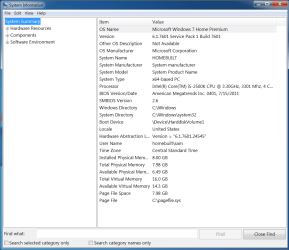
Msinfo32 does not state definitively the boot mode as bios or uefi. Gparted shows both a system reserved and efi partition. Looking at C:\Windows\Panther\NewOs\Panther ...... [Ctrl F > Detected boot environment ... was not found]. I can't find that file in one of my other dual boot (W7-Linux) machines. No idea why.
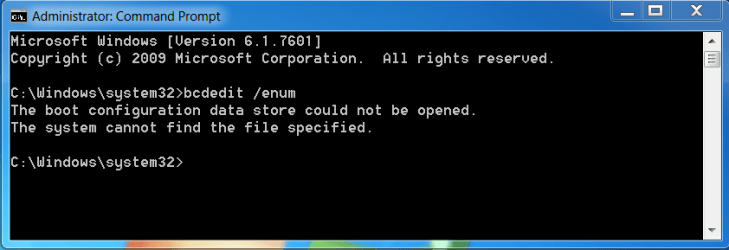
Bcdedit /enum echoed back an error (see attached). Looking around with diskpart I think I see some things that don't look right
(also see attached).
This Windows 7 machine boots both Windows and Linux and seems to operate normally. But why can't I repair this W7 installation after
deleting Linux.
I have dd'ed a copy of that drive to another WD500G (same model) so I can work on that. So I zapped the extended partition and Linux partition within it and moved the efi partition to the end of the drive so I could give W7 that space. After doing that and re-installing that drive it would only boot into grub rescue. I tried to repair the W7 boot files with the original install disk {startup repair}. Then command line with bootrec /fixmbr and /fixboot. None of that worked.
I gave up on that and dd'ed the original drive back to the copy so I could start over (dd was from a Linux CD live session as before). I started looking around and found some things that don't seem right.
Msinfo32 does not state definitively the boot mode as bios or uefi. Gparted shows both a system reserved and efi partition. Looking at C:\Windows\Panther\NewOs\Panther ...... [Ctrl F > Detected boot environment ... was not found]. I can't find that file in one of my other dual boot (W7-Linux) machines. No idea why.
Bcdedit /enum echoed back an error (see attached). Looking around with diskpart I think I see some things that don't look right
(also see attached).
This Windows 7 machine boots both Windows and Linux and seems to operate normally. But why can't I repair this W7 installation after
deleting Linux.
Attachments
My Computers
System One System Two
-
- Computer type
- PC/Desktop
- Computer Manufacturer/Model Number
- custom build
- OS
- Windows 7 Home Premium 64-bit SP1
- CPU
- amd fx-4350
- Motherboard
- ASRock 980DE3/U3S3
- Memory
- DDR3 16384 MBytes
- Graphics Card(s)
- NVIDIA GeForce GTX 650
- Hard Drives
- KINGSTON SA400S37120G
Samsung SSD 870 EVO 500GB
WD2500AAJB-00WGA0
- Antivirus
- microsoft security essentials
- Browser
- firefox
-
- Computer type
- PC/Desktop


 .... thanks so much
