install problems

when i create new system images can i create them on the same external hard drive? or will it overwrite the previous one?

(posting from my new computer now.. :))
 

My Computer

Computer type
PC/Desktop
Computer Manufacturer/Model Number
My First Build
OS
Windows 7 64-bit Home
CPU
Intel Core i7-870 Lynnfield 2.93 Ghz
Motherboard
Asus P7P55D-E Pro
Memory
8GB 4x2 A-Data 1333 Mhz
Graphics Card(s)
HIS Radeon HD 5850 1GB
Sound Card
Onboard
Monitor(s) Displays
Dell S2440L 24"
Screen Resolution
1080p
Hard Drives
120 GB Intel X25-M SATA Solid State Drive ///
1 TB Western Digital Caviar Black SATA 6gb/s 7200rpm Drive
PSU
Corsair 650TX 650 Watt
Case
Antec Three Hundred
Cooling
Stock Intel /// 4 Antec Case Fans /// NZXT Sentry-2
Keyboard
Logitech LX 710
Mouse
Logitech LX 710
Other Info
LG Blu-Ray Drive
Keeping different versions of system images

If you're saving your system images on an internal or external drive, or on CDs or DVDs, you can keep several versions of system images. On internal and external hard drives, older system images will be deleted when the drive runs out of space. To help conserve disk space, you can manually delete older system images.

Backup images are saved as backup periods in this format at the selected saved to location like the example below.

(backup location)\WindowsImageBackup\(computer name)\Backup (year-month-day) (time)

Brink's Tutorial

:ar: http://www.sevenforums.com/tutorials/663-backup-complete-computer-create-image-backup.html
 

My Computer

Computer type
PC/Desktop
Computer Manufacturer/Model Number
Built them myself, Science Experiments !
OS
Win7 Enterprise, Win7 x86 (Ult 7600), Win7 x64 Ult 7600, TechNet RTM on AMD x64 (2.8Ghz)
CPU
AMD fx8350 4ghz, AMD-32 2400mhz, AMD-64 3200mhz, AMDx64 2.8G
Motherboard
SIS 755, ECS-K8M890M-M (Ult 7600), GigaByte & others
Memory
2gb, 4gb on the Ult 7600, 4gb on Technet RTM, 32gb on FX8350
Graphics Card(s)
Draw my own Graphics, several nVidia cards
Sound Card
on motherboard
Monitor(s) Displays
19" flat scr, 28" I-Inc widescr,22" Emprex Widescr, 23" Acer
Screen Resolution
1280 x 1024, 1440 x 900, 1920 x 1080
Hard Drives
6 pata Ide HD's & 2 Sata HD's
added 80gb external on Ult 7600 computer,
numerous extra 1tb, 2TB, 3Tb SATA HD's
A collection of ext HD Docks w/ HDs
PSU
430w, 550w, 600w, 700, 800, etc
Case
All Generic Full Towers
Cooling
Open Air & a few fans, some w/ colored LEDs
Keyboard
Compaq & Dell recycled from GoodWill
Mouse
Made in China Optical Wired Mouse
Internet Speed
Fast Cable InterNet
Antivirus
AVG Free on 24 different Desktops, NO Problems!
Browser
IE 8 is preferred, but use FireFox sometimes
Other Info
Linksys Routers, switches, & Hubs
Too Many USB Flash Drives to count, Biggest is 64GB !
Eight computers in my home network.
Sixteen computers at my business network.
Linked via TeamViewer !
Lots of old used spare computer parts everywhere!

Attachments

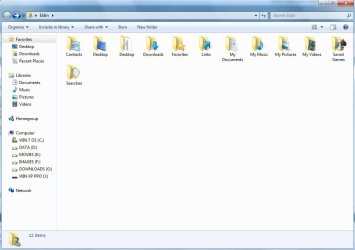
  • username.jpg
    username.jpg
    52.5 KB · Views: 1
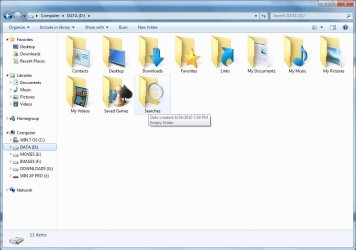
  • data.jpg
    data.jpg
    66.6 KB · Views: 3
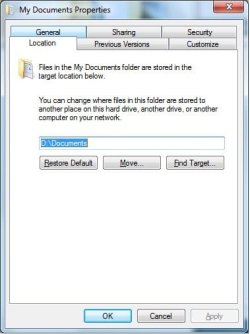
  • data2.jpg
    data2.jpg
    31.5 KB · Views: 1
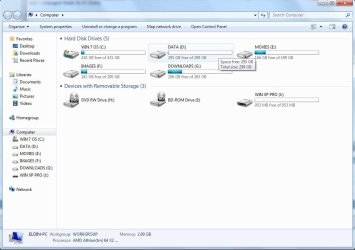
  • computer.jpg
    computer.jpg
    66.1 KB · Views: 1

My Computers

System One System Two

  • Computer type
    PC/Desktop
    Computer Manufacturer/Model Number
    PowerSpec G164
    OS
    WIN10
    CPU
    AMD Ryzen 5 3600 6-Core Processor 3.59 GHz
    Memory
    16.0 GB
    Internet Speed
    VERY FAST>>>!!!
  • Antivirus
    ESET Security Premium
ah yes, i see... ok so ill just need to move the locations of all those folders - seems easy enough

i still want to install everything to my C: drive (programs, etc...) right? just keep all my data to the other drive (partition) so that if needed i can just restore the image to the broken C: drive without losing all my data and files?
 

My Computer

Computer type
PC/Desktop
Computer Manufacturer/Model Number
My First Build
OS
Windows 7 64-bit Home
CPU
Intel Core i7-870 Lynnfield 2.93 Ghz
Motherboard
Asus P7P55D-E Pro
Memory
8GB 4x2 A-Data 1333 Mhz
Graphics Card(s)
HIS Radeon HD 5850 1GB
Sound Card
Onboard
Monitor(s) Displays
Dell S2440L 24"
Screen Resolution
1080p
Hard Drives
120 GB Intel X25-M SATA Solid State Drive ///
1 TB Western Digital Caviar Black SATA 6gb/s 7200rpm Drive
PSU
Corsair 650TX 650 Watt
Case
Antec Three Hundred
Cooling
Stock Intel /// 4 Antec Case Fans /// NZXT Sentry-2
Keyboard
Logitech LX 710
Mouse
Logitech LX 710
Other Info
LG Blu-Ray Drive
ah yes, i see... ok so ill just need to move the locations of all those folders - seems easy enough

i still want to install everything to my C: drive (programs, etc...) right? just keep all my data to the other drive (partition) so that if needed i can just restore the image to the broken C: drive without losing all my data and files?


Exactly! Keep OS and applications separate from your DATA/files.

This also helps with keeping the size of the images small because it only contains the OS and application not user information like DATA/files.
 

My Computers

System One System Two

  • Computer type
    PC/Desktop
    Computer Manufacturer/Model Number
    PowerSpec G164
    OS
    WIN10
    CPU
    AMD Ryzen 5 3600 6-Core Processor 3.59 GHz
    Memory
    16.0 GB
    Internet Speed
    VERY FAST>>>!!!
  • Antivirus
    ESET Security Premium
thanks, now i understand... ill get that done tonite

a couple more questions..

how do i know that windows recognized my drive as AHCI? i set it that way in BIOS before i installed, is that enough? is there a way to verify?

also, i said earlier that my temps with asus pcprobe II were in the mid-high 30's °C at idle so i figured my heatsink was fine... i let it run for a few mins while i was watching tv and a couple minutes after it went to screen saver and then my monitor went to powersave mode it gave me an alarm and said the temps were now at 60°C+ as soon as i woke it back up and it got back to the desktop they dropped (within seconds) back to 37°C-38°C... its not really getting that hot, is it? it must be some sort of setting or something that causes it to read higher when in sleep/screen saver mode, right?
 

My Computer

Computer type
PC/Desktop
Computer Manufacturer/Model Number
My First Build
OS
Windows 7 64-bit Home
CPU
Intel Core i7-870 Lynnfield 2.93 Ghz
Motherboard
Asus P7P55D-E Pro
Memory
8GB 4x2 A-Data 1333 Mhz
Graphics Card(s)
HIS Radeon HD 5850 1GB
Sound Card
Onboard
Monitor(s) Displays
Dell S2440L 24"
Screen Resolution
1080p
Hard Drives
120 GB Intel X25-M SATA Solid State Drive ///
1 TB Western Digital Caviar Black SATA 6gb/s 7200rpm Drive
PSU
Corsair 650TX 650 Watt
Case
Antec Three Hundred
Cooling
Stock Intel /// 4 Antec Case Fans /// NZXT Sentry-2
Keyboard
Logitech LX 710
Mouse
Logitech LX 710
Other Info
LG Blu-Ray Drive
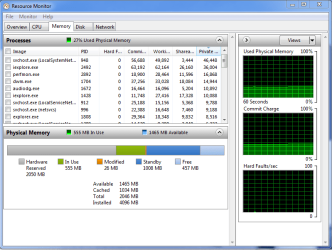
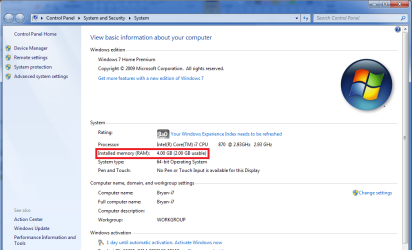
is windows not detecting all of my installed ram? i have 2 sticks in at the moment, 4 gigs total
 

Attachments

  • resmon.png
    resmon.png
    27 KB · Views: 6
  • sysprop.png
    sysprop.png
    49.1 KB · Views: 7

My Computer

Computer type
PC/Desktop
Computer Manufacturer/Model Number
My First Build
OS
Windows 7 64-bit Home
CPU
Intel Core i7-870 Lynnfield 2.93 Ghz
Motherboard
Asus P7P55D-E Pro
Memory
8GB 4x2 A-Data 1333 Mhz
Graphics Card(s)
HIS Radeon HD 5850 1GB
Sound Card
Onboard
Monitor(s) Displays
Dell S2440L 24"
Screen Resolution
1080p
Hard Drives
120 GB Intel X25-M SATA Solid State Drive ///
1 TB Western Digital Caviar Black SATA 6gb/s 7200rpm Drive
PSU
Corsair 650TX 650 Watt
Case
Antec Three Hundred
Cooling
Stock Intel /// 4 Antec Case Fans /// NZXT Sentry-2
Keyboard
Logitech LX 710
Mouse
Logitech LX 710
Other Info
LG Blu-Ray Drive
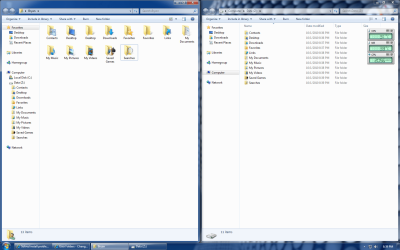
sorry for all the posts in a row.. i moved all of my folders over to my Z: Data drive.. with the "desktop" and "favorites" folder it created another folder in the original location after i moved the locations... is this normal? can i just delete them? the locations for them are C: drive, and when i click properties on them I dont have a location tab to change them anymore
 

Attachments

  • newfolders.png
    newfolders.png
    104 KB · Views: 1
Last edited:

My Computer

Computer type
PC/Desktop
Computer Manufacturer/Model Number
My First Build
OS
Windows 7 64-bit Home
CPU
Intel Core i7-870 Lynnfield 2.93 Ghz
Motherboard
Asus P7P55D-E Pro
Memory
8GB 4x2 A-Data 1333 Mhz
Graphics Card(s)
HIS Radeon HD 5850 1GB
Sound Card
Onboard
Monitor(s) Displays
Dell S2440L 24"
Screen Resolution
1080p
Hard Drives
120 GB Intel X25-M SATA Solid State Drive ///
1 TB Western Digital Caviar Black SATA 6gb/s 7200rpm Drive
PSU
Corsair 650TX 650 Watt
Case
Antec Three Hundred
Cooling
Stock Intel /// 4 Antec Case Fans /// NZXT Sentry-2
Keyboard
Logitech LX 710
Mouse
Logitech LX 710
Other Info
LG Blu-Ray Drive
Can't speak for issue about temps or ram, but for the user folders, yes its normal and you don't have to delete them. I still have them in both DATA and in C:/Users/YourUsernames/Desktop and C:/Users/YourUsername/Favorites
 

My Computers

System One System Two

  • Computer type
    PC/Desktop
    Computer Manufacturer/Model Number
    PowerSpec G164
    OS
    WIN10
    CPU
    AMD Ryzen 5 3600 6-Core Processor 3.59 GHz
    Memory
    16.0 GB
    Internet Speed
    VERY FAST>>>!!!
  • Antivirus
    ESET Security Premium
ok, ill just leave them there... they dont seem to be hurting anything.. no data will be stored in the C: versions of the favorites or desktop folders, correct?

ill try my ram/temp issue in the hardware forum maybe

thanks
 

My Computer

Computer type
PC/Desktop
Computer Manufacturer/Model Number
My First Build
OS
Windows 7 64-bit Home
CPU
Intel Core i7-870 Lynnfield 2.93 Ghz
Motherboard
Asus P7P55D-E Pro
Memory
8GB 4x2 A-Data 1333 Mhz
Graphics Card(s)
HIS Radeon HD 5850 1GB
Sound Card
Onboard
Monitor(s) Displays
Dell S2440L 24"
Screen Resolution
1080p
Hard Drives
120 GB Intel X25-M SATA Solid State Drive ///
1 TB Western Digital Caviar Black SATA 6gb/s 7200rpm Drive
PSU
Corsair 650TX 650 Watt
Case
Antec Three Hundred
Cooling
Stock Intel /// 4 Antec Case Fans /// NZXT Sentry-2
Keyboard
Logitech LX 710
Mouse
Logitech LX 710
Other Info
LG Blu-Ray Drive
During the installation of some applications; some were saved to the default location, C:/User... most be a bug or something in the program. Most should be saved to the DATA, but there only shortcuts anyhow.

Lets say you download a big file and ask it to be saved to the desktop, it should save to the DATA partition. If everything was done correctly.

As far as the Favorites folder, it appears Internet Explorer is saving them to the right partition. (DATA)
 

Attachments

  • folders.png
    folders.png
    395.7 KB · Views: 2

My Computers

System One System Two

  • Computer type
    PC/Desktop
    Computer Manufacturer/Model Number
    PowerSpec G164
    OS
    WIN10
    CPU
    AMD Ryzen 5 3600 6-Core Processor 3.59 GHz
    Memory
    16.0 GB
    Internet Speed
    VERY FAST>>>!!!
  • Antivirus
    ESET Security Premium
that is something i can change during the install of each application, correct? i can pick the path? it should default to the "new" location on the DATA partition, but if it doesn't i just change it and all will be good, right?
 

My Computer

Computer type
PC/Desktop
Computer Manufacturer/Model Number
My First Build
OS
Windows 7 64-bit Home
CPU
Intel Core i7-870 Lynnfield 2.93 Ghz
Motherboard
Asus P7P55D-E Pro
Memory
8GB 4x2 A-Data 1333 Mhz
Graphics Card(s)
HIS Radeon HD 5850 1GB
Sound Card
Onboard
Monitor(s) Displays
Dell S2440L 24"
Screen Resolution
1080p
Hard Drives
120 GB Intel X25-M SATA Solid State Drive ///
1 TB Western Digital Caviar Black SATA 6gb/s 7200rpm Drive
PSU
Corsair 650TX 650 Watt
Case
Antec Three Hundred
Cooling
Stock Intel /// 4 Antec Case Fans /// NZXT Sentry-2
Keyboard
Logitech LX 710
Mouse
Logitech LX 710
Other Info
LG Blu-Ray Drive
No for each application if you want them to work/perform correctly, keep them in the OS partition.

If you do a recovery to the OS partition, and the application was not in the same partition, it will not work at all.

You would have to re-install the application, even if you restored both the OS and DATA at the same time, which I don't believe you can, the application would still not work.

Keep applications in the OS and DATA separate.
 

My Computers

System One System Two

  • Computer type
    PC/Desktop
    Computer Manufacturer/Model Number
    PowerSpec G164
    OS
    WIN10
    CPU
    AMD Ryzen 5 3600 6-Core Processor 3.59 GHz
    Memory
    16.0 GB
    Internet Speed
    VERY FAST>>>!!!
  • Antivirus
    ESET Security Premium
Now you see why I advised against making the OS partition too small. ;)
 

My Computer

Computer Manufacturer/Model Number
* BFK Customs *
OS
W 7 64-bit Ultimate
CPU
Intel Q9550 Yorkfield
Motherboard
ASUS P5Q Pro
Memory
8GB Dominator 8500C5D
Graphics Card(s)
ATI : XFX 5870
Sound Card
Realtek HD Audio 7-1
Monitor(s) Displays
1x 47" LCD HDMI & 3x 26" LCD HDMI
Screen Resolution
1920x1080P & 1920x1200
Hard Drives
1x 80GB Intel X25-M G2 SSD : 1x 500GB & 1x 640GB WD Caviar Black(s)
PSU
Corsair 620HX
Case
Cooler Master RC-690
Cooling
Tuniq Tower 120, 2x 140mm and 3x 120mm case fans
Keyboard
Microsoft 500
Mouse
Razer Diamondback 3G
Internet Speed
14 Mb/s
Other Info
1x Koutech 3Gb/s SATA HDD Hot Swap Rack
Yea my partition is extremely big, and wasteful. 100GB-150GB would be more than enough.

The drive is 1TB but I only wanted the OS and DATA on one drive, and my other 500GB drive for Images, Movies, and Downloads. ;)

The secondary drive, its easy to remove it and take with me to another PC that I'm repairing.
 

My Computers

System One System Two

  • Computer type
    PC/Desktop
    Computer Manufacturer/Model Number
    PowerSpec G164
    OS
    WIN10
    CPU
    AMD Ryzen 5 3600 6-Core Processor 3.59 GHz
    Memory
    16.0 GB
    Internet Speed
    VERY FAST>>>!!!
  • Antivirus
    ESET Security Premium
my OS partition is 100GB right now, i dont see needing it any bigger than that ever...

i started windows updates and was doing them 5 at a time, got through 20 or so and the next five caused a BSOD upon restart... i posted the report in the crashes and debugging forum.. you could take a look

or should i just system restore to the last 5 i did? it creates a restore point after each windows update right?
 

My Computer

Computer type
PC/Desktop
Computer Manufacturer/Model Number
My First Build
OS
Windows 7 64-bit Home
CPU
Intel Core i7-870 Lynnfield 2.93 Ghz
Motherboard
Asus P7P55D-E Pro
Memory
8GB 4x2 A-Data 1333 Mhz
Graphics Card(s)
HIS Radeon HD 5850 1GB
Sound Card
Onboard
Monitor(s) Displays
Dell S2440L 24"
Screen Resolution
1080p
Hard Drives
120 GB Intel X25-M SATA Solid State Drive ///
1 TB Western Digital Caviar Black SATA 6gb/s 7200rpm Drive
PSU
Corsair 650TX 650 Watt
Case
Antec Three Hundred
Cooling
Stock Intel /// 4 Antec Case Fans /// NZXT Sentry-2
Keyboard
Logitech LX 710
Mouse
Logitech LX 710
Other Info
LG Blu-Ray Drive
Yes System Restore to before that group of updates, then install each individually with a restore point to find out which is the problem Update. Create an email tech support case on WUD website for that update to learn what was the conflict.

You may need to boot your DVD Repair console or Repair CD to System Restore. If that fails use Startup Repair and post back the exact problem it finds.
 
i reseated my ram and fixed that issue. reinstalled my windows updates and fixed that issue.

i created another image and it appears it has overwritten my old image from the fresh install :(

how can i tell?
 

My Computer

Computer type
PC/Desktop
Computer Manufacturer/Model Number
My First Build
OS
Windows 7 64-bit Home
CPU
Intel Core i7-870 Lynnfield 2.93 Ghz
Motherboard
Asus P7P55D-E Pro
Memory
8GB 4x2 A-Data 1333 Mhz
Graphics Card(s)
HIS Radeon HD 5850 1GB
Sound Card
Onboard
Monitor(s) Displays
Dell S2440L 24"
Screen Resolution
1080p
Hard Drives
120 GB Intel X25-M SATA Solid State Drive ///
1 TB Western Digital Caviar Black SATA 6gb/s 7200rpm Drive
PSU
Corsair 650TX 650 Watt
Case
Antec Three Hundred
Cooling
Stock Intel /// 4 Antec Case Fans /// NZXT Sentry-2
Keyboard
Logitech LX 710
Mouse
Logitech LX 710
Other Info
LG Blu-Ray Drive
there is only one folder, and its from today
 

My Computer

Computer type
PC/Desktop
Computer Manufacturer/Model Number
My First Build
OS
Windows 7 64-bit Home
CPU
Intel Core i7-870 Lynnfield 2.93 Ghz
Motherboard
Asus P7P55D-E Pro
Memory
8GB 4x2 A-Data 1333 Mhz
Graphics Card(s)
HIS Radeon HD 5850 1GB
Sound Card
Onboard
Monitor(s) Displays
Dell S2440L 24"
Screen Resolution
1080p
Hard Drives
120 GB Intel X25-M SATA Solid State Drive ///
1 TB Western Digital Caviar Black SATA 6gb/s 7200rpm Drive
PSU
Corsair 650TX 650 Watt
Case
Antec Three Hundred
Cooling
Stock Intel /// 4 Antec Case Fans /// NZXT Sentry-2
Keyboard
Logitech LX 710
Mouse
Logitech LX 710
Other Info
LG Blu-Ray Drive
Back
Top