Solved install ssd and keep all programs without a reinstall of windows

That really helps me. Not a user of the command prompt, didn't think that reformat would let me delete an operating system. Thank you. Will be doing it tomorrow.
 

My Computer My Computer

At a glance

Windows 7, 64 bit, Home Premium
Computer type
PC/Desktop
Computer Manufacturer/Model Number
HP
OS
Windows 7, 64 bit, Home Premium
Hard Drives
ssd and hdd
Antivirus
avg
Browser
IE 1
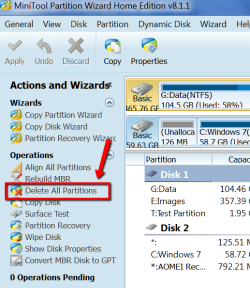
I understand - command prompt is not everybody's cup of tea. I would use Partition Wizard and delete all partitions. With PW you don't get the usual Windows push back if you want to manipulate system partitions.
 

Attachments

  • 2015-01-20_2114.png
    2015-01-20_2114.png
    35 KB · Views: 22

My Computer My Computer

At a glance

Vista, Windows7, Mint Mate, Zorin, Windows 8from 1.6GHz Duo to i7
Computer Manufacturer/Model Number
HP, Dell, Gateway, Toshiba - 4 laptops and 2 desktops
OS
Vista, Windows7, Mint Mate, Zorin, Windows 8
CPU
from 1.6GHz Duo to i7
Monitor(s) Displays
2x HP w2207
Hard Drives
5x HDD, 7x SSD, 12x Externals
Keyboard
with trackball - no mices
Mouse
Trackball mice
Internet Speed
DSL 6000
As long as it gives me a blank HDD. Then I can proceed with moving my data, as you suggested in an earlier post. That may take me awhile, trying to sort what is a program file and what isn't. But, moving toward my goal in a positive direction. Thanks
 

My Computer My Computer

At a glance

Windows 7, 64 bit, Home Premium
Computer type
PC/Desktop
Computer Manufacturer/Model Number
HP
OS
Windows 7, 64 bit, Home Premium
Hard Drives
ssd and hdd
Antivirus
avg
Browser
IE 1
Use the Elevated Command Prompt to run Diskpart Clean Command.

I've now restated this multiple times to make sure it gets done correctly. If any less than Clean command is done then the boot code which is interfering with the SSD boot will remain even if you delete, recreate and/or reformat the partitions.
 
Last edited:
@gregrocker

Since you are so adamant in me doing the clean command, I have it done as you asked, I hope.
 

Attachments

  • snip today.JPG
    snip today.JPG
    83.3 KB · Views: 2

My Computer My Computer

At a glance

Windows 7, 64 bit, Home Premium
Computer type
PC/Desktop
Computer Manufacturer/Model Number
HP
OS
Windows 7, 64 bit, Home Premium
Hard Drives
ssd and hdd
Antivirus
avg
Browser
IE 1
Looks good. PW would have been easier, but that's OK. Now you can define partitions. I would not make 1 big partition on the whole drive. Just one Data Partition large enough for your data now and in the future. Note that the allocation units in Disk Management are in MBs and not GBs. So e.g. 200GBs are 200000MB

Reason: A big partition is not always easy to shrink with Disk Management (because of the MFT). It is a lot easier to leave unallocated space on the disk for future use - even if you want to extend the sata partition later.

But if you want additional partitions (in addition to the Data Partition) for other things, that's a different matter. Those you can define right now.
 

My Computer My Computer

At a glance

Vista, Windows7, Mint Mate, Zorin, Windows 8from 1.6GHz Duo to i7
Computer Manufacturer/Model Number
HP, Dell, Gateway, Toshiba - 4 laptops and 2 desktops
OS
Vista, Windows7, Mint Mate, Zorin, Windows 8
CPU
from 1.6GHz Duo to i7
Monitor(s) Displays
2x HP w2207
Hard Drives
5x HDD, 7x SSD, 12x Externals
Keyboard
with trackball - no mices
Mouse
Trackball mice
Internet Speed
DSL 6000
Agreed, just split it in half, put data on half, and data and disk images on the other.

Or even 3, 2 300 GBs each and a 331 GB for disk images.

And I agree with Wolfgang about using PW, it`s just sooooo much easier.
 

My Computer My Computer

At a glance

Windows 10 Pro x64Intel Core i7 6700KGSkill TridentZ RGB 16GB 3600 16-16-16-36EVGA GTX 980 Ti SC x2
Computer type
PC/Desktop
Computer Manufacturer/Model Number
Skylake Special #666
OS
Windows 10 Pro x64
CPU
Intel Core i7 6700K
Motherboard
Asus Sabertooth Z170 Mark 1
Memory
GSkill TridentZ RGB 16GB 3600 16-16-16-36
Graphics Card(s)
EVGA GTX 980 Ti SC x2
Sound Card
Realtek High Definition
Monitor(s) Displays
AOC G2460PG
Screen Resolution
1920 x 1080 144Hz
Hard Drives
Samsung 860 Pro 256GB, Seagate Barracuda 4TB x2
PSU
EVGA 1000 P2, EVGA White Custom Braided Cables
Case
Corsair Vengeance C70 Gunmetal Black
Cooling
Corsair H100i v2, Corsair ML120 x2, Thermal Grizzly Kryonaut
Keyboard
Logitech G910 Orion Spectrum
Mouse
Logitech G700s
Internet Speed
Verizon Fios Quantum Gateway 75/75
Antivirus
Windows Defender, Malwarebytes Free 3.8.3
Browser
Chrome
Other Info
Corsair SP120 x4, LG Blu-ray Drive, Durabrand HT-395 100 Watt Dolby Digital Amp, Corsair H2100 Wireless 7.1 Headset
Yes, would have been easier, at least for me. But gregrocker wanted me to do it with the command prompt so I did.
 

My Computer My Computer

At a glance

Windows 7, 64 bit, Home Premium
Computer type
PC/Desktop
Computer Manufacturer/Model Number
HP
OS
Windows 7, 64 bit, Home Premium
Hard Drives
ssd and hdd
Antivirus
avg
Browser
IE 1
If you'd used PW to wipe the HD it woudl have taken much longer since it has no real quick wipe, plus you were being advised to only delete the partitions when we'd already been through finding out that the drive was slowing your boot which can only mean boot code is interfering. Merely deleting the partitions does not get rid of this boot code, only wiping it.

It is frustrating that I'm still having to argue this when I spelled it out clearly several times already. I understand there are quite a few things going on in the thread, so maybe it isn't clear to all that your SSD has boot times which are a deal-killer.
 
Last edited:
Sorry, you feel that way. But, your book smart and not a very good teacher for the unknowing. I'm sure you know the subject matter as you have passed that on. But then again you didn't know that when I did the disk alignment mine was good, at least understand and read the link you posted. Carry on my friend but just posting links is not the way to teach and help the novices. All in all though. thank you for your help. Patience with someone is a virtue.

Just so you know, I know too, a clean install is the best. But, it's the easy way out. Solve the question you were asked. If you don't know how, pass it to others.
 
Last edited:

My Computer My Computer

At a glance

Windows 7, 64 bit, Home Premium
Computer type
PC/Desktop
Computer Manufacturer/Model Number
HP
OS
Windows 7, 64 bit, Home Premium
Hard Drives
ssd and hdd
Antivirus
avg
Browser
IE 1
  • Like
Reactions: whs
My apologies. I should have shown more patience. I understand you are trying to learn which is exactly who we like to work with. You were getting advice from all directions about many aspects of this drive change and doing an admirable job in processing the information and keeping up.

Upon review I feel I didn't make it clear enough that the boot times for the SSD were really a deal killer. This might have refocused the help on solving the boot time for which there are standard steps we've used for years here that always work. I was trying to press those steps in competition with others helping with other things, yet you kept up quite well even then.

I am not an expert on SSD alignment which is why I deferred to Wolfgang on it, so I don't know why you'd fault me for doing that. We are specialists here, and some are the best in the field.

You are the first in 50,000 I've helped here to say I'm not a good teacher, so I want to learn from that and will try to improve. With a reply asking for more help every few minutes I can become short so I may need to slow down to give each thread better help.
 
Last edited:
Greg`s advice on using the clean command was correct to wipe any code from the hard drive, but you were already told about that before anyway. Post # 51

What Wolfgang and I recommend now is using PW to create your partitions on the hard drive.

Partition the hard drive how you want, then give us a new shot of DM when you can :)
 

My Computer My Computer

At a glance

Windows 10 Pro x64Intel Core i7 6700KGSkill TridentZ RGB 16GB 3600 16-16-16-36EVGA GTX 980 Ti SC x2
Computer type
PC/Desktop
Computer Manufacturer/Model Number
Skylake Special #666
OS
Windows 10 Pro x64
CPU
Intel Core i7 6700K
Motherboard
Asus Sabertooth Z170 Mark 1
Memory
GSkill TridentZ RGB 16GB 3600 16-16-16-36
Graphics Card(s)
EVGA GTX 980 Ti SC x2
Sound Card
Realtek High Definition
Monitor(s) Displays
AOC G2460PG
Screen Resolution
1920 x 1080 144Hz
Hard Drives
Samsung 860 Pro 256GB, Seagate Barracuda 4TB x2
PSU
EVGA 1000 P2, EVGA White Custom Braided Cables
Case
Corsair Vengeance C70 Gunmetal Black
Cooling
Corsair H100i v2, Corsair ML120 x2, Thermal Grizzly Kryonaut
Keyboard
Logitech G910 Orion Spectrum
Mouse
Logitech G700s
Internet Speed
Verizon Fios Quantum Gateway 75/75
Antivirus
Windows Defender, Malwarebytes Free 3.8.3
Browser
Chrome
Other Info
Corsair SP120 x4, LG Blu-ray Drive, Durabrand HT-395 100 Watt Dolby Digital Amp, Corsair H2100 Wireless 7.1 Headset
@gregrocker

It was much to my surprise that you made the post#170 (since edited). Because even though I thought the drive wipe would have been easier for me using other method I did it your way, or at least think I did. I thought I would get a finally, or about time comment, instead you went on a rant, prompting my post #171.

I did ask for step by step directions. Remember the very computer I am trying to fix is the one I'm using. I came here seeking help, and you have given your time without charging anything. I thank you for that.

As far as the comment I made about the helpful tutorial you posted from whs, I knew my numbers were good. Because I must have read the tutorial 50 times before even trying it. I thought, since you posted the tutorial, you knew what was in it. Just goes to show, we can't know everything.

I didn't come here to argue or debate. When changing things on my computer, I just like to know why changes are suggested and what happens when I make them. I should have never did what I did (cloning). I should have came here 1st.

Anyway, let's kiss and make up. lol

I now have a clean HDD to work with, so on to partitioning it and switching things from SSD to it. And, figure out how to use the HDD as the go to for downloads of new data.

 

My Computer My Computer

At a glance

Windows 7, 64 bit, Home Premium
Computer type
PC/Desktop
Computer Manufacturer/Model Number
HP
OS
Windows 7, 64 bit, Home Premium
Hard Drives
ssd and hdd
Antivirus
avg
Browser
IE 1
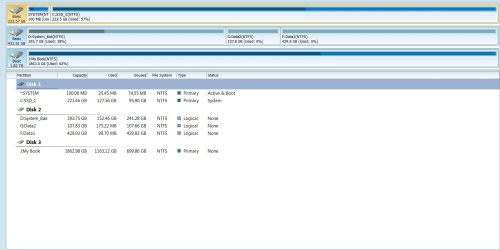
Hi all, been away for awhile couldn't be helped. Anyway, I have accomplished most of what I wanted. I want to thank all who participated in this thread and all who made tutorials that were used. I have to still move data from SSD to HDD, when I can. Posting a snip of how things are now, and marking this thread solved. Once again thank you to all who have helped. Marking this thread solved.
 

Attachments

  • 111111snip.JPG
    111111snip.JPG
    98.7 KB · Views: 3
Last edited:

My Computer My Computer

At a glance

Windows 7, 64 bit, Home Premium
Computer type
PC/Desktop
Computer Manufacturer/Model Number
HP
OS
Windows 7, 64 bit, Home Premium
Hard Drives
ssd and hdd
Antivirus
avg
Browser
IE 1
Back
Top