Solved install ssd and keep all programs without a reinstall of windows

Tomorrow I will ask him to disconnect the hard dirve again, then count how long it takes to boot the pc from the time he pushes the power button until the time he gets to the Windows 7 desktop.
 

My Computer My Computer

At a glance

Windows 10 Pro x64Intel Core i7 6700KGSkill TridentZ RGB 16GB 3600 16-16-16-36EVGA GTX 980 Ti SC x2
Computer type
PC/Desktop
Computer Manufacturer/Model Number
Skylake Special #666
OS
Windows 10 Pro x64
CPU
Intel Core i7 6700K
Motherboard
Asus Sabertooth Z170 Mark 1
Memory
GSkill TridentZ RGB 16GB 3600 16-16-16-36
Graphics Card(s)
EVGA GTX 980 Ti SC x2
Sound Card
Realtek High Definition
Monitor(s) Displays
AOC G2460PG
Screen Resolution
1920 x 1080 144Hz
Hard Drives
Samsung 860 Pro 256GB, Seagate Barracuda 4TB x2
PSU
EVGA 1000 P2, EVGA White Custom Braided Cables
Case
Corsair Vengeance C70 Gunmetal Black
Cooling
Corsair H100i v2, Corsair ML120 x2, Thermal Grizzly Kryonaut
Keyboard
Logitech G910 Orion Spectrum
Mouse
Logitech G700s
Internet Speed
Verizon Fios Quantum Gateway 75/75
Antivirus
Windows Defender, Malwarebytes Free 3.8.3
Browser
Chrome
Other Info
Corsair SP120 x4, LG Blu-ray Drive, Durabrand HT-395 100 Watt Dolby Digital Amp, Corsair H2100 Wireless 7.1 Headset
Yes, I already said Recovery will not work without the OS partition, and provided the steps with illustrated tutorials for him to use at his leisure to do whatever he wants to do.

With all that space there is no reason to rush, so he should take all the time needed to make sure everything is backed up first.

I'm still waiting to hear if the boot times improved to know if he even has an SSD install he should keep. So for the fifth time: did boot times improve when you unplugged the HD because if so then it should be wiped of boot code using Diskpart Clean Command ?

I did answer you in post #97. Your right, machine looks cleaner now. I think I'll leave it as is, with the exception of the unallocated space that's left. Thanks
 

My Computer My Computer

At a glance

Windows 7, 64 bit, Home Premium
Computer type
PC/Desktop
Computer Manufacturer/Model Number
HP
OS
Windows 7, 64 bit, Home Premium
Hard Drives
ssd and hdd
Antivirus
avg
Browser
IE 1
Here is a snip of my boot time from this morning. It is with everything connected. 66.5 seconds, Don't know what it was before SSD installed, but was slower. I'm okay with it.
 

Attachments

  • boot2.JPG
    boot2.JPG
    118.7 KB · Views: 7
Last edited:

My Computer My Computer

At a glance

Windows 7, 64 bit, Home Premium
Computer type
PC/Desktop
Computer Manufacturer/Model Number
HP
OS
Windows 7, 64 bit, Home Premium
Hard Drives
ssd and hdd
Antivirus
avg
Browser
IE 1
I specifically asked about boot times with the HD unplugged. There is a reason for this. Old boot code on the hard drive can be slowing boot, as can the Active partition being queried by the BIOS.

We also must take into account that the factory install is the worst possible install of WIn7 one can have, so is hardly a decent candidate for cloning to an SSD. It would be like moving the engine of a junker into a Lexus. If forced to do this I would at least Clean Up Factory Bloatware establishing a clean boot to see if it improves any.

Your best bet is always to Clean Reinstall Windows 7 to get the freshest start and fastest performance.
 
Actually Gate, 66 seconds is an eternity for a ssd, when you get time, and if you want I`d like you to try what I suggestsed in post # 124 and count 1 1 thousand 2 1 thousnad and let us know how long it takes to get to the fully loaded desktop.

And when you`re ready to wipe the hard drive just come back and let us know, cheers. :thumbsup:

Get some rest :)
 

My Computer My Computer

At a glance

Windows 10 Pro x64Intel Core i7 6700KGSkill TridentZ RGB 16GB 3600 16-16-16-36EVGA GTX 980 Ti SC x2
Computer type
PC/Desktop
Computer Manufacturer/Model Number
Skylake Special #666
OS
Windows 10 Pro x64
CPU
Intel Core i7 6700K
Motherboard
Asus Sabertooth Z170 Mark 1
Memory
GSkill TridentZ RGB 16GB 3600 16-16-16-36
Graphics Card(s)
EVGA GTX 980 Ti SC x2
Sound Card
Realtek High Definition
Monitor(s) Displays
AOC G2460PG
Screen Resolution
1920 x 1080 144Hz
Hard Drives
Samsung 860 Pro 256GB, Seagate Barracuda 4TB x2
PSU
EVGA 1000 P2, EVGA White Custom Braided Cables
Case
Corsair Vengeance C70 Gunmetal Black
Cooling
Corsair H100i v2, Corsair ML120 x2, Thermal Grizzly Kryonaut
Keyboard
Logitech G910 Orion Spectrum
Mouse
Logitech G700s
Internet Speed
Verizon Fios Quantum Gateway 75/75
Antivirus
Windows Defender, Malwarebytes Free 3.8.3
Browser
Chrome
Other Info
Corsair SP120 x4, LG Blu-ray Drive, Durabrand HT-395 100 Watt Dolby Digital Amp, Corsair H2100 Wireless 7.1 Headset
Thanks for coming back. I will take the computer apart again in the morning and do the count you want with the HDD disconnected, from power button press to W7 desktop. I'll get back to you with it.
 

My Computer My Computer

At a glance

Windows 7, 64 bit, Home Premium
Computer type
PC/Desktop
Computer Manufacturer/Model Number
HP
OS
Windows 7, 64 bit, Home Premium
Hard Drives
ssd and hdd
Antivirus
avg
Browser
IE 1
Okay, got a later start here then anticipated but, here we go.

Using counting method you wanted. Counted boot before anything disconnected. 47s. till desktop came up.

Counted boot after HDD disconnected 34s. till desktop came up.

Did each twice. First and second timings within a second or so of each count. So, while not a very accurate way to do it. That's what I got.

Note: that included typing in my password each time.
 

My Computer My Computer

At a glance

Windows 7, 64 bit, Home Premium
Computer type
PC/Desktop
Computer Manufacturer/Model Number
HP
OS
Windows 7, 64 bit, Home Premium
Hard Drives
ssd and hdd
Antivirus
avg
Browser
IE 1

My Computer My Computer

At a glance

Windows 10 Pro x64Intel Core i7 6700KGSkill TridentZ RGB 16GB 3600 16-16-16-36EVGA GTX 980 Ti SC x2
Computer type
PC/Desktop
Computer Manufacturer/Model Number
Skylake Special #666
OS
Windows 10 Pro x64
CPU
Intel Core i7 6700K
Motherboard
Asus Sabertooth Z170 Mark 1
Memory
GSkill TridentZ RGB 16GB 3600 16-16-16-36
Graphics Card(s)
EVGA GTX 980 Ti SC x2
Sound Card
Realtek High Definition
Monitor(s) Displays
AOC G2460PG
Screen Resolution
1920 x 1080 144Hz
Hard Drives
Samsung 860 Pro 256GB, Seagate Barracuda 4TB x2
PSU
EVGA 1000 P2, EVGA White Custom Braided Cables
Case
Corsair Vengeance C70 Gunmetal Black
Cooling
Corsair H100i v2, Corsair ML120 x2, Thermal Grizzly Kryonaut
Keyboard
Logitech G910 Orion Spectrum
Mouse
Logitech G700s
Internet Speed
Verizon Fios Quantum Gateway 75/75
Antivirus
Windows Defender, Malwarebytes Free 3.8.3
Browser
Chrome
Other Info
Corsair SP120 x4, LG Blu-ray Drive, Durabrand HT-395 100 Watt Dolby Digital Amp, Corsair H2100 Wireless 7.1 Headset
With the HD disconnected, run Startup Repair to check over your boot files.

Did you already follow whs's suggestions to check alignment? SSD Alignment - Windows 7 Forums
SSD Tweaks and Optimizations in Windows 7

If you have storage space I'd move the files off the HD to wipe it with Diskpart Clean Command,
then either swap its cable with the SSD if possible so it appears in Disk1 in Disk Mgmt, or format only Logical data partitions if not: Partition / Extended : Logical Drives - Windows 7 Forums

I've already given you steps to Clean Up Factory Bloatware especially establishing a Clean Boot which very much affects boot times.

If none of these bring the SSD boot time down below 20 seconds then I'd probably do a Clean Reinstall Windows 7 or if unwilling to do that for other reasons chalk up the slow boot times to needing to clone the HP factory install.
 
@AddRAM, and gregrocker.

Have appointments to go to today, and maybe tomorrow. So be back when I can.

1. Password, when computer was first set up circumstances here at home needed a password. Not required so much now, I just never got rid of it.

2. I will run the startup repair.

3. No, I didn't do the alignment check. Will do that too.

4. I should have lots of space, more than enough after HHD is wiped.

5. I can switch SATA cables around. Right now they are, #1 empty, #2 HDD,(but, it's disconnected right now) #3 DVD, #4 SSD.

6. Looked through the Clean Up Factory Bloatware, Pretty much like what I have running.

That's where I am right now, with the computer.

Thanks for your replies.
 

My Computer My Computer

At a glance

Windows 7, 64 bit, Home Premium
Computer type
PC/Desktop
Computer Manufacturer/Model Number
HP
OS
Windows 7, 64 bit, Home Premium
Hard Drives
ssd and hdd
Antivirus
avg
Browser
IE 1
You want the ssd on the 1st sata port on the motherboard, it will be labeled either 0 or 1.

Some boards start with 0 then 1,2,3, etc. Some start with 1 then 2,3,4 etc.

It will be written very small, if you have glasses, wear them to see.

Hard drive 2nd
DVD drive 3rd

Actually, the dvd drive can be hooked up to the last sata port.

Could you also give me the exact make and model of the pc again, what you said it was way back when didn`t help me, I want to look up the specs. It`s an HP Model ???? Exactly ?
 

My Computer My Computer

At a glance

Windows 10 Pro x64Intel Core i7 6700KGSkill TridentZ RGB 16GB 3600 16-16-16-36EVGA GTX 980 Ti SC x2
Computer type
PC/Desktop
Computer Manufacturer/Model Number
Skylake Special #666
OS
Windows 10 Pro x64
CPU
Intel Core i7 6700K
Motherboard
Asus Sabertooth Z170 Mark 1
Memory
GSkill TridentZ RGB 16GB 3600 16-16-16-36
Graphics Card(s)
EVGA GTX 980 Ti SC x2
Sound Card
Realtek High Definition
Monitor(s) Displays
AOC G2460PG
Screen Resolution
1920 x 1080 144Hz
Hard Drives
Samsung 860 Pro 256GB, Seagate Barracuda 4TB x2
PSU
EVGA 1000 P2, EVGA White Custom Braided Cables
Case
Corsair Vengeance C70 Gunmetal Black
Cooling
Corsair H100i v2, Corsair ML120 x2, Thermal Grizzly Kryonaut
Keyboard
Logitech G910 Orion Spectrum
Mouse
Logitech G700s
Internet Speed
Verizon Fios Quantum Gateway 75/75
Antivirus
Windows Defender, Malwarebytes Free 3.8.3
Browser
Chrome
Other Info
Corsair SP120 x4, LG Blu-ray Drive, Durabrand HT-395 100 Watt Dolby Digital Amp, Corsair H2100 Wireless 7.1 Headset

My Computer My Computer

At a glance

Windows 7, 64 bit, Home Premium
Computer type
PC/Desktop
Computer Manufacturer/Model Number
HP
OS
Windows 7, 64 bit, Home Premium
Hard Drives
ssd and hdd
Antivirus
avg
Browser
IE 1
This is a shot of your board, I circled the sata ports.
 
Last edited:

My Computer My Computer

At a glance

Windows 10 Pro x64Intel Core i7 6700KGSkill TridentZ RGB 16GB 3600 16-16-16-36EVGA GTX 980 Ti SC x2
Computer type
PC/Desktop
Computer Manufacturer/Model Number
Skylake Special #666
OS
Windows 10 Pro x64
CPU
Intel Core i7 6700K
Motherboard
Asus Sabertooth Z170 Mark 1
Memory
GSkill TridentZ RGB 16GB 3600 16-16-16-36
Graphics Card(s)
EVGA GTX 980 Ti SC x2
Sound Card
Realtek High Definition
Monitor(s) Displays
AOC G2460PG
Screen Resolution
1920 x 1080 144Hz
Hard Drives
Samsung 860 Pro 256GB, Seagate Barracuda 4TB x2
PSU
EVGA 1000 P2, EVGA White Custom Braided Cables
Case
Corsair Vengeance C70 Gunmetal Black
Cooling
Corsair H100i v2, Corsair ML120 x2, Thermal Grizzly Kryonaut
Keyboard
Logitech G910 Orion Spectrum
Mouse
Logitech G700s
Internet Speed
Verizon Fios Quantum Gateway 75/75
Antivirus
Windows Defender, Malwarebytes Free 3.8.3
Browser
Chrome
Other Info
Corsair SP120 x4, LG Blu-ray Drive, Durabrand HT-395 100 Watt Dolby Digital Amp, Corsair H2100 Wireless 7.1 Headset
I know where they are, just didn't know it mattered what port # stuff was plugged into.
 

My Computer My Computer

At a glance

Windows 7, 64 bit, Home Premium
Computer type
PC/Desktop
Computer Manufacturer/Model Number
HP
OS
Windows 7, 64 bit, Home Premium
Hard Drives
ssd and hdd
Antivirus
avg
Browser
IE 1
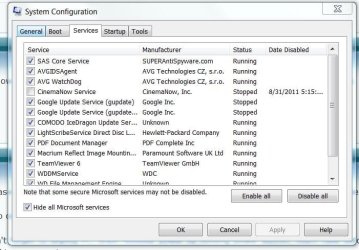
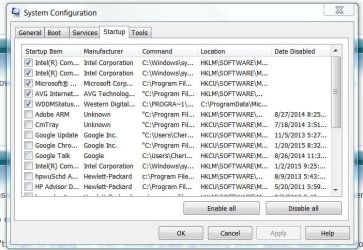
Please post back a screenshot of msconfig>Startup and >Services after Hiding all MS Services.

Also once you move SSD to port 1 post back Disk Mgmt screenshot.

Don't forget to unplug PC, drain residual power by holding power button, touch case before reaching inside, avoid working on carpet.
 
@gregrocker. Do you want the above posted items done with or without HHD plugged back in?
 

My Computer My Computer

At a glance

Windows 7, 64 bit, Home Premium
Computer type
PC/Desktop
Computer Manufacturer/Model Number
HP
OS
Windows 7, 64 bit, Home Premium
Hard Drives
ssd and hdd
Antivirus
avg
Browser
IE 1
Plug the Hard drive back in, we want to see the result of where it shows up in the disk management shot.

The purpose of having the ssd on the 1st sata port is so the system (motherboard) does not have to do any extra searching before it finds the proper drive to boot from, in this case the ssd, the sooner it finds it, the faster windows will boot. The whole purpose for installing a solid state drive.

Greg would also like a shot of the services and startup sections of msconfig with all Microsoft items hidden ( there is a check box, you will see it on the services tab ) that way we can see what is running at startup, and can recommend what to turn off.

to get to msconfig, type msconfig in the search box.

Just click the start button to bring it up :)
 
Last edited:

My Computer My Computer

At a glance

Windows 10 Pro x64Intel Core i7 6700KGSkill TridentZ RGB 16GB 3600 16-16-16-36EVGA GTX 980 Ti SC x2
Computer type
PC/Desktop
Computer Manufacturer/Model Number
Skylake Special #666
OS
Windows 10 Pro x64
CPU
Intel Core i7 6700K
Motherboard
Asus Sabertooth Z170 Mark 1
Memory
GSkill TridentZ RGB 16GB 3600 16-16-16-36
Graphics Card(s)
EVGA GTX 980 Ti SC x2
Sound Card
Realtek High Definition
Monitor(s) Displays
AOC G2460PG
Screen Resolution
1920 x 1080 144Hz
Hard Drives
Samsung 860 Pro 256GB, Seagate Barracuda 4TB x2
PSU
EVGA 1000 P2, EVGA White Custom Braided Cables
Case
Corsair Vengeance C70 Gunmetal Black
Cooling
Corsair H100i v2, Corsair ML120 x2, Thermal Grizzly Kryonaut
Keyboard
Logitech G910 Orion Spectrum
Mouse
Logitech G700s
Internet Speed
Verizon Fios Quantum Gateway 75/75
Antivirus
Windows Defender, Malwarebytes Free 3.8.3
Browser
Chrome
Other Info
Corsair SP120 x4, LG Blu-ray Drive, Durabrand HT-395 100 Watt Dolby Digital Amp, Corsair H2100 Wireless 7.1 Headset
How things are today.

SATA #1 SSD
SATA #2 HDD
SATA #3 DVD

Reset boot priority.
DVD #1
SSD #2
HHD #3

Verified disk alignment using whs tutorial. Resuts:
part #1 100mb 1024kb
part #2 223gb 101mb

took screen shots.
 

Attachments

  • adisk management..JPG
    adisk management..JPG
    117 KB · Views: 4
  • aservices.JPG
    aservices.JPG
    64.1 KB · Views: 0
  • astartup.JPG
    astartup.JPG
    77.3 KB · Views: 0

My Computer My Computer

At a glance

Windows 7, 64 bit, Home Premium
Computer type
PC/Desktop
Computer Manufacturer/Model Number
HP
OS
Windows 7, 64 bit, Home Premium
Hard Drives
ssd and hdd
Antivirus
avg
Browser
IE 1
I would not be running AVG at all. It bloated up before Win7 was even in beta so has never been recommended here except to uninstall it, since we see only problems with it.

I would uninstall AVG and replace it with one of the free recommended AV's which have no adverse impact on performance: MSE is most recommended here for all 6 years, while Panda Cloud is a bit more aggressive and likewise does not affect performance.

Because AVG is bloatware at its worst, it requires a special tool to uninstall all of it: AVG uninstaller | Download tools and utilities

I don't know what you're running by Comodo but we never see anything but problems with it here too, and those problems often go away when its uninstalled.

As it says in the tutorials, you need none of those checked items starting with Windows except the AV and any sync. All others are freeloaders on the system, most sneak in there to spy on you to gather consumer data under the guise of being Updaters. Likewise the Services tab with all MS Services hidden.
 
Back
Top