Install updates/shut down problem

janey6

New member
Local time
8:13 PM
Messages
19
I am running Windows 7 64-bit on my main desktop PC. (I am waiting for the Windows 10 upgrade).

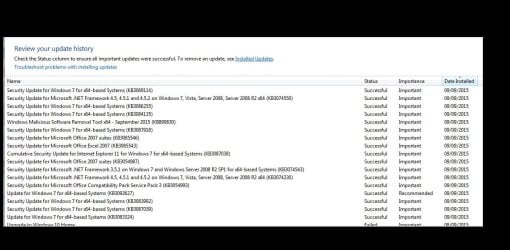
My PC appears to be installing updates OK but every time I power up, the Start button shows the exclamation mark and 'installs updates and then shuts down' message - see attachments.

Any ideas why, please?
 

Attachments

  • Shut down.jpg
    Shut down.jpg
    13.6 KB · Views: 2
  • Updates.jpg
    Updates.jpg
    122.5 KB · Views: 2

My Computer

OS
Windows 7
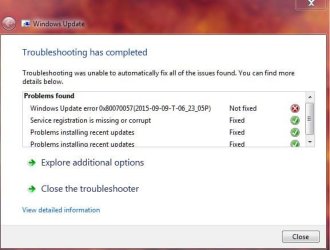
I am having exactly the same problem, I thought there might be a problem with the Windows Updater and when I run the Updater automatic troubleshooter the results stated the there was an error that it could not fix: error "0x80070057".
 

Attachments

  • Capture.JPG
    Capture.JPG
    44.5 KB · Views: 15

My Computer

Computer type
Laptop
Computer Manufacturer/Model Number
Samsung
OS
Windows 7 Home Premium x64
Please follow the Windows Update Posting Instructions and post the requested data

If the file is too large (8MB compressed), remove the older CBSPersist cab files until the final file is below the limit - you can always post them separately after zipping them. (the forum doesn't allow the upload of bare CAB files, for a number of reasons)

Please also post the C:\Windows\windowsudpate.log file
 

My Computer

Computer type
Laptop
Computer Manufacturer/Model Number
Asus K52F or Lenovo B51-80
OS
Win 7 x64 Home Premium (and x86 VirtualBox VM)/Win10
CPU
i3 370M/i7 6500U
Motherboard
Asus/Lenovo
Memory
8GB - finally :)/8GB
Graphics Card(s)
it's an i3, dude!/dual Intel&nVidia
Sound Card
onboard
Monitor(s) Displays
15.6" built-in
Screen Resolution
1366x768/1920x1080
Hard Drives
750GB Seagate internal
Sundry external drives attached to other computers on the local network
1TB SSD on the Lenovo
PSU
n/a
Internet Speed
as much as I can get - usually on a dongle/phone, so <1MB/s
Antivirus
MSE/Defender
Browser
IE11/12/Edge/Chrome/FF(if I must)
Back
Top