Install Windows 7 on Dell XPS 9343

mxj262

New member
Local time
3:47 PM
Messages
11
Please help me with step by step instruction to install Windows 7 ultimate on my
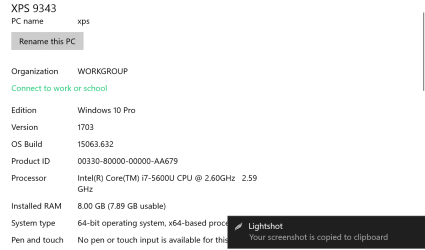
xps 13 9343 . This laptop came with windows 8 which i then upgraded to windows 10
windows 10 is not compatible with my work softwares
 

Attachments

  • Screenshot_1.png
    Screenshot_1.png
    24.3 KB · Views: 1

My Computer My Computer

At a glance

Windows 7 Ultimate x64i7 vPro8 GB
Computer type
Laptop
Computer Manufacturer/Model Number
DELL
OS
Windows 7 Ultimate x64
CPU
i7 vPro
Memory
8 GB
Hard Drives
SSD 256 GB

My Computers My Computers

  • At a glance

    7 X64i5 84002x8gb 3200mhz
    Computer type
    PC/Desktop
    OS
    7 X64
    CPU
    i5 8400
    Motherboard
    gigabyte b365m ds3h
    Memory
    2x8gb 3200mhz
    Hard Drives
    various
    PSU
    pure power 11 400w cm
    Case
    Coolermaster
    Cooling
    cryorig m9i
  • At a glance

    7x64g54008gb ddr4 2400
    Computer type
    PC/Desktop
    OS
    7x64
    CPU
    g5400
    Motherboard
    ga b365m ds3h
    Memory
    8gb ddr4 2400
    PSU
    xfx pro 450w
Hi SIW2,'
this is for 9350 does that apply to 9343 also
 

My Computer My Computer

At a glance

Windows 7 Ultimate x64i7 vPro8 GB
Computer type
Laptop
Computer Manufacturer/Model Number
DELL
OS
Windows 7 Ultimate x64
CPU
i7 vPro
Memory
8 GB
Hard Drives
SSD 256 GB
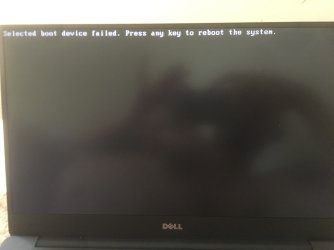
i am getting this error
 

Attachments

  • IMG_0601.JPG
    IMG_0601.JPG
    664.5 KB · Views: 0

My Computer My Computer

At a glance

Windows 7 Ultimate x64i7 vPro8 GB
Computer type
Laptop
Computer Manufacturer/Model Number
DELL
OS
Windows 7 Ultimate x64
CPU
i7 vPro
Memory
8 GB
Hard Drives
SSD 256 GB
What media you're trying to boot (DVD, USB)?
 

My Computers My Computers

  • At a glance

    Windows 7 HP 64i5 6600K - 800MHz to 4200MHz4+4G GSkill DDR4 3000IG - Intel 530
    Computer type
    PC/Desktop
    Computer Manufacturer/Model Number
    custom build
    OS
    Windows 7 HP 64
    CPU
    i5 6600K - 800MHz to 4200MHz
    Motherboard
    GA-Z170-HD3P
    Memory
    4+4G GSkill DDR4 3000
    Graphics Card(s)
    IG - Intel 530
    Monitor(s) Displays
    Samsung 226BW
    Screen Resolution
    1680x1050
    Hard Drives
    (1) -1 SM951 – 128GB M.2 AHCI PCIe SSD drive for Windows 7 and Lubuntu
    (2) -1 WD SATA 3 - 1T for Data
    (3) -1 WD SATA 3 - 1T for backup
    PSU
    Thermaltake 450W TR2 gold
    Keyboard
    Old and good Chicony mechanical keyboard
    Mouse
    Logitech mX performance - 9 buttons (had to disable some)
    Internet Speed
    500Mb/s
    Browser
    Firefox 64
    Other Info
    TinyWall firewall
  • At a glance

    Windows 7 Proi7-4500U 800MHz to 3.0GHz(4+4)G DDR3 1600IG intel 4400 + NVIDIA GeForce GT 745M
    Computer type
    Laptop
    System Manufacturer/Model Number
    Asus Q550LF
    OS
    Windows 7 Pro
    CPU
    i7-4500U 800MHz to 3.0GHz
    Motherboard
    Asus Q550LF
    Memory
    (4+4)G DDR3 1600
    Graphics Card(s)
    IG intel 4400 + NVIDIA GeForce GT 745M
    Sound Card
    Realtek
    Monitor(s) Displays
    LG Display LP156WF4-SPH1
    Screen Resolution
    1920 x 1080
    Hard Drives
    BX500 120G SSD for Windows and programs +
    1T HDD for data
    Internet Speed
    500 Mb/s
    Browser
    Firefox
    Other Info
    TinyWall firewall

My Computer My Computer

At a glance

W7 home premium 32bit/W7HP 64bit/w10 tp insid...E5300 dual core3gbNvidia Geforce 7100 Nforce 630i
Computer type
PC/Desktop
Computer Manufacturer/Model Number
medionl/Aspire 6930G/acer x55a
OS
W7 home premium 32bit/W7HP 64bit/w10 tp insider ring
CPU
E5300 dual core
Motherboard
medion MS7366
Memory
3gb
Graphics Card(s)
Nvidia Geforce 7100 Nforce 630i
Monitor(s) Displays
avixc
Internet Speed
n (isp resticted to 72)
Antivirus
mse/pands
Browser
palemoon
Other Info
Belkin Fd7050 n USB using Railink RT2870 drivers, more upto date
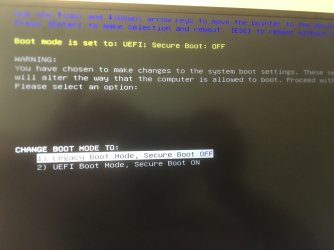
i am trying to boot using a USB
 

Attachments

  • IMG_0610-min.JPG
    IMG_0610-min.JPG
    710.3 KB · Views: 0

My Computer My Computer

At a glance

Windows 7 Ultimate x64i7 vPro8 GB
Computer type
Laptop
Computer Manufacturer/Model Number
DELL
OS
Windows 7 Ultimate x64
CPU
i7 vPro
Memory
8 GB
Hard Drives
SSD 256 GB
when you created the USB
was it for a UEFI install

see point 3 in the tutorial

you CANNOT MIX the 2, you end up like you have

Roy
 

My Computer My Computer

At a glance

W7 home premium 32bit/W7HP 64bit/w10 tp insid...E5300 dual core3gbNvidia Geforce 7100 Nforce 630i
Computer type
PC/Desktop
Computer Manufacturer/Model Number
medionl/Aspire 6930G/acer x55a
OS
W7 home premium 32bit/W7HP 64bit/w10 tp insider ring
CPU
E5300 dual core
Motherboard
medion MS7366
Memory
3gb
Graphics Card(s)
Nvidia Geforce 7100 Nforce 630i
Monitor(s) Displays
avixc
Internet Speed
n (isp resticted to 72)
Antivirus
mse/pands
Browser
palemoon
Other Info
Belkin Fd7050 n USB using Railink RT2870 drivers, more upto date
when you created the USB
was it for a UEFI install

see point 3 in the tutorial

you CANNOT MIX the 2, you end up like you have

Roy

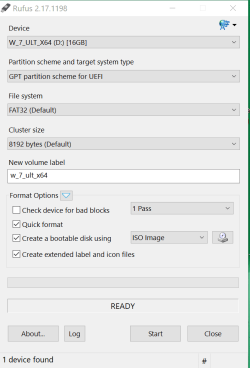
Yes GPT for UEFI
 

Attachments

  • Rufus GPT UEFI.png
    Rufus GPT UEFI.png
    15.9 KB · Views: 0

My Computer My Computer

At a glance

Windows 7 Ultimate x64i7 vPro8 GB
Computer type
Laptop
Computer Manufacturer/Model Number
DELL
OS
Windows 7 Ultimate x64
CPU
i7 vPro
Memory
8 GB
Hard Drives
SSD 256 GB
I have been involved in several threads explaining how to incorporate usb3 and sata/nvme drivers into boot.wim AND the install.wim image.

1) In your case, you need to install them into boot.wim image 2. and install.wim image 4 (Ultimate).

2) You then need to copy the contents of boot.wim image 2 sources folder to the installation media sources folder (overwrite).

3) You would sensible to install them into winre.wim image 1 as well.

[DELL have prepared install media for download, but I think they only have Professional edition.]


How do I install Windows 7 on XPS 13 Model Number 9343 - Microsoft OS Forum - Software Operating Systems - Dell Community


Detailed instructions:

Dell Windows 7 64 Bit Reinstallation SP2 OEM .iso for a Skylake UEFI BIOS
 
Last edited:

My Computers My Computers

  • At a glance

    7 X64i5 84002x8gb 3200mhz
    Computer type
    PC/Desktop
    OS
    7 X64
    CPU
    i5 8400
    Motherboard
    gigabyte b365m ds3h
    Memory
    2x8gb 3200mhz
    Hard Drives
    various
    PSU
    pure power 11 400w cm
    Case
    Coolermaster
    Cooling
    cryorig m9i
  • At a glance

    7x64g54008gb ddr4 2400
    Computer type
    PC/Desktop
    OS
    7x64
    CPU
    g5400
    Motherboard
    ga b365m ds3h
    Memory
    8gb ddr4 2400
    PSU
    xfx pro 450w
Can i use Win7-USB3.0-Creator-V3-Win7Admin
Download Windows 7* USB 3.0 Creator Utility

Beginning patch process...
Accessing ./sources folder for install.wim & boot.wim
Detecting if 64-bit or 32-bit...
Windows image is 64 bit
Detecting windows image edition...
Edition is Windows Ultimate.
Creating mount directory
Determining number of images
Number of images detected: 4
Mounting install.wim image:1
Adding USB 3.0 Drivers to install.wim image: 1
Unmounting and committing install.wim image: 1
Mounting install.wim image:2
Adding USB 3.0 Drivers to install.wim image: 2
Unmounting and committing install.wim image: 2
Mounting install.wim image:3
Adding USB 3.0 Drivers to install.wim image: 3
Unmounting and committing install.wim image: 3
Mounting install.wim image:4
Adding USB 3.0 Drivers to install.wim image: 4
Unmounting and committing install.wim image: 4
Mounting boot.wim image:1 WinPe
Unmounting and committing boot.wim image:1 WinPe
Mounting boot.wim image:2 Windows Startup
Adding USB 3.0 Drivers to boot.wim image:2 Windows Startup
Unnmounting and committing boot.wim image:2 Windows Startup
Cleaning up mount directory

is the process complete here ? because after this there is no activity

the pc i am using to create this USB3.0 has windows 10 i used the tool for windows 10/windows 8
and it gives this error

Beginning patch process...
Initializing dism... Complete
Getting image information... Error: 0x80070002
 

My Computer My Computer

At a glance

Windows 7 Ultimate x64i7 vPro8 GB
Computer type
Laptop
Computer Manufacturer/Model Number
DELL
OS
Windows 7 Ultimate x64
CPU
i7 vPro
Memory
8 GB
Hard Drives
SSD 256 GB
Yes, it has finished and unmounted.
 

My Computers My Computers

  • At a glance

    7 X64i5 84002x8gb 3200mhz
    Computer type
    PC/Desktop
    OS
    7 X64
    CPU
    i5 8400
    Motherboard
    gigabyte b365m ds3h
    Memory
    2x8gb 3200mhz
    Hard Drives
    various
    PSU
    pure power 11 400w cm
    Case
    Coolermaster
    Cooling
    cryorig m9i
  • At a glance

    7x64g54008gb ddr4 2400
    Computer type
    PC/Desktop
    OS
    7x64
    CPU
    g5400
    Motherboard
    ga b365m ds3h
    Memory
    8gb ddr4 2400
    PSU
    xfx pro 450w
so i have done these steps

step1. creating the bootable USB

Step2. making it compatible with USB 3.0

please tell me the next step

I have downloaded the Samsung NVMe drivers and i think i will need to create a boot option for USB
 

Attachments

  • IMG_0640[1].JPG
    IMG_0640[1].JPG
    78.6 KB · Views: 0
Last edited:

My Computer My Computer

At a glance

Windows 7 Ultimate x64i7 vPro8 GB
Computer type
Laptop
Computer Manufacturer/Model Number
DELL
OS
Windows 7 Ultimate x64
CPU
i7 vPro
Memory
8 GB
Hard Drives
SSD 256 GB
Put the Samsung NVMe drivers files (*.cat, *.sys, *.inf) on another USB flash disk.
Boot the Win 7 installation disk and when it ask for a driver on a CD / DVD, browse to the USB flash disk.
 

My Computers My Computers

  • At a glance

    Windows 7 HP 64i5 6600K - 800MHz to 4200MHz4+4G GSkill DDR4 3000IG - Intel 530
    Computer type
    PC/Desktop
    Computer Manufacturer/Model Number
    custom build
    OS
    Windows 7 HP 64
    CPU
    i5 6600K - 800MHz to 4200MHz
    Motherboard
    GA-Z170-HD3P
    Memory
    4+4G GSkill DDR4 3000
    Graphics Card(s)
    IG - Intel 530
    Monitor(s) Displays
    Samsung 226BW
    Screen Resolution
    1680x1050
    Hard Drives
    (1) -1 SM951 – 128GB M.2 AHCI PCIe SSD drive for Windows 7 and Lubuntu
    (2) -1 WD SATA 3 - 1T for Data
    (3) -1 WD SATA 3 - 1T for backup
    PSU
    Thermaltake 450W TR2 gold
    Keyboard
    Old and good Chicony mechanical keyboard
    Mouse
    Logitech mX performance - 9 buttons (had to disable some)
    Internet Speed
    500Mb/s
    Browser
    Firefox 64
    Other Info
    TinyWall firewall
  • At a glance

    Windows 7 Proi7-4500U 800MHz to 3.0GHz(4+4)G DDR3 1600IG intel 4400 + NVIDIA GeForce GT 745M
    Computer type
    Laptop
    System Manufacturer/Model Number
    Asus Q550LF
    OS
    Windows 7 Pro
    CPU
    i7-4500U 800MHz to 3.0GHz
    Motherboard
    Asus Q550LF
    Memory
    (4+4)G DDR3 1600
    Graphics Card(s)
    IG intel 4400 + NVIDIA GeForce GT 745M
    Sound Card
    Realtek
    Monitor(s) Displays
    LG Display LP156WF4-SPH1
    Screen Resolution
    1920 x 1080
    Hard Drives
    BX500 120G SSD for Windows and programs +
    1T HDD for data
    Internet Speed
    500 Mb/s
    Browser
    Firefox
    Other Info
    TinyWall firewall
OK so i have two usb plugged in one has the OS anothere has these drivers for the SSD
 

My Computer My Computer

At a glance

Windows 7 Ultimate x64i7 vPro8 GB
Computer type
Laptop
Computer Manufacturer/Model Number
DELL
OS
Windows 7 Ultimate x64
CPU
i7 vPro
Memory
8 GB
Hard Drives
SSD 256 GB
Did you create the Dell Factory Recover disk? You can launch from BIOS. If something goes wrong, you can reinstall win 8.

So you're ready to install. Boot from the Win 7 installation disk, go to install - advanced - delete all partitions, create new.
Do you also have a HDD or only the M.2 SSD?
 

My Computers My Computers

  • At a glance

    Windows 7 HP 64i5 6600K - 800MHz to 4200MHz4+4G GSkill DDR4 3000IG - Intel 530
    Computer type
    PC/Desktop
    Computer Manufacturer/Model Number
    custom build
    OS
    Windows 7 HP 64
    CPU
    i5 6600K - 800MHz to 4200MHz
    Motherboard
    GA-Z170-HD3P
    Memory
    4+4G GSkill DDR4 3000
    Graphics Card(s)
    IG - Intel 530
    Monitor(s) Displays
    Samsung 226BW
    Screen Resolution
    1680x1050
    Hard Drives
    (1) -1 SM951 – 128GB M.2 AHCI PCIe SSD drive for Windows 7 and Lubuntu
    (2) -1 WD SATA 3 - 1T for Data
    (3) -1 WD SATA 3 - 1T for backup
    PSU
    Thermaltake 450W TR2 gold
    Keyboard
    Old and good Chicony mechanical keyboard
    Mouse
    Logitech mX performance - 9 buttons (had to disable some)
    Internet Speed
    500Mb/s
    Browser
    Firefox 64
    Other Info
    TinyWall firewall
  • At a glance

    Windows 7 Proi7-4500U 800MHz to 3.0GHz(4+4)G DDR3 1600IG intel 4400 + NVIDIA GeForce GT 745M
    Computer type
    Laptop
    System Manufacturer/Model Number
    Asus Q550LF
    OS
    Windows 7 Pro
    CPU
    i7-4500U 800MHz to 3.0GHz
    Motherboard
    Asus Q550LF
    Memory
    (4+4)G DDR3 1600
    Graphics Card(s)
    IG intel 4400 + NVIDIA GeForce GT 745M
    Sound Card
    Realtek
    Monitor(s) Displays
    LG Display LP156WF4-SPH1
    Screen Resolution
    1920 x 1080
    Hard Drives
    BX500 120G SSD for Windows and programs +
    1T HDD for data
    Internet Speed
    500 Mb/s
    Browser
    Firefox
    Other Info
    TinyWall firewall
I would install the drivers and MS nvme upates into boot.wim image 2 and install.wim image 4.

You then need to copy the contents of the updated boot.wim image 2 sources folder to the updated install media sources folder.

Otherwise setup won't recognize the install media.
 
Last edited:

My Computers My Computers

  • At a glance

    7 X64i5 84002x8gb 3200mhz
    Computer type
    PC/Desktop
    OS
    7 X64
    CPU
    i5 8400
    Motherboard
    gigabyte b365m ds3h
    Memory
    2x8gb 3200mhz
    Hard Drives
    various
    PSU
    pure power 11 400w cm
    Case
    Coolermaster
    Cooling
    cryorig m9i
  • At a glance

    7x64g54008gb ddr4 2400
    Computer type
    PC/Desktop
    OS
    7x64
    CPU
    g5400
    Motherboard
    ga b365m ds3h
    Memory
    8gb ddr4 2400
    PSU
    xfx pro 450w

My Computers My Computers

  • At a glance

    7 X64i5 84002x8gb 3200mhz
    Computer type
    PC/Desktop
    OS
    7 X64
    CPU
    i5 8400
    Motherboard
    gigabyte b365m ds3h
    Memory
    2x8gb 3200mhz
    Hard Drives
    various
    PSU
    pure power 11 400w cm
    Case
    Coolermaster
    Cooling
    cryorig m9i
  • At a glance

    7x64g54008gb ddr4 2400
    Computer type
    PC/Desktop
    OS
    7x64
    CPU
    g5400
    Motherboard
    ga b365m ds3h
    Memory
    8gb ddr4 2400
    PSU
    xfx pro 450w

My Computer My Computer

At a glance

Windows 7 Ultimate x64i7 vPro8 GB
Computer type
Laptop
Computer Manufacturer/Model Number
DELL
OS
Windows 7 Ultimate x64
CPU
i7 vPro
Memory
8 GB
Hard Drives
SSD 256 GB
I would install the drivers and MS nvme upates into boot.wim image 2 and install.wim image 4.

You then need to copy the contents of the updated boot.wim image 2 sources folder to the updated install media sources folder.

Otherwise setup won't recognize the install media.
I will need more explanation on this step

i do not know how to locate boot.wim and install.wim image are these in the bootable USB ?
which folder i have to copy to
 

My Computer My Computer

At a glance

Windows 7 Ultimate x64i7 vPro8 GB
Computer type
Laptop
Computer Manufacturer/Model Number
DELL
OS
Windows 7 Ultimate x64
CPU
i7 vPro
Memory
8 GB
Hard Drives
SSD 256 GB
Back
Top