Install Windows 7 SATA controller driver

At this point, neither.

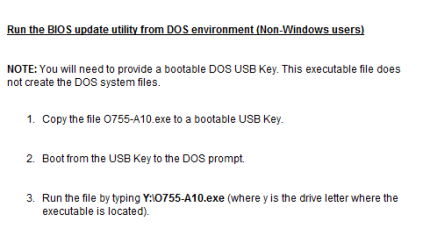
I tried to follow Dell's steps for the bios install, but I don't know how to boot in DOS. Keep in mind that I am trying to install to a blank hard drive. I assumed I would have to have an OS installed before I could run DOS. Regardless, I tried every function key on separates boots in hopes that I would have a menu to select DOS. I also checked in Bios for DOS, but saw nothing. I don't know where else to look or how to do it. If DOS is possible without any OS, please steer me in the right direction.

If not, I assume the only way that I can install these files is to make the bootable or somehow extract the contents from the .exe.

I appreciate the help.
 

My Computer

OS
7
Ok - good news/bad news.

Good news - the ms dos/flash solution worked and bios is updated to the latest, greatest (a04 to a17 so it was quite a jump)! There were no SATA drivers for the hard drive that I am using so nothing else was loaded.

Also, I was able to see the hard drive now in the 'partition section' of the software install.

Bad news is I still can't install Win 7. I am getting this error: 'this computers hardware may not support booting to this disk. Ensure that the disk's controller is enabled in the computer's bios menu.'

This hard drive is 'on' in the bios so I'm not sure what else to do in bios. Suggestions or thoughts?

I really appreciate your help!
 

My Computer

OS
7
Check the BIOS to see the setting for Sata Controller, IDE,AHCI or raid.
 

My Computer

OS
ME/XP/Vista/Win7
Check the BIOS to see the setting for Sata Controller, IDE,AHCI or raid.

It is set to AHCI, which I assume is what I need.

Honestly, I'm not sure if I need those drivers or not. Is there any harm installing something that is not necessary? How can I be sure/verify if I need them or not?
 

My Computer

OS
7
Check the BIOS to see the setting for Sata Controller, IDE,AHCI or raid.

It is set to AHCI, which I assume is what I need.

Honestly, I'm not sure if I need those drivers or not. Is there any harm installing something that is not necessary? How can I be sure/verify if I need them or not?

AHCI is good.

If setup can find the HD, you will not need them.
 

My Computer

OS
ME/XP/Vista/Win7
Ok - I won't install any other drivers. But, unfortunately, I'm still in the same spot and receiving the same error. I'm at a loss!
 

My Computer

OS
7
Ok - I won't install any other drivers. But, unfortunately, I'm still in the same spot and receiving the same error. I'm at a loss!

Try loading the drivers.

Ok - may as well.

I have to run out for a bit, but will give these 2 ( Intel(R) Rapid Storage Technology &  64-bit Intel® RST Driver Files for F6 Install) a try since the OS I am installing is Win 7 64 bit. It will be late so as a courtesy I wanted to let you know since you wouldn't hang around for results.

Will post an update when I am done.

Thanks again!
 

My Computer

OS
7
Ok, quick update.

I had no luck getting either of these installed unfortunately.
This one ( 64-bit Intel® RST Driver Files for F6 Install) downloaded as a .zip file. There was no .exe in the zipped file to upload.

As for the other one (Â Intel(R) Rapid Storage Technology), well, I just couldn't get it to work. I typed in the name in the DOS prompt, but it didn't recognize it. I tried it in all caps and lower case, with and without the .exe extension and neither worked. Not sure what I am doing or wrong.

I am tired so perhaps I will give them a shot in the morning.

Or perhaps I should just download the Intel drivers from the Dell site (Drivers & Downloads) and give them a shot.
 

My Computer

OS
7
Ok, quick update.

I had no luck getting either of these installed unfortunately.
This one ( 64-bit Intel® RST Driver Files for F6 Install) downloaded as a .zip file. There was no .exe in the zipped file to upload. .


Dell OptiPlex 755 has a Intel Sata Controller, if you need them download from here:
http://downloadcenter.intel.com/Sea...t=Intel®+Rapid+Storage+Technology+(Intel®+RST

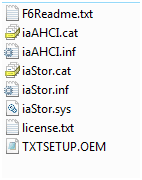
The files you should have on disk are
Capture3.PNG

No need for a .exe
http://www.sevenforums.com/tutorials/68505-sata-driver-load-windows-7-vista-setup.html
Use the files disk here:
4.PNG
 

My Computer

OS
ME/XP/Vista/Win7
Interesting development...I can no longer see the hard drive now.

I hadn't made any changes since I could see it last night. Bios is still version a17. I loaded my flash drive with the files from above (http://www.sevenforums.com/attachme...windows-7-sata-controller-driver-capture3.png) to install them in the 'load drivers' section of the install. I realized that I was still set to boot from the flash drive so I went into bios to change the boot sequence. No drive was seen in the boot sequence. Interestingly enough, if you scrolled down to drives it saw my hard drive on sata1.

Anyway, I thought I would proceed with the install and sure enough it was missing in the partition section of the install.

I tried to load the sata drivers, but it said it didn't find any that would work (or something along those lines). It did see one on the flash drive, I selected it and attempted to install it, but that is when I received the message that none would work.

This is baffling and frustrating!

So back to the drawing board...
 

My Computer

OS
7
The problem may very well be solved and I can honestly tell you that I have never seen anything like this before.

So instead of running check disk, I thought I would give something else a shot first. The drive that I had installed was my back-up in my other PC and had been fully functional so I didn't necessarily think that was the issue. I had a brand new 1 TB drive that I had planned to use as my primary back-up in this PC so since it was new I thought I would give it a shot to see if it would recognize that drive.

So I pulled the old drive and attempted to pop in the new drive, but it wouldn't go into the sata data cable. After a close review it appears that the plastic protector on the sata data cable connection on the drive broke off into the data cable. I assume that I had a loose connection and that is why it would occasionally recognize it.

Luckily, I just happened to have another sata data cable on hand and tried it with the new drive and not only did it recognize it, it is installing right now.

So I just partitioned that drive. Not my preferred method, but since the other drive appears to be useless now I guess this is the route that I am going to have to take. Maybe I will buy an external for my back-up in time.

I really appreciate the help. It was quite a learning experience for me.
 

My Computer

OS
7
Hi guys. can you help me. i have a Sony Vaio E series, Product name: SVE11125CXW. I have a problem when formating it to windows 8 or windows 7 in 64 bit, there is no sata drive shows. I use RT Seven lite to load the driver of my laptop to the OS i use but i cant find any driver that supported on my SATA Drives. I check it on
Sony eSupport - SVE11125CXW - Support but i cant find it. Can someone help me about my problem? Thanks
 

My Computer

Computer type
PC/Desktop
OS
Bulacan
Antivirus
Philippines
sata drives missing

Hi guys. can you help me. i have a Sony Vaio E series, Product name: SVE11125CXW. I have a problem when formating it to windows 8 or windows 7 in 64 bit, there is no sata drive shows. I use RT Seven lite to load the driver of my laptop to the OS i use but i cant find any driver that supported on my SATA Drives. I check it on
Sony eSupport - SVE11125CXW - Support but i cant find it. Can someone help me about my problem? Thanks
 

My Computer

Computer type
PC/Desktop
OS
Bulacan
Antivirus
Philippines
Hi guys. can you help me. i have a Sony Vaio E series, Product name: SVE11125CXW. I have a problem when formating it to windows 8 or windows 7 in 64 bit, there is no sata drive shows. I use RT Seven lite to load the driver of my laptop to the OS i use but i cant find any driver that supported on my SATA Drives. I check it on
Sony eSupport - SVE11125CXW - Support but i cant find it. Can someone help me about my problem? Thanks

No drivers are need for SATA HDD drives.
Look for the Sata controller drivers, which is part of the motherboard.
 

My Computer

OS
ME/XP/Vista/Win7
Back
Top