
Installation box too small, application maximized broken?

penjaga

New member
Local time
10:40 AM
Messages
5
Hi, sorry for my bad English. I've met this error and don't know what is the possible solution or how to find the fix.

1. Whenever i try to install some software, the installation box too small to see anything and sometimes opened too large, i cant even see the next, submit button etc.

2. Some application opened in a very small screen. When i try to maximize, windows maximized but still small, only large grey area showing.

What to do with this or if you know what keyword to find the fix, please tell me.

Thanks.
 

My Computer

Computer type
Laptop
Computer Manufacturer/Model Number
Dell
OS
Microsoft Windows 7 Ultimate 64-bit 7601 Multiprocessor Free Service Pack 1
CPU
Intel(R) Core(TM) i5-2410M CPU @ 2.30GHz
Motherboard
Dell Inc. 0RY9C2
Memory
6.00 GB
Graphics Card(s)
(1) NVIDIA GeForce GT 525M (2) Intel(R) HD Graphics Fam
Sound Card
High Definition Audio Device
Screen Resolution
1600 x 900
Hard Drives
(1) TOSHIBA MK5056GSY (2) WD Elements 10A2 USB Device
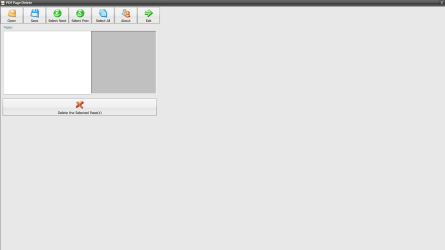
This is one way windows is showing.

Attached pic.
 

Attachments

  • Screenshot_4.png
    Screenshot_4.png
    10.3 KB · Views: 4

My Computer

Computer type
Laptop
Computer Manufacturer/Model Number
Dell
OS
Microsoft Windows 7 Ultimate 64-bit 7601 Multiprocessor Free Service Pack 1
CPU
Intel(R) Core(TM) i5-2410M CPU @ 2.30GHz
Motherboard
Dell Inc. 0RY9C2
Memory
6.00 GB
Graphics Card(s)
(1) NVIDIA GeForce GT 525M (2) Intel(R) HD Graphics Fam
Sound Card
High Definition Audio Device
Screen Resolution
1600 x 900
Hard Drives
(1) TOSHIBA MK5056GSY (2) WD Elements 10A2 USB Device
Trying to install Calibre. Screen too small.

Cant see anything at all.

Change resolution, text etc but nothing. Pls help.
 

Attachments

  • Screenshot_2.png
    Screenshot_2.png
    53.8 KB · Views: 5
Last edited:

My Computer

Computer type
Laptop
Computer Manufacturer/Model Number
Dell
OS
Microsoft Windows 7 Ultimate 64-bit 7601 Multiprocessor Free Service Pack 1
CPU
Intel(R) Core(TM) i5-2410M CPU @ 2.30GHz
Motherboard
Dell Inc. 0RY9C2
Memory
6.00 GB
Graphics Card(s)
(1) NVIDIA GeForce GT 525M (2) Intel(R) HD Graphics Fam
Sound Card
High Definition Audio Device
Screen Resolution
1600 x 900
Hard Drives
(1) TOSHIBA MK5056GSY (2) WD Elements 10A2 USB Device

My Computer

Computer type
PC/Desktop
Computer Manufacturer/Model Number
ASUS A85XM-A custom build
OS
Windows 10 Pro 64 bit
CPU
AMD A4-5300 APU with Radeon(tm) HD Graphics
Motherboard
ASUSTeK COMPUTER INC. A85XM-A
Memory
8.00 GB
Graphics Card(s)
AMD Radeon HD 7480D
Sound Card
(1) High Definition Audio Device (2) Realtek High Definiti
Monitor(s) Displays
HP W2072a 20 inch Led Backlit Monitor
Screen Resolution
1600 x 900 x 32 bits (4294967296 colors) @ 60 Hz
Hard Drives
TOSHIBA DT01ACA100 SATA Disk Device
Keyboard
Acer
Mouse
Acer
Internet Speed
varies
Antivirus
Windows Defender Antivirus
Browser
Waterfox, Edge
Thanks Ethel. Done.

BTW, i am using external keyboard as the attached one is broken.
 

My Computer

Computer type
Laptop
Computer Manufacturer/Model Number
Dell
OS
Microsoft Windows 7 Ultimate 64-bit 7601 Multiprocessor Free Service Pack 1
CPU
Intel(R) Core(TM) i5-2410M CPU @ 2.30GHz
Motherboard
Dell Inc. 0RY9C2
Memory
6.00 GB
Graphics Card(s)
(1) NVIDIA GeForce GT 525M (2) Intel(R) HD Graphics Fam
Sound Card
High Definition Audio Device
Screen Resolution
1600 x 900
Hard Drives
(1) TOSHIBA MK5056GSY (2) WD Elements 10A2 USB Device
Hi penjaga, First thing to try is from the Control Panel

Click appearance and personalization

Display

Click set custom text size (DPI) there is a dropdown menu, I have mine at 100, and have no trouble

seeing text, and there is a box at the bottom that is checked for use windows XP style DPI scaling.


If you have other programs not opening full screen you can try under the startmenu

Right click

Properties

Beside where you see Run there is a dropdown menu, try maximised and see if this helps. :D
 

My Computer

Computer type
PC/Desktop
Computer Manufacturer/Model Number
ASUS A85XM-A custom build
OS
Windows 10 Pro 64 bit
CPU
AMD A4-5300 APU with Radeon(tm) HD Graphics
Motherboard
ASUSTeK COMPUTER INC. A85XM-A
Memory
8.00 GB
Graphics Card(s)
AMD Radeon HD 7480D
Sound Card
(1) High Definition Audio Device (2) Realtek High Definiti
Monitor(s) Displays
HP W2072a 20 inch Led Backlit Monitor
Screen Resolution
1600 x 900 x 32 bits (4294967296 colors) @ 60 Hz
Hard Drives
TOSHIBA DT01ACA100 SATA Disk Device
Keyboard
Acer
Mouse
Acer
Internet Speed
varies
Antivirus
Windows Defender Antivirus
Browser
Waterfox, Edge

My Computer

Computer type
PC/Desktop
Computer Manufacturer/Model Number
ASUS A85XM-A custom build
OS
Windows 10 Pro 64 bit
CPU
AMD A4-5300 APU with Radeon(tm) HD Graphics
Motherboard
ASUSTeK COMPUTER INC. A85XM-A
Memory
8.00 GB
Graphics Card(s)
AMD Radeon HD 7480D
Sound Card
(1) High Definition Audio Device (2) Realtek High Definiti
Monitor(s) Displays
HP W2072a 20 inch Led Backlit Monitor
Screen Resolution
1600 x 900 x 32 bits (4294967296 colors) @ 60 Hz
Hard Drives
TOSHIBA DT01ACA100 SATA Disk Device
Keyboard
Acer
Mouse
Acer
Internet Speed
varies
Antivirus
Windows Defender Antivirus
Browser
Waterfox, Edge
Hi. My screen resolution is 1600 X 900 which is the one recommended. :)

I already have the setting above, but just for the sake of trying, i change to medium 125%. Nothing change.

Then i set it back to 100%, also nothing changed when i try to install certain software.
 

My Computer

Computer type
Laptop
Computer Manufacturer/Model Number
Dell
OS
Microsoft Windows 7 Ultimate 64-bit 7601 Multiprocessor Free Service Pack 1
CPU
Intel(R) Core(TM) i5-2410M CPU @ 2.30GHz
Motherboard
Dell Inc. 0RY9C2
Memory
6.00 GB
Graphics Card(s)
(1) NVIDIA GeForce GT 525M (2) Intel(R) HD Graphics Fam
Sound Card
High Definition Audio Device
Screen Resolution
1600 x 900
Hard Drives
(1) TOSHIBA MK5056GSY (2) WD Elements 10A2 USB Device
Hi penjaga, If it only happens with some software you install maybe the below tutorial may help by Brink,

for running programs in compatibility mode with windows 7. :D


Compatibility Mode
 

My Computer

Computer type
PC/Desktop
Computer Manufacturer/Model Number
ASUS A85XM-A custom build
OS
Windows 10 Pro 64 bit
CPU
AMD A4-5300 APU with Radeon(tm) HD Graphics
Motherboard
ASUSTeK COMPUTER INC. A85XM-A
Memory
8.00 GB
Graphics Card(s)
AMD Radeon HD 7480D
Sound Card
(1) High Definition Audio Device (2) Realtek High Definiti
Monitor(s) Displays
HP W2072a 20 inch Led Backlit Monitor
Screen Resolution
1600 x 900 x 32 bits (4294967296 colors) @ 60 Hz
Hard Drives
TOSHIBA DT01ACA100 SATA Disk Device
Keyboard
Acer
Mouse
Acer
Internet Speed
varies
Antivirus
Windows Defender Antivirus
Browser
Waterfox, Edge
Back
Top