Solved Installation Failure: July 2018 Security Update...

Cr00zng

New member
Pro User
Local time
12:54 AM
Messages
568
The system in question is Windows 7 Professional 64-bit, version 6.1 (Build: 7601 Service Pack 1). Trying to install the June 2018 Security Updates, both via Windows update and manually, but it fails:

Installation Failure: Windows failed to install the following update with error 0x80073701: 2018-06 Security Monthly Quality Rollup for Windows 7 for x64-based Systems (KB4284826).

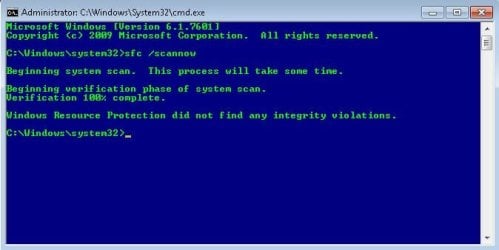
The "sfc /scannow" comes up empty:

sfc_w7.jpg

The System Update Readiness tool does install, but the June Security Update does not:
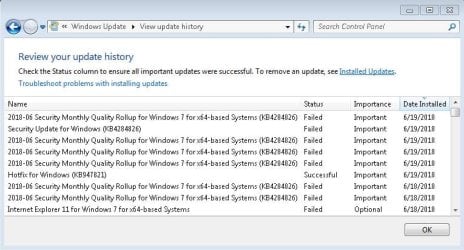
w7_update_fail.jpg

The update for IE 11 does not install either... The CBS log is large, ~335 MBs, even the zipped up file is 17MBs. I did not try repair installation, the chances are that it would not work.

Other than the Windows update issue, the system in itself is working just fine.

Is there a way to fix this system, or just start fresh?

TIA...
 

My Computer

Computer type
PC/Desktop
Computer Manufacturer/Model Number
Custom built at Home
OS
Windows 7 64-bit, Windows 8.1 64-bit, OSX El Capitan, Windows 10 (VMware)
CPU
Intel i5-3350P 3.1 GHz
Motherboard
Gigabyte GA-Z77X-UP5 TH
Memory
16 GBs GSkill Sniper
Graphics Card(s)
Radeon HD 7850
Sound Card
VIA HD Audio
Monitor(s) Displays
Dell U2410 24"
Screen Resolution
1920x1200
Hard Drives
1 x Intel 520 240 GBs
1 x Seagate 1TBs SATA 2.0,
1 x Seagate 1TBs eSATA 2.0
PSU
Thermaltake 850W
Case
Antec P183
Cooling
Noctua NH-D14 Heatsink 2 x 120mm fans, 4 x 120mm case fans
Keyboard
Dell Multimedia keyboard
Mouse
Logitech Trackball
Internet Speed
28.5 Mb/s
Update...

Well, the repair install did work, initiating the repair from within Windows...

The repair install did work at the first time with one hiccup; it did not preserve the product key, that I presumed it would. The Windows 7 DVD and box it came with got lost somewhere and forgot the extract it from Windows prior to the repair; restored the image with Macrium Reflect (MR) and retrieved the product key.

The second time around it worked, activated the license and off it went installing around 150 updates. Some of the customization disappeared, but other than that, the system is back to normal.

Created an image with MR and updated Windows 7 to 1803, I did not have a choice even if I wanted 1709 version. The update took its sweet time, completed with one issue, the desktop background image was upside down. The system activated Windows 10 on its own without any action on my part. That's probably due to the fact, that I may have tried updating this Windows 7 to 10 late last year, but not certain about that.

In either case, I'll probably roll back to Windows 7. Windows 10 has some issues with displaying images and videos and don't feel like troubleshooting the issues...
 

My Computer

Computer type
PC/Desktop
Computer Manufacturer/Model Number
Custom built at Home
OS
Windows 7 64-bit, Windows 8.1 64-bit, OSX El Capitan, Windows 10 (VMware)
CPU
Intel i5-3350P 3.1 GHz
Motherboard
Gigabyte GA-Z77X-UP5 TH
Memory
16 GBs GSkill Sniper
Graphics Card(s)
Radeon HD 7850
Sound Card
VIA HD Audio
Monitor(s) Displays
Dell U2410 24"
Screen Resolution
1920x1200
Hard Drives
1 x Intel 520 240 GBs
1 x Seagate 1TBs SATA 2.0,
1 x Seagate 1TBs eSATA 2.0
PSU
Thermaltake 850W
Case
Antec P183
Cooling
Noctua NH-D14 Heatsink 2 x 120mm fans, 4 x 120mm case fans
Keyboard
Dell Multimedia keyboard
Mouse
Logitech Trackball
Internet Speed
28.5 Mb/s
I have Windows 7 ultimate and I am prolblem installing update KB4338818. It fails at 98%. it being going on since 7/14/18. Any help?
 

My Computer

Computer type
PC/Desktop
Computer Manufacturer/Model Number
hp
OS
CA
Antivirus
norton
Browser
chrome
HI Cr00zng,
Glad to see you resolved your issue. Always a good idea to have a system backup! And, yes, as you found out, glad it was not the hard way, Repair Install does not preserve your 25-character product key.
Try using [FONT=&quot]Dism++ | New Windows Utility for installing Windows Updates. Much faster, and has simple GUI[/FONT]

Nic
 

My Computer

Computer type
PC/Desktop
Computer Manufacturer/Model Number
HP Desktop & Compaq Laptop
OS
Win 10 x64, Linux Lite, Win 7 x64, BlackArch, & Kali
Hard Drives
Samsung 850 Pro 256Gb,
Hitachi HDD 1Tb,
Crucial MX SSD 250Gb
Segate 3Tb USB 3.0 Ext. Backup HDD
Internet Speed
150Mbps dn, 20Mbps up
Antivirus
Avast Free, Malwarebytes Anti-Exploit & Anti-Ransomware
Browser
Firefox, Chrome, Opera, & VPN
Back
Top