Installation Fried My CPU

doogster

New member
Local time
3:27 PM
Messages
12
I was running windows xp fine.
I attempted to install windows 7 from a CD.
During installation the computer had to reboot which was fine.
When it rebooted my monitor appears to have not turned on.
I could hear the hard drive still working so I didn't think anything was wrong.
Then the computer shut down which concerned me. I noticed a burning smell coming from my CPU.
I gave it a few minutes before attempting to turn on my computer.
I attempted to turn the computer on. It did not turn on. I saw a spark underneath the CPU fan.

Is my CPU now fried? Please help. What do I do?
 

My Computer

Computer Manufacturer/Model Number
Self Made
OS
Windows 7 & XP
CPU
P4 3.2 Dual Core
Motherboard
Gigabyte - GA-EP43T-UD3L
Memory
DDR3 2gigs
Graphics Card(s)
ATI Diamond
Sound Card
On board
Hard Drives
400G Seagate
PSU
Corsair 550W
What happens when you press the power button exactly?

Does the fan spin up? If not, it may be a bad PSU. Try another.

Did you hear any beeps? Look up the beep codes.

Did you open the case beforehand and change anything? What?
 
What happens when you press the power button exactly?
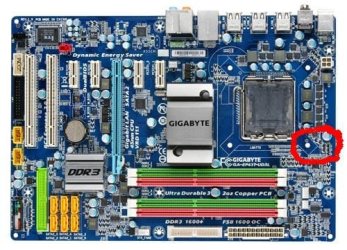
I see a spark from underneath the CPU. I took off the CPU fan and tried to start it up. It is not a spark. It is an orange light off my motherboard which is a releif.
This sounds more like a failed PSU. But the PSU is brand new and a high end item. Corsair 550W
The CPU fan attempts to spin.
The computer then does nothing.
Here is the motherboard I am using
I have attached a picture where the orange light blinks when I try to turn on the computer.

Does the fan spin up? If not, it may be a bad PSU. Try another.
Yes. The PSU is a brand new PSU. I just installed it today.

Did you hear any beeps? Look up the beep codes.
There were no beeps

Did you open the case beforehand and change anything? What?
The case was open during the installation process.

Please help
 

Attachments

  • mb_productimage_ga-ep43t-ud3l_big.jpg
    mb_productimage_ga-ep43t-ud3l_big.jpg
    53.1 KB · Views: 171

My Computer

Computer Manufacturer/Model Number
Self Made
OS
Windows 7 & XP
CPU
P4 3.2 Dual Core
Motherboard
Gigabyte - GA-EP43T-UD3L
Memory
DDR3 2gigs
Graphics Card(s)
ATI Diamond
Sound Card
On board
Hard Drives
400G Seagate
PSU
Corsair 550W
Is the Power supply working?

Check all of your connections carefully.
 
Last edited:
I would pull the HS/ and inspect the CPU itself for any abnormal signs , the motherboard as well.
Double check RAM, and GPU to make sure its seated properly.
Double check all wiring connections from PSU to MOBO


The following Award BIOS beep code descriptions may help you identify possible problems.

1 short: System boots successfully
2 short: CMOS setting error
1 long, 1 short: Memory or motherboard error
1 long, 2 short: Monitor or graphics card error
1 long, 3 short: Keyboard error
1 long, 9 short: BIOS ROM error
Continuous long beeps: Graphics card not inserted properly
Continuous short beeps: Power error
 

My Computer

Computer Manufacturer/Model Number
Custom (Self Build)
OS
Windows 7 Home Premium 64bit
CPU
Intel Core i7 2700k
Motherboard
eVGA P67 SLI
Memory
8GB Mushkin Redline Ridgebacks @1866
Graphics Card(s)
EVGA GTX570 SC
Sound Card
XiFi Titanium HD
Monitor(s) Displays
LG W2453V
Screen Resolution
1920x1080
Hard Drives
Intel 320 80GB -- Intel X25-V 40GB --WD Black 1TB x2 -- WD Blue 640GB
PSU
Seasonic x750
Case
Corsair 600T SE White
Cooling
eVGA Superclocked CPU Cooler
Keyboard
Saitek Cyborg
Antivirus
Kaspersky
Browser
IE
Other Info
LG BD/DVD
Is the Power supply working?
I do not know to be honest. It appears no. Which is shocking as this is a brand new PSU CLICK HERE

I checked all the connections quite diligently before I started the computer and installed Windows XP first. Before reformatting and doing an install from Windows 7.

To confirm I have connected a 24 pin connector and a 4 pin connector to my mobo. Was there anything I missed?

There is one other cable that fits into sys fan but I did not connect it. Could this have been the problem? Is this the cable for the PSU fan? Could the PSU overheated from not having the fan cable plugged in? The PSU was only on for maximum three hours.

Check all of your connections carefully.

There's a fireman in here if you need him ;)
I do not get the fireman joke, lol

What you think, fireman?[/QUOTE]

This post is longer then three characters.
 

My Computer

Computer Manufacturer/Model Number
Self Made
OS
Windows 7 & XP
CPU
P4 3.2 Dual Core
Motherboard
Gigabyte - GA-EP43T-UD3L
Memory
DDR3 2gigs
Graphics Card(s)
ATI Diamond
Sound Card
On board
Hard Drives
400G Seagate
PSU
Corsair 550W
I would pull the HS/ and inspect the CPU itself for any abnormal signs , the motherboard as well.
Double check RAM, and GPU to make sure its seated properly.
Double check all wiring connections from PSU to MOBO


The following Award BIOS beep code descriptions may help you identify possible problems.

1 short: System boots successfully
2 short: CMOS setting error
1 long, 1 short: Memory or motherboard error
1 long, 2 short: Monitor or graphics card error
1 long, 3 short: Keyboard error
1 long, 9 short: BIOS ROM error
Continuous long beeps: Graphics card not inserted properly
Continuous short beeps: Power error

There are no beeps. But thanks for the post that will be useful information in the future.

Could you please read my above post in terms of the connections from the PSU to the MOBO.

Once again the computer was working fine before installation.
 

My Computer

Computer Manufacturer/Model Number
Self Made
OS
Windows 7 & XP
CPU
P4 3.2 Dual Core
Motherboard
Gigabyte - GA-EP43T-UD3L
Memory
DDR3 2gigs
Graphics Card(s)
ATI Diamond
Sound Card
On board
Hard Drives
400G Seagate
PSU
Corsair 550W
The fan on the power supply itself should be running.
Is it?

As far as connections:
you should have the 24pin and a 4 (or8) Pin for the CPU to the MOBO, and the little CPU fan wire that connects to the MOBO.

It is quite possible the power supply went out, CPU Died, or both.
Although we could have another issue entirely.

couple Questions:
How does the CPU look? Any abnormal signs?
A burnt smell in the area still?
how about the board itself in that area?

Also, you should have a beep of some form. Even a short beep to confirm no issues.
It may be a great help to you to hook up the little speaker that came with your motherboard to help assist you narrow down the issue, if it isn't already. provided the MOBO is OK,
it will tell what is wrong through the series of beeps, or at least point you in the general direction to look,so that little speaker will help a lot.


At this point, I would disconnect everything that isnt necessary. Only 1 stick of RAM and all other things that aren't absolutley needed for basic operation. DVD Drives, Even the Mouse.

Unplug all power, and reset the CMOS.
Pull the little battery and wait 5-10 minutes.
put it back in and re-connect power

Try to boot again, and see what happens. if you can get to bios, reset to optimized default.

Would also be helpful for further troubleshooting in this case, if you have any spare PSU, (doesnt matter what size) that you know works, and a possible spare CPU you know is good.
 
Last edited:

My Computer

Computer Manufacturer/Model Number
Custom (Self Build)
OS
Windows 7 Home Premium 64bit
CPU
Intel Core i7 2700k
Motherboard
eVGA P67 SLI
Memory
8GB Mushkin Redline Ridgebacks @1866
Graphics Card(s)
EVGA GTX570 SC
Sound Card
XiFi Titanium HD
Monitor(s) Displays
LG W2453V
Screen Resolution
1920x1080
Hard Drives
Intel 320 80GB -- Intel X25-V 40GB --WD Black 1TB x2 -- WD Blue 640GB
PSU
Seasonic x750
Case
Corsair 600T SE White
Cooling
eVGA Superclocked CPU Cooler
Keyboard
Saitek Cyborg
Antivirus
Kaspersky
Browser
IE
Other Info
LG BD/DVD
Swear there was a fireman in here. I looked down at who was in the thread to see if you had more help coming, and there was some fireman460 or such. Sorry! :shock:

I'd post this in General to get max hits. They may move it to Hardware where it's slower but more specific.
 
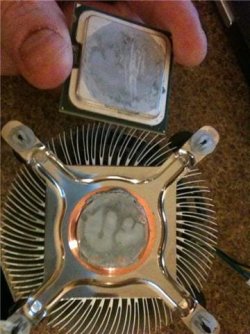
I got a new power supply to test if it is the PSU or the mobo. But before I start it up I took a picture of my CPU and noticed the grey chalky texture, which can be scratched off. Is this normal?
 

Attachments

  • GetAttachment.aspx.jpeg
    GetAttachment.aspx.jpeg
    33.4 KB · Views: 116

My Computer

Computer Manufacturer/Model Number
Self Made
OS
Windows 7 & XP
CPU
P4 3.2 Dual Core
Motherboard
Gigabyte - GA-EP43T-UD3L
Memory
DDR3 2gigs
Graphics Card(s)
ATI Diamond
Sound Card
On board
Hard Drives
400G Seagate
PSU
Corsair 550W
I got a new power supply to test if it is the PSU or the mobo. But before I start it up I took a picture of my CPU and noticed the grey chalky texture, which can be scratched off. Is this normal?

Yes that's the thermal compound, don't wipe it off. If the CPU works you should clean off that old compound and put some fresh paste on there.
 

My Computer

Computer Manufacturer/Model Number
Me =-)
OS
Win 7 Pro 64bit + XP MCE 32bit
CPU
Intel 2.4 C2D
Motherboard
EVGA 680i
Memory
4 x 1GB Corsair XMS2 DDR2 800
Graphics Card(s)
XFX 7900GS
Sound Card
integrated
Monitor(s) Displays
19" Widscreen
Screen Resolution
1440 x 900
Hard Drives
1TB sata WD Black
400 sata Seagate
200 IDE Seagate
PSU
600 watt Ultra X-Finity
Case
XG Red Viper
Cooling
Zalman 9700
Keyboard
Saitek Eclipse II
Mouse
Logitech Wireless G7
Internet Speed
20Mbps Cable
Other Info
Built Jan 2007
I just noticed you built you own PC, didn't you install the heatsink yourself? If you bought a retail CPU that is usually already applied to the bottom of the stock heatsink.
 

My Computer

Computer Manufacturer/Model Number
Me =-)
OS
Win 7 Pro 64bit + XP MCE 32bit
CPU
Intel 2.4 C2D
Motherboard
EVGA 680i
Memory
4 x 1GB Corsair XMS2 DDR2 800
Graphics Card(s)
XFX 7900GS
Sound Card
integrated
Monitor(s) Displays
19" Widscreen
Screen Resolution
1440 x 900
Hard Drives
1TB sata WD Black
400 sata Seagate
200 IDE Seagate
PSU
600 watt Ultra X-Finity
Case
XG Red Viper
Cooling
Zalman 9700
Keyboard
Saitek Eclipse II
Mouse
Logitech Wireless G7
Internet Speed
20Mbps Cable
Other Info
Built Jan 2007
i dont really see how a spark could've come from under the CPU HS, unless it was the fan that went pop..??

CPU's are very hardy little beasts, you'll struggle to burn one out..... its more likely you shorted something on the board.

its a C2D so it would've shut itself down before it was damaged, unfortunately the only sure-fire way to know is gonna be to grab yourself a cheap P4 & check the board is still working.. :)
 

My Computer

Computer Manufacturer/Model Number
myself
OS
SEVEN x64
CPU
Q9450 @ 3.6GHZ 1.34v
Motherboard
ASUS P5K PREMIUM P35
Memory
8GB 1066 buffalo firestix @ 1152mhz CL5
Graphics Card(s)
Sapphire HD 5970 + GTX260 (physX)
Sound Card
Creative X-FI Xtreme Gamer
Monitor(s) Displays
SAMSUNG 20'' & SAMSUNG 23'' (dual screens)
Screen Resolution
2048x1152 & 1680x1050
Hard Drives
1x seagate 160gb IDE & 1x seagate 160gb SATA
PSU
XCILIO 850w (78A)
Case
CM590 1x 120x38mm & 2x92x38mm / 4x 120x25mm
Cooling
AC7 PRO @ 92x38mm blower, Lamptron military bus bay controll
Keyboard
LOGITECH E110
Mouse
logitech NX5
Internet Speed
2MB
Other Info
its a continual ''work in progress''....
To confirm I have connected a 24 pin connector and a 4 pin connector to my mobo. Was there anything I missed?

There is one other cable that fits into sys fan but I did not connect it. Could this have been the problem? Is this the cable for the PSU fan? Could the PSU overheated from not having the fan cable plugged in? The PSU was only on for maximum three hours.
Sys fan motherboard pinout is for 3 or 4 pin case fans, and it allows the system monitor to control the fan speed if a smart fan is attached. Do not connect any part of the power supply to this header, it will most likely wreck your motherboard.
The cable from your PSU was most likely a 4 pin floppy drive power cable that outputs 5 volts, and will short out your mobo.
 

My Computer

OS
XP Pro/Vista Ultimate (64)/Windows 7 Ultimate Signature Edition(64)
CPU
Core 2 Duo E8500 @ stock
Motherboard
Gigabyte EP45-UD3R
Memory
8Gb (4 X 2Gb) Corsair Dominator 1066Mhz DDR2
Graphics Card(s)
XFX ATI Radeon 4870 1Gb
Sound Card
Onboard 7.1
Monitor(s) Displays
BenQ E2200Hd, Asus VW161D, HP L1506
Screen Resolution
1920 X 1080
Hard Drives
Seagate 7200.12 500Gb
2 X Hitachi 1Tb
PSU
CoolerMaster 650 EPD
Case
Thermaltake
Cooling
2 X Noctua 120mm's, Stock Intel
Keyboard
Logitech
Mouse
Logitech
Viper - I bought this cpu a few years ago. the heat sink paste was already applied. I uhh just wiped most of it of (newb) and I dont have any more paste of know where to buy some.


Would it be okay to put the fan on the cpu and try booting up now tha tmost of the paste is gone? is it that big of a deal?

I am trying to determine if the problem was my PSU, CPU, or mobo

Skunksmash - It was not a spark I confirmed it was a light on my mother board.

The cable I am wondering about is the PX cable which is a 4 pin horizontal connector. IT was not connected to the mobo. I actually forgot to install it it was installed on my last mobo. So I though that was the issue. Please advise.
 

My Computer

Computer Manufacturer/Model Number
Self Made
OS
Windows 7 & XP
CPU
P4 3.2 Dual Core
Motherboard
Gigabyte - GA-EP43T-UD3L
Memory
DDR3 2gigs
Graphics Card(s)
ATI Diamond
Sound Card
On board
Hard Drives
400G Seagate
PSU
Corsair 550W
Viper - I uhh just wiped most of it of (newb) and I dont have any more paste of know where to buy some.

Radio Shack. Includes application tool and instructions. Use precision, patience.


Would it be okay to put the fan on the cpu and try booting up now tha tmost of the paste is gone? is it that big of a deal?

It needs to have old paste removed, fresh paste applied if you wiped any off or broke bond.
 
just tried booting up with a new psu. fan does not turn on there is an orange light on the mobo thinking the mobo if fried but i have no idea how..its is brand new!!!:mad:

trying my old mobo now
 

My Computer

Computer Manufacturer/Model Number
Self Made
OS
Windows 7 & XP
CPU
P4 3.2 Dual Core
Motherboard
Gigabyte - GA-EP43T-UD3L
Memory
DDR3 2gigs
Graphics Card(s)
ATI Diamond
Sound Card
On board
Hard Drives
400G Seagate
PSU
Corsair 550W
Would it be okay to put the fan on the cpu and try booting up now tha tmost of the paste is gone? is it that big of a deal?
No, make sure you use a fresh smear of thermal paste... like Arctic Silver 5. Without it your temps will go sky high and you will either risk cooking your cpu or it will just lockup and shutdown constantly
 

My Computer

OS
XP Pro/Vista Ultimate (64)/Windows 7 Ultimate Signature Edition(64)
CPU
Core 2 Duo E8500 @ stock
Motherboard
Gigabyte EP45-UD3R
Memory
8Gb (4 X 2Gb) Corsair Dominator 1066Mhz DDR2
Graphics Card(s)
XFX ATI Radeon 4870 1Gb
Sound Card
Onboard 7.1
Monitor(s) Displays
BenQ E2200Hd, Asus VW161D, HP L1506
Screen Resolution
1920 X 1080
Hard Drives
Seagate 7200.12 500Gb
2 X Hitachi 1Tb
PSU
CoolerMaster 650 EPD
Case
Thermaltake
Cooling
2 X Noctua 120mm's, Stock Intel
Keyboard
Logitech
Mouse
Logitech
Viper - I bought this cpu a few years ago. the heat sink paste was already applied. I uhh just wiped most of it of (newb) and I dont have any more paste of know where to buy some.


Would it be okay to put the fan on the cpu and try booting up now tha tmost of the paste is gone? is it that big of a deal?

I am trying to determine if the problem was my PSU, CPU, or mobo

Skunksmash - It was not a spark I confirmed it was a light on my mother board.

The cable I am wondering about is the PX cable which is a 4 pin horizontal connector. IT was not connected to the mobo. I actually forgot to install it it was installed on my last mobo. So I though that was the issue. Please advise.

but the system was working perfectly until you tried to install the new OS, correct..???

if the system weren't wired correctly it wouldn't of posted in the first place..??

this ''4pin connection'' your referring to, you say it was installed on your old rig.. whereabouts on the board..??, are you referring to the 4pin plug situated near the CPU socket..??

:)
 

My Computer

Computer Manufacturer/Model Number
myself
OS
SEVEN x64
CPU
Q9450 @ 3.6GHZ 1.34v
Motherboard
ASUS P5K PREMIUM P35
Memory
8GB 1066 buffalo firestix @ 1152mhz CL5
Graphics Card(s)
Sapphire HD 5970 + GTX260 (physX)
Sound Card
Creative X-FI Xtreme Gamer
Monitor(s) Displays
SAMSUNG 20'' & SAMSUNG 23'' (dual screens)
Screen Resolution
2048x1152 & 1680x1050
Hard Drives
1x seagate 160gb IDE & 1x seagate 160gb SATA
PSU
XCILIO 850w (78A)
Case
CM590 1x 120x38mm & 2x92x38mm / 4x 120x25mm
Cooling
AC7 PRO @ 92x38mm blower, Lamptron military bus bay controll
Keyboard
LOGITECH E110
Mouse
logitech NX5
Internet Speed
2MB
Other Info
its a continual ''work in progress''....

Attachments

  • Capture.JPG
    Capture.JPG
    35.7 KB · Views: 17

My Computer

OS
XP Pro/Vista Ultimate (64)/Windows 7 Ultimate Signature Edition(64)
CPU
Core 2 Duo E8500 @ stock
Motherboard
Gigabyte EP45-UD3R
Memory
8Gb (4 X 2Gb) Corsair Dominator 1066Mhz DDR2
Graphics Card(s)
XFX ATI Radeon 4870 1Gb
Sound Card
Onboard 7.1
Monitor(s) Displays
BenQ E2200Hd, Asus VW161D, HP L1506
Screen Resolution
1920 X 1080
Hard Drives
Seagate 7200.12 500Gb
2 X Hitachi 1Tb
PSU
CoolerMaster 650 EPD
Case
Thermaltake
Cooling
2 X Noctua 120mm's, Stock Intel
Keyboard
Logitech
Mouse
Logitech
Back
Top