Installation Fried My CPU

My Computer

OS
XP Pro/Vista Ultimate (64)/Windows 7 Ultimate Signature Edition(64)
CPU
Core 2 Duo E8500 @ stock
Motherboard
Gigabyte EP45-UD3R
Memory
8Gb (4 X 2Gb) Corsair Dominator 1066Mhz DDR2
Graphics Card(s)
XFX ATI Radeon 4870 1Gb
Sound Card
Onboard 7.1
Monitor(s) Displays
BenQ E2200Hd, Asus VW161D, HP L1506
Screen Resolution
1920 X 1080
Hard Drives
Seagate 7200.12 500Gb
2 X Hitachi 1Tb
PSU
CoolerMaster 650 EPD
Case
Thermaltake
Cooling
2 X Noctua 120mm's, Stock Intel
Keyboard
Logitech
Mouse
Logitech
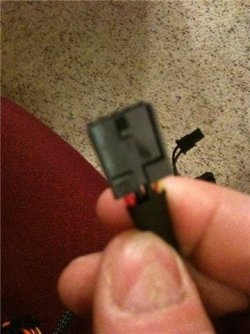
This is the 4 pin cable that was not connected which i believe was conected on my last mobo. Is this an issue?

Skunk yes the computer worked fine with Windows XP when I attempted to install windows 7 when it rebooted it never started up and there was a burning smell from under the CPU area.
 

Attachments

  • GetAttachment.aspx.jpeg
    GetAttachment.aspx.jpeg
    27.3 KB · Views: 7

My Computer

Computer Manufacturer/Model Number
Self Made
OS
Windows 7 & XP
CPU
P4 3.2 Dual Core
Motherboard
Gigabyte - GA-EP43T-UD3L
Memory
DDR3 2gigs
Graphics Card(s)
ATI Diamond
Sound Card
On board
Hard Drives
400G Seagate
PSU
Corsair 550W
Thanks Orpheus
 

My Computer

Computer Manufacturer/Model Number
Self Made
OS
Windows 7 & XP
CPU
P4 3.2 Dual Core
Motherboard
Gigabyte - GA-EP43T-UD3L
Memory
DDR3 2gigs
Graphics Card(s)
ATI Diamond
Sound Card
On board
Hard Drives
400G Seagate
PSU
Corsair 550W
You're welcome :)
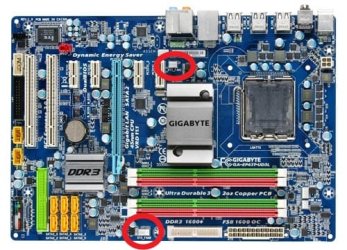
Phew! for a minute there I thought you'd connected the floppy power to one of these:

The connector you're holding in the pic looks like it could be a standard molex 12V connector, used to supply power to older style IDE drives and to supply extra 12V power to some motherboards. The newer 4 pin power connector has made it's use on late model motherboards obselete. Not sure though as the photo is a little blurry... can you identify it on the connector pic i posted?
 

Attachments

  • mb_productimage_ga-ep43t-ud3l_big.jpg
    mb_productimage_ga-ep43t-ud3l_big.jpg
    53.4 KB · Views: 13

My Computer

OS
XP Pro/Vista Ultimate (64)/Windows 7 Ultimate Signature Edition(64)
CPU
Core 2 Duo E8500 @ stock
Motherboard
Gigabyte EP45-UD3R
Memory
8Gb (4 X 2Gb) Corsair Dominator 1066Mhz DDR2
Graphics Card(s)
XFX ATI Radeon 4870 1Gb
Sound Card
Onboard 7.1
Monitor(s) Displays
BenQ E2200Hd, Asus VW161D, HP L1506
Screen Resolution
1920 X 1080
Hard Drives
Seagate 7200.12 500Gb
2 X Hitachi 1Tb
PSU
CoolerMaster 650 EPD
Case
Thermaltake
Cooling
2 X Noctua 120mm's, Stock Intel
Keyboard
Logitech
Mouse
Logitech
ahh okay, i didnt think it was an issue but i wasnt 100% sure as i have never had a computer issue like this before. I am currently installing my old MOBO to get a better idea.

I just dont see how the mobo or cpu would burn out after installing windows 7....to me knowledge my new mobo was compatible with all my hard ware.
 

My Computer

Computer Manufacturer/Model Number
Self Made
OS
Windows 7 & XP
CPU
P4 3.2 Dual Core
Motherboard
Gigabyte - GA-EP43T-UD3L
Memory
DDR3 2gigs
Graphics Card(s)
ATI Diamond
Sound Card
On board
Hard Drives
400G Seagate
PSU
Corsair 550W
Just an afterthought.... have you checked the back of the power supply for a switch that allows you to select the correct voltage? ie. 230V/110V...
 

My Computer

OS
XP Pro/Vista Ultimate (64)/Windows 7 Ultimate Signature Edition(64)
CPU
Core 2 Duo E8500 @ stock
Motherboard
Gigabyte EP45-UD3R
Memory
8Gb (4 X 2Gb) Corsair Dominator 1066Mhz DDR2
Graphics Card(s)
XFX ATI Radeon 4870 1Gb
Sound Card
Onboard 7.1
Monitor(s) Displays
BenQ E2200Hd, Asus VW161D, HP L1506
Screen Resolution
1920 X 1080
Hard Drives
Seagate 7200.12 500Gb
2 X Hitachi 1Tb
PSU
CoolerMaster 650 EPD
Case
Thermaltake
Cooling
2 X Noctua 120mm's, Stock Intel
Keyboard
Logitech
Mouse
Logitech
there is no switch other then the power switch on both power supplies i tried
 

My Computer

Computer Manufacturer/Model Number
Self Made
OS
Windows 7 & XP
CPU
P4 3.2 Dual Core
Motherboard
Gigabyte - GA-EP43T-UD3L
Memory
DDR3 2gigs
Graphics Card(s)
ATI Diamond
Sound Card
On board
Hard Drives
400G Seagate
PSU
Corsair 550W
there is no switch other then the power switch on both power supplies i tried
Nice feature!
"Universal AC input 90~264V automatically scans and detects the correct
voltage. No more hassle of flipping that tiny red switch!"
from your psu manual
 

My Computer

OS
XP Pro/Vista Ultimate (64)/Windows 7 Ultimate Signature Edition(64)
CPU
Core 2 Duo E8500 @ stock
Motherboard
Gigabyte EP45-UD3R
Memory
8Gb (4 X 2Gb) Corsair Dominator 1066Mhz DDR2
Graphics Card(s)
XFX ATI Radeon 4870 1Gb
Sound Card
Onboard 7.1
Monitor(s) Displays
BenQ E2200Hd, Asus VW161D, HP L1506
Screen Resolution
1920 X 1080
Hard Drives
Seagate 7200.12 500Gb
2 X Hitachi 1Tb
PSU
CoolerMaster 650 EPD
Case
Thermaltake
Cooling
2 X Noctua 120mm's, Stock Intel
Keyboard
Logitech
Mouse
Logitech
Well I just rehooked my old motherboard up.
Teseted with both power supplies. No luck. It is safe to say it is in fact my CPU that randomly went kaput. hence the burning smell I originally smelt.

Way to go Microsoft once again for releasing another ****ty operating system, can i get a refund on my purchase of Windows 7 and my 3.2 dual core P4 processor that you ****ed up, go **** yourself and have a ni day.

I will repost when when test both mother boards with an older P4 used processor
 

My Computer

Computer Manufacturer/Model Number
Self Made
OS
Windows 7 & XP
CPU
P4 3.2 Dual Core
Motherboard
Gigabyte - GA-EP43T-UD3L
Memory
DDR3 2gigs
Graphics Card(s)
ATI Diamond
Sound Card
On board
Hard Drives
400G Seagate
PSU
Corsair 550W
Windows Install

Installing Windows 7 did not cause this issue it's just a coincidence hardware can just go up in smoke sometimes it sounds like the board is shorted out to me it happens just be careful with your power supply's plugging them into a shorted out board can short the PSU as well
 

My Computer

Computer Manufacturer/Model Number
Custom Built
OS
Windows 7 Ultimate 32 bit
CPU
AMD Athlon 64 X2 4200+ Overclocked to 3.0Ghz
Motherboard
Biostar TF560 A2+
Memory
2 Gigs of G.Skill DDR2 800
Graphics Card(s)
HIS ATI Radeon HD 2600 Pro With IceQ cooler
Sound Card
6.1 Channel Sound Blaster Live 24 Bit
Monitor(s) Displays
Dual 20.5 " LG Flatrons W2052TO
Screen Resolution
1152x864
Hard Drives
Dual 36 Gig 10,000 RPM Raptors
PSU
430 watt Seasonic 80%+ Dual 12v Rails 2x80mm fans
Case
CHIEFMAX YA-5X
Cooling
4-80mm case fans 1-140mm case fan freezer 64 Pro CPU cooler
Keyboard
Saitek Eclipse II
Mouse
A4Tech wireless battery free optical scroll mouse
Internet Speed
1.5 meg down 384 up
Other Info
Logisys LED fan/light controller and dual 16" LED sticks mounted inside top of case all fans are LED all lighting is blue
DVD RW and CD RW both and Memory card reader
After reading the whole thread, i can't believe you're actually blaming Windows 7 for your hardware problem....please, and it is not a s****y OS
Sorry, guys if i seem a lil tad :mad:
 

My Computer

Computer Manufacturer/Model Number
custom of course...built by grimreaper
OS
Windows 7 Ultimate X64
CPU
Intel Core 2 Quad Q9650 3.0GHz (3.6GHz 24/7) maxed 4.05GHz
Motherboard
EVGA 790i Ultra SLi Model#132-CK-NF79-A1 BIOS P10
Memory
8GB OCZ DDR3 PC3-14400 @ 1800MHz NVIDIA SLi-Ready
Graphics Card(s)
2XBFG GeForce GTX 280 OC Edition SLi'd
Sound Card
SoundBlaster X-Fi Titanium Fatal1ty Pro Series
Monitor(s) Displays
Samsung 52" 1080P LCD HDTV (LN52B550)
Screen Resolution
1920X1080 @ 60Hz
Hard Drives
3xWestern Digital WD1001FALS Caviar Black 1TB Hard Drive(s) RAID 0 x2 encased in 3xMasscool KuFormula SHF1 HDD Cooler(s)
PSU
ThermalTake ToughPower 1200W P/N:W0133RU Modularized
Case
ThermalTake P/N: VH6000BWS Armor Full-Tower
Cooling
ThermalTake SpinQ P/N: P0466 CPU Cooler
Keyboard
Logitech cordless Y-RAJ56A piece of ****
Mouse
Logitech G7 Laser Cordless mouse black
Internet Speed
10 Mbps DL-1Mbps UL wirelessly DWA-552 extreme N
Other Info
1XSamsung DVD burner SH-S223Q/BEBN SATA
1XSamsung DVD burner SH-S223L/BEBN SATA
1XLG GGW-H20L Blu-Ray burner
4XCooler Master 120mm Blue LED SickleFlow 2000 RPM
1XBelkin UPS F6C1500TWRK) backup power supply
But before I start it up I took a picture of my CPU and noticed the grey chalky texture, which can be scratched off. Is this normal?
:what:

It is safe to say it is in fact my CPU that randomly went kaput. hence the burning smell I originally smelt.
:doh:
Way to go Microsoft once again for releasing another ****ty operating system, can i get a refund on my purchase of Windows 7 and my 3.2 dual core P4 processor that you ****ed up, go **** yourself and have a ni day.

:roflmao:
 
While I can understand your frustration, it's just not possible that the installation of Windows 7 was the cause of your problem. The main suspect here is your power supply, as according to what you have told us it was correctly installed and connected, and it was the only different component that was attached to what was previously a perfectly working PC. If that's the case, I'd be contacting the retailer and/or Corsair for replacement or reimbursement. I'm sure there are consumer laws in your country which protect end users against damage due to faulty workmanship or products that aren't of a merchantable quality. If you take this route, prepare to prove that the installation was undertaken according to manufacturers instructions. If the power supply was incorrectly connected to the motherboard, inspection by an electronics repair technician will show that in either the motherboard or the power supply's circuitry.
Let us know what happens, I for one am curious to hear what the diagnosis would be :)
 

My Computer

OS
XP Pro/Vista Ultimate (64)/Windows 7 Ultimate Signature Edition(64)
CPU
Core 2 Duo E8500 @ stock
Motherboard
Gigabyte EP45-UD3R
Memory
8Gb (4 X 2Gb) Corsair Dominator 1066Mhz DDR2
Graphics Card(s)
XFX ATI Radeon 4870 1Gb
Sound Card
Onboard 7.1
Monitor(s) Displays
BenQ E2200Hd, Asus VW161D, HP L1506
Screen Resolution
1920 X 1080
Hard Drives
Seagate 7200.12 500Gb
2 X Hitachi 1Tb
PSU
CoolerMaster 650 EPD
Case
Thermaltake
Cooling
2 X Noctua 120mm's, Stock Intel
Keyboard
Logitech
Mouse
Logitech

My Computer

Computer Manufacturer/Model Number
custom of course...built by grimreaper
OS
Windows 7 Ultimate X64
CPU
Intel Core 2 Quad Q9650 3.0GHz (3.6GHz 24/7) maxed 4.05GHz
Motherboard
EVGA 790i Ultra SLi Model#132-CK-NF79-A1 BIOS P10
Memory
8GB OCZ DDR3 PC3-14400 @ 1800MHz NVIDIA SLi-Ready
Graphics Card(s)
2XBFG GeForce GTX 280 OC Edition SLi'd
Sound Card
SoundBlaster X-Fi Titanium Fatal1ty Pro Series
Monitor(s) Displays
Samsung 52" 1080P LCD HDTV (LN52B550)
Screen Resolution
1920X1080 @ 60Hz
Hard Drives
3xWestern Digital WD1001FALS Caviar Black 1TB Hard Drive(s) RAID 0 x2 encased in 3xMasscool KuFormula SHF1 HDD Cooler(s)
PSU
ThermalTake ToughPower 1200W P/N:W0133RU Modularized
Case
ThermalTake P/N: VH6000BWS Armor Full-Tower
Cooling
ThermalTake SpinQ P/N: P0466 CPU Cooler
Keyboard
Logitech cordless Y-RAJ56A piece of ****
Mouse
Logitech G7 Laser Cordless mouse black
Internet Speed
10 Mbps DL-1Mbps UL wirelessly DWA-552 extreme N
Other Info
1XSamsung DVD burner SH-S223Q/BEBN SATA
1XSamsung DVD burner SH-S223L/BEBN SATA
1XLG GGW-H20L Blu-Ray burner
4XCooler Master 120mm Blue LED SickleFlow 2000 RPM
1XBelkin UPS F6C1500TWRK) backup power supply
Back
Top