Installation Help ( First Time Doing It)

CookieMonsta

New member
Local time
1:53 PM
Messages
29
Hello , First of all i want to tell you before you continue reading that this is my First time installing an OS , i have no clue how to do it, so you would have to explain me in a " installing for dummies " way .

Currently i have Windows Vista Home premium x64, and i would like to install windows 7. Unfortunately i don't have an external drive to backup my data. I was asking my friends and they were telling me that to do a partition.

My question is: Can i make a partition , store my data there ( let's call it "Disk A " ) and install Windows 7 in the actual drive where vista is located [ "C" ],or in another partition, and then wipe where Vista is located to stay only with 7, so would be something like replacing 7 for vista. Without loosing the data. And keep that partition where the data is

I have only 1 Hard Drive [750GB]

I have looked the guides but i couldn't find what i needed to continue, so i decided to ask.

Thank you for your time and help
 

My Computer

Computer Manufacturer/Model Number
Hp pavilion Elite M9405f
OS
Windows 7 Ultimate 64x
CPU
Intel Core 2 Quad Q8200 2.33Ghz
Graphics Card(s)
Nvidia Geoforce 9500 Gs
Hello CookieMonsta, welcome to Seven Forums!


Before we make any specific recommendations will you please post a snip/screen-shot of the entire disk management drive map with a full description as to which drive/partition is which, so we can see what you have going on as there may be a fairly simple way to resolve the situation.

In the Windows start menu right click computer and click manage, in the left pane of the "Computer Management" window that opens click disk management and post a maximized snip of that.


How to Upload and Post a Screenshot and File in Seven Forums
 

My Computer

Computer Manufacturer/Model Number
* BFK Customs *
OS
W 7 64-bit Ultimate
CPU
Intel Q9550 Yorkfield
Motherboard
ASUS P5Q Pro
Memory
8GB Dominator 8500C5D
Graphics Card(s)
ATI : XFX 5870
Sound Card
Realtek HD Audio 7-1
Monitor(s) Displays
1x 47" LCD HDMI & 3x 26" LCD HDMI
Screen Resolution
1920x1080P & 1920x1200
Hard Drives
1x 80GB Intel X25-M G2 SSD : 1x 500GB & 1x 640GB WD Caviar Black(s)
PSU
Corsair 620HX
Case
Cooler Master RC-690
Cooling
Tuniq Tower 120, 2x 140mm and 3x 120mm case fans
Keyboard
Microsoft 500
Mouse
Razer Diamondback 3G
Internet Speed
14 Mb/s
Other Info
1x Koutech 3Gb/s SATA HDD Hot Swap Rack
Have you created the set of HP recovery disks yet, so you can take it back to Vista if ever needed?


Do you ever plan to take it back to Vista or will you do Windows 7 from now on?


The method outlined in this tutorial at the link below is the way I would take this.

Clean Install Windows 7 : Ahead of Vista
 

My Computer

Computer Manufacturer/Model Number
* BFK Customs *
OS
W 7 64-bit Ultimate
CPU
Intel Q9550 Yorkfield
Motherboard
ASUS P5Q Pro
Memory
8GB Dominator 8500C5D
Graphics Card(s)
ATI : XFX 5870
Sound Card
Realtek HD Audio 7-1
Monitor(s) Displays
1x 47" LCD HDMI & 3x 26" LCD HDMI
Screen Resolution
1920x1080P & 1920x1200
Hard Drives
1x 80GB Intel X25-M G2 SSD : 1x 500GB & 1x 640GB WD Caviar Black(s)
PSU
Corsair 620HX
Case
Cooler Master RC-690
Cooling
Tuniq Tower 120, 2x 140mm and 3x 120mm case fans
Keyboard
Microsoft 500
Mouse
Razer Diamondback 3G
Internet Speed
14 Mb/s
Other Info
1x Koutech 3Gb/s SATA HDD Hot Swap Rack
I'm not planning to return to vista , i would like to move on to 7
 

My Computer

Computer Manufacturer/Model Number
Hp pavilion Elite M9405f
OS
Windows 7 Ultimate 64x
CPU
Intel Core 2 Quad Q8200 2.33Ghz
Graphics Card(s)
Nvidia Geoforce 9500 Gs
The method outlined in this tutorial at the link below is the way I would take this if I were in your position, it's a completely safe method and you will not lose anything on the Vista install until you intentionally remove it.

Clean Install Windows 7 : Ahead of Vista
 

My Computer

Computer Manufacturer/Model Number
* BFK Customs *
OS
W 7 64-bit Ultimate
CPU
Intel Q9550 Yorkfield
Motherboard
ASUS P5Q Pro
Memory
8GB Dominator 8500C5D
Graphics Card(s)
ATI : XFX 5870
Sound Card
Realtek HD Audio 7-1
Monitor(s) Displays
1x 47" LCD HDMI & 3x 26" LCD HDMI
Screen Resolution
1920x1080P & 1920x1200
Hard Drives
1x 80GB Intel X25-M G2 SSD : 1x 500GB & 1x 640GB WD Caviar Black(s)
PSU
Corsair 620HX
Case
Cooler Master RC-690
Cooling
Tuniq Tower 120, 2x 140mm and 3x 120mm case fans
Keyboard
Microsoft 500
Mouse
Razer Diamondback 3G
Internet Speed
14 Mb/s
Other Info
1x Koutech 3Gb/s SATA HDD Hot Swap Rack
OK it looks like that is what i need , i just will need you to guide me in some stuffs.

The first part you shirk where Vista is to have enough space for 7, then created a partition , installed in the 7 in the new partition , right ?

in my case i would have to make a partition to store my personal data and another one for the windows 7 ?
 

My Computer

Computer Manufacturer/Model Number
Hp pavilion Elite M9405f
OS
Windows 7 Ultimate 64x
CPU
Intel Core 2 Quad Q8200 2.33Ghz
Graphics Card(s)
Nvidia Geoforce 9500 Gs
Let's do this one step at a time, you're in no real big hurry right?

Don't do anything to the Vista partition yet, leave everything right where it is! ;)


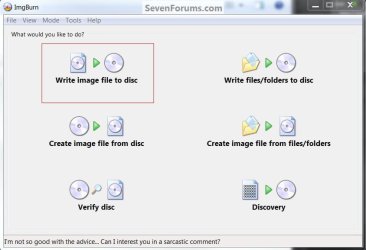
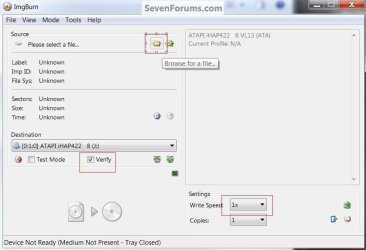
First download the Partition Wizard Bootable Disk (PWBD) ISO file to the desktop, from this first link below and then use ImgBurn to burn the ISO to a CD, when that's done post back here and we'll pick it up again there.


Scroll down to see the PWBD ISO file download.

Partition Wizard Free Bootable CD

Use this program to create the PWBD.

ImgBurn Free ISO Burning Software


click an image to enlarge
ImgBurn.jpgImgBurn2.jpg
 

My Computer

Computer Manufacturer/Model Number
* BFK Customs *
OS
W 7 64-bit Ultimate
CPU
Intel Q9550 Yorkfield
Motherboard
ASUS P5Q Pro
Memory
8GB Dominator 8500C5D
Graphics Card(s)
ATI : XFX 5870
Sound Card
Realtek HD Audio 7-1
Monitor(s) Displays
1x 47" LCD HDMI & 3x 26" LCD HDMI
Screen Resolution
1920x1080P & 1920x1200
Hard Drives
1x 80GB Intel X25-M G2 SSD : 1x 500GB & 1x 640GB WD Caviar Black(s)
PSU
Corsair 620HX
Case
Cooler Master RC-690
Cooling
Tuniq Tower 120, 2x 140mm and 3x 120mm case fans
Keyboard
Microsoft 500
Mouse
Razer Diamondback 3G
Internet Speed
14 Mb/s
Other Info
1x Koutech 3Gb/s SATA HDD Hot Swap Rack
OK it looks like that is what i need , i just will need you to guide me in some stuffs.

The first part you shirk where Vista is to have enough space for 7, then created a partition , installed in the 7 in the new partition , right ?

in my case i would have to make a partition to store my personal data and another one for the windows 7 ?

You do not have to create any partitions first to move any of your personal data to before you do Step One, that's the whole purpose of using this method.

After you have created the PWBD you then boot the PWBD to do just Step One in the tutorial I posted above to Resize the left side of the Vista partition; after Step One completes, remove the PWBD from the CD/DVD drive and at the upper left pane of the Partition Wizard program that's still open click General then Exit to close the PW program and restart Windows Vista to let it accept the new changes you just made as outlined in the tutorial.

The Vista restarts must be done to let Vista accept the changes!

When you are completely finished with all the steps of the tutorial you will have two (2) complete Windows OS that are fully functioning and this way you will be able to move all your personal data to the new Windows 7 at your leisure.

Then when you are completely sure you have everything from Vista you need, then you will be able to completely remove Vista and use that partition for additional storage if you choose.

Please be sure to post back here to keep me updated as you proceed. :)
 

My Computer

Computer Manufacturer/Model Number
* BFK Customs *
OS
W 7 64-bit Ultimate
CPU
Intel Q9550 Yorkfield
Motherboard
ASUS P5Q Pro
Memory
8GB Dominator 8500C5D
Graphics Card(s)
ATI : XFX 5870
Sound Card
Realtek HD Audio 7-1
Monitor(s) Displays
1x 47" LCD HDMI & 3x 26" LCD HDMI
Screen Resolution
1920x1080P & 1920x1200
Hard Drives
1x 80GB Intel X25-M G2 SSD : 1x 500GB & 1x 640GB WD Caviar Black(s)
PSU
Corsair 620HX
Case
Cooler Master RC-690
Cooling
Tuniq Tower 120, 2x 140mm and 3x 120mm case fans
Keyboard
Microsoft 500
Mouse
Razer Diamondback 3G
Internet Speed
14 Mb/s
Other Info
1x Koutech 3Gb/s SATA HDD Hot Swap Rack
Sorry for the delay , i had to leave yesterday.

I just finished to burn the PWBD to the disc

OK so first i follow the steps of the "How To Change the Drive Boot Priority in BIOS" to set the optical drive as first in order, then i move to the " How to Install Windows 7 to a Partition Ahead of Installed Vista" tutorial and do the step #1.

and then i continue with the remainin steps of the second guide , right ?

One question , is there a recommended number that i should set the shrink to ? and when i do this , will loose the data that is in there ?
 

My Computer

Computer Manufacturer/Model Number
Hp pavilion Elite M9405f
OS
Windows 7 Ultimate 64x
CPU
Intel Core 2 Quad Q8200 2.33Ghz
Graphics Card(s)
Nvidia Geoforce 9500 Gs
Did you see the #9 post I just made above your last post?


No don't make edits to old posts, please make new posts, edits are too hard to keep up with.
 

My Computer

Computer Manufacturer/Model Number
* BFK Customs *
OS
W 7 64-bit Ultimate
CPU
Intel Q9550 Yorkfield
Motherboard
ASUS P5Q Pro
Memory
8GB Dominator 8500C5D
Graphics Card(s)
ATI : XFX 5870
Sound Card
Realtek HD Audio 7-1
Monitor(s) Displays
1x 47" LCD HDMI & 3x 26" LCD HDMI
Screen Resolution
1920x1080P & 1920x1200
Hard Drives
1x 80GB Intel X25-M G2 SSD : 1x 500GB & 1x 640GB WD Caviar Black(s)
PSU
Corsair 620HX
Case
Cooler Master RC-690
Cooling
Tuniq Tower 120, 2x 140mm and 3x 120mm case fans
Keyboard
Microsoft 500
Mouse
Razer Diamondback 3G
Internet Speed
14 Mb/s
Other Info
1x Koutech 3Gb/s SATA HDD Hot Swap Rack
I just finished to burn the PWBD to the disc

OK so first i follow the steps of the "How To Change the Drive Boot Priority in BIOS" to set the optical drive as first in order, then i move to the " How to Install Windows 7 to a Partition Ahead of Installed Vista" tutorial and do the step #1.

and then i continue with the remainin steps of the second guide , right ?

One question , is there a recommended number that i should set the shrink to ? and when i do this , will loose the data that is in there ?
 

My Computer

Computer Manufacturer/Model Number
Hp pavilion Elite M9405f
OS
Windows 7 Ultimate 64x
CPU
Intel Core 2 Quad Q8200 2.33Ghz
Graphics Card(s)
Nvidia Geoforce 9500 Gs
I just finished to burn the PWBD to the disc

1. OK so first i follow the steps of the "How To Change the Drive Boot Priority in BIOS" to set the optical drive as first in order, then i move to the " How to Install Windows 7 to a Partition Ahead of Installed Vista" tutorial and do the step #1.

2. and then i continue with the remainin steps of the second guide , right ?

3. One question , is there a recommended number that i should set the shrink to ? and when i do this ,

4. will loose the data that is in there ?

1. Yes

2. Yes, though you must do the Vista restarts before you continue on to Step Two.

3. Yes just resize the left side of the Vista partition to 100GB to do the installation to, this is plenty for now and can be changed later if you choose and it will make the resize 'easier/faster' to complete.

4. No you will not lose any data at all.
 

My Computer

Computer Manufacturer/Model Number
* BFK Customs *
OS
W 7 64-bit Ultimate
CPU
Intel Q9550 Yorkfield
Motherboard
ASUS P5Q Pro
Memory
8GB Dominator 8500C5D
Graphics Card(s)
ATI : XFX 5870
Sound Card
Realtek HD Audio 7-1
Monitor(s) Displays
1x 47" LCD HDMI & 3x 26" LCD HDMI
Screen Resolution
1920x1080P & 1920x1200
Hard Drives
1x 80GB Intel X25-M G2 SSD : 1x 500GB & 1x 640GB WD Caviar Black(s)
PSU
Corsair 620HX
Case
Cooler Master RC-690
Cooling
Tuniq Tower 120, 2x 140mm and 3x 120mm case fans
Keyboard
Microsoft 500
Mouse
Razer Diamondback 3G
Internet Speed
14 Mb/s
Other Info
1x Koutech 3Gb/s SATA HDD Hot Swap Rack
I'm doing the resize at this moment , one thing is that it did'nt let me shrink it to 100gb it stopped at 317gb , is that ok ?
 

My Computer

Computer Manufacturer/Model Number
Hp pavilion Elite M9405f
OS
Windows 7 Ultimate 64x
CPU
Intel Core 2 Quad Q8200 2.33Ghz
Graphics Card(s)
Nvidia Geoforce 9500 Gs
Yes that will be ok, just relax and let it complete and then remove the PWBD from the CD/DVD drive and restart Windows Vista to let it accept the changes to the partition structure.

A couple separate Vista restarts will be ok and are preferred before you go on to Step Two; and do restarts after you complete Step Two and continue on to Step Three.


Be sure to mark the new Windows 7 partition as Active just before you want to do the Windows 7 installation process.

One tip though, be sure to be ready to start the Windows 7 install before you mark the created Windows 7 partition active, once it's active and if you try to restart Vista it will not start.

Once the Windows 7 partition is active, then boot the Windows 7 installation media to do the clean install process.

How to Do a Clean Installation with Windows 7
 

My Computer

Computer Manufacturer/Model Number
* BFK Customs *
OS
W 7 64-bit Ultimate
CPU
Intel Q9550 Yorkfield
Motherboard
ASUS P5Q Pro
Memory
8GB Dominator 8500C5D
Graphics Card(s)
ATI : XFX 5870
Sound Card
Realtek HD Audio 7-1
Monitor(s) Displays
1x 47" LCD HDMI & 3x 26" LCD HDMI
Screen Resolution
1920x1080P & 1920x1200
Hard Drives
1x 80GB Intel X25-M G2 SSD : 1x 500GB & 1x 640GB WD Caviar Black(s)
PSU
Corsair 620HX
Case
Cooler Master RC-690
Cooling
Tuniq Tower 120, 2x 140mm and 3x 120mm case fans
Keyboard
Microsoft 500
Mouse
Razer Diamondback 3G
Internet Speed
14 Mb/s
Other Info
1x Koutech 3Gb/s SATA HDD Hot Swap Rack
"One tip though, be sure to be ready to start the Windows 7 install before you mark the created Windows 7 partition active, once it's active and if you try to restart Vista it will not start."

so i put the dvd in optical drive before setting it to active ?
 

My Computer

Computer Manufacturer/Model Number
Hp pavilion Elite M9405f
OS
Windows 7 Ultimate 64x
CPU
Intel Core 2 Quad Q8200 2.33Ghz
Graphics Card(s)
Nvidia Geoforce 9500 Gs
Just follow Step Three starting at #1, it's all laid out there.


Sorry mate, I realize I gave you a 'scary' warning with no real explanation.

I meant not to mark the new Windows 7 partition active until you are actually ready to start the Windows 7 installation process, it's not something that can be done in advance and come back to later.

The active flag is the indicator to (2.)Windows Recovery Environmeny (WinRE) and the (1.)Windows installers where to (re)create the "System" boot files.

1. For the installation process.

2. WinRE, if the Windows boot loader ever needs repaired.


I hope this helps clarify.


One new question though, is the Windows 7 DVD you have an upgrade version or a full version installer.
 

My Computer

Computer Manufacturer/Model Number
* BFK Customs *
OS
W 7 64-bit Ultimate
CPU
Intel Q9550 Yorkfield
Motherboard
ASUS P5Q Pro
Memory
8GB Dominator 8500C5D
Graphics Card(s)
ATI : XFX 5870
Sound Card
Realtek HD Audio 7-1
Monitor(s) Displays
1x 47" LCD HDMI & 3x 26" LCD HDMI
Screen Resolution
1920x1080P & 1920x1200
Hard Drives
1x 80GB Intel X25-M G2 SSD : 1x 500GB & 1x 640GB WD Caviar Black(s)
PSU
Corsair 620HX
Case
Cooler Master RC-690
Cooling
Tuniq Tower 120, 2x 140mm and 3x 120mm case fans
Keyboard
Microsoft 500
Mouse
Razer Diamondback 3G
Internet Speed
14 Mb/s
Other Info
1x Koutech 3Gb/s SATA HDD Hot Swap Rack

My Computer

Computer Manufacturer/Model Number
Hp pavilion Elite M9405f
OS
Windows 7 Ultimate 64x
CPU
Intel Core 2 Quad Q8200 2.33Ghz
Graphics Card(s)
Nvidia Geoforce 9500 Gs
You're doing a good job, well done; you need to format it, that's all.


In Windows Vista disk management right click the 'new' partition Raw space and in the drop down click full Format (don't put a check/tic at the Quick box) and just follow the prompts.

Be sure to do a Vista restart after the format process finishes.


When the format / restart is finished, you will be ready to start the installation process starting at Step Three #1 of the tutorial.


With the full installer you have, just follow the outline presented in this tutorial and just skip the format reference as that's not necessary, you will have already done that.

How to Do a Clean Installation with Windows 7
 

My Computer

Computer Manufacturer/Model Number
* BFK Customs *
OS
W 7 64-bit Ultimate
CPU
Intel Q9550 Yorkfield
Motherboard
ASUS P5Q Pro
Memory
8GB Dominator 8500C5D
Graphics Card(s)
ATI : XFX 5870
Sound Card
Realtek HD Audio 7-1
Monitor(s) Displays
1x 47" LCD HDMI & 3x 26" LCD HDMI
Screen Resolution
1920x1080P & 1920x1200
Hard Drives
1x 80GB Intel X25-M G2 SSD : 1x 500GB & 1x 640GB WD Caviar Black(s)
PSU
Corsair 620HX
Case
Cooler Master RC-690
Cooling
Tuniq Tower 120, 2x 140mm and 3x 120mm case fans
Keyboard
Microsoft 500
Mouse
Razer Diamondback 3G
Internet Speed
14 Mb/s
Other Info
1x Koutech 3Gb/s SATA HDD Hot Swap Rack
Thank you very much , it worked perfectly!

I have one question , now that i have, windows 7 running fine.
How can i move the data from the vista partition to 7 and then erase or shrink the vista one to recover the data that is holding there , half of my hard drive.

I appreciate your time and help,

have a great day
 

My Computer

Computer Manufacturer/Model Number
Hp pavilion Elite M9405f
OS
Windows 7 Ultimate 64x
CPU
Intel Core 2 Quad Q8200 2.33Ghz
Graphics Card(s)
Nvidia Geoforce 9500 Gs
Back
Top