Hello again, you are most welcome.
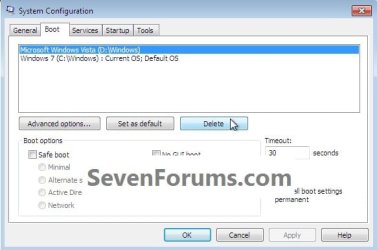
Have you done Step Three #4 to get Vista booting again, along with Windows 7?
You actually now have what's commonly referred to as a dual boot, you just have to add a boot entry for Vista to the "System" boot files, (the dual boot menu) it is very easy to accomplish.
Do this below and restart Windows 7 and watch what happens when the PC starts back up.
4) There's one last step if you want to get back to Windows Vista, you will need to use EasyBCD from within Windows 7 to add an entry for Vista to the Windows boot (dual boot) menu but that's the easiest part of this process.
click to enlarge

Have you done Step Three #4 to get Vista booting again, along with Windows 7?
You actually now have what's commonly referred to as a dual boot, you just have to add a boot entry for Vista to the "System" boot files, (the dual boot menu) it is very easy to accomplish.
Do this below and restart Windows 7 and watch what happens when the PC starts back up.
Note
4) There's one last step if you want to get back to Windows Vista, you will need to use EasyBCD from within Windows 7 to add an entry for Vista to the Windows boot (dual boot) menu but that's the easiest part of this process.
click to enlarge

My Computer
- Computer Manufacturer/Model Number
- * BFK Customs *
- OS
- W 7 64-bit Ultimate
- CPU
- Intel Q9550 Yorkfield
- Motherboard
- ASUS P5Q Pro
- Memory
- 8GB Dominator 8500C5D
- Graphics Card(s)
- ATI : XFX 5870
- Sound Card
- Realtek HD Audio 7-1
- Monitor(s) Displays
- 1x 47" LCD HDMI & 3x 26" LCD HDMI
- Screen Resolution
- 1920x1080P & 1920x1200
- Hard Drives
- 1x 80GB Intel X25-M G2 SSD : 1x 500GB & 1x 640GB WD Caviar Black(s)
- PSU
- Corsair 620HX
- Case
- Cooler Master RC-690
- Cooling
- Tuniq Tower 120, 2x 140mm and 3x 120mm case fans
- Keyboard
- Microsoft 500
- Mouse
- Razer Diamondback 3G
- Internet Speed
- 14 Mb/s
- Other Info
- 1x Koutech 3Gb/s SATA HDD Hot Swap Rack