Solved Installation of Floppy Disk Drive

BJC1992

New member
Member
Local time
10:45 PM
Messages
94
Im trying to install a floppy disk drive on Windows 7, although I use a flashdrive too a floppy drive is still useful to me. I have enabled it on the BIOS but nothing shows up in 'My Computer' or 'Device Manager', it is connected to an IDE slot on the motherboard and I have checked to see if its plugged in properly, can anyone advise me on what I need to do next?
 

My Computer My Computer

Computer type
PC/Desktop
Computer Manufacturer/Model Number
Advent SE 1101
OS
Windows 7 32 Bit
CPU
AMD Sempron(tm) 140 Processor 2.70Ghz
Memory
4GB (3.12GB Usable)
Graphics Card(s)
Nvidia GeForce 210
Sound Card
Nvidia High Definition Audio
Monitor(s) Displays
Compaq 7500
Hard Drives
320GB
Keyboard
Standard PS/2 Keyboard
Mouse
Microsoft PS/2 Mouse
Antivirus
Avast Antivirus Free
Browser
Google Chrome
Other Info
ACPI x86 Based PC
Hi and welcome.

When you say connected to IDE slot, are you connecting to the dedicated floppy 34 pin connector?
 

My Computer My Computer

Computer type
PC/Desktop
Computer Manufacturer/Model Number
Custom Built
OS
Windows 10 Pro x64, Windows 8.1 Pro x64, Windows 7 Ultimate x64 SP1,
CPU
INTEL i9-7920X LGA 2066
Motherboard
Gigabyte X299-WU8 F3
Memory
64 GB (4 X 16 GB) G-Skill V Series DDR4 3200 Quad Channel
Graphics Card(s)
EVGA GTX 1060 SC 3 GB
Sound Card
Realtek Onboard ALC1220
Monitor(s) Displays
2 x Samsung S27E310
Screen Resolution
1920x1080
Hard Drives
Samsung 2 x 970 EVO Plus 500 GB NVMe
1 x 6TB WD 6003FZBX SATA
1 x 6TB WD 60EFRX SATA
12 x 3TB WD 30EFRX SATA
PSU
Seasonic X-1050
Case
Thermaltake Armor+
Cooling
Corsair H80i V2 Liquid AOI Cooler
Keyboard
Logitech G510s
Mouse
Logitech MX Master 2S
Internet Speed
200 Mb/s
Antivirus
ESET NOD32 13.1
Browser
EDGE (Dev, Canary, Beta), Chrome
Other Info
ASUS RT-AC68U router
Malwarebytes 4.0.4
Yes it's connected to the dedicated port for the floppy drive
 

My Computer My Computer

Computer type
PC/Desktop
Computer Manufacturer/Model Number
Advent SE 1101
OS
Windows 7 32 Bit
CPU
AMD Sempron(tm) 140 Processor 2.70Ghz
Memory
4GB (3.12GB Usable)
Graphics Card(s)
Nvidia GeForce 210
Sound Card
Nvidia High Definition Audio
Monitor(s) Displays
Compaq 7500
Hard Drives
320GB
Keyboard
Standard PS/2 Keyboard
Mouse
Microsoft PS/2 Mouse
Antivirus
Avast Antivirus Free
Browser
Google Chrome
Other Info
ACPI x86 Based PC
I have only experienced four issues with floppy drives

Bad ribbon cable.
Ribbon cable plugged in backwards.
Power connector not plugged in correctly.
Bad floppy drive.
 

My Computer My Computer

Computer type
PC/Desktop
Computer Manufacturer/Model Number
Custom Built
OS
Windows 10 Pro x64, Windows 8.1 Pro x64, Windows 7 Ultimate x64 SP1,
CPU
INTEL i9-7920X LGA 2066
Motherboard
Gigabyte X299-WU8 F3
Memory
64 GB (4 X 16 GB) G-Skill V Series DDR4 3200 Quad Channel
Graphics Card(s)
EVGA GTX 1060 SC 3 GB
Sound Card
Realtek Onboard ALC1220
Monitor(s) Displays
2 x Samsung S27E310
Screen Resolution
1920x1080
Hard Drives
Samsung 2 x 970 EVO Plus 500 GB NVMe
1 x 6TB WD 6003FZBX SATA
1 x 6TB WD 60EFRX SATA
12 x 3TB WD 30EFRX SATA
PSU
Seasonic X-1050
Case
Thermaltake Armor+
Cooling
Corsair H80i V2 Liquid AOI Cooler
Keyboard
Logitech G510s
Mouse
Logitech MX Master 2S
Internet Speed
200 Mb/s
Antivirus
ESET NOD32 13.1
Browser
EDGE (Dev, Canary, Beta), Chrome
Other Info
ASUS RT-AC68U router
Malwarebytes 4.0.4
The cables themselves are new ones, but will check later to see if they're properly inserted, and will let you know the outcome.
 

My Computer My Computer

Computer type
PC/Desktop
Computer Manufacturer/Model Number
Advent SE 1101
OS
Windows 7 32 Bit
CPU
AMD Sempron(tm) 140 Processor 2.70Ghz
Memory
4GB (3.12GB Usable)
Graphics Card(s)
Nvidia GeForce 210
Sound Card
Nvidia High Definition Audio
Monitor(s) Displays
Compaq 7500
Hard Drives
320GB
Keyboard
Standard PS/2 Keyboard
Mouse
Microsoft PS/2 Mouse
Antivirus
Avast Antivirus Free
Browser
Google Chrome
Other Info
ACPI x86 Based PC
Have you tried using an external USB floppy drive?
 

My Computer My Computer

Computer type
PC/Desktop
Computer Manufacturer/Model Number
custom build
OS
Windows 7 Professional 64bit
CPU
Intel i7-5960X
Motherboard
EVGA X99 Classified
Memory
64GB Corsair Dominator 2400MHz
Graphics Card(s)
3 EVGA GTX980's
Sound Card
on board
Monitor(s) Displays
3 Dell E2715H 27"
Screen Resolution
1920x1080 (5760x1080)
Hard Drives
Samsung 950 Pro 1TB M.2 SSD,
Western Digital Black 2TB HDD's x5
Western Digital Black 1TB HDD's x3
PSU
Corsair AX1200i
Case
Corsair 750D
Cooling
Corsair H110i GT
Keyboard
Corsair K70
Mouse
Corsair M45
Internet Speed
250 down/10 up
Antivirus
Microsoft Security Essentials
Browser
IE 11, Google Chrome
I have in the past and that worked fine without any trouble. If I can't get this one to work that might be my only other option.
 

My Computer My Computer

Computer type
PC/Desktop
Computer Manufacturer/Model Number
Advent SE 1101
OS
Windows 7 32 Bit
CPU
AMD Sempron(tm) 140 Processor 2.70Ghz
Memory
4GB (3.12GB Usable)
Graphics Card(s)
Nvidia GeForce 210
Sound Card
Nvidia High Definition Audio
Monitor(s) Displays
Compaq 7500
Hard Drives
320GB
Keyboard
Standard PS/2 Keyboard
Mouse
Microsoft PS/2 Mouse
Antivirus
Avast Antivirus Free
Browser
Google Chrome
Other Info
ACPI x86 Based PC
I have now tried a new ribbon cable, and checked to see if the power cable was connected properly. I then started up the PC, and still nothing happens, except that this time the green light stays on permanently, but the drive still does not show up in My Computer or Device Manager.
 

My Computer My Computer

Computer type
PC/Desktop
Computer Manufacturer/Model Number
Advent SE 1101
OS
Windows 7 32 Bit
CPU
AMD Sempron(tm) 140 Processor 2.70Ghz
Memory
4GB (3.12GB Usable)
Graphics Card(s)
Nvidia GeForce 210
Sound Card
Nvidia High Definition Audio
Monitor(s) Displays
Compaq 7500
Hard Drives
320GB
Keyboard
Standard PS/2 Keyboard
Mouse
Microsoft PS/2 Mouse
Antivirus
Avast Antivirus Free
Browser
Google Chrome
Other Info
ACPI x86 Based PC
When the light stays on it usually means the ribbon cable is reversed in the drive connector.
 

My Computer My Computer

Computer type
PC/Desktop
Computer Manufacturer/Model Number
Custom Built
OS
Windows 10 Pro x64, Windows 8.1 Pro x64, Windows 7 Ultimate x64 SP1,
CPU
INTEL i9-7920X LGA 2066
Motherboard
Gigabyte X299-WU8 F3
Memory
64 GB (4 X 16 GB) G-Skill V Series DDR4 3200 Quad Channel
Graphics Card(s)
EVGA GTX 1060 SC 3 GB
Sound Card
Realtek Onboard ALC1220
Monitor(s) Displays
2 x Samsung S27E310
Screen Resolution
1920x1080
Hard Drives
Samsung 2 x 970 EVO Plus 500 GB NVMe
1 x 6TB WD 6003FZBX SATA
1 x 6TB WD 60EFRX SATA
12 x 3TB WD 30EFRX SATA
PSU
Seasonic X-1050
Case
Thermaltake Armor+
Cooling
Corsair H80i V2 Liquid AOI Cooler
Keyboard
Logitech G510s
Mouse
Logitech MX Master 2S
Internet Speed
200 Mb/s
Antivirus
ESET NOD32 13.1
Browser
EDGE (Dev, Canary, Beta), Chrome
Other Info
ASUS RT-AC68U router
Malwarebytes 4.0.4
I have unplugged the ribbon cable and I have reversed which end it was plugged into, so the end that was plugged into the motherboard is now plugged into the floppy drive, is that what you meant? And now no light comes on at all and I'm right back where I started.
 

My Computer My Computer

Computer type
PC/Desktop
Computer Manufacturer/Model Number
Advent SE 1101
OS
Windows 7 32 Bit
CPU
AMD Sempron(tm) 140 Processor 2.70Ghz
Memory
4GB (3.12GB Usable)
Graphics Card(s)
Nvidia GeForce 210
Sound Card
Nvidia High Definition Audio
Monitor(s) Displays
Compaq 7500
Hard Drives
320GB
Keyboard
Standard PS/2 Keyboard
Mouse
Microsoft PS/2 Mouse
Antivirus
Avast Antivirus Free
Browser
Google Chrome
Other Info
ACPI x86 Based PC
I have unplugged the ribbon cable and I have reversed which end it was plugged into, so the end that was plugged into the motherboard is now plugged into the floppy drive, is that what you meant? And now no light comes on at all and I'm right back where I started.
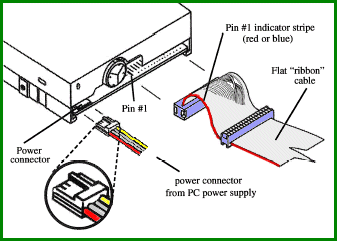
I think the earlier poster meant: doublecheck to make sure one end is correctly aligned into the motherboard and the other end is correctly aligned into the floppy drive. There is a Pin Zero that needs to be in Pin Zero's slot [for the lack of a better word]. In the old days, both cable and slots were "knobbed" so that no error could be made.
** Guys/Gals! I've been saying "Pin Zero," that is wrong, I was wrong! It is: Pin 1 **
 
Last edited:

My Computer My Computer

Computer type
PC/Desktop
Computer Manufacturer/Model Number
Antec desktop; Acer Aspire laptops
OS
Windows 7 Professional 64-bit
CPU
Desktop i5; Acers i5 & i7
Memory
desktop 16GB; 1 Acer 8GB & 1 Acer 16GB
Hard Drives
1TB split into 2 equal partitions [OS and data] usable by RJS
Internet Speed
AT&T DSL
Browser
FF, GChrome, msIE
Other Info
Windows 7 Firewall, Emsisoft AM/AV, MSE [scan-only], SpywareBlaster, Ruiware/BillP combine
When it says reversed (and the light is solid), it means the connector is in upside down.

Undo what you just did. The end that has the twist in the cable should go to the floppy drive.
 

My Computer My Computer

Computer type
PC/Desktop
Computer Manufacturer/Model Number
custom build
OS
Windows 7 Professional 64bit
CPU
Intel i7-5960X
Motherboard
EVGA X99 Classified
Memory
64GB Corsair Dominator 2400MHz
Graphics Card(s)
3 EVGA GTX980's
Sound Card
on board
Monitor(s) Displays
3 Dell E2715H 27"
Screen Resolution
1920x1080 (5760x1080)
Hard Drives
Samsung 950 Pro 1TB M.2 SSD,
Western Digital Black 2TB HDD's x5
Western Digital Black 1TB HDD's x3
PSU
Corsair AX1200i
Case
Corsair 750D
Cooling
Corsair H110i GT
Keyboard
Corsair K70
Mouse
Corsair M45
Internet Speed
250 down/10 up
Antivirus
Microsoft Security Essentials
Browser
IE 11, Google Chrome
When it says reversed (and the light is solid), it means the connector is in upside down. Undo what you just did. The end that has the twist in the cable should go to the floppy drive.
And one still has to have Pin Zero connected correctly to both MB & FD.
** Guys/Gals! I've been saying "Pin Zero," I was wrong! It is: Pin 1 **
 
Last edited:

My Computer My Computer

Computer type
PC/Desktop
Computer Manufacturer/Model Number
Antec desktop; Acer Aspire laptops
OS
Windows 7 Professional 64-bit
CPU
Desktop i5; Acers i5 & i7
Memory
desktop 16GB; 1 Acer 8GB & 1 Acer 16GB
Hard Drives
1TB split into 2 equal partitions [OS and data] usable by RJS
Internet Speed
AT&T DSL
Browser
FF, GChrome, msIE
Other Info
Windows 7 Firewall, Emsisoft AM/AV, MSE [scan-only], SpywareBlaster, Ruiware/BillP combine
** Guys/Gals! I've been saying "Pin Zero," I was wrong! It is: Pin 1 **
 
Last edited:

My Computer My Computer

Computer type
PC/Desktop
Computer Manufacturer/Model Number
Antec desktop; Acer Aspire laptops
OS
Windows 7 Professional 64-bit
CPU
Desktop i5; Acers i5 & i7
Memory
desktop 16GB; 1 Acer 8GB & 1 Acer 16GB
Hard Drives
1TB split into 2 equal partitions [OS and data] usable by RJS
Internet Speed
AT&T DSL
Browser
FF, GChrome, msIE
Other Info
Windows 7 Firewall, Emsisoft AM/AV, MSE [scan-only], SpywareBlaster, Ruiware/BillP combine
I put the cable the correct way round, with the twisted end into the floppy drive, and then when I started the PC nothing happened, I have since tried another cable and still nothing, this now has me stumped! I know they only connect in the slot one way round, and I'm sure the power cables are connected properly. But I don't know what you mean by 'Pin Zero' and 'Pin 1'.
 

My Computer My Computer

Computer type
PC/Desktop
Computer Manufacturer/Model Number
Advent SE 1101
OS
Windows 7 32 Bit
CPU
AMD Sempron(tm) 140 Processor 2.70Ghz
Memory
4GB (3.12GB Usable)
Graphics Card(s)
Nvidia GeForce 210
Sound Card
Nvidia High Definition Audio
Monitor(s) Displays
Compaq 7500
Hard Drives
320GB
Keyboard
Standard PS/2 Keyboard
Mouse
Microsoft PS/2 Mouse
Antivirus
Avast Antivirus Free
Browser
Google Chrome
Other Info
ACPI x86 Based PC
The individual cables & pins are generally numbered to indicate proper orientation. RolandJS just had a brain-fart and suggested numbering started with zero rather than one. Methinks he has programming experience.

Anyway, it's possible that previous mis-cabling fried something in the drive or even the controller... :'(
 

My Computer My Computer

Computer type
PC/Desktop
OS
Windows 7 Professional x64, Arch Linux
...But I don't know what you mean by 'Pin Zero' and 'Pin 1'.

fdd-connection.gif


computer-hardware-basic-shashank-27-728.jpg


Can you test the floppy drive in another computer to be sure that the drive is working?
 

My Computer My Computer

Computer type
Laptop
Computer Manufacturer/Model Number
Employer provided Dell Latitude
OS
W7 Pro SP1 64bit
CPU
i7
Memory
8GB
Graphics Card(s)
Intel HD Graphics
Hard Drives
crappy SSD
Antivirus
Employer mandated Symantec Endpoint Protection
Browser
Pale Moon 64bit, IE11 64bit & Chrome 64bit
At the moment there is no other computer I can try the drive in, I think then I may just get a portable floppy drive as I don't reckon I'll get this one to work, but if I can pick up one cheap somewhere then I will give it another go, as I often see parts cheap at boot sales etc, thanks everyone for all your help, is most appreciated. If I have any success in getting the current drive to work I shall let you all know. Thanks for your assistance.
 

My Computer My Computer

Computer type
PC/Desktop
Computer Manufacturer/Model Number
Advent SE 1101
OS
Windows 7 32 Bit
CPU
AMD Sempron(tm) 140 Processor 2.70Ghz
Memory
4GB (3.12GB Usable)
Graphics Card(s)
Nvidia GeForce 210
Sound Card
Nvidia High Definition Audio
Monitor(s) Displays
Compaq 7500
Hard Drives
320GB
Keyboard
Standard PS/2 Keyboard
Mouse
Microsoft PS/2 Mouse
Antivirus
Avast Antivirus Free
Browser
Google Chrome
Other Info
ACPI x86 Based PC
Does Windows 7 even support a Floppy Disk drive?

If the motherboard does have a real Floppy Disk slot, the drive would still have to be set up (activated) in the BIOS. These days, it would probably be disabled by default.

With all the if's, and's and but's, involved with getting a floppy disk drive to work, as witness all the previous posts about pin 0, pin 1, twisted cables, etc., , , it's just a lot easier in time and money to go buy a USB Floppy Drive, and then you can use it on virtually ANY PC. I have more than one.

Good Luck!
TechnoMage :cool:
 

My Computer My Computer

Computer type
PC/Desktop
Computer Manufacturer/Model Number
Various
OS
Win 7 Pro, SP1, x86, Win-11/Pro/64
CPU
AMD
Motherboard
Various
Memory
8GB Crucial
Graphics Card(s)
Various
Sound Card
OnBoard
Monitor(s) Displays
Acer 21.5"
Hard Drives
Crucial SSD, 500 GB
PSU
OEM
Case
SFF Slim Line Case
Cooling
OEM
Keyboard
eMachines
Mouse
Logitech Wireless
Internet Speed
varies
Antivirus
Windows Defender/Super Anti-Spyware
Browser
Firefox
It does indeed have a dedicated slot for a floppy drive, and the first thing that I done was enable it in the BIOS, but as you say it's proving more trouble than it's worth, so I intend to buy a portable USB drive. Thanks to everyone for you help and advice.
 

My Computer My Computer

Computer type
PC/Desktop
Computer Manufacturer/Model Number
Advent SE 1101
OS
Windows 7 32 Bit
CPU
AMD Sempron(tm) 140 Processor 2.70Ghz
Memory
4GB (3.12GB Usable)
Graphics Card(s)
Nvidia GeForce 210
Sound Card
Nvidia High Definition Audio
Monitor(s) Displays
Compaq 7500
Hard Drives
320GB
Keyboard
Standard PS/2 Keyboard
Mouse
Microsoft PS/2 Mouse
Antivirus
Avast Antivirus Free
Browser
Google Chrome
Other Info
ACPI x86 Based PC
Back
Top