Installation Problem

FunnyBunny

New member
Local time
10:37 AM
Messages
18
I do not know if this problem was solved but I tried searching and found nothing. Here is my problem.

I downloaded Windows 7 RC right from Microsoft Website this morning and it downloaded in an hour or so while I was at school. I copied the .iso to a DVD. I ran the setup.exe and it starts up, goes fine, but then i get this error:

Windows cannot open the required file C:\Users\RAGHAV~1\AppData\Local\Temp\Rar$EX34.3232\Sources\install.wim. Make sure all files required for installation are available, and restart the installation. Error code: 0x80070026

I went to that directory and guess what I find... INSTALL.WIM right there...

I am currently running Windows 7 Beta Version 7000.

Please help me :cry:
 

My Computer

Computer Manufacturer/Model Number
HP Pavilion DV7-1264NR
OS
Windows 7 Ultimate 64-Bit (6.1, Build 7100)
CPU
AMD Turion X2 Dual-Core Mobile RM-72 (2 CPUs), ~2.1Ghz
Memory
4 GB
Graphics Card(s)
ATI Radeon HD 3200 Graphics
Sound Card
SRS Premium Sound
Screen Resolution
1440 By 900
You cannot simnply copy the ISo to DVD. You must use an ISO burn program like imgburn (free) and burn the ISO that way.

Then you set your bios to boot from CD/DVD, insert DVD, and boot to sttart the install
 

My Computer

Computer Manufacturer/Model Number
Intel E8500
OS
Win7 build 7100, Win Bus 64bit, Mac OS X
Motherboard
Asus P5Q3 Deluxe WiFi
Memory
4gb DDR3 Gskill
Graphics Card(s)
EVGA Nvidia Geforce 9800GT
Sound Card
Onboard Soundmax
Monitor(s) Displays
8 yr old Princeton 17" LCD
Screen Resolution
1024 768
Hard Drives
3 Sata 2 Seagate 500gb
Case
Coolermaster
Keyboard
Microsoft USB
Mouse
Logitech USB
Hi funnybunny,

Are you trying to do an Upgrade install?

You would be better doing a clean install - just boot the dvd.

Copy any important data somewhere safe first.
 

My Computers

System One System Two

  • Computer type
    PC/Desktop
    OS
    7 X64
    CPU
    i5 8400
    Motherboard
    gigabyte b365m ds3h
    Memory
    2x8gb 3200mhz
    Hard Drives
    various
    PSU
    pure power 11 400w cm
    Case
    Coolermaster
    Cooling
    cryorig m9i
  • Computer type
    PC/Desktop
    OS
    7x64
    CPU
    g5400
    Motherboard
    ga b365m ds3h
    Memory
    8gb ddr4 2400
    PSU
    xfx pro 450w
Sorry i should have put in my post that i am clean installing, as i have backed up my system also.
I went into my BIOS and the boot starts from Optical drive, which is my dvd drive. So i guess my problem is that i have to use an iso burner. Lol ok...
 

My Computer

Computer Manufacturer/Model Number
HP Pavilion DV7-1264NR
OS
Windows 7 Ultimate 64-Bit (6.1, Build 7100)
CPU
AMD Turion X2 Dual-Core Mobile RM-72 (2 CPUs), ~2.1Ghz
Memory
4 GB
Graphics Card(s)
ATI Radeon HD 3200 Graphics
Sound Card
SRS Premium Sound
Screen Resolution
1440 By 900
Last edited:

My Computer

Computer Manufacturer/Model Number
Custom Build
OS
W7 RTM Ultimate x64
CPU
Intel Q8400 @ 2.66GHZ
Motherboard
Gigabyte GA-EG45M-UD2H
Memory
4GB DDR2-800
Graphics Card(s)
Gainward GTS 450 GLH 1GB Edition
Sound Card
Integrated 8 Channel
Monitor(s) Displays
AOC 23.6 Inch Widescreen LCD
Screen Resolution
1920x1080
Hard Drives
Seagate 500GB Internal
Western Digital 1TB Internal

Hitachi 1TB External
PSU
Apevia Java Power 500W
Case
Cooler Master HAF 922 Black
Cooling
Stock Intel CPU Fan
Keyboard
HP SK-2960 Multimedia Keyboard
Mouse
Logitech M350 Wireless Gaming Mouse
Internet Speed
1.5MB
C:\Users\RAGHAV~1\AppData\Local\Temp\Rar$EX34.3232\Sources\install.wim

According to that file, you used WinRar and that installer is looking for the extracted file. As the first replier said, you have to burn the image, not simply copy it over.

Hope you got it resolved by burning it correctly.
 

My Computer

Computer Manufacturer/Model Number
Custom Made
OS
Windows 7 Build 7600|16384- 64bit
CPU
AMD Phenom II X4 810 - 2.61ghz Deneb
Motherboard
Asus M4A79T Deluxe
Memory
4GB DDR3 Mushkin (1600 O.C. Rated)
Graphics Card(s)
ATI HD Radeon 4890 1GB
Sound Card
Realtek HD Onboard Audio
Monitor(s) Displays
AOC 912vwa-1
Screen Resolution
1440x900 (Max Monitor)
Hard Drives
10000RPM 150GB Western Digital Velociraptor
PSU
Corsair TSX750W
Case
Antec Nine Hundred
Cooling
Air Cooled
Keyboard
Logitech Elite
Mouse
Logitech MX518
Internet Speed
Comcast High-Speed (+Powerboost)
switching to win 7

Hi everyone,

I'm currently running Ubuntu, but I want to switch to Windows 7 and I'm running into a problem during installation. Here's what I did:

-I downloaded the .ISO file from the Microsoft website for Windows 7 Ultimate and also I downloaded the ImgBurn program.
-I extracted the files from the .ISO file into a folder.
-I loaded ImgBurn and followed the steps for creating a boot disk from their web site here How to create a Windows Vista / 7 installation disc (bootable) using ImgBurn - ImgBurn Support Forum
-The disc was created and I shut down and rebooted my comp to the bios screen so I could run the disc.
-I enter the Windows 7 setup, but I soon receive this error:
Windows cannot open the required file D:\Sources\install.wim.
Make sure all files required for installation are available, and restart the installation.
Error code: 0x80070026


I read that it may be a problem with the file I downloaded, so I downloaded it again and created a new disc; same problem.
I also read somewhere that I have to burn the file as a .UDF or something? I don't know what that is.
Anyway, can anyone help me? I love Windows 7 and want to get it on my computer!
 

My Computer

OS
Ubuntu Linux v11
I extracted the files because according to the ImgBurn how to, under step 6 (How to create a Windows Vista / 7 installation disc (bootable) using ImgBurn - ImgBurn Support Forum) I had to select the 'etfsboot.com' as the boot image which wasn't selectable unless I extracted the files.

Are you suggesting I select the .ISO file as my source file? What should I use as my boot image?

Thank you for the links, but I know how to load an OS. Navigating to BIOS and loading from the disc is easy. It's the disc burning that I'm having trouble with.
 

My Computer

OS
Ubuntu Linux v11
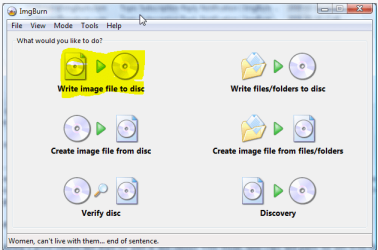
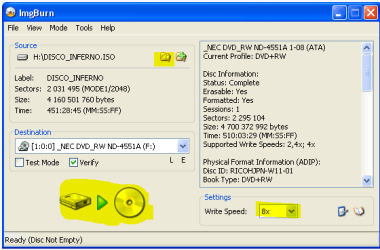
Select Write Image File to Disk, click on the file icon to browse to the ISO, insert a blank DVD, select 4x speed, Burn.
 

Attachments

  • 1.PNG
    1.PNG
    26.2 KB · Views: 8
  • 2.PNG
    2.PNG
    11.2 KB · Views: 8
:D
Yep, that worked. Thanks a lot for your help! I guess the ImgBurn guide isn't for loading an OS...
 

My Computer

OS
Ubuntu Linux v11
Back
Top