Installation Problem

Massoom

New member
Local time
5:39 PM
Messages
12
Hi I Have a problem with installation


when i came on "Install Now -->" Stage and when i click on install then a come up
See This Pic
2437d1231630431-clean-install-windows-7-step4.jpg

and which is not showing me any drive but when i check the bios its show me the Hard Drive
See This pic
2440d1231630464-clean-install-windows-7-step7.jpg


But i dont see any drive..

when i load driver also then its show me nothing drives only show me "Bootx" and "DvD Drive"


and my other problam is that

i disabled all services and turned off computer after that my computer is not starting .....

please help

i will wait your reply

sorry for my bad English
English is not my Country Language Thats Y I Cont Understand Too Much


My Computer

OS
Windows 7 Professional
You need to boot the DVD to try install.

Choose Custom install and use Drive Options to create your partition(s), format before install.

If you still can't see HD, try wiping the HD: SSD - HDD Optimize for Windows Reinstallation

This time use Step 2.2 in the tutorial to create and mark Active the partition to see if installer will now see it.

Next try resetting the CMOS: Clear CMOS - 3 Ways to Clear the CMOS - Reset BIOS

While in BIOS setup, set SATA controller to AHCI to try install.

Unplug all other HDs and peripherals.
 
You need to boot the DVD to try install.

Choose Custom install and use Drive Options to create your partition(s), format before install.

If you still can't see HD, try wiping the HD: SSD - HDD Optimize for Windows Reinstallation

This time use Step 2.2 in the tutorial to create and mark Active the partition to see if installer will now see it.

Next try resetting the CMOS: Clear CMOS - 3 Ways to Clear the CMOS - Reset BIOS

While in BIOS setup, set SATA controller to AHCI to try install.

Unplug all other HDs and peripherals.

http://www.sevenforums.com/tutorials/91339-ssd-hdd-optimize-windows-reinstallation.html

i already told u that i cont access in windows how do i access in windows without starting any services my win7's All "SERVICES.MSC" are disabled and i cont see the desktop even i cont see the welcome screen

 
Last edited by a moderator:

My Computer

OS
Windows 7 Professional
Massoom, because you are carrying out a clean install of Windows, what went on before shouldn't matter,

Do you understand what we mean by booting into your Windows DVD?

Briefly, you need to start your computer and insert your Windows DVD into the optical drive then restart your computer and look for a prompt to press any key so that your computer boots into Windows.

Your Windows manual should tell you how to carry out a clean install.

http://www.sevenforums.com/tutorials/1649-clean-install-windows-7-a.html
 

My Computer

Computer Manufacturer/Model Number
HP Pavilion Elite 495UK
OS
Windows 7 Ultimate SP1 64-Bit
CPU
Intel Core i7 870 @ 2.93GHz
Motherboard
MSI 2A9C (CPU1)
Memory
8Gb Dual-Channel DDR3 @ 664MHz
Graphics Card(s)
nVidia GeForce GTX 460 1024MB dedicated RAM
Sound Card
Realtek HD Audio
Monitor(s) Displays
HP2310i
Screen Resolution
1920 x 1080
Hard Drives
1x1954GB Hitachi HDS22020ALA 330 (RAID), 1x1954GB Hitachi External for backup and storage
PSU
460W
Case
HP Elite
Cooling
Air cooled
Keyboard
Logitech K750 solar-powered keyboard
Mouse
Logitech Wireless M180 mouse
Internet Speed
2Mb
Other Info
Pure Avanti Flow Internet Radio with iPod Dock, 64Gb iPod, HP USB Speakers, Sony MDR-V500 Headphones, Sony Vaio F-Series Laptop
when i want to repair windows bcoz i dont want to lose data from c:/ drive i have important and business files so i don't want to format and when i go to repair option its says me that load your driver when i click on the load driver its show me in my computer folder
boot (x:)
31.2 mb free of 33.6
and

dvd drive

i dont see any drive even i dont see my other drive........:(
 

My Computer

OS
Windows 7 Professional
Huh ? What ?

We need more input.

And could you please turn your letters to black so we can read them.

It`s not Christmas yet. Actually we all hate Christmas ! Right people !!

:picnic: :picnic: :picnic:
 

My Computer

Computer Manufacturer/Model Number
Myself
OS
Windows 7 Ultimate 64Bit
CPU
C2D E8200
Motherboard
XFX 750i
Memory
8GB PNY PC2-6400
Graphics Card(s)
BFG 9600GT x 2
Sound Card
Stock XFX Optical
Monitor(s) Displays
Gateway 22" HD Display
Hard Drives
C: 1 TB G: 500 GB H: 500 GB
PSU
Ultra LSP 550 Pro Lifetime Series
Case
Xion2
Cooling
ThermalTake

My Computer

Computer Manufacturer/Model Number
HP Pavilion Elite 495UK
OS
Windows 7 Ultimate SP1 64-Bit
CPU
Intel Core i7 870 @ 2.93GHz
Motherboard
MSI 2A9C (CPU1)
Memory
8Gb Dual-Channel DDR3 @ 664MHz
Graphics Card(s)
nVidia GeForce GTX 460 1024MB dedicated RAM
Sound Card
Realtek HD Audio
Monitor(s) Displays
HP2310i
Screen Resolution
1920 x 1080
Hard Drives
1x1954GB Hitachi HDS22020ALA 330 (RAID), 1x1954GB Hitachi External for backup and storage
PSU
460W
Case
HP Elite
Cooling
Air cooled
Keyboard
Logitech K750 solar-powered keyboard
Mouse
Logitech Wireless M180 mouse
Internet Speed
2Mb
Other Info
Pure Avanti Flow Internet Radio with iPod Dock, 64Gb iPod, HP USB Speakers, Sony MDR-V500 Headphones, Sony Vaio F-Series Laptop
Your original post only asks for help installing Win7, so how could we know that you want to salvage your current install when you don't say that?

I dont' know why you'd expect Win7 to start if you turned off all of its services.

If you want to try to salvage your current Win7 install, boot the Win7 DVD Repair console on second screen after you boot DVD, accept any offered Repair. How to Boot your Computer from a Bootable CD or DVD -

If Win7 doesn't start, boot back in to System Recovery Options, run Startup Repair repeatedly.

If Startup Repair cannot fix it then boot back in to same list to try System Restore to a point before you turned off your services.

If these all fail you can copy out your files using the DVD or Repair CD: Copy & Paste - in Windows Recovery Console

If you are able to start Win7 then tell us exactly what the problem is that caused you to become so reckless and we will try to help you solve the problem.

If you are not able to start Win7, post back exactly what happens after each step given and we will try some additional steps, or help you clean reinstall or run Factory REcovery.

The links in blue in our posts are to illustrated tutorials. Please use black type in your replies, ask any questions needed but be polite as we are volunteers and this is the busiest tech support forum in the world.
 
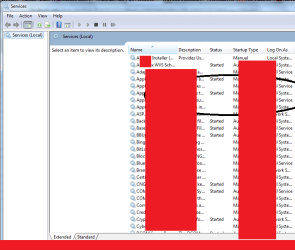
What's the purpose of a screenshot when you won't let us see which services are affected? Or even if they're actually disabled or just stopped?

We can't help you like this.
 

My Computer

Computer type
PC/Desktop
Computer Manufacturer/Model Number
Custom-built
OS
Windows 7 Professional SP1 32-bit
CPU
Intel Core 2 Duo E6600 2.4GHz
Motherboard
Asus PL5D2
Memory
4GB DDR2-667 (4x1GB in dual-channel config)
Graphics Card(s)
nVidia GeForce 9800 GT
Sound Card
Creative X-Fi XtremeMusic
Monitor(s) Displays
Acer P236H
Screen Resolution
1920x1200 (DVI)
Hard Drives
OCZ SSD Vertex Plus 60GB SATA (Firmware 3.55), 64MB cache
Hitachi HD321KJ SATA, 320GB, 7200rpm, 16MB cache
PSU
Antec TruePower 2.0
Case
Cooler Master Centurion
Cooling
Too many fans
Keyboard
Standard
Mouse
Microsoft wireless optical mouse
Internet Speed
AT&T U-verse (18mbit/sec)
Antivirus
Microsoft Security Essentials
Browser
Firefox
Other Info
Other devices:
Compaq CQ-60 laptop
Google Nexus 7 (2012) tablet
Nvidia SHIELD tablet (US/LTE)
Hardkernel ODROID-XU single-board computer (Samsung Exynos 5420)
What's the purpose of a screenshot when you won't let us see which services are affected? Or even if they're actually disabled or just stopped?

We can't help you like this.

Check this Pic

and i share this pic from Google.....i don't have my own pc which have this problem
and I Disabled Every Services and I Cont Access windows 7..........
Check This Pic
 

My Computer

OS
Windows 7 Professional
Your original post only asks for help installing Win7, so how could we know that you want to salvage your current install when you don't say that?

I dont' know why you'd expect Win7 to start if you turned off all of its services.


If you want to try to salvage your current Win7 install, boot the Win7 DVD Repair console on second screen after you boot DVD, accept any offered Repair.
How to Boot your Computer from a Bootable CD or DVD -

If Win7 doesn't start, boot back in to
System Recovery Options, run Startup Repair repeatedly.

If Startup Repair cannot fix it then boot back in to same list to try System Restore to a point before you turned off your services.


If these all fail you can copy out your files using the DVD or Repair CD:
Copy & Paste - in Windows Recovery Console

If you are able to start Win7 then tell us exactly what the problem is that caused you to become so reckless and we will try to help you solve the problem.


If you are not able to start Win7, post back exactly what happens after each step given and we will try some additional steps, or help you clean reinstall or run Factory REcovery.


The links in blue in our posts are to illustrated tutorials. Please use black type in your replies, ask any questions needed but be polite as we are volunteers and this is the busiest tech support forum in the world.


Ok ...

i have 2 problem

1st is this

i Disabled all services and i cont Enable services and also i cont access in windows 7

2nd is this

when i start to install windows 7 (i have orignal copy of win7 pro) and when i come on this stage then its not showing me any drive...

See this Pic


And when I Want To Go For Copy My Important Files Its Also Not Showing Me Drive Else
Like this Pic

Click Here


In This Pic U Can See 4 Drive But In My Pc I Can Only SE

2 Drive

Wich is


boot (x: )
31.2 mb free of 33.6

and

Dvd Drive


NOTE
IF MY 1ST PROBLEM CAN B SOLVE I DON'T NEED MY 2ND PROBLEM
I Think My Question Is Completed

Regard

Massoom
 

My Computer

OS
Windows 7 Professional
I understand your problem.

I have given you the steps to follow to attempt to repair this.

Complete the steps in order.

If you don't understand any of the steps, ask back questions until you understand what to do.
 
Hi Massoom,

You are very lucky to have Greg's help with this - please follow his suggestions.

Also, do NOT use coloured font for your replies - it makes it harder for us to help you.

Regards,
golden
 

My Computer

Computer type
PC/Desktop
Computer Manufacturer/Model Number
Golden Mk. I.4
OS
Windows 10 Pro x64 ; Xubuntu x64
CPU
Intel i7 860 @ 2.80 GHz O/C'ed to 4.0GHz
Motherboard
Gigabyte P55A-UD3R Rev.1. Award BIOS F13
Memory
16GB Corsair Vengance DDR3 @ 661 MHz Dual Channel (9-9-9-24)
Graphics Card(s)
EVGA NVidia GTX 560 1024MB
Sound Card
Realtek Integrated
Monitor(s) Displays
Dual Samsung SyncMaster 2494HS
Screen Resolution
1920*1080 and 1920*1080
Hard Drives
1*Samsung 840 EVO 120GB SSD;
1*OCZ Vertex 2 60GB SSD;
2*Samsung F3 SpinPoint 1TB in RAID0;
1*Samsung F1 SpinPoint 1TB;
2*Western Digital 1TB External USB 3.0
1*Western Digital 500GB External USB 3.0
1*Seagate 500GB External USB 2.0
PSU
Thermaltake ToughPower QFan 750W
Case
Thermaltake Element S VK60001W2Z
Cooling
Corsair H60 Water Cooling, 2*230mm and 2*80mm case fans
Keyboard
Logitech G110
Mouse
Logitech MX518
I understand your problem.

I have given you the steps to follow to attempt to repair this.

Complete the steps in order.

If you don't understand any of the steps, ask back questions until you understand what to do.
If you want to try to salvage your current Windows 7 install, boot the Windows 7 DVD Repair console on second screen after you boot DVD, accept any offered Repair. How to Boot your Computer from a Bootable CD or DVD -
Bro After Bios Setting


I Use This Method

http://www.sevenforums.com/tutorials/681-startup-repair.html?ltr=S

But Its Showing Me
Send Information About This Problem (Recommeded)
Don't Send

And I Also Dont Have Restore Point......I Was Disabled For Some Priv8 Reasons.....:(

If these all fail you can copy out your files using the DVD or Repair CD: Copy & Paste - in Windows Recovery Console
chek my previous post

If you are able to start Windows 7 then tell us exactly what the problem is that caused you to become so reckless and we will try to help you solve the problem

i'm not able to start windows 7

If you are not able to start Windows 7, post back exactly what happens after each step given and we will try some additional steps, or help you clean reinstall or run Factory REcovery.
yes i need this help

The links in blue in our posts are to illustrated tutorials. Please use black type in your replies, ask any questions needed but be polite as we are volunteers and this is the busiest tech support forum in the world.
i checked tutorials
Sorry for the with color reply its my habbit
and i can see bro its World Fast and Good and top Forum.....
Hi Massoom,

You are very lucky to have Greg's help with this - please follow his suggestions.

Also, do NOT use coloured font for your replies - it makes it harder for us to help you.

Regards,
golden

and yes bro i'm thinking i getting verry quick reply :D

and sorry for words color its my Habit :(

thnx for help
 

My Computer

OS
Windows 7 Professional
If you disabled System Restore then Startup Repair has no way to set your System back to where it was before you ruined it by disabling all of your services.

How many times have your run Startup Repair from the booted DVD?

Reboot the computer and tap F8 key to access Advanced Boot Options,
select Last Known Good Configuration and reboot.

What is the problem with copying out your files using the tutorial linked? If you cannot use the DVD or Repair CD to do this then use free Paragon Rescue CD.

I am researching turning Services on from the Command Line. Maybe someone else is proficient with this or can write a script to turn on your Services from Repair CMD.
 
Last edited:
If you disabled System Restore then Startup Repair has no way to set your System back to where it was before you ruined it by disabling all of your services.

Bro i dont need to restor i want to repair or want my files which are all in c drive

How many times have your run Startup Repair from the booted DVD?

i think 5 or 6 time


What is the problem with copying out your files using the tutorial linked?
i cont see my c drive

And when I Want To Go For Copy My Important Files Its Also Not Showing Me Drive Else
Like this Pic

Click Here


In This Pic U Can See 4 Drive But In My Pc I Can Only SE

2 Drive

Wich is

boot (x: )
31.2 mb free of 33.6

and

Dvd Drive


If you cannot use the DVD or Repair CD to do this then use free Paragon Rescue CD.
i dont have problem in DVD or Bios or DVD Drive

I am researching turning Services on from the Command Line. Maybe someone else is familar with this.

Ok Bro i'm also Searching on google.....lets see

and waiting also
 

My Computer

OS
Windows 7 Professional
The repair which you need is System Restore, which is automated by Startup Repair but cannot be run because you disabled it. Try Last Known Good Config on the F8 Advanced Boot Options.

If you cannot see your data drive to click on it to copy out the files to another external drive, then download and burn to CD Paragon Rescue CD to see if it sees these files and can copy them out. If not then your files may be lost unless someone can turn your Services back on via the Disk Command Line.

I find it hard to believe that Win7 would allow you to turn off Services it requires to run. Only a person trying to destroy their OS would persist in doing such a thing.
 
The repair which you need is System Restore, which is automated by Startup Repair but cannot be run because you disabled it. Try Last Known Good Config on the F8 Advanced Boot Options.

If you cannot see your data drive to click on it to copy out the files to another external drive, then download and burn to CD Paragon Rescue CD to see if it sees these files and can copy them out. If not then your files may be lost unless someone can turn your Services back on via the Disk Command Line.

I find it hard to believe that Win7 would allow you to turn off Services it requires to run. Only a person trying to destroy their OS would persist in doing such a thing.
i dont see any solution in F8 Area bro :(

and i dont understand about "Paragon Rescue CD"
Can you explain in easy words and also can u provide Tutorial
 

My Computer

OS
Windows 7 Professional
Back
Top