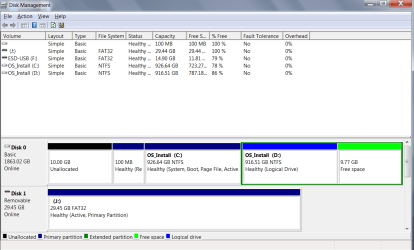
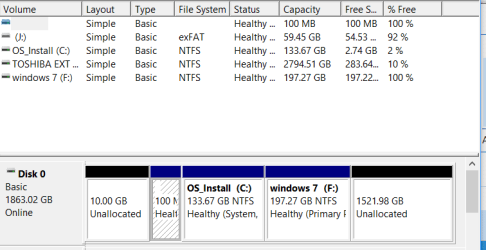
My Goal, is to put a windows 7 and a 10 OS, from each of two smaller HD (both previously used on my machine) onto different partitions of a new bigger HD, keeping all my old programs and data...so I can boot into either as I may prefer.
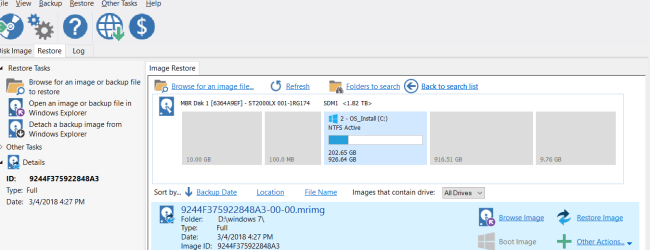
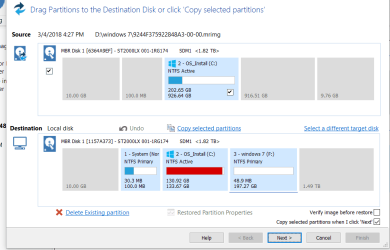
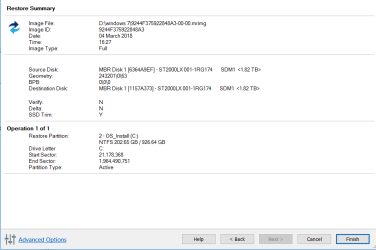
I purchased a new 1.8 TB Hard Drive, and partitioned it into two partitions. I cloned my original OS 7 HD and all its partitions onto one (C) of the two partitions on my new 1.8TB HD. Booting into windows 7 worked fine. I then cloned my newer OS 10 main partition from, a later used, small HD, all from the same machine, onto the second partition (D) of the new drive. I then used easyBCD to create a new entry in the boot menu, directed to the windows 10 partition, I had copied to the new 1.8 drive, on its own D partition. This gave me choice at boot up, of booting into windows 7 or 10, at start up. Windows 7 boot up choice works fine.
However, when I reboot the computer and select the boot into windows 10 option, and push enter, I immediately get the message "windows can not verify the digital signature for this file" File: /windows/system32/winload.exe . I will attempt to add a shot of this screen. Cant get it to post.... see it here: IMG_20180221_090707.jpg - Google Drive
Also pushing f8 when the windows 10 install is selected, during start up, only brings up the same exact error message. So I cant use that F8 method to disable driver signature verification in the 10OS install. How can I fix this, does Megahertz07 or anyone else have any ideas????Thank you.
PS I did turn off signature verification in the windows 7 OS install, but still get this same above message when I try to boot to OS10. I also tried replacing the winload.exe file on the 10 partition with a direct copy of that file from the original, smaller, OS 10 disk, I had cloned from, but no change. Thus I speculate... that the winload.exe file is probably not actually corrupt or unsigned, indeed it says it is signed in it's properties, but probably the boot up partition data is somehow still not right. (perhaps not actually directing properly to the winload.exe file, or some other issue? Any ideas on what I can try now? THANK YOU!
PSS I just got this advice from Megahertz07 via a PM.
"Protheos , you should create a new thread under /installation-setup, post the above message so other people could also help you.
On a private message other people with similar problem can't learn the solution we find to your problem.
Did you try to do a startup repair with Win 10 installation disk?"
My reply to this NOW is: Thank you, I have now tried this, but startup repair, after a diagnosis, simply says, "startup repair couldn't repair your PC"
Does anyone have any ideas for what I can try from here? Thank you!
I purchased a new 1.8 TB Hard Drive, and partitioned it into two partitions. I cloned my original OS 7 HD and all its partitions onto one (C) of the two partitions on my new 1.8TB HD. Booting into windows 7 worked fine. I then cloned my newer OS 10 main partition from, a later used, small HD, all from the same machine, onto the second partition (D) of the new drive. I then used easyBCD to create a new entry in the boot menu, directed to the windows 10 partition, I had copied to the new 1.8 drive, on its own D partition. This gave me choice at boot up, of booting into windows 7 or 10, at start up. Windows 7 boot up choice works fine.
However, when I reboot the computer and select the boot into windows 10 option, and push enter, I immediately get the message "windows can not verify the digital signature for this file" File: /windows/system32/winload.exe . I will attempt to add a shot of this screen. Cant get it to post.... see it here: IMG_20180221_090707.jpg - Google Drive
Also pushing f8 when the windows 10 install is selected, during start up, only brings up the same exact error message. So I cant use that F8 method to disable driver signature verification in the 10OS install. How can I fix this, does Megahertz07 or anyone else have any ideas????Thank you.
PS I did turn off signature verification in the windows 7 OS install, but still get this same above message when I try to boot to OS10. I also tried replacing the winload.exe file on the 10 partition with a direct copy of that file from the original, smaller, OS 10 disk, I had cloned from, but no change. Thus I speculate... that the winload.exe file is probably not actually corrupt or unsigned, indeed it says it is signed in it's properties, but probably the boot up partition data is somehow still not right. (perhaps not actually directing properly to the winload.exe file, or some other issue? Any ideas on what I can try now? THANK YOU!
PSS I just got this advice from Megahertz07 via a PM.
"Protheos , you should create a new thread under /installation-setup, post the above message so other people could also help you.
On a private message other people with similar problem can't learn the solution we find to your problem.
Did you try to do a startup repair with Win 10 installation disk?"
My reply to this NOW is: Thank you, I have now tried this, but startup repair, after a diagnosis, simply says, "startup repair couldn't repair your PC"
Does anyone have any ideas for what I can try from here? Thank you!
My Computer
- Computer type
- Laptop
- Computer Manufacturer/Model Number
- msi
- OS
- windows 7 32 bit home premium
- Memory
- 4gb
- Hard Drives
- 1.8tb
- Browser
- firefox