
Solved Installed 8GB memory card and have issues.

Dhahn

New member
Member
Local time
9:44 PM
Messages
27
Location
Benson, AZ
Hello all,
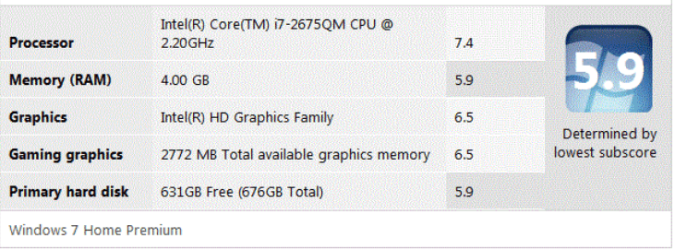
After I installed an 8GB memory card in lieu of the OEM 6GB card, I received a notice to re-run “Windows Experience Index” due to detecting new hardware installed.
After the run, I noticed a decrease in the index results… see attached snip. I also notice in “System Properties” the memory is listed at 4GB. Was listed as 6GB in “System Properties” prior to the 8GB installation… I reinstalled the OEM 6GB card and re-run “Windows Experience Index”… No change from the snip information and “system Properties” is still showing a 4GB card?
What operations have I missed in up-grading the memory?
NOTE: Prior to installing the 8GB card I jotted down the Index readings as follows.
7.5
7.5
6.5
6.5
5.9

Thanks in advance,
Dennis
 

Attachments
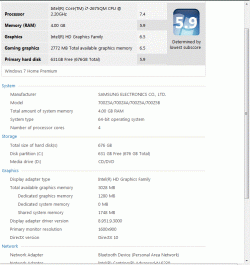
  • 8GB memory card installed.GIF
    8GB memory card installed.GIF
    72.2 KB · Views: 33

My Computer My Computer

Computer Manufacturer/Model Number
Samsung series 7 Chronos - NP700Z5A - S04US Laptop S/N00125
OS
Windows 7 Home Premium 64 bit SP 1
CPU
Intel i7-2675QM @2.20GHz Sandy Bridge 32nm / Cache 6MB L3
Motherboard
?
Memory
RAM 8GB DDR3 / Crucial 4GB in slot 1 _ 4GB on motherboard
Graphics Card(s)
AMD Radeon HD 650M / Graphics memory 1GB DDR5
Sound Card
Realtek HD
Monitor(s) Displays
15.6" Matt screen & small width bezel... love this screen!
Screen Resolution
1600x900
Hard Drives
Hitachi HTS 727575A9E364 750GB 7200RPM /
SanDisk issd P4 8GB
PSU
Samsung 90W Power Brick / Battery 8 Cell Li-Po / 5420 mAh
Case
Aluminum / exception, plastic bottom but overall very sturdy
Cooling
Internal fan's
Keyboard
102 Backlit, love this keyboard, keys have nice soft texture
Mouse
Wireless Logitech
Internet Speed
DSL up to 12Mbps
Other Info
Up graded RAM from 6GB to 8GB using Crucial 4GB card.
Up graded network card from Broadcom to intel 6230. Full HDMI port, mini VGA port, (2) 3.0 USB (1) 2.0 USB, Slot-Load DVD, Multi 4 in1 card slot. Coolmaster Notepal. Hate the touchpad & "Easy Software Manager" This is the best laptop machine I have ever owned, super fast performance at 1/2 the cost for a compatable Mac.

My Computer My Computer

Computer type
PC/Desktop
Computer Manufacturer/Model Number
Home made Desktop
OS
Windows 10 Pro. 64/ version 1709 Windows 7 Pro/64
CPU
Intel i7-6800K @ 4.3
Motherboard
ASUS X-99 Deluxe II
Memory
Corsair Platinum 16 gig @2400
Graphics Card(s)
EVGA GTX 1070 OC
Monitor(s) Displays
Asus 27" LED LCD/VE278Q
Screen Resolution
1920-1080 or 1280-720 HDMI
Hard Drives
INTEL SSD 730-240 Gb Sata 3.0/
PSU
EVGA Platium 1200W
Case
Phanteks Luxe Tempered Glass 8 fans/ one radiator
Cooling
XSPC/ Water Cooled CPU
Keyboard
Das 4 Professional
Mouse
Logitech M705/MX Anywhere 2-S
Internet Speed
100 mbits
Antivirus
Microsoft Security Essentials/ Malwarebytes Premium 3.0/ SAS
Browser
I.E. 11 default/Firefox/ ISP Time Warner Cable/Spectrum
Other Info
LG BluRay Burner/
Sound system-KLipsch-THX/
Icy Dock ssd Hot Swap bays.
Popular google backing suggests going to your start menu, type msconfig and open this up.

Once this panel is up, go to the "Boot" tab and press the "Advanced options.." button. On the right of the pop-up window, is maximum ram ticked? If so, untick it.

Let us know
 

My Computer My Computer

Computer Manufacturer/Model Number
ASUS
OS
Windows 7 Ultimate x64, Windows 7 Professional x64, Windows XP x64 SP3
CPU
i7-2630QM
Memory
32.00 GB
Graphics Card(s)
nVidia GTX 560M
Monitor(s) Displays
Default 17`` & LG IPS234
Screen Resolution
1920 x 1080
Hard Drives
Internal:
120 SSD - OCZ Agility 3
750 HDD - Seagate Misc

External:
1000 HDD - Buffalo Ministation 3.0
2048 NHDD - Seagate Barracuda Green (Over 1GBPS Network)
Keyboard
tT eSports Challenger Ultimate
Mouse
Razer Deathadder Black Edition
Internet Speed
100 Mbps + 60 Mbps
Layback Bear,

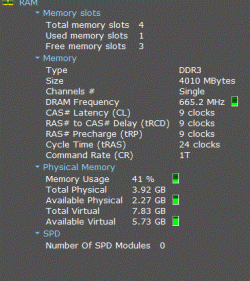
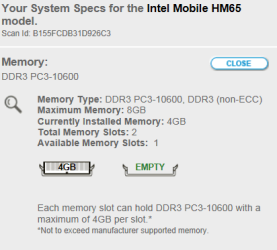
Thanks for the reply... downloaded the program and attached a snip in regard to my RAM... I see that there is a few slots "free"... is this telling me that there is more slots for cards?... if so, I did not see one using the access cover for relplacing the 6GB with the 8GB. I will more than likley have to remove the bottom cover if there is more slots. One thing is not clear... why does running windows experience show a decline in the index and system info show 4GB.

Is there anymore info you need for me to snip?

Thanks very much!

Dennis
 

Attachments

  • Seven snip RAM.GIF
    Seven snip RAM.GIF
    47.4 KB · Views: 11

My Computer My Computer

Computer Manufacturer/Model Number
Samsung series 7 Chronos - NP700Z5A - S04US Laptop S/N00125
OS
Windows 7 Home Premium 64 bit SP 1
CPU
Intel i7-2675QM @2.20GHz Sandy Bridge 32nm / Cache 6MB L3
Motherboard
?
Memory
RAM 8GB DDR3 / Crucial 4GB in slot 1 _ 4GB on motherboard
Graphics Card(s)
AMD Radeon HD 650M / Graphics memory 1GB DDR5
Sound Card
Realtek HD
Monitor(s) Displays
15.6" Matt screen & small width bezel... love this screen!
Screen Resolution
1600x900
Hard Drives
Hitachi HTS 727575A9E364 750GB 7200RPM /
SanDisk issd P4 8GB
PSU
Samsung 90W Power Brick / Battery 8 Cell Li-Po / 5420 mAh
Case
Aluminum / exception, plastic bottom but overall very sturdy
Cooling
Internal fan's
Keyboard
102 Backlit, love this keyboard, keys have nice soft texture
Mouse
Wireless Logitech
Internet Speed
DSL up to 12Mbps
Other Info
Up graded RAM from 6GB to 8GB using Crucial 4GB card.
Up graded network card from Broadcom to intel 6230. Full HDMI port, mini VGA port, (2) 3.0 USB (1) 2.0 USB, Slot-Load DVD, Multi 4 in1 card slot. Coolmaster Notepal. Hate the touchpad & "Easy Software Manager" This is the best laptop machine I have ever owned, super fast performance at 1/2 the cost for a compatable Mac.
We need to know what motherboard you have. Does Speccy give you that information. With you exact motherboard and ram information we can check and see if they are made for each other.
Intel i7 is not enough information. i7 what?
Take a look at my specs. Lower left of this post and it will give you a idea of the kind of information that is needed so we can give our best advice.
Once yours are filled in completely and correct it will follow your every post.
Laptops are limited in options.
As Colin has posted. Good point. Have you been in msconfig/boot before this problem started? It should be set properly unless you have change it before.
 

My Computer My Computer

Computer type
PC/Desktop
Computer Manufacturer/Model Number
Home made Desktop
OS
Windows 10 Pro. 64/ version 1709 Windows 7 Pro/64
CPU
Intel i7-6800K @ 4.3
Motherboard
ASUS X-99 Deluxe II
Memory
Corsair Platinum 16 gig @2400
Graphics Card(s)
EVGA GTX 1070 OC
Monitor(s) Displays
Asus 27" LED LCD/VE278Q
Screen Resolution
1920-1080 or 1280-720 HDMI
Hard Drives
INTEL SSD 730-240 Gb Sata 3.0/
PSU
EVGA Platium 1200W
Case
Phanteks Luxe Tempered Glass 8 fans/ one radiator
Cooling
XSPC/ Water Cooled CPU
Keyboard
Das 4 Professional
Mouse
Logitech M705/MX Anywhere 2-S
Internet Speed
100 mbits
Antivirus
Microsoft Security Essentials/ Malwarebytes Premium 3.0/ SAS
Browser
I.E. 11 default/Firefox/ ISP Time Warner Cable/Spectrum
Other Info
LG BluRay Burner/
Sound system-KLipsch-THX/
Icy Dock ssd Hot Swap bays.

My Computer My Computer

Computer type
PC/Desktop
Computer Manufacturer/Model Number
Me
OS
Win 7 Ultimate x64
CPU
FX-8350 @ 4.6 GHz so far
Motherboard
Asus M5A97 EVO
Memory
ADATA XPG V1 Series Black 8GB DDR3 1600
Graphics Card(s)
Sapphire R9 270x Dual-X
Sound Card
Xonar DGX w/ Corsair Vengence 1300
Monitor(s) Displays
Acer S232HL Abid
Screen Resolution
1920x1080
Hard Drives
120 GB OCZ Vertex 3
500 GB Seagate 7200.12
PSU
Antec Earthwatts 650W Green
Case
Antec Three Hundred
Cooling
Cooler Master 212 EVO
Keyboard
Logitech G510
Mouse
Logitech G500s
Internet Speed
35000/3000
Sorry for not having my complete system specs listing in my profile. I will fill it in with complete information.
Now back to my issue… I am completely blown away with the quick responses after posting my issue. You guys are amazing. Yes I was in my booting system using (f2) upon start-up just this AM. I was having difficulty booting from the CD disc “windows defender offline” that I downloaded this AM… now I have to remember what change I made while in that program!.

Colin: I was not ignoring your post. Thank you for your information!. Ryder Cup… Go “Luke Donald”

Thanks guys!

Dennis
 
Last edited:

My Computer My Computer

Computer Manufacturer/Model Number
Samsung series 7 Chronos - NP700Z5A - S04US Laptop S/N00125
OS
Windows 7 Home Premium 64 bit SP 1
CPU
Intel i7-2675QM @2.20GHz Sandy Bridge 32nm / Cache 6MB L3
Motherboard
?
Memory
RAM 8GB DDR3 / Crucial 4GB in slot 1 _ 4GB on motherboard
Graphics Card(s)
AMD Radeon HD 650M / Graphics memory 1GB DDR5
Sound Card
Realtek HD
Monitor(s) Displays
15.6" Matt screen & small width bezel... love this screen!
Screen Resolution
1600x900
Hard Drives
Hitachi HTS 727575A9E364 750GB 7200RPM /
SanDisk issd P4 8GB
PSU
Samsung 90W Power Brick / Battery 8 Cell Li-Po / 5420 mAh
Case
Aluminum / exception, plastic bottom but overall very sturdy
Cooling
Internal fan's
Keyboard
102 Backlit, love this keyboard, keys have nice soft texture
Mouse
Wireless Logitech
Internet Speed
DSL up to 12Mbps
Other Info
Up graded RAM from 6GB to 8GB using Crucial 4GB card.
Up graded network card from Broadcom to intel 6230. Full HDMI port, mini VGA port, (2) 3.0 USB (1) 2.0 USB, Slot-Load DVD, Multi 4 in1 card slot. Coolmaster Notepal. Hate the touchpad & "Easy Software Manager" This is the best laptop machine I have ever owned, super fast performance at 1/2 the cost for a compatable Mac.
Popular google backing suggests going to your start menu, type msconfig and open this up.

Once this panel is up, go to the "Boot" tab and press the "Advanced options.." button. On the right of the pop-up window, is maximum ram ticked? If so, untick it.

Let us know

Colin,

The Max RAM was not ticked... I have an item that I changed this AM in regard to boot priorty that I have to fiqure out what I changed.
Thank you very much for your post!

Dennis
 

My Computer My Computer

Computer Manufacturer/Model Number
Samsung series 7 Chronos - NP700Z5A - S04US Laptop S/N00125
OS
Windows 7 Home Premium 64 bit SP 1
CPU
Intel i7-2675QM @2.20GHz Sandy Bridge 32nm / Cache 6MB L3
Motherboard
?
Memory
RAM 8GB DDR3 / Crucial 4GB in slot 1 _ 4GB on motherboard
Graphics Card(s)
AMD Radeon HD 650M / Graphics memory 1GB DDR5
Sound Card
Realtek HD
Monitor(s) Displays
15.6" Matt screen & small width bezel... love this screen!
Screen Resolution
1600x900
Hard Drives
Hitachi HTS 727575A9E364 750GB 7200RPM /
SanDisk issd P4 8GB
PSU
Samsung 90W Power Brick / Battery 8 Cell Li-Po / 5420 mAh
Case
Aluminum / exception, plastic bottom but overall very sturdy
Cooling
Internal fan's
Keyboard
102 Backlit, love this keyboard, keys have nice soft texture
Mouse
Wireless Logitech
Internet Speed
DSL up to 12Mbps
Other Info
Up graded RAM from 6GB to 8GB using Crucial 4GB card.
Up graded network card from Broadcom to intel 6230. Full HDMI port, mini VGA port, (2) 3.0 USB (1) 2.0 USB, Slot-Load DVD, Multi 4 in1 card slot. Coolmaster Notepal. Hate the touchpad & "Easy Software Manager" This is the best laptop machine I have ever owned, super fast performance at 1/2 the cost for a compatable Mac.
Make and model are in the first screen shot,

Series 7 Notebook 700Z5A - TECH SPECS | SAMSUNG

And no it doesn't have four memory slots, looks like it is being misread by Speccy.

Stormy13,

I did not think it had four slots, it only has one memory card slot that I saw. I wonder if Speccy was reading my USB 3.0 lexar multi-card 25 in 1 reader... I recently formatted 3 cards using it?
 

My Computer My Computer

Computer Manufacturer/Model Number
Samsung series 7 Chronos - NP700Z5A - S04US Laptop S/N00125
OS
Windows 7 Home Premium 64 bit SP 1
CPU
Intel i7-2675QM @2.20GHz Sandy Bridge 32nm / Cache 6MB L3
Motherboard
?
Memory
RAM 8GB DDR3 / Crucial 4GB in slot 1 _ 4GB on motherboard
Graphics Card(s)
AMD Radeon HD 650M / Graphics memory 1GB DDR5
Sound Card
Realtek HD
Monitor(s) Displays
15.6" Matt screen & small width bezel... love this screen!
Screen Resolution
1600x900
Hard Drives
Hitachi HTS 727575A9E364 750GB 7200RPM /
SanDisk issd P4 8GB
PSU
Samsung 90W Power Brick / Battery 8 Cell Li-Po / 5420 mAh
Case
Aluminum / exception, plastic bottom but overall very sturdy
Cooling
Internal fan's
Keyboard
102 Backlit, love this keyboard, keys have nice soft texture
Mouse
Wireless Logitech
Internet Speed
DSL up to 12Mbps
Other Info
Up graded RAM from 6GB to 8GB using Crucial 4GB card.
Up graded network card from Broadcom to intel 6230. Full HDMI port, mini VGA port, (2) 3.0 USB (1) 2.0 USB, Slot-Load DVD, Multi 4 in1 card slot. Coolmaster Notepal. Hate the touchpad & "Easy Software Manager" This is the best laptop machine I have ever owned, super fast performance at 1/2 the cost for a compatable Mac.
We need to know what motherboard you have. Does Speccy give you that information. With you exact motherboard and ram information we can check and see if they are made for each other.
Intel i7 is not enough information. i7 what?
Take a look at my specs. Lower left of this post and it will give you a idea of the kind of information that is needed so we can give our best advice.
Once yours are filled in completely and correct it will follow your every post.
Laptops are limited in options.
As Colin has posted. Good point. Have you been in msconfig/boot before this problem started? It should be set properly unless you have change it before.

Layback Bear,

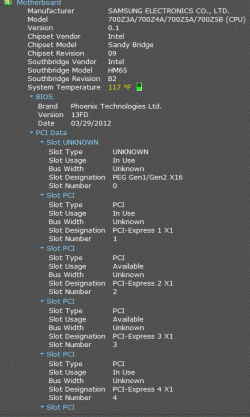
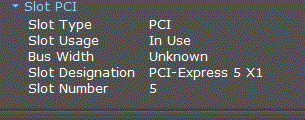
Here is my Motherboard snip... as mentioned I have been in my boot section and may have caused the problem. I will tomorrow see what I have changed and let you guys know if the issue is fixed.

Dennis
 

Attachments

  • Seven part 1 of 2.GIF
    Seven part 1 of 2.GIF
    106.3 KB · Views: 20
  • Seven part 2 of 2.GIF
    Seven part 2 of 2.GIF
    11.8 KB · Views: 145

My Computer My Computer

Computer Manufacturer/Model Number
Samsung series 7 Chronos - NP700Z5A - S04US Laptop S/N00125
OS
Windows 7 Home Premium 64 bit SP 1
CPU
Intel i7-2675QM @2.20GHz Sandy Bridge 32nm / Cache 6MB L3
Motherboard
?
Memory
RAM 8GB DDR3 / Crucial 4GB in slot 1 _ 4GB on motherboard
Graphics Card(s)
AMD Radeon HD 650M / Graphics memory 1GB DDR5
Sound Card
Realtek HD
Monitor(s) Displays
15.6" Matt screen & small width bezel... love this screen!
Screen Resolution
1600x900
Hard Drives
Hitachi HTS 727575A9E364 750GB 7200RPM /
SanDisk issd P4 8GB
PSU
Samsung 90W Power Brick / Battery 8 Cell Li-Po / 5420 mAh
Case
Aluminum / exception, plastic bottom but overall very sturdy
Cooling
Internal fan's
Keyboard
102 Backlit, love this keyboard, keys have nice soft texture
Mouse
Wireless Logitech
Internet Speed
DSL up to 12Mbps
Other Info
Up graded RAM from 6GB to 8GB using Crucial 4GB card.
Up graded network card from Broadcom to intel 6230. Full HDMI port, mini VGA port, (2) 3.0 USB (1) 2.0 USB, Slot-Load DVD, Multi 4 in1 card slot. Coolmaster Notepal. Hate the touchpad & "Easy Software Manager" This is the best laptop machine I have ever owned, super fast performance at 1/2 the cost for a compatable Mac.
PCI slots are not RAM slots...
You can travel to Crucial.com and run the online scanner and it'll tell you exactly what type and capacity of RAM that PC can use.

Personally i think it's the wrong RAM
 

My Computer My Computer

Computer Manufacturer/Model Number
Self-Built
OS
Vista Ultimate X64/ Windows 7 Dual-boot
CPU
Q6600
Motherboard
ASUS P5K
Memory
4G OCZ PC2 8500 Platinum
Graphics Card(s)
EVGA 8800GTS Vid Card
Hard Drives
500G Seagate SATA
200G Seagate SATA
100G WD Caviar SATA
80G WD Caviar IDE
PSU
OCZ Elite 800W PSU
Case
RaidMax Smilodon Case
Wrong ram is a possibility as Patio has posted. That is why I request motherboard specs put in the OP's ((My System Specs)). along with other needed information.
I do not Google around looking for OP specs or jump from post to post trying to piece them together.
This picture might help on your msconfig/boot/advance.
Just for now.PNG
Have a nice day.
 
Last edited:

My Computer My Computer

Computer type
PC/Desktop
Computer Manufacturer/Model Number
Home made Desktop
OS
Windows 10 Pro. 64/ version 1709 Windows 7 Pro/64
CPU
Intel i7-6800K @ 4.3
Motherboard
ASUS X-99 Deluxe II
Memory
Corsair Platinum 16 gig @2400
Graphics Card(s)
EVGA GTX 1070 OC
Monitor(s) Displays
Asus 27" LED LCD/VE278Q
Screen Resolution
1920-1080 or 1280-720 HDMI
Hard Drives
INTEL SSD 730-240 Gb Sata 3.0/
PSU
EVGA Platium 1200W
Case
Phanteks Luxe Tempered Glass 8 fans/ one radiator
Cooling
XSPC/ Water Cooled CPU
Keyboard
Das 4 Professional
Mouse
Logitech M705/MX Anywhere 2-S
Internet Speed
100 mbits
Antivirus
Microsoft Security Essentials/ Malwarebytes Premium 3.0/ SAS
Browser
I.E. 11 default/Firefox/ ISP Time Warner Cable/Spectrum
Other Info
LG BluRay Burner/
Sound system-KLipsch-THX/
Icy Dock ssd Hot Swap bays.
Yes, and for one example, there are several different kinds of i7 processors with different socket types, though it was listed in the first picture you posted, so for your System Specs you could list it as i7-2675QM. I wouldn't bother listing the speed unless it's different from normal and you wanted to show an overclock, or similar.
 

My Computer My Computer

Computer type
PC/Desktop
OS
Windows 7 Professional SP1 64bit, Manjaro Xfce, Debian 10 64bit Xfce
CPU
Intel i7-3930K @ 4.2GHz
Motherboard
ASUS P9X79 WS
Memory
Corsair Dominator 64GB Quad Channel DDR3 @ 1600MHz
Graphics Card(s)
EVGA GeForce GTX Titan Black Superclocked (×2, SLI)
Monitor(s) Displays
Sony Bravia 46"
Screen Resolution
1920×1080 (Full Screen), 1366×768 (Windows)
Hard Drives
Samsung 860 PRO 4TB SSD, Samsung 850 EVO 1TB SSD, Western Digital WD Gold 16TB 7200 RPM 512MB Cache HDD
PSU
Corsair AX1200 (1200W, 100.4A @ 12V)
Case
Corsair Obsidian 750D
Cooling
Corsair H110, 5 NOCTUA NF-A14 industrialPPC-3000 PWM Fans
Keyboard
Logitech K360
Mouse
Logitech M220
Browser
Firefox Developer Edition, Pale Moon, Tor
It's a laptop. And from this,

Maximum RAM in 700Z5A

it only has one available ram slot, with the other stick being soldered to the motherboard.
 

My Computer My Computer

Computer type
PC/Desktop
Computer Manufacturer/Model Number
Me
OS
Win 7 Ultimate x64
CPU
FX-8350 @ 4.6 GHz so far
Motherboard
Asus M5A97 EVO
Memory
ADATA XPG V1 Series Black 8GB DDR3 1600
Graphics Card(s)
Sapphire R9 270x Dual-X
Sound Card
Xonar DGX w/ Corsair Vengence 1300
Monitor(s) Displays
Acer S232HL Abid
Screen Resolution
1920x1080
Hard Drives
120 GB OCZ Vertex 3
500 GB Seagate 7200.12
PSU
Antec Earthwatts 650W Green
Case
Antec Three Hundred
Cooling
Cooler Master 212 EVO
Keyboard
Logitech G510
Mouse
Logitech G500s
Internet Speed
35000/3000
No success. I restored back prior to installing the 8GB memory card. Before the restore, I reinstalled the original 6GB memory card. After booting up, windows experience index noted new hardware and asked for a windows experience rerun… before running, the numbers (see below) were where they were before I installed the 8GB card. After the run, the numbers (in the snip) were again lower and it lists I have 4GB of memory.
Before installing 8GB memory:
7.5
7.5
6.5
6.5
5.9
I’m not experienced in problems such as this with computers.
Dennis
 

Attachments

  • with 6GB memory card.PNG
    with 6GB memory card.PNG
    134.2 KB · Views: 4

My Computer My Computer

Computer Manufacturer/Model Number
Samsung series 7 Chronos - NP700Z5A - S04US Laptop S/N00125
OS
Windows 7 Home Premium 64 bit SP 1
CPU
Intel i7-2675QM @2.20GHz Sandy Bridge 32nm / Cache 6MB L3
Motherboard
?
Memory
RAM 8GB DDR3 / Crucial 4GB in slot 1 _ 4GB on motherboard
Graphics Card(s)
AMD Radeon HD 650M / Graphics memory 1GB DDR5
Sound Card
Realtek HD
Monitor(s) Displays
15.6" Matt screen & small width bezel... love this screen!
Screen Resolution
1600x900
Hard Drives
Hitachi HTS 727575A9E364 750GB 7200RPM /
SanDisk issd P4 8GB
PSU
Samsung 90W Power Brick / Battery 8 Cell Li-Po / 5420 mAh
Case
Aluminum / exception, plastic bottom but overall very sturdy
Cooling
Internal fan's
Keyboard
102 Backlit, love this keyboard, keys have nice soft texture
Mouse
Wireless Logitech
Internet Speed
DSL up to 12Mbps
Other Info
Up graded RAM from 6GB to 8GB using Crucial 4GB card.
Up graded network card from Broadcom to intel 6230. Full HDMI port, mini VGA port, (2) 3.0 USB (1) 2.0 USB, Slot-Load DVD, Multi 4 in1 card slot. Coolmaster Notepal. Hate the touchpad & "Easy Software Manager" This is the best laptop machine I have ever owned, super fast performance at 1/2 the cost for a compatable Mac.
Wrong ram is a possibility as Patio has posted. That is why I request motherboard specs put in the OP's ((My System Specs)). along with other needed information.
I do not Google around looking for OP specs or jump from post to post trying to piece them together.
This picture might help on your msconfig/boot/advance.
View attachment 234243
Have a nice day.

In my profile I have (My System Specs) listed... I sure did not expect you to jump around via Google etc looking for (My System Specs) when I belive that I posted enough info.

Dennis
 

My Computer My Computer

Computer Manufacturer/Model Number
Samsung series 7 Chronos - NP700Z5A - S04US Laptop S/N00125
OS
Windows 7 Home Premium 64 bit SP 1
CPU
Intel i7-2675QM @2.20GHz Sandy Bridge 32nm / Cache 6MB L3
Motherboard
?
Memory
RAM 8GB DDR3 / Crucial 4GB in slot 1 _ 4GB on motherboard
Graphics Card(s)
AMD Radeon HD 650M / Graphics memory 1GB DDR5
Sound Card
Realtek HD
Monitor(s) Displays
15.6" Matt screen & small width bezel... love this screen!
Screen Resolution
1600x900
Hard Drives
Hitachi HTS 727575A9E364 750GB 7200RPM /
SanDisk issd P4 8GB
PSU
Samsung 90W Power Brick / Battery 8 Cell Li-Po / 5420 mAh
Case
Aluminum / exception, plastic bottom but overall very sturdy
Cooling
Internal fan's
Keyboard
102 Backlit, love this keyboard, keys have nice soft texture
Mouse
Wireless Logitech
Internet Speed
DSL up to 12Mbps
Other Info
Up graded RAM from 6GB to 8GB using Crucial 4GB card.
Up graded network card from Broadcom to intel 6230. Full HDMI port, mini VGA port, (2) 3.0 USB (1) 2.0 USB, Slot-Load DVD, Multi 4 in1 card slot. Coolmaster Notepal. Hate the touchpad & "Easy Software Manager" This is the best laptop machine I have ever owned, super fast performance at 1/2 the cost for a compatable Mac.
Another option as speccy may be innacurate would be to run the online scanner at Crucial.com...
It'll tell exactly what type and capacities that PC can use.

I'm repeating myself as you didn't say if you tried this or not.
 

My Computer My Computer

Computer Manufacturer/Model Number
Self-Built
OS
Vista Ultimate X64/ Windows 7 Dual-boot
CPU
Q6600
Motherboard
ASUS P5K
Memory
4G OCZ PC2 8500 Platinum
Graphics Card(s)
EVGA 8800GTS Vid Card
Hard Drives
500G Seagate SATA
200G Seagate SATA
100G WD Caviar SATA
80G WD Caviar IDE
PSU
OCZ Elite 800W PSU
Case
RaidMax Smilodon Case
Another option as speccy may be innacurate would be to run the online scanner at Crucial.com...
It'll tell exactly what type and capacities that PC can use.

I'm repeating myself as you didn't say if you tried this or not.


I ran the Crucial scanner and it came up with 4GB, but the Intel Mobile is not what I entered. I entered Samsung, NP700Z5A-S04US. I recall runing the scan when I ordered the 8GB from Crucial a few weeks ago. What I dont understand is why does my system keep showing I have an 4GB when I install either the orginal 6GB or the 8GB?.. as mentioned above in a post, I only have 1 ram slot and the other 4GB card is hard wired to the motherboard. I'm going to place a landline with Crucial tomorrow.

Thanks for your input!
Dennis
 

Attachments

  • Crucial scan.PNG
    Crucial scan.PNG
    9.7 KB · Views: 1

My Computer My Computer

Computer Manufacturer/Model Number
Samsung series 7 Chronos - NP700Z5A - S04US Laptop S/N00125
OS
Windows 7 Home Premium 64 bit SP 1
CPU
Intel i7-2675QM @2.20GHz Sandy Bridge 32nm / Cache 6MB L3
Motherboard
?
Memory
RAM 8GB DDR3 / Crucial 4GB in slot 1 _ 4GB on motherboard
Graphics Card(s)
AMD Radeon HD 650M / Graphics memory 1GB DDR5
Sound Card
Realtek HD
Monitor(s) Displays
15.6" Matt screen & small width bezel... love this screen!
Screen Resolution
1600x900
Hard Drives
Hitachi HTS 727575A9E364 750GB 7200RPM /
SanDisk issd P4 8GB
PSU
Samsung 90W Power Brick / Battery 8 Cell Li-Po / 5420 mAh
Case
Aluminum / exception, plastic bottom but overall very sturdy
Cooling
Internal fan's
Keyboard
102 Backlit, love this keyboard, keys have nice soft texture
Mouse
Wireless Logitech
Internet Speed
DSL up to 12Mbps
Other Info
Up graded RAM from 6GB to 8GB using Crucial 4GB card.
Up graded network card from Broadcom to intel 6230. Full HDMI port, mini VGA port, (2) 3.0 USB (1) 2.0 USB, Slot-Load DVD, Multi 4 in1 card slot. Coolmaster Notepal. Hate the touchpad & "Easy Software Manager" This is the best laptop machine I have ever owned, super fast performance at 1/2 the cost for a compatable Mac.
I see where I messed up… Samsung claims this laptop is capable of 8GB max… 6GB is standard, 4GB is hardwired on motherboard, 2GB in the slot. I installed an 8GB card which exceeds the RAM max.
Sounds like something in the motherboard or elsewhere quit working after I installed the 8GB card. Maybe the hardwired 4GB RAM is the only card working?
Does this make any sense?
 

My Computer My Computer

Computer Manufacturer/Model Number
Samsung series 7 Chronos - NP700Z5A - S04US Laptop S/N00125
OS
Windows 7 Home Premium 64 bit SP 1
CPU
Intel i7-2675QM @2.20GHz Sandy Bridge 32nm / Cache 6MB L3
Motherboard
?
Memory
RAM 8GB DDR3 / Crucial 4GB in slot 1 _ 4GB on motherboard
Graphics Card(s)
AMD Radeon HD 650M / Graphics memory 1GB DDR5
Sound Card
Realtek HD
Monitor(s) Displays
15.6" Matt screen & small width bezel... love this screen!
Screen Resolution
1600x900
Hard Drives
Hitachi HTS 727575A9E364 750GB 7200RPM /
SanDisk issd P4 8GB
PSU
Samsung 90W Power Brick / Battery 8 Cell Li-Po / 5420 mAh
Case
Aluminum / exception, plastic bottom but overall very sturdy
Cooling
Internal fan's
Keyboard
102 Backlit, love this keyboard, keys have nice soft texture
Mouse
Wireless Logitech
Internet Speed
DSL up to 12Mbps
Other Info
Up graded RAM from 6GB to 8GB using Crucial 4GB card.
Up graded network card from Broadcom to intel 6230. Full HDMI port, mini VGA port, (2) 3.0 USB (1) 2.0 USB, Slot-Load DVD, Multi 4 in1 card slot. Coolmaster Notepal. Hate the touchpad & "Easy Software Manager" This is the best laptop machine I have ever owned, super fast performance at 1/2 the cost for a compatable Mac.
Shame on me... in a conversation with crucial tech support this AM.
Tech person noted this style of slot can be touchy while installing a card... insert at approx 30 degrees angle and keep about 30lbs of pressure until card is seated then push down untill locked. Got back my full 6GB of RAM and my numbers in Windows Experience Index.
Crucial is sending a 4GB card and prepaid shipping for the 8GB card return.
GREAT customer support!
Gentleman... thanks for all of your support posts!
Dennis
 
Last edited:

My Computer My Computer

Computer Manufacturer/Model Number
Samsung series 7 Chronos - NP700Z5A - S04US Laptop S/N00125
OS
Windows 7 Home Premium 64 bit SP 1
CPU
Intel i7-2675QM @2.20GHz Sandy Bridge 32nm / Cache 6MB L3
Motherboard
?
Memory
RAM 8GB DDR3 / Crucial 4GB in slot 1 _ 4GB on motherboard
Graphics Card(s)
AMD Radeon HD 650M / Graphics memory 1GB DDR5
Sound Card
Realtek HD
Monitor(s) Displays
15.6" Matt screen & small width bezel... love this screen!
Screen Resolution
1600x900
Hard Drives
Hitachi HTS 727575A9E364 750GB 7200RPM /
SanDisk issd P4 8GB
PSU
Samsung 90W Power Brick / Battery 8 Cell Li-Po / 5420 mAh
Case
Aluminum / exception, plastic bottom but overall very sturdy
Cooling
Internal fan's
Keyboard
102 Backlit, love this keyboard, keys have nice soft texture
Mouse
Wireless Logitech
Internet Speed
DSL up to 12Mbps
Other Info
Up graded RAM from 6GB to 8GB using Crucial 4GB card.
Up graded network card from Broadcom to intel 6230. Full HDMI port, mini VGA port, (2) 3.0 USB (1) 2.0 USB, Slot-Load DVD, Multi 4 in1 card slot. Coolmaster Notepal. Hate the touchpad & "Easy Software Manager" This is the best laptop machine I have ever owned, super fast performance at 1/2 the cost for a compatable Mac.
Back
Top