Solved Installed an SSD on custom pc, explorer.exe error & start menu no work

ForeverHeights

New member
Member
Local time
8:33 AM
Messages
64
Installed an SSD on custom pc, explorer.exe error & start menu no work

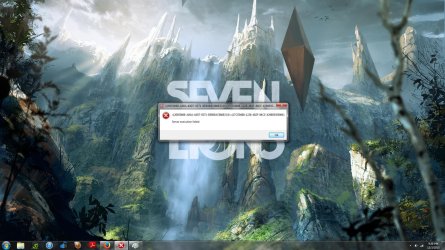
Just tried installing an Kingston SSD on my computer. Everything worked fine but I tried to switch data from my original HDD over to SDD and successfully did so. Noticed after that my HDD became labeled (E:/) and was mentioned twice on the list. Then I started to have problems a while after. None of the start menu shortcuts work, whether I type them in to the search bar or just try to click them on the start menu they fail to open. This stupid error appears every like 15 seconds saying "error exe.eplorer" or something like that. Another error pops up frequently too which i included a screenshot of.

Here is the link to the tutorial of switching data between the two drives to explain what I was doing better
How to Migrate to a Solid-State Drive Without Reinstalling Windows

Any help will be appreciated. Thanks.
 

Attachments
  • Untitled.jpg
    Untitled.jpg
    290.9 KB · Views: 8

My Computer My Computer

At a glance

Windows 7 Home Premium x64AMD FX(tm)-8350 Eight Core ProcessorPatroit intel Extreme Master4GB(x2) DDR3-1600Gigabyte GeForce 660 Ti 2 GB
Computer type
PC/Desktop
Computer Manufacturer/Model Number
Custom Build
OS
Windows 7 Home Premium x64
CPU
AMD FX(tm)-8350 Eight Core Processor
Motherboard
Gigabyte 990FXA-UD3 ATX AM3+
Memory
Patroit intel Extreme Master4GB(x2) DDR3-1600
Graphics Card(s)
Gigabyte GeForce 660 Ti 2 GB
Hard Drives
Seagate Barracuda 1TB 3.5" 7200RPM Internal Hard Drive
Antivirus
ESET Smart Security
Browser
Google Chrome
Do I understand that you tried to move the folders from 1 system to the other with the location tab in Properties ??
 

My Computer My Computer

At a glance

Vista, Windows7, Mint Mate, Zorin, Windows 8from 1.6GHz Duo to i7
Computer Manufacturer/Model Number
HP, Dell, Gateway, Toshiba - 4 laptops and 2 desktops
OS
Vista, Windows7, Mint Mate, Zorin, Windows 8
CPU
from 1.6GHz Duo to i7
Monitor(s) Displays
2x HP w2207
Hard Drives
5x HDD, 7x SSD, 12x Externals
Keyboard
with trackball - no mices
Mouse
Trackball mice
Internet Speed
DSL 6000
That is correct yes. Also, it said something about merging two folders together when I had to move locations and it wouldnt let me change locations unless I said yes to that so I did and I think thats where things went wrong.
 

My Computer My Computer

At a glance

Windows 7 Home Premium x64AMD FX(tm)-8350 Eight Core ProcessorPatroit intel Extreme Master4GB(x2) DDR3-1600Gigabyte GeForce 660 Ti 2 GB
Computer type
PC/Desktop
Computer Manufacturer/Model Number
Custom Build
OS
Windows 7 Home Premium x64
CPU
AMD FX(tm)-8350 Eight Core Processor
Motherboard
Gigabyte 990FXA-UD3 ATX AM3+
Memory
Patroit intel Extreme Master4GB(x2) DDR3-1600
Graphics Card(s)
Gigabyte GeForce 660 Ti 2 GB
Hard Drives
Seagate Barracuda 1TB 3.5" 7200RPM Internal Hard Drive
Antivirus
ESET Smart Security
Browser
Google Chrome
Go back and restore the default for those folders. The you can try 2 things:

1. A more conservative approach and move the data with a simple copy/paste to the appropriate folder on the SSD

2. Move with the locaqtion tab - but to a defined folder on the SSD - not to the root.
 

My Computer My Computer

At a glance

Vista, Windows7, Mint Mate, Zorin, Windows 8from 1.6GHz Duo to i7
Computer Manufacturer/Model Number
HP, Dell, Gateway, Toshiba - 4 laptops and 2 desktops
OS
Vista, Windows7, Mint Mate, Zorin, Windows 8
CPU
from 1.6GHz Duo to i7
Monitor(s) Displays
2x HP w2207
Hard Drives
5x HDD, 7x SSD, 12x Externals
Keyboard
with trackball - no mices
Mouse
Trackball mice
Internet Speed
DSL 6000
How do I restore the default for the folders?
 

My Computer My Computer

At a glance

Windows 7 Home Premium x64AMD FX(tm)-8350 Eight Core ProcessorPatroit intel Extreme Master4GB(x2) DDR3-1600Gigabyte GeForce 660 Ti 2 GB
Computer type
PC/Desktop
Computer Manufacturer/Model Number
Custom Build
OS
Windows 7 Home Premium x64
CPU
AMD FX(tm)-8350 Eight Core Processor
Motherboard
Gigabyte 990FXA-UD3 ATX AM3+
Memory
Patroit intel Extreme Master4GB(x2) DDR3-1600
Graphics Card(s)
Gigabyte GeForce 660 Ti 2 GB
Hard Drives
Seagate Barracuda 1TB 3.5" 7200RPM Internal Hard Drive
Antivirus
ESET Smart Security
Browser
Google Chrome
Look into Properties > Location tab. And predefine a seperate folder for each one you want to move - if you choose solution #2.
 

My Computer My Computer

At a glance

Vista, Windows7, Mint Mate, Zorin, Windows 8from 1.6GHz Duo to i7
Computer Manufacturer/Model Number
HP, Dell, Gateway, Toshiba - 4 laptops and 2 desktops
OS
Vista, Windows7, Mint Mate, Zorin, Windows 8
CPU
from 1.6GHz Duo to i7
Monitor(s) Displays
2x HP w2207
Hard Drives
5x HDD, 7x SSD, 12x Externals
Keyboard
with trackball - no mices
Mouse
Trackball mice
Internet Speed
DSL 6000
Here is the problem I am having. I can't delete the shortcuts when I try to either because it says it can't find them. Also, E:/ is listed twice
 

Attachments

  • Untitled.png
    Untitled.png
    156.5 KB · Views: 3

My Computer My Computer

At a glance

Windows 7 Home Premium x64AMD FX(tm)-8350 Eight Core ProcessorPatroit intel Extreme Master4GB(x2) DDR3-1600Gigabyte GeForce 660 Ti 2 GB
Computer type
PC/Desktop
Computer Manufacturer/Model Number
Custom Build
OS
Windows 7 Home Premium x64
CPU
AMD FX(tm)-8350 Eight Core Processor
Motherboard
Gigabyte 990FXA-UD3 ATX AM3+
Memory
Patroit intel Extreme Master4GB(x2) DDR3-1600
Graphics Card(s)
Gigabyte GeForce 660 Ti 2 GB
Hard Drives
Seagate Barracuda 1TB 3.5" 7200RPM Internal Hard Drive
Antivirus
ESET Smart Security
Browser
Google Chrome
That looks like this sytem got pretty much mucked up. I think it's back to square 1.

Did you take an image after the initial installation. If not, have a look whether there are any restore points from before you started playing with the folders. Would avoid a reinstallation.
 

My Computer My Computer

At a glance

Vista, Windows7, Mint Mate, Zorin, Windows 8from 1.6GHz Duo to i7
Computer Manufacturer/Model Number
HP, Dell, Gateway, Toshiba - 4 laptops and 2 desktops
OS
Vista, Windows7, Mint Mate, Zorin, Windows 8
CPU
from 1.6GHz Duo to i7
Monitor(s) Displays
2x HP w2207
Hard Drives
5x HDD, 7x SSD, 12x Externals
Keyboard
with trackball - no mices
Mouse
Trackball mice
Internet Speed
DSL 6000
As in format the SSD and recover my old HDD to the point of before I tried all this? You wouldnt recommend re-installation of what sorry?
 

My Computer My Computer

At a glance

Windows 7 Home Premium x64AMD FX(tm)-8350 Eight Core ProcessorPatroit intel Extreme Master4GB(x2) DDR3-1600Gigabyte GeForce 660 Ti 2 GB
Computer type
PC/Desktop
Computer Manufacturer/Model Number
Custom Build
OS
Windows 7 Home Premium x64
CPU
AMD FX(tm)-8350 Eight Core Processor
Motherboard
Gigabyte 990FXA-UD3 ATX AM3+
Memory
Patroit intel Extreme Master4GB(x2) DDR3-1600
Graphics Card(s)
Gigabyte GeForce 660 Ti 2 GB
Hard Drives
Seagate Barracuda 1TB 3.5" 7200RPM Internal Hard Drive
Antivirus
ESET Smart Security
Browser
Google Chrome
What I am looking at in your snip is the SSD system - right ??

It is not that I do not recommend a reinstallation of the OS on the SSD. That is just a lot of work. If you could recover the situation with a prior image or restore point, that would be easier.
 

My Computer My Computer

At a glance

Vista, Windows7, Mint Mate, Zorin, Windows 8from 1.6GHz Duo to i7
Computer Manufacturer/Model Number
HP, Dell, Gateway, Toshiba - 4 laptops and 2 desktops
OS
Vista, Windows7, Mint Mate, Zorin, Windows 8
CPU
from 1.6GHz Duo to i7
Monitor(s) Displays
2x HP w2207
Hard Drives
5x HDD, 7x SSD, 12x Externals
Keyboard
with trackball - no mices
Mouse
Trackball mice
Internet Speed
DSL 6000
Yeah that is my SSD. I did not take an image of the SSD after I did everything to it :/. Guess I will just have to do everything all over again.
 

My Computer My Computer

At a glance

Windows 7 Home Premium x64AMD FX(tm)-8350 Eight Core ProcessorPatroit intel Extreme Master4GB(x2) DDR3-1600Gigabyte GeForce 660 Ti 2 GB
Computer type
PC/Desktop
Computer Manufacturer/Model Number
Custom Build
OS
Windows 7 Home Premium x64
CPU
AMD FX(tm)-8350 Eight Core Processor
Motherboard
Gigabyte 990FXA-UD3 ATX AM3+
Memory
Patroit intel Extreme Master4GB(x2) DDR3-1600
Graphics Card(s)
Gigabyte GeForce 660 Ti 2 GB
Hard Drives
Seagate Barracuda 1TB 3.5" 7200RPM Internal Hard Drive
Antivirus
ESET Smart Security
Browser
Google Chrome
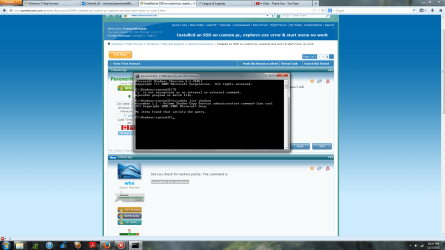
Did you check for restore points. The command is

vssadmin list shadows
 

My Computer My Computer

At a glance

Vista, Windows7, Mint Mate, Zorin, Windows 8from 1.6GHz Duo to i7
Computer Manufacturer/Model Number
HP, Dell, Gateway, Toshiba - 4 laptops and 2 desktops
OS
Vista, Windows7, Mint Mate, Zorin, Windows 8
CPU
from 1.6GHz Duo to i7
Monitor(s) Displays
2x HP w2207
Hard Drives
5x HDD, 7x SSD, 12x Externals
Keyboard
with trackball - no mices
Mouse
Trackball mice
Internet Speed
DSL 6000
Here is a picture of what happens when I type that into CMD
 

Attachments

  • Untitled.png
    Untitled.png
    129.1 KB · Views: 3

My Computer My Computer

At a glance

Windows 7 Home Premium x64AMD FX(tm)-8350 Eight Core ProcessorPatroit intel Extreme Master4GB(x2) DDR3-1600Gigabyte GeForce 660 Ti 2 GB
Computer type
PC/Desktop
Computer Manufacturer/Model Number
Custom Build
OS
Windows 7 Home Premium x64
CPU
AMD FX(tm)-8350 Eight Core Processor
Motherboard
Gigabyte 990FXA-UD3 ATX AM3+
Memory
Patroit intel Extreme Master4GB(x2) DDR3-1600
Graphics Card(s)
Gigabyte GeForce 660 Ti 2 GB
Hard Drives
Seagate Barracuda 1TB 3.5" 7200RPM Internal Hard Drive
Antivirus
ESET Smart Security
Browser
Google Chrome
That means you have none - too bad. You apparently have not yet installed any programs. That makes reinstallation a lot easier. Do you need any help with that?
 

My Computer My Computer

At a glance

Vista, Windows7, Mint Mate, Zorin, Windows 8from 1.6GHz Duo to i7
Computer Manufacturer/Model Number
HP, Dell, Gateway, Toshiba - 4 laptops and 2 desktops
OS
Vista, Windows7, Mint Mate, Zorin, Windows 8
CPU
from 1.6GHz Duo to i7
Monitor(s) Displays
2x HP w2207
Hard Drives
5x HDD, 7x SSD, 12x Externals
Keyboard
with trackball - no mices
Mouse
Trackball mice
Internet Speed
DSL 6000
I think I should be okay, thanks.
 

My Computer My Computer

At a glance

Windows 7 Home Premium x64AMD FX(tm)-8350 Eight Core ProcessorPatroit intel Extreme Master4GB(x2) DDR3-1600Gigabyte GeForce 660 Ti 2 GB
Computer type
PC/Desktop
Computer Manufacturer/Model Number
Custom Build
OS
Windows 7 Home Premium x64
CPU
AMD FX(tm)-8350 Eight Core Processor
Motherboard
Gigabyte 990FXA-UD3 ATX AM3+
Memory
Patroit intel Extreme Master4GB(x2) DDR3-1600
Graphics Card(s)
Gigabyte GeForce 660 Ti 2 GB
Hard Drives
Seagate Barracuda 1TB 3.5" 7200RPM Internal Hard Drive
Antivirus
ESET Smart Security
Browser
Google Chrome
My tip: define the whole SSD as a primary, active, aligned partition and install into that. Then you do not get the dreaded 100MB system partition. Makes imaging later a lot easier.
 

My Computer My Computer

At a glance

Vista, Windows7, Mint Mate, Zorin, Windows 8from 1.6GHz Duo to i7
Computer Manufacturer/Model Number
HP, Dell, Gateway, Toshiba - 4 laptops and 2 desktops
OS
Vista, Windows7, Mint Mate, Zorin, Windows 8
CPU
from 1.6GHz Duo to i7
Monitor(s) Displays
2x HP w2207
Hard Drives
5x HDD, 7x SSD, 12x Externals
Keyboard
with trackball - no mices
Mouse
Trackball mice
Internet Speed
DSL 6000
How can I do this when I cannot even get into the "computer tab". I cannot format the drive again if i can't get into it. My other drive doesnt have windows on it either
 

My Computer My Computer

At a glance

Windows 7 Home Premium x64AMD FX(tm)-8350 Eight Core ProcessorPatroit intel Extreme Master4GB(x2) DDR3-1600Gigabyte GeForce 660 Ti 2 GB
Computer type
PC/Desktop
Computer Manufacturer/Model Number
Custom Build
OS
Windows 7 Home Premium x64
CPU
AMD FX(tm)-8350 Eight Core Processor
Motherboard
Gigabyte 990FXA-UD3 ATX AM3+
Memory
Patroit intel Extreme Master4GB(x2) DDR3-1600
Graphics Card(s)
Gigabyte GeForce 660 Ti 2 GB
Hard Drives
Seagate Barracuda 1TB 3.5" 7200RPM Internal Hard Drive
Antivirus
ESET Smart Security
Browser
Google Chrome
How can I do this when I cannot even get into the "computer tab". I cannot format the drive again if i can't get into it. My other drive doesnt have windows on it either

You cannot format the Windows 7 OS disc from within Computer. You have to format it when you reinstall Windows, which is part of the installation process.
 

My Computer My Computer

At a glance

Windows 7 Home Premium 64 bit sp1Intel i5 3570 3.4Ghz Ivy Bridge SKT 1155 quad...G-Skill Rip Jaws 16Gb (8x2) DDR3 -1600 PC3 12...Gigabyte NVIDIA GT610 1Gb DDR3 810/1200 PCI-E...
Computer type
PC/Desktop
Computer Manufacturer/Model Number
Self built using existing case
OS
Windows 7 Home Premium 64 bit sp1
CPU
Intel i5 3570 3.4Ghz Ivy Bridge SKT 1155 quad core
Motherboard
Gigabyte Z77-HD3 SKT 1155 2xSata 3, 4x USB 3.0
Memory
G-Skill Rip Jaws 16Gb (8x2) DDR3 -1600 PC3 12800 CL 10 red
Graphics Card(s)
Gigabyte NVIDIA GT610 1Gb DDR3 810/1200 PCI-E 2.0 Silent
Sound Card
NVIDIA High Definition & Realtech High Definition Audio
Monitor(s) Displays
2 x Philips 226V4L 16:9 aspect ratio
Screen Resolution
1920 x 1080 HD
Hard Drives
Samsung 840 Pro 256gb SSD, SATA 3.
Hitachi Touro Portable 1tb, USB 3.0 HDD used for image b/ups.
PSU
Corsair VS450
Case
Codeng
Cooling
PSU fan & CPU fan
Keyboard
Logitech
Mouse
Logitech Wireless trackball M570
Internet Speed
Wireless 3G. 3mg down & 550kb up.
Antivirus
Bitdefender Internet Security 2020
Browser
Opera (Current Version) & Firefox
Other Info
MS Office 2013 Pro. Davis weather station software. MGE Nova 600 avr UPS.
Boot with your installation disc and go to command prompt at startup. From there, run the following commands:

Diskpart
List disk
Select disk n (where n is the number that was given for your disk in List disk)
Clean
Create partition primary assign letter=C (the 'assign letter=C' is optional)
Format fs=ntfs quick
Active
Exit

Then install into that partition.
 

My Computer My Computer

At a glance

Vista, Windows7, Mint Mate, Zorin, Windows 8from 1.6GHz Duo to i7
Computer Manufacturer/Model Number
HP, Dell, Gateway, Toshiba - 4 laptops and 2 desktops
OS
Vista, Windows7, Mint Mate, Zorin, Windows 8
CPU
from 1.6GHz Duo to i7
Monitor(s) Displays
2x HP w2207
Hard Drives
5x HDD, 7x SSD, 12x Externals
Keyboard
with trackball - no mices
Mouse
Trackball mice
Internet Speed
DSL 6000
Whenever I try to re-install windows on my SSD and I click install again and pick custom it says something along the lines of "re-start, then re-insert disk, then download" or something along those lines. And when I try that it doesnt work. So, what I have done so far is, re-install windows on my original HDD, and now I was going to try to follow those steps I posted earlier by lifehacker and I formated the SSD. Should I try those steps in the lifehacker post? What should I do now? Sorry if I am making things complicated
 

My Computer My Computer

At a glance

Windows 7 Home Premium x64AMD FX(tm)-8350 Eight Core ProcessorPatroit intel Extreme Master4GB(x2) DDR3-1600Gigabyte GeForce 660 Ti 2 GB
Computer type
PC/Desktop
Computer Manufacturer/Model Number
Custom Build
OS
Windows 7 Home Premium x64
CPU
AMD FX(tm)-8350 Eight Core Processor
Motherboard
Gigabyte 990FXA-UD3 ATX AM3+
Memory
Patroit intel Extreme Master4GB(x2) DDR3-1600
Graphics Card(s)
Gigabyte GeForce 660 Ti 2 GB
Hard Drives
Seagate Barracuda 1TB 3.5" 7200RPM Internal Hard Drive
Antivirus
ESET Smart Security
Browser
Google Chrome
Back
Top