Solved Installed an SSD on custom pc, explorer.exe error & start menu no work

Did you try what I posted above?
 

My Computer My Computer

At a glance

Vista, Windows7, Mint Mate, Zorin, Windows 8from 1.6GHz Duo to i7
Computer Manufacturer/Model Number
HP, Dell, Gateway, Toshiba - 4 laptops and 2 desktops
OS
Vista, Windows7, Mint Mate, Zorin, Windows 8
CPU
from 1.6GHz Duo to i7
Monitor(s) Displays
2x HP w2207
Hard Drives
5x HDD, 7x SSD, 12x Externals
Keyboard
with trackball - no mices
Mouse
Trackball mice
Internet Speed
DSL 6000
It found 51 errors. Am I supposed to buy this? It wont let me repair without purchasing it
 

My Computer My Computer

At a glance

Windows 7 Home Premium x64AMD FX(tm)-8350 Eight Core ProcessorPatroit intel Extreme Master4GB(x2) DDR3-1600Gigabyte GeForce 660 Ti 2 GB
Computer type
PC/Desktop
Computer Manufacturer/Model Number
Custom Build
OS
Windows 7 Home Premium x64
CPU
AMD FX(tm)-8350 Eight Core Processor
Motherboard
Gigabyte 990FXA-UD3 ATX AM3+
Memory
Patroit intel Extreme Master4GB(x2) DDR3-1600
Graphics Card(s)
Gigabyte GeForce 660 Ti 2 GB
Hard Drives
Seagate Barracuda 1TB 3.5" 7200RPM Internal Hard Drive
Antivirus
ESET Smart Security
Browser
Google Chrome
I researched it a lot online and found that it is known to be scareware so....
 

My Computer My Computer

At a glance

Windows 7 Home Premium x64AMD FX(tm)-8350 Eight Core ProcessorPatroit intel Extreme Master4GB(x2) DDR3-1600Gigabyte GeForce 660 Ti 2 GB
Computer type
PC/Desktop
Computer Manufacturer/Model Number
Custom Build
OS
Windows 7 Home Premium x64
CPU
AMD FX(tm)-8350 Eight Core Processor
Motherboard
Gigabyte 990FXA-UD3 ATX AM3+
Memory
Patroit intel Extreme Master4GB(x2) DDR3-1600
Graphics Card(s)
Gigabyte GeForce 660 Ti 2 GB
Hard Drives
Seagate Barracuda 1TB 3.5" 7200RPM Internal Hard Drive
Antivirus
ESET Smart Security
Browser
Google Chrome
I don't know what you are talking about.
 

My Computer My Computer

At a glance

Vista, Windows7, Mint Mate, Zorin, Windows 8from 1.6GHz Duo to i7
Computer Manufacturer/Model Number
HP, Dell, Gateway, Toshiba - 4 laptops and 2 desktops
OS
Vista, Windows7, Mint Mate, Zorin, Windows 8
CPU
from 1.6GHz Duo to i7
Monitor(s) Displays
2x HP w2207
Hard Drives
5x HDD, 7x SSD, 12x Externals
Keyboard
with trackball - no mices
Mouse
Trackball mice
Internet Speed
DSL 6000
Well do I have to pay to use it? I am not trying to insult you, I am just trying to be careful of what I download on my computer. Sorry if I offended you.
 

My Computer My Computer

At a glance

Windows 7 Home Premium x64AMD FX(tm)-8350 Eight Core ProcessorPatroit intel Extreme Master4GB(x2) DDR3-1600Gigabyte GeForce 660 Ti 2 GB
Computer type
PC/Desktop
Computer Manufacturer/Model Number
Custom Build
OS
Windows 7 Home Premium x64
CPU
AMD FX(tm)-8350 Eight Core Processor
Motherboard
Gigabyte 990FXA-UD3 ATX AM3+
Memory
Patroit intel Extreme Master4GB(x2) DDR3-1600
Graphics Card(s)
Gigabyte GeForce 660 Ti 2 GB
Hard Drives
Seagate Barracuda 1TB 3.5" 7200RPM Internal Hard Drive
Antivirus
ESET Smart Security
Browser
Google Chrome
You have to pay to use what?? All I posted above were some commands for cmd. And you did not offends me. I am just lost with what you refer to.
 

My Computer My Computer

At a glance

Vista, Windows7, Mint Mate, Zorin, Windows 8from 1.6GHz Duo to i7
Computer Manufacturer/Model Number
HP, Dell, Gateway, Toshiba - 4 laptops and 2 desktops
OS
Vista, Windows7, Mint Mate, Zorin, Windows 8
CPU
from 1.6GHz Duo to i7
Monitor(s) Displays
2x HP w2207
Hard Drives
5x HDD, 7x SSD, 12x Externals
Keyboard
with trackball - no mices
Mouse
Trackball mice
Internet Speed
DSL 6000
I can't find it anymore.... Maybe it was just a clever location of an ad, but it said "tip, download this to help" and it was literally right under your text so that's what I thought you were referring too. I'm not crazy, but its not there anymore. I'll try the cmd thing now
 

My Computer My Computer

At a glance

Windows 7 Home Premium x64AMD FX(tm)-8350 Eight Core ProcessorPatroit intel Extreme Master4GB(x2) DDR3-1600Gigabyte GeForce 660 Ti 2 GB
Computer type
PC/Desktop
Computer Manufacturer/Model Number
Custom Build
OS
Windows 7 Home Premium x64
CPU
AMD FX(tm)-8350 Eight Core Processor
Motherboard
Gigabyte 990FXA-UD3 ATX AM3+
Memory
Patroit intel Extreme Master4GB(x2) DDR3-1600
Graphics Card(s)
Gigabyte GeForce 660 Ti 2 GB
Hard Drives
Seagate Barracuda 1TB 3.5" 7200RPM Internal Hard Drive
Antivirus
ESET Smart Security
Browser
Google Chrome

My Computer My Computer

At a glance

Vista, Windows7, Mint Mate, Zorin, Windows 8from 1.6GHz Duo to i7
Computer Manufacturer/Model Number
HP, Dell, Gateway, Toshiba - 4 laptops and 2 desktops
OS
Vista, Windows7, Mint Mate, Zorin, Windows 8
CPU
from 1.6GHz Duo to i7
Monitor(s) Displays
2x HP w2207
Hard Drives
5x HDD, 7x SSD, 12x Externals
Keyboard
with trackball - no mices
Mouse
Trackball mice
Internet Speed
DSL 6000
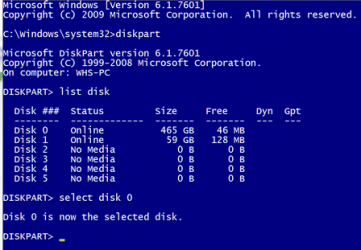
Okay I will when I get out of cmd. So I can get to the part where the disks are listed and my choices are listed as mySSD is #0 and my HDD is #1. When I try to select my SSD it is not working. What do i type in? Just the number 0? Because that didnt work
 

My Computer My Computer

At a glance

Windows 7 Home Premium x64AMD FX(tm)-8350 Eight Core ProcessorPatroit intel Extreme Master4GB(x2) DDR3-1600Gigabyte GeForce 660 Ti 2 GB
Computer type
PC/Desktop
Computer Manufacturer/Model Number
Custom Build
OS
Windows 7 Home Premium x64
CPU
AMD FX(tm)-8350 Eight Core Processor
Motherboard
Gigabyte 990FXA-UD3 ATX AM3+
Memory
Patroit intel Extreme Master4GB(x2) DDR3-1600
Graphics Card(s)
Gigabyte GeForce 660 Ti 2 GB
Hard Drives
Seagate Barracuda 1TB 3.5" 7200RPM Internal Hard Drive
Antivirus
ESET Smart Security
Browser
Google Chrome
You must learn how to read. You must put in select disk 0. like this.
 

Attachments

  • 2013-12-04_2026.png
    2013-12-04_2026.png
    24.8 KB · Views: 4

My Computer My Computer

At a glance

Vista, Windows7, Mint Mate, Zorin, Windows 8from 1.6GHz Duo to i7
Computer Manufacturer/Model Number
HP, Dell, Gateway, Toshiba - 4 laptops and 2 desktops
OS
Vista, Windows7, Mint Mate, Zorin, Windows 8
CPU
from 1.6GHz Duo to i7
Monitor(s) Displays
2x HP w2207
Hard Drives
5x HDD, 7x SSD, 12x Externals
Keyboard
with trackball - no mices
Mouse
Trackball mice
Internet Speed
DSL 6000
Sorry am I babysitting my baby cousin so I have to keep an eye on him so i didnt read it properly. I got to the "Create partition primary assign letter=C" part and it says something like "argument not valid or something like that. I tried multiple times, readying the "help creating partition" in cmd now
 

My Computer My Computer

At a glance

Windows 7 Home Premium x64AMD FX(tm)-8350 Eight Core ProcessorPatroit intel Extreme Master4GB(x2) DDR3-1600Gigabyte GeForce 660 Ti 2 GB
Computer type
PC/Desktop
Computer Manufacturer/Model Number
Custom Build
OS
Windows 7 Home Premium x64
CPU
AMD FX(tm)-8350 Eight Core Processor
Motherboard
Gigabyte 990FXA-UD3 ATX AM3+
Memory
Patroit intel Extreme Master4GB(x2) DDR3-1600
Graphics Card(s)
Gigabyte GeForce 660 Ti 2 GB
Hard Drives
Seagate Barracuda 1TB 3.5" 7200RPM Internal Hard Drive
Antivirus
ESET Smart Security
Browser
Google Chrome
Leave assign letter=C off
 

My Computer My Computer

At a glance

Vista, Windows7, Mint Mate, Zorin, Windows 8from 1.6GHz Duo to i7
Computer Manufacturer/Model Number
HP, Dell, Gateway, Toshiba - 4 laptops and 2 desktops
OS
Vista, Windows7, Mint Mate, Zorin, Windows 8
CPU
from 1.6GHz Duo to i7
Monitor(s) Displays
2x HP w2207
Hard Drives
5x HDD, 7x SSD, 12x Externals
Keyboard
with trackball - no mices
Mouse
Trackball mice
Internet Speed
DSL 6000
after i am done with cmd I mean. I finished the other steps
 

My Computer My Computer

At a glance

Windows 7 Home Premium x64AMD FX(tm)-8350 Eight Core ProcessorPatroit intel Extreme Master4GB(x2) DDR3-1600Gigabyte GeForce 660 Ti 2 GB
Computer type
PC/Desktop
Computer Manufacturer/Model Number
Custom Build
OS
Windows 7 Home Premium x64
CPU
AMD FX(tm)-8350 Eight Core Processor
Motherboard
Gigabyte 990FXA-UD3 ATX AM3+
Memory
Patroit intel Extreme Master4GB(x2) DDR3-1600
Graphics Card(s)
Gigabyte GeForce 660 Ti 2 GB
Hard Drives
Seagate Barracuda 1TB 3.5" 7200RPM Internal Hard Drive
Antivirus
ESET Smart Security
Browser
Google Chrome
If you are done with cmd, do the installation. Choose 'custom installation' and direct the installer to that partition.
 

My Computer My Computer

At a glance

Vista, Windows7, Mint Mate, Zorin, Windows 8from 1.6GHz Duo to i7
Computer Manufacturer/Model Number
HP, Dell, Gateway, Toshiba - 4 laptops and 2 desktops
OS
Vista, Windows7, Mint Mate, Zorin, Windows 8
CPU
from 1.6GHz Duo to i7
Monitor(s) Displays
2x HP w2207
Hard Drives
5x HDD, 7x SSD, 12x Externals
Keyboard
with trackball - no mices
Mouse
Trackball mice
Internet Speed
DSL 6000
So once i have completed the installation of windows on my SSD I go into my BIOS, make my SSD the first thing in my boot order correct? Then what do I do with my HDD? It has windows installed on it, and all my other stuff. Do I somehow uninstall windows from it and everything else then start from scratch? I do have the HDD backed up on my external HDD. Thanks again for all the help. I really appreciate your time and patience with me.
 

My Computer My Computer

At a glance

Windows 7 Home Premium x64AMD FX(tm)-8350 Eight Core ProcessorPatroit intel Extreme Master4GB(x2) DDR3-1600Gigabyte GeForce 660 Ti 2 GB
Computer type
PC/Desktop
Computer Manufacturer/Model Number
Custom Build
OS
Windows 7 Home Premium x64
CPU
AMD FX(tm)-8350 Eight Core Processor
Motherboard
Gigabyte 990FXA-UD3 ATX AM3+
Memory
Patroit intel Extreme Master4GB(x2) DDR3-1600
Graphics Card(s)
Gigabyte GeForce 660 Ti 2 GB
Hard Drives
Seagate Barracuda 1TB 3.5" 7200RPM Internal Hard Drive
Antivirus
ESET Smart Security
Browser
Google Chrome
Yes you have to change the bootorder in the BIOS.

I would leave the old system for a bit until you are comfortable with the new installation. Then you probably want to leave your user data on the HDD. There are several ways to go about that. Do you have an external drive with sufficient free space to which we could temporarily copy your user data.
 

My Computer My Computer

At a glance

Vista, Windows7, Mint Mate, Zorin, Windows 8from 1.6GHz Duo to i7
Computer Manufacturer/Model Number
HP, Dell, Gateway, Toshiba - 4 laptops and 2 desktops
OS
Vista, Windows7, Mint Mate, Zorin, Windows 8
CPU
from 1.6GHz Duo to i7
Monitor(s) Displays
2x HP w2207
Hard Drives
5x HDD, 7x SSD, 12x Externals
Keyboard
with trackball - no mices
Mouse
Trackball mice
Internet Speed
DSL 6000
Yes I have approximately 100 or 200 GB left of space on it i believe. If you have the time, would you mind telling me how to do that? If not its okay. Windows is around 50% done downloading just so you know.
 

My Computer My Computer

At a glance

Windows 7 Home Premium x64AMD FX(tm)-8350 Eight Core ProcessorPatroit intel Extreme Master4GB(x2) DDR3-1600Gigabyte GeForce 660 Ti 2 GB
Computer type
PC/Desktop
Computer Manufacturer/Model Number
Custom Build
OS
Windows 7 Home Premium x64
CPU
AMD FX(tm)-8350 Eight Core Processor
Motherboard
Gigabyte 990FXA-UD3 ATX AM3+
Memory
Patroit intel Extreme Master4GB(x2) DDR3-1600
Graphics Card(s)
Gigabyte GeForce 660 Ti 2 GB
Hard Drives
Seagate Barracuda 1TB 3.5" 7200RPM Internal Hard Drive
Antivirus
ESET Smart Security
Browser
Google Chrome
When I boot from the SSD a screen comes up and says "windows failed to start due to a hardware change" or something along those lines. It gives me a few options to choose from but if I wait a bit it goes back to the re-installation screen and says its completing the installation. Is this supposed to happen?
 

My Computer My Computer

At a glance

Windows 7 Home Premium x64AMD FX(tm)-8350 Eight Core ProcessorPatroit intel Extreme Master4GB(x2) DDR3-1600Gigabyte GeForce 660 Ti 2 GB
Computer type
PC/Desktop
Computer Manufacturer/Model Number
Custom Build
OS
Windows 7 Home Premium x64
CPU
AMD FX(tm)-8350 Eight Core Processor
Motherboard
Gigabyte 990FXA-UD3 ATX AM3+
Memory
Patroit intel Extreme Master4GB(x2) DDR3-1600
Graphics Card(s)
Gigabyte GeForce 660 Ti 2 GB
Hard Drives
Seagate Barracuda 1TB 3.5" 7200RPM Internal Hard Drive
Antivirus
ESET Smart Security
Browser
Google Chrome
Excuse my ignorance, it seems to be working fine now and guiding me through the process. Is there any way I could donate you money for all of your help? i have a disposable credit card that i could use. Its the least I could do for all of your help
 

My Computer My Computer

At a glance

Windows 7 Home Premium x64AMD FX(tm)-8350 Eight Core ProcessorPatroit intel Extreme Master4GB(x2) DDR3-1600Gigabyte GeForce 660 Ti 2 GB
Computer type
PC/Desktop
Computer Manufacturer/Model Number
Custom Build
OS
Windows 7 Home Premium x64
CPU
AMD FX(tm)-8350 Eight Core Processor
Motherboard
Gigabyte 990FXA-UD3 ATX AM3+
Memory
Patroit intel Extreme Master4GB(x2) DDR3-1600
Graphics Card(s)
Gigabyte GeForce 660 Ti 2 GB
Hard Drives
Seagate Barracuda 1TB 3.5" 7200RPM Internal Hard Drive
Antivirus
ESET Smart Security
Browser
Google Chrome
I would deal as follows with the old OS partition on the HDD - all operations from the new OS on the HDD.

1. Copy all the user data (Documents, Music, Videos, Pictures, Downloads) from that partition to the external disk. And do not forget to make a backup of your Favorites in Internet Explorer or whatever browser you use. Make a seperate folder for all that stuff on your external disk so that it does not get mixed up with other files.

2. Once you are sure that everything that is worth keeping is backed up, go into Disk Management and delete that partition and the volume until you have unallocated space. Then create a new partition in that unallocated space.

3. Now copy the saved folders Documents, Music, etc. to that new partiton. The downloads you copy into the download folder of the SSD. The Favorites you import to the Internet Explorer.

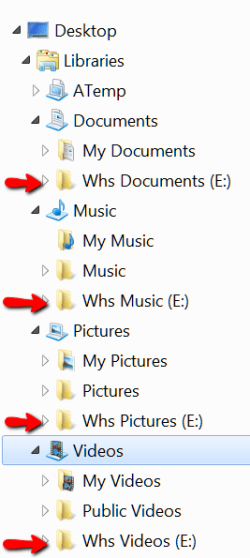
4. Rename the 4 folders on the new HDD partition to e.g. Old Documents, Old Music, Old Videos, Old Pictures. I named mine Whs Documents, Whs Music, etc. So you choose what you like. You will see later why this is good to do.

5. Now right click on each of those renamed folders and INCLUDE them into the approriate library - Documents to the documents library, Music to the music library, etc.

6. Now you will have this situation in your libraries - note my folders on the HDD start with Whs

 

Attachments

  • 2013-12-04_2129.png
    2013-12-04_2129.png
    12.2 KB · Views: 3

My Computer My Computer

At a glance

Vista, Windows7, Mint Mate, Zorin, Windows 8from 1.6GHz Duo to i7
Computer Manufacturer/Model Number
HP, Dell, Gateway, Toshiba - 4 laptops and 2 desktops
OS
Vista, Windows7, Mint Mate, Zorin, Windows 8
CPU
from 1.6GHz Duo to i7
Monitor(s) Displays
2x HP w2207
Hard Drives
5x HDD, 7x SSD, 12x Externals
Keyboard
with trackball - no mices
Mouse
Trackball mice
Internet Speed
DSL 6000
Back
Top