
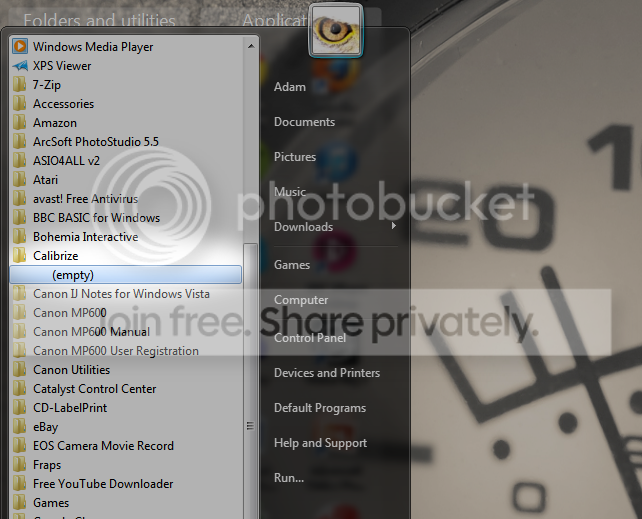
I've noticed that programs I've installed past a certain date (can't be sure when but programs I installed a while ago are fine) don't appear in their start menu folders, it just says empty.
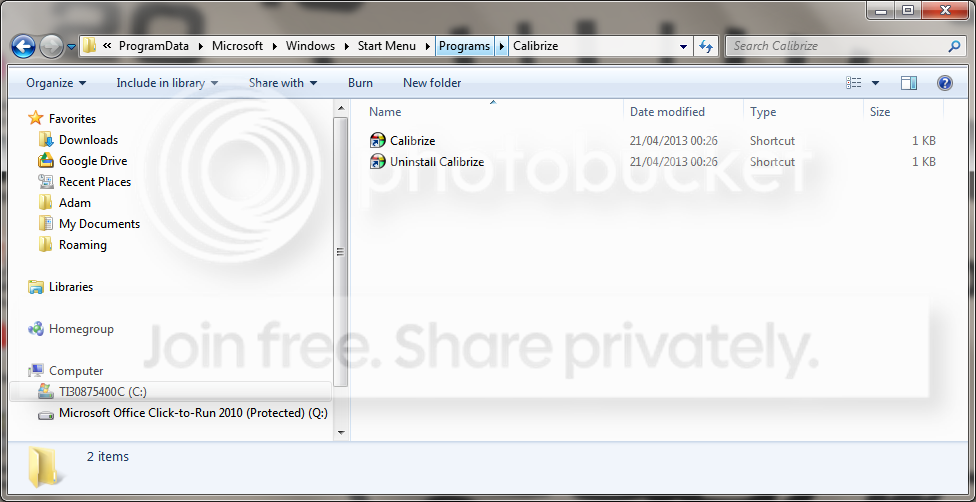
So I've checked "C:\ProgramData\Microsoft\Windows\Start Menu\Programs\" and the shortcuts are there in the file.
I'm at a loss as to why the items aren't there on the start menu when I can see the shortcuts are there in the file. I only have one account on this laptop (administrator). It is like this for all programs I've installed past about a few months ago (Which is I think around the time when Norton completely refused to install properly so I switched to Avast, in case that is in any way relevant (I did use the tool to completely remove Norton in the end)).
All the programs work fine, it's just irritating not being able to access them here.
Can anyone help?
So I've checked "C:\ProgramData\Microsoft\Windows\Start Menu\Programs\" and the shortcuts are there in the file.
I'm at a loss as to why the items aren't there on the start menu when I can see the shortcuts are there in the file. I only have one account on this laptop (administrator). It is like this for all programs I've installed past about a few months ago (Which is I think around the time when Norton completely refused to install properly so I switched to Avast, in case that is in any way relevant (I did use the tool to completely remove Norton in the end)).
All the programs work fine, it's just irritating not being able to access them here.
Can anyone help?
My Computer
- Computer type
- Laptop
- Computer Manufacturer/Model Number
- Toshiba
- OS
- Windows 7 Home Premium x64
- Antivirus
- Avast
- Browser
- Chrome


