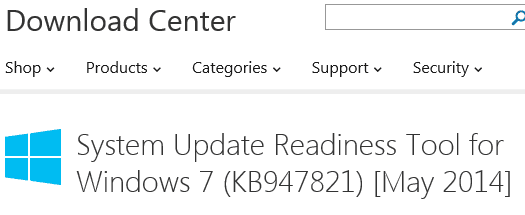
Solved Installed SURT...where is it?

pappi

Banned
Local time
9:52 PM
Messages
294
Location
Manhattan, New York City
I installed(Run instead of Save) SURT from a link posted by Brink but I cannot locate where it was filed.
 

My Computer

Computer type
Laptop
Computer Manufacturer/Model Number
HP Pavilion dv7-2173cl Entertainment Notebook PC
OS
W7 pro 32-bit.
Memory
4GB
Graphics Card(s)
ATI Mobility Radeon HD 4650 (M96)
Sound Card
•Altec Lansing with SRS Premium Sound and Sub-Woofer
Monitor(s) Displays
17.3” Diagonal HD+ High-Definition HP LED BrightView W
Screen Resolution
1600 x 900
Hard Drives
500GB (5400RPM)
Keyboard
101-key compatible with full size keyboard
Antivirus
MSE
Browser
IE 11
Selecting Run puts the file in the Temporary Internet Files area.

Once the SURT has run, that is it. It has done all that it is going to do. There is no start menu entry and there is no user interface.
 

My Computer

Computer type
Laptop
Computer Manufacturer/Model Number
Employer provided Dell Latitude
OS
W7 Pro SP1 64bit
CPU
i7
Memory
8GB
Graphics Card(s)
Intel HD Graphics
Hard Drives
crappy SSD
Antivirus
Employer mandated Symantec Endpoint Protection
Browser
Pale Moon 64bit, IE11 64bit & Chrome 64bit
So if I reinstall and save, what shall I do with it? I mean, is it of any further use after the initial installation that has a Hotfix update. Would it show updates separate from those in Windows update?
 

My Computer

Computer type
Laptop
Computer Manufacturer/Model Number
HP Pavilion dv7-2173cl Entertainment Notebook PC
OS
W7 pro 32-bit.
Memory
4GB
Graphics Card(s)
ATI Mobility Radeon HD 4650 (M96)
Sound Card
•Altec Lansing with SRS Premium Sound and Sub-Woofer
Monitor(s) Displays
17.3” Diagonal HD+ High-Definition HP LED BrightView W
Screen Resolution
1600 x 900
Hard Drives
500GB (5400RPM)
Keyboard
101-key compatible with full size keyboard
Antivirus
MSE
Browser
IE 11
I'm not sure that I understand what you are asking - so I'm just going to ramble on a bit and hope that one or more of the things that I say helps you out.


There is no need* to save a copy of the SURT; it changes from time to time. There is no need to even run/install the SURT unless directed to do so by those attempting to help you resolve an problem with the Windows Update process.

*Unless you were asked to keep a copy of the SURT so that it could be run multiple times. (You can always download it again.)


When you ask Windows to check for updates, this SURT KB will not show up as an Windows Update. It is a tool to fix a problem, not a patch/update. Once this SURT KB has been installed, the Windows Update process will not give you a notification that a new version of the tool. While it does not hurt to run the SURT, it is not something that most people do just for the fun of it. They typically do it when they are having trouble with Windows Updates.

The tool has a KB number (KB947821). Take a look in your list of installed updates and see if it is there.
 

My Computer

Computer type
Laptop
Computer Manufacturer/Model Number
Employer provided Dell Latitude
OS
W7 Pro SP1 64bit
CPU
i7
Memory
8GB
Graphics Card(s)
Intel HD Graphics
Hard Drives
crappy SSD
Antivirus
Employer mandated Symantec Endpoint Protection
Browser
Pale Moon 64bit, IE11 64bit & Chrome 64bit
Yes...that was the Hotfix. So the tool itself(SURT) was the hotfix update?

CaptureHotfix.PNG
 

My Computer

Computer type
Laptop
Computer Manufacturer/Model Number
HP Pavilion dv7-2173cl Entertainment Notebook PC
OS
W7 pro 32-bit.
Memory
4GB
Graphics Card(s)
ATI Mobility Radeon HD 4650 (M96)
Sound Card
•Altec Lansing with SRS Premium Sound and Sub-Woofer
Monitor(s) Displays
17.3” Diagonal HD+ High-Definition HP LED BrightView W
Screen Resolution
1600 x 900
Hard Drives
500GB (5400RPM)
Keyboard
101-key compatible with full size keyboard
Antivirus
MSE
Browser
IE 11
It certainly looks that way:

KB1.png

KB2.png
 

My Computer

Computer type
Laptop
Computer Manufacturer/Model Number
Employer provided Dell Latitude
OS
W7 Pro SP1 64bit
CPU
i7
Memory
8GB
Graphics Card(s)
Intel HD Graphics
Hard Drives
crappy SSD
Antivirus
Employer mandated Symantec Endpoint Protection
Browser
Pale Moon 64bit, IE11 64bit & Chrome 64bit
SURT trips up a lot of people. They expect that it will be installed just like any other program. But SURT runs when it is installed. There's nothing to do afterwards, except post the log if you're troubleshooting an issue.

The nature of SURT is that it changes about every quarter, the downloaded cabinet files change as development releases new updates. This makes SURT a very large download. To make sure it has the latest files, it always downloads the current set of cabinet files.

As Usernameissues said, you really only want to just run this if it is suggested as a possible solution to an issue on your machine.

Bill
.
 

My Computer

Computer type
Laptop
Computer Manufacturer/Model Number
HP Pavilion dv6-6c10us
OS
x64 (6.3.9600) Win8.1 Pro & soon dual boot x64 (6.1.7601) Win7_SP1 HomePrem
CPU
AMD A6-3420M APU with Radeon(tm) HD Graphics
Motherboard
Hewlett-Packard 1805
Memory
6.00 GB
Graphics Card(s)
AMD Radeon(TM) HD 6520G
Sound Card
(1) AMD High Definition Audio Device (2) IDT High Definiti
Monitor(s) Displays
HP W2072a 20" LCD (1600 x 900) @ 60 Hz
Screen Resolution
1366 x 768 x 32 bits (4294967296 colors) @ 60 Hz
Hard Drives
ST640LM0 00 HM641JI SATA Disk Device
Keyboard
Logitech k520 wireless KB
Mouse
Logitech m320 wireless mouse (bundled with KB)
Internet Speed
15/5 | 54 MB Wireless 'n'
Antivirus
Realtime: Defender or Avast | On-demand: Malwarebytes, ESET
Browser
IE 11 on Win8, IE 10 on win 7
Other Info
Media: [Gimp, Audacity, VLC] || Comm: [WEmail 2012, Skype] || Productivity: [OpenOffice,| Textpad] || Utils: [Sysinternals, cCleaner, Speccy, Defraggler]
Although it is shown in View update history, it is not shown in View installed updates and therefore I cannot uninstall it. Being not listed in View installed updates I wonder if SURT is not in my system having been installed through Run instead of Save.
 

My Computer

Computer type
Laptop
Computer Manufacturer/Model Number
HP Pavilion dv7-2173cl Entertainment Notebook PC
OS
W7 pro 32-bit.
Memory
4GB
Graphics Card(s)
ATI Mobility Radeon HD 4650 (M96)
Sound Card
•Altec Lansing with SRS Premium Sound and Sub-Woofer
Monitor(s) Displays
17.3” Diagonal HD+ High-Definition HP LED BrightView W
Screen Resolution
1600 x 900
Hard Drives
500GB (5400RPM)
Keyboard
101-key compatible with full size keyboard
Antivirus
MSE
Browser
IE 11
Although it is shown in View update history, it is not shown in View installed updates and therefore I cannot uninstall it. Being not listed in View installed updates I wonder if SURT is not in my system having been installed through Run instead of Save.
There is no reason to doubt that the SURT is not on your system. But there is no harm in installing it again. Please repeat the same steps that you did before and document it with screenshots. I would like to see the Run (button?) that you are talking about.
 

My Computer

Computer type
Laptop
Computer Manufacturer/Model Number
Employer provided Dell Latitude
OS
W7 Pro SP1 64bit
CPU
i7
Memory
8GB
Graphics Card(s)
Intel HD Graphics
Hard Drives
crappy SSD
Antivirus
Employer mandated Symantec Endpoint Protection
Browser
Pale Moon 64bit, IE11 64bit & Chrome 64bit
I no longer have the link from Brink. Can't find it in Download Center(found one for 64 bit. I have 32).

I had same problem last month with Run button. It was missing in IE 11( but not in FF). Open button did not respond. And then when I used Save button, I could not open saved file for installation. I ended up uninstalling IE 11, and then had it reinstalled. Uninstalling and Reinstalling IE 11 solved the problem. Now I have Run button. (and that's why I finally uninstalled FF since IE hacking issues seemed resolved and IE 11 showing Run button. No point in having two browsers.)
 

My Computer

Computer type
Laptop
Computer Manufacturer/Model Number
HP Pavilion dv7-2173cl Entertainment Notebook PC
OS
W7 pro 32-bit.
Memory
4GB
Graphics Card(s)
ATI Mobility Radeon HD 4650 (M96)
Sound Card
•Altec Lansing with SRS Premium Sound and Sub-Woofer
Monitor(s) Displays
17.3” Diagonal HD+ High-Definition HP LED BrightView W
Screen Resolution
1600 x 900
Hard Drives
500GB (5400RPM)
Keyboard
101-key compatible with full size keyboard
Antivirus
MSE
Browser
IE 11
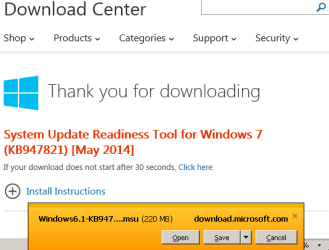
Wait!!!!...I found the link, tried to download it again but this time Run button is missing.

It's very probable, I had used Open button(instead of Run or Save). My bad. I really thought I used Run button. I did not.

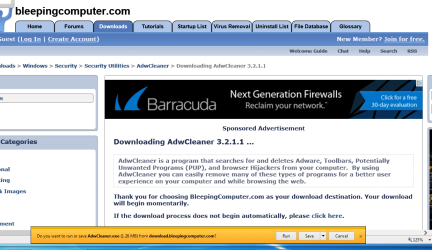
But I do have the Run button on other installations...like adwcleaner.
 

My Computer

Computer type
Laptop
Computer Manufacturer/Model Number
HP Pavilion dv7-2173cl Entertainment Notebook PC
OS
W7 pro 32-bit.
Memory
4GB
Graphics Card(s)
ATI Mobility Radeon HD 4650 (M96)
Sound Card
•Altec Lansing with SRS Premium Sound and Sub-Woofer
Monitor(s) Displays
17.3” Diagonal HD+ High-Definition HP LED BrightView W
Screen Resolution
1600 x 900
Hard Drives
500GB (5400RPM)
Keyboard
101-key compatible with full size keyboard
Antivirus
MSE
Browser
IE 11
Captureadw.PNG

Last month, I could not install adwcleaner using IE 11 because of missing Run button. I could install it using FF because it had Run button.
 

My Computer

Computer type
Laptop
Computer Manufacturer/Model Number
HP Pavilion dv7-2173cl Entertainment Notebook PC
OS
W7 pro 32-bit.
Memory
4GB
Graphics Card(s)
ATI Mobility Radeon HD 4650 (M96)
Sound Card
•Altec Lansing with SRS Premium Sound and Sub-Woofer
Monitor(s) Displays
17.3” Diagonal HD+ High-Definition HP LED BrightView W
Screen Resolution
1600 x 900
Hard Drives
500GB (5400RPM)
Keyboard
101-key compatible with full size keyboard
Antivirus
MSE
Browser
IE 11
Funny, I installed FF in my sister's (she is 85 with very low computing skill) new laptop(her old one with XP had virus that crushed her system) while IE was having hacker issues. Now that IE is safe, she refused to uninstall FF. She found it "more fun" than IE. So now she has two browsers.

I do not like having space occupying programs that I do not use. Since IE has been deemed safe again, I stopped using FF. I can always install FF in the event IE gets in any trouble again.
 

My Computer

Computer type
Laptop
Computer Manufacturer/Model Number
HP Pavilion dv7-2173cl Entertainment Notebook PC
OS
W7 pro 32-bit.
Memory
4GB
Graphics Card(s)
ATI Mobility Radeon HD 4650 (M96)
Sound Card
•Altec Lansing with SRS Premium Sound and Sub-Woofer
Monitor(s) Displays
17.3” Diagonal HD+ High-Definition HP LED BrightView W
Screen Resolution
1600 x 900
Hard Drives
500GB (5400RPM)
Keyboard
101-key compatible with full size keyboard
Antivirus
MSE
Browser
IE 11
Back
Top