
Solved Installed Win 7 Ult x64 on mSata SSD, EFI System Part on other drive?

majorchamp

New member
Local time
6:31 PM
Messages
23
I will try to make a long story short.

Got my computer 1 month ago, and it had Windows 8 pre-installed on the 750gb HDD. I had heard it might have an mSata port on the motherboard, so I ordered a 256gb Crucial mSata SSD. Well, turns out my computer did not have the mSata port. Instead, I purchased an mSata -> Sata 2.5" HD caddy. I moved my 750gb HDD into an optical -> sata caddy, and put my 256gb SSD into the old HDD spot.

I loaded up Windows 7 Ultimate x64 on the SSD, wiped the partions on the 750gb HDD (but not the 500MB EFI System Partition or the 40mb OEM Partition), and all was well. I had an awesome SSD for my os / programs, and a solid storage drive.

Well my storage drive starting getting a random click...and it bothered me so Dell just sent me a replacement. I loaded up the replacement tonight and on reboot my computer couldn't find a bootable device.

I honestly thought Windows 7 installed on the SSD would have created a boot record.

I tried loading my Windows 7 DVD at boot to repair, and it gave me some incompatibility error.

I created a 500mb partition on my SSD, but haven't done anything yet. I thought about copying the EFI System partition over, but I also don't want to screw anything up.

Can anyone give me some advice. I have spent 3 weeks setting up all the programs, my preferences, etc.. I really don't want to reinstall Windows. I have done nightly backups using Acronis True Image.

The 750GB drive I believe is a GPT though it is formatted for NTFS.

I am at a loss.
 

My Computer My Computer

At a glance

Windows 7 Ultimate x64i516gb
Computer type
PC/Desktop
Computer Manufacturer/Model Number
Dell Inspiron 15R SE
OS
Windows 7 Ultimate x64
CPU
i5
Memory
16gb
Hard Drives
256gb mSata SSD Crucial
750gb Western Digital
I guess one possible option is to make an exact clone of the current D drive, using an SATA - USB adaptor with the new drive attached, or something.

Though I will "always" be locked to that drive being important for Windows to start.
 

My Computer My Computer

At a glance

Windows 7 Ultimate x64i516gb
Computer type
PC/Desktop
Computer Manufacturer/Model Number
Dell Inspiron 15R SE
OS
Windows 7 Ultimate x64
CPU
i5
Memory
16gb
Hard Drives
256gb mSata SSD Crucial
750gb Western Digital

My Computer My Computer

At a glance

Windows 7 Ultimate x64i516gb
Computer type
PC/Desktop
Computer Manufacturer/Model Number
Dell Inspiron 15R SE
OS
Windows 7 Ultimate x64
CPU
i5
Memory
16gb
Hard Drives
256gb mSata SSD Crucial
750gb Western Digital
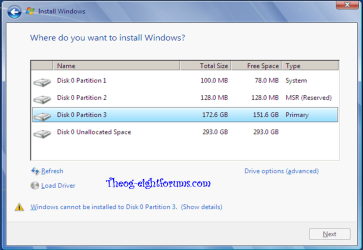
When I attempt to run the solutions here: http://www.sevenforums.com/installation-setup/156030-create-mbr.html#post1337456

I first ran them just fine when my 750GB hdd was still in the laptop. Files copied, the boot..commands worked, even the windows 7 installation was found.

Once I removed the drive from the equation and was going off of my SSD alone...it can't find Windows 7, the bcdboot c:\windows fails, etc...

bah
 

My Computer My Computer

At a glance

Windows 7 Ultimate x64i516gb
Computer type
PC/Desktop
Computer Manufacturer/Model Number
Dell Inspiron 15R SE
OS
Windows 7 Ultimate x64
CPU
i5
Memory
16gb
Hard Drives
256gb mSata SSD Crucial
750gb Western Digital

My Computer My Computer

At a glance

Windows 7 Ultimate 32-Bit & Windows 7 Ultimat...Intel Core i7 CPU 950 @ 3.07GHzOCZ 6GB (3 x 2GB) 240-Pin DDR3 SDRAM DDR3 160...ATI Radeon HD 5700 Series
Computer Manufacturer/Model Number
Custom Built
OS
Windows 7 Ultimate 32-Bit & Windows 7 Ultimate 64-Bit
CPU
Intel Core i7 CPU 950 @ 3.07GHz
Motherboard
ASUS P6T DELUXE V2
Memory
OCZ 6GB (3 x 2GB) 240-Pin DDR3 SDRAM DDR3 1600 OCZ3X1600R2
Graphics Card(s)
ATI Radeon HD 5700 Series
Sound Card
OnBoard
Hard Drives
WD6400AACS-00M3B0 (640GB SATA )
PSU
CORSAIR 850w
Case
NZXT LEXA
Cooling
Intel Stock Heatsink Fan
Keyboard
Microsoft Wireless Laser Keyboard 7000
Mouse
Microsoft Wireless Laser Mouse 7000
When I try bcdboot c:\windows (without my 750gb drive in) it tells me "failure when attempting to copy boot files"
 

My Computer My Computer

At a glance

Windows 7 Ultimate x64i516gb
Computer type
PC/Desktop
Computer Manufacturer/Model Number
Dell Inspiron 15R SE
OS
Windows 7 Ultimate x64
CPU
i5
Memory
16gb
Hard Drives
256gb mSata SSD Crucial
750gb Western Digital
My Computer My Computer

At a glance

Windows 7 Ultimate x64i516gb
Computer type
PC/Desktop
Computer Manufacturer/Model Number
Dell Inspiron 15R SE
OS
Windows 7 Ultimate x64
CPU
i5
Memory
16gb
Hard Drives
256gb mSata SSD Crucial
750gb Western Digital
What is interesting...is if I startup the Recovery DVD under UEFI dvd mode, then it finds a Windows 7 Ultimate N (recovered) on (unknown) local disk.

So when I run startup repair on that...it just ends up telling me all things good.
 

My Computer My Computer

At a glance

Windows 7 Ultimate x64i516gb
Computer type
PC/Desktop
Computer Manufacturer/Model Number
Dell Inspiron 15R SE
OS
Windows 7 Ultimate x64
CPU
i5
Memory
16gb
Hard Drives
256gb mSata SSD Crucial
750gb Western Digital
Can you boot up to the desktop without the 750gb plugged in ?
 

My Computer My Computer

At a glance

Windows 7 Ultimate 32-Bit & Windows 7 Ultimat...Intel Core i7 CPU 950 @ 3.07GHzOCZ 6GB (3 x 2GB) 240-Pin DDR3 SDRAM DDR3 160...ATI Radeon HD 5700 Series
Computer Manufacturer/Model Number
Custom Built
OS
Windows 7 Ultimate 32-Bit & Windows 7 Ultimate 64-Bit
CPU
Intel Core i7 CPU 950 @ 3.07GHz
Motherboard
ASUS P6T DELUXE V2
Memory
OCZ 6GB (3 x 2GB) 240-Pin DDR3 SDRAM DDR3 1600 OCZ3X1600R2
Graphics Card(s)
ATI Radeon HD 5700 Series
Sound Card
OnBoard
Hard Drives
WD6400AACS-00M3B0 (640GB SATA )
PSU
CORSAIR 850w
Case
NZXT LEXA
Cooling
Intel Stock Heatsink Fan
Keyboard
Microsoft Wireless Laser Keyboard 7000
Mouse
Microsoft Wireless Laser Mouse 7000
No.

In fact, I am now at a point where I tried some of those bootrec options suggested in other threads, and now I am offered a Windows 7 and Windows 8 boot option at startup..and selecting Windows 7 causes me to see the Windows boot logo forever, it never goes forward.

So I have basically screwed myself up now..and I am at a loss as to the next steps.
 

My Computer My Computer

At a glance

Windows 7 Ultimate x64i516gb
Computer type
PC/Desktop
Computer Manufacturer/Model Number
Dell Inspiron 15R SE
OS
Windows 7 Ultimate x64
CPU
i5
Memory
16gb
Hard Drives
256gb mSata SSD Crucial
750gb Western Digital
My boot files are all screwed up now...

I just booted up from the DVD and into recovery and tried a repair, and it failed. I loaded up the command prompt and did a c:\ and previously it showed the contents of my SSD, now the c:\ shows my 750gb drive.

the disk is still there, when I do diskpart, list disks, list partitions
 

My Computer My Computer

At a glance

Windows 7 Ultimate x64i516gb
Computer type
PC/Desktop
Computer Manufacturer/Model Number
Dell Inspiron 15R SE
OS
Windows 7 Ultimate x64
CPU
i5
Memory
16gb
Hard Drives
256gb mSata SSD Crucial
750gb Western Digital
I don't want to re-install Windows...I want to fix my boot records.
 

My Computer My Computer

At a glance

Windows 7 Ultimate x64i516gb
Computer type
PC/Desktop
Computer Manufacturer/Model Number
Dell Inspiron 15R SE
OS
Windows 7 Ultimate x64
CPU
i5
Memory
16gb
Hard Drives
256gb mSata SSD Crucial
750gb Western Digital
What is interesting is if I use diskpart and look at my list of volumes, my SSD drive shows "hidden" under Info, but if I look at it in gParted in Ubuntu Live, it says "boot" and hidden is unchecked.
 

My Computer My Computer

At a glance

Windows 7 Ultimate x64i516gb
Computer type
PC/Desktop
Computer Manufacturer/Model Number
Dell Inspiron 15R SE
OS
Windows 7 Ultimate x64
CPU
i5
Memory
16gb
Hard Drives
256gb mSata SSD Crucial
750gb Western Digital
With UEFI you need 3 partitions that is part of the GPT .

If you want MBR you would need to disable your UEFI inside your BIOS.
 

My Computer My Computer

At a glance

Windows 7 Ultimate 32-Bit & Windows 7 Ultimat...Intel Core i7 CPU 950 @ 3.07GHzOCZ 6GB (3 x 2GB) 240-Pin DDR3 SDRAM DDR3 160...ATI Radeon HD 5700 Series
Computer Manufacturer/Model Number
Custom Built
OS
Windows 7 Ultimate 32-Bit & Windows 7 Ultimate 64-Bit
CPU
Intel Core i7 CPU 950 @ 3.07GHz
Motherboard
ASUS P6T DELUXE V2
Memory
OCZ 6GB (3 x 2GB) 240-Pin DDR3 SDRAM DDR3 1600 OCZ3X1600R2
Graphics Card(s)
ATI Radeon HD 5700 Series
Sound Card
OnBoard
Hard Drives
WD6400AACS-00M3B0 (640GB SATA )
PSU
CORSAIR 850w
Case
NZXT LEXA
Cooling
Intel Stock Heatsink Fan
Keyboard
Microsoft Wireless Laser Keyboard 7000
Mouse
Microsoft Wireless Laser Mouse 7000
Your not going to believe this..had a guy help me with gParted..we copied the 500mb MBR partition from the 750gb drive, over to the 500mb partition I created on the ssd...and my computer boots up again.

WOOT!
 

My Computer My Computer

At a glance

Windows 7 Ultimate x64i516gb
Computer type
PC/Desktop
Computer Manufacturer/Model Number
Dell Inspiron 15R SE
OS
Windows 7 Ultimate x64
CPU
i5
Memory
16gb
Hard Drives
256gb mSata SSD Crucial
750gb Western Digital
It sounds like it wasn't even installed in UEFI (Unified Extensible Firmware Interface) - Install Windows 7 with - Windows 7 Forums if you repaired it by copying an MBR format boot partition over from the old install.

Can you post back a screenshot of Disk Management - Post a Screen Capture Image - Windows 7 Forums so we can see what happened.

HI Gregrocker,

Yea, honestly I am a bit confused myself. The computer came with Windows 8, so I do recall seeing those 3 partitions that were mentioned above. System, MSR, and Primary. If I recall, out of the box the Dell had like 6 partitions on that 1 drive. I blew away all but the EFI 500mb and the 40mb OEM partition (glad I did). I know it is recommended to remove the secondary drive while installing the OS to the SSD..I don't recall if I did this or not. Why the secondary drive was important for the boot is beyond me. What is on that EFI is beyond me, it's a 500MB partition but only like 47MB of content.

My understanding is that the Windows 8 can take advantage of a true UEFI environement, but Windows 7 cannot.

The new HD Dell sent me, 750gb, btw still clicks at those same moments..so either the batch is bad, or by design they just have that flaw. Dell said they are sending me another..I asked if other brands were available lol. It's a Western Digital. But during the formatting of the new one, from within Disk Management I was given MBR or GPT. So I chose GPT, then put an NTFS file system.

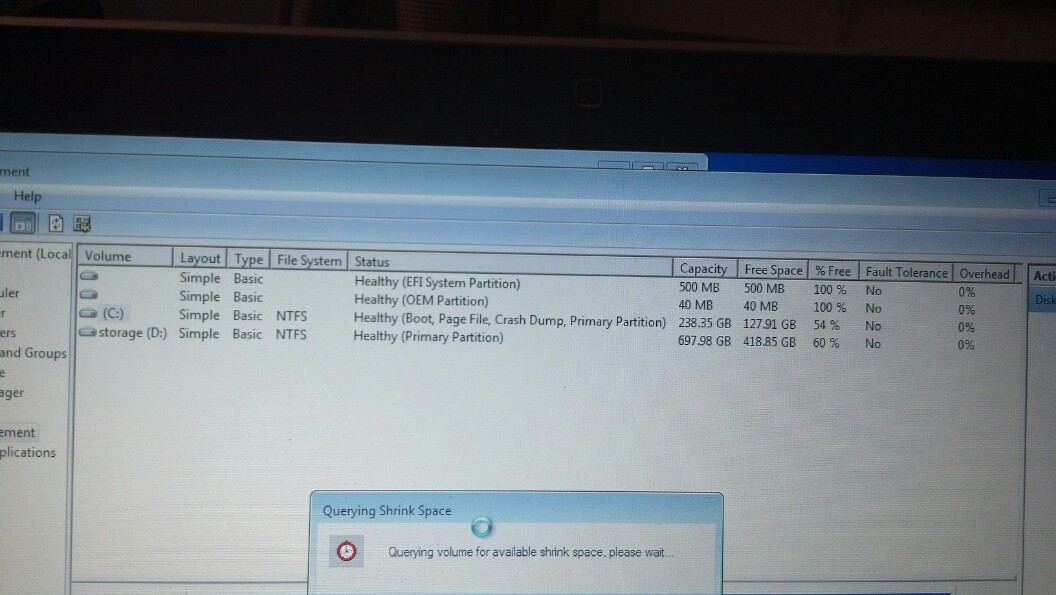
Here is a screenshot of my OLD setup

J45pD8X.jpg


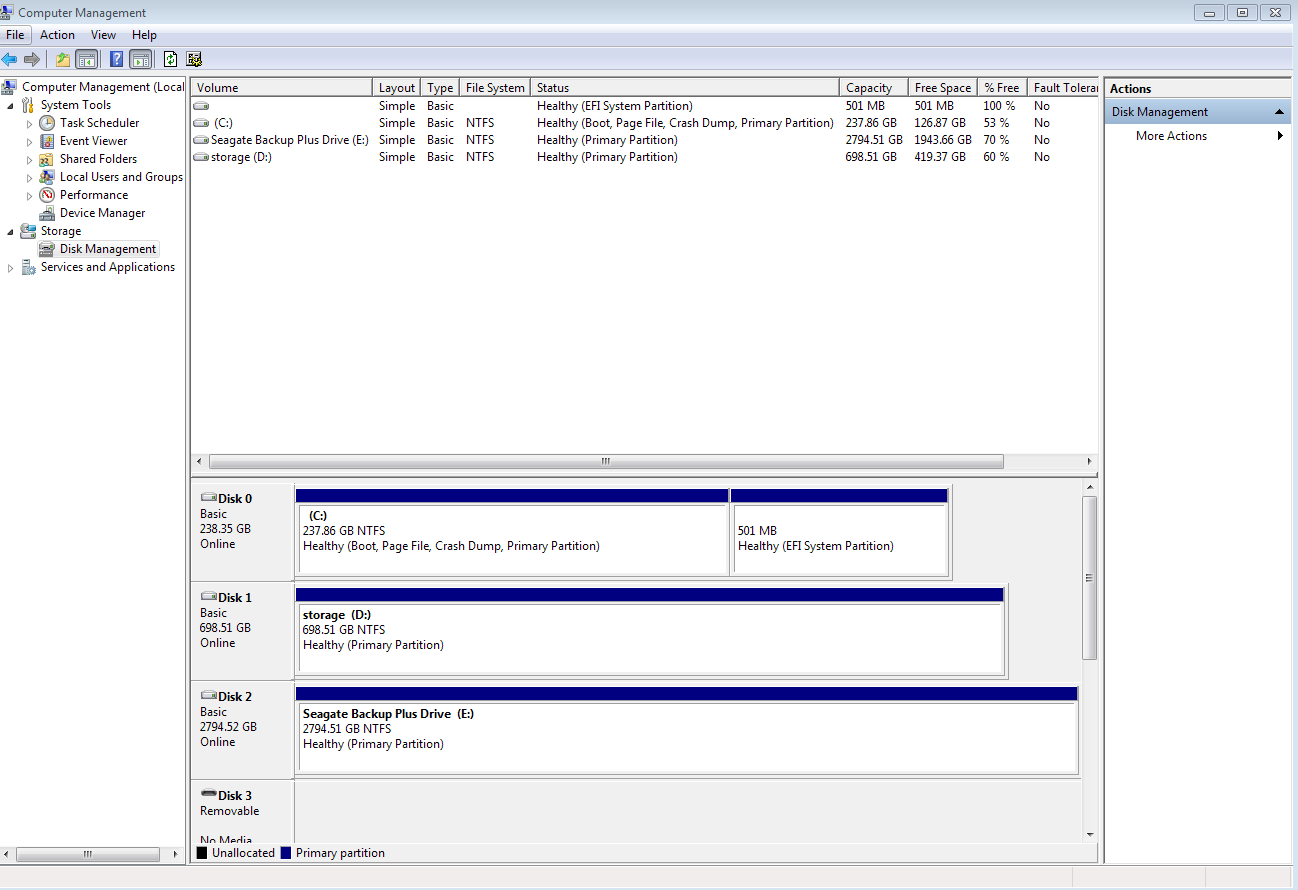
Here is my latest and my computer is thus far running great. I ran a chkdsk after adding that 500mb partition and all was clean.

7qwBckE.png
 

My Computer My Computer

At a glance

Windows 7 Ultimate x64i516gb
Computer type
PC/Desktop
Computer Manufacturer/Model Number
Dell Inspiron 15R SE
OS
Windows 7 Ultimate x64
CPU
i5
Memory
16gb
Hard Drives
256gb mSata SSD Crucial
750gb Western Digital
I am actually happy to have this working without needing those other partitions on the old 750gb drive. Now this latest dell HD has the full use for just storage.
 

My Computer My Computer

At a glance

Windows 7 Ultimate x64i516gb
Computer type
PC/Desktop
Computer Manufacturer/Model Number
Dell Inspiron 15R SE
OS
Windows 7 Ultimate x64
CPU
i5
Memory
16gb
Hard Drives
256gb mSata SSD Crucial
750gb Western Digital
Actually Win7 can also be installed to UEFI (Unified Extensible Firmware Interface) - Install Windows 7 with - Windows 7 Forums.'

But a Win8 PC not only has UEFI but also Secure Boot.

So to install Win7 you must at least turn off Secure Boot in BIOS setup, then either install to UEFI per above tutorial or Bypass UEFI to Install WIn7 to a normal MBR hard drive you've wiped to clear the GPT formatting.

In this case if you say that copying to the HD the EFI System partition allows it to boot then it is likely UEFI but still seems unusual since that normally requires two special partitions as such.

You can confirm that the disk is a GPT disk if you right click on the disk # in Disk Mgmt and it has Convert to MBR Disk now. (See screenshot below)

 
Back
Top