Solved Installing a new ssd

garyh99

New member
Local time
9:24 PM
Messages
36
I want to install a new 128 gb ssd to my win 7 32bit computer to replace my current startup drive.

My plan is to use Norton Ghost to copy my c drive to the ssd then re-format the old c drive, thus giving me a ssd start-up drive and a drive for extra storage.

Am I on the correct path? Is there anything else I need to do?
 

My Computer

OS
windows 7 ultimate 32bit
Yes, you need to first align the SSD and create an active primary partition before you dump the Ghost image on it. See here for details: http://www.sevenforums.com/tutorials/113967-ssd-alignment.html?ltr=S Then there are a few useful things to check. There are many threads on this forum where things are explained - e.g. here: http://www.sevenforums.com/installation-setup/122717-how-hard-move-install-another-hdd.html

PS: If you have the 100MB active boot partition, things are a bit more complicated. Better check that in Disk Management first.
 

My Computer

Computer Manufacturer/Model Number
HP, Dell, Gateway, Toshiba - 4 laptops and 2 desktops
OS
Vista, Windows7, Mint Mate, Zorin, Windows 8
CPU
from 1.6GHz Duo to i7
Monitor(s) Displays
2x HP w2207
Hard Drives
5x HDD, 7x SSD, 12x Externals
Keyboard
with trackball - no mices
Mouse
Trackball mice
Internet Speed
DSL 6000
Thanks for the tips. I'll definitely not wipe my old startup disk until I insure the new one is running properly.
 

My Computer

OS
windows 7 ultimate 32bit
That is a safe approach. Also remind you that you have to change the boot sequence in the BIOS after you moved the OS to the SSD. Again, what is the story on the 100MB active boot partition?
 

My Computer

Computer Manufacturer/Model Number
HP, Dell, Gateway, Toshiba - 4 laptops and 2 desktops
OS
Vista, Windows7, Mint Mate, Zorin, Windows 8
CPU
from 1.6GHz Duo to i7
Monitor(s) Displays
2x HP w2207
Hard Drives
5x HDD, 7x SSD, 12x Externals
Keyboard
with trackball - no mices
Mouse
Trackball mice
Internet Speed
DSL 6000
Disk Management only shows it as one partition. It shows as Healthy (Boot, Page File, Crash Dump, Primary Partition)

It's 500 Gb with partition size of 465.76 GB
 

My Computer

OS
windows 7 ultimate 32bit
Disk Management only shows it as one partition. It shows as Healthy (Boot, Page File, Crash Dump, Primary Partition)

It's 500 Gb with partition size of 465.76 GB
It should also say "Active". Maybe you can post a snip of your Disk Management. Then I will have a look.
 

My Computer

Computer Manufacturer/Model Number
HP, Dell, Gateway, Toshiba - 4 laptops and 2 desktops
OS
Vista, Windows7, Mint Mate, Zorin, Windows 8
CPU
from 1.6GHz Duo to i7
Monitor(s) Displays
2x HP w2207
Hard Drives
5x HDD, 7x SSD, 12x Externals
Keyboard
with trackball - no mices
Mouse
Trackball mice
Internet Speed
DSL 6000
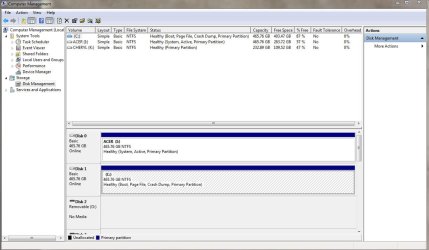
Here's a snip. C is boot, I is internal, the other is external.

Capture.jpg
 

My Computer

OS
windows 7 ultimate 32bit
I'll try again
 

Attachments

  • Capture.jpg
    Capture.jpg
    100.9 KB · Views: 137

My Computer

OS
windows 7 ultimate 32bit
Looks good. Your C: is the active partition. So you can dump the image into the aligned active, primary partition on the SSD. I do not recall the Ghost options during restore (have not used it since Vista), but if it asks to restore the MBR and mark the partition "active", say "yes". Then change the BIOS boot sequence and off you go. - Lots of luck and let us know how it went.
 

My Computer

Computer Manufacturer/Model Number
HP, Dell, Gateway, Toshiba - 4 laptops and 2 desktops
OS
Vista, Windows7, Mint Mate, Zorin, Windows 8
CPU
from 1.6GHz Duo to i7
Monitor(s) Displays
2x HP w2207
Hard Drives
5x HDD, 7x SSD, 12x Externals
Keyboard
with trackball - no mices
Mouse
Trackball mice
Internet Speed
DSL 6000
I've never used Ghost for this operation. It allows you to copy one hd to another. It's not really a restore from a backup.
 

My Computer

OS
windows 7 ultimate 32bit
I've never used Ghost for this operation. It allows you to copy one hd to another. It's not really a restore from a backup.
If you feel more comfortable, use free Macrium. Here is my complete video tutorial. With Macrium I know it works, with Ghost I have never tried that operation. And with Macrium we can help you more too.
 

My Computer

Computer Manufacturer/Model Number
HP, Dell, Gateway, Toshiba - 4 laptops and 2 desktops
OS
Vista, Windows7, Mint Mate, Zorin, Windows 8
CPU
from 1.6GHz Duo to i7
Monitor(s) Displays
2x HP w2207
Hard Drives
5x HDD, 7x SSD, 12x Externals
Keyboard
with trackball - no mices
Mouse
Trackball mice
Internet Speed
DSL 6000
Again, thanks for the tip. I'll watch the video and download Macrium. My ssd won't get here for a few days. But now I think I'll be ready for the "process". Thanks for your help. I'll let you know what happens.
 

My Computer

OS
windows 7 ultimate 32bit
What is the Acer I drive that is in DISK0? It is currently holding the System Active flag and booting Windows.

Is your Windows 7 on that drive or C in DISK1?

 
Long story. I thought it was booting from C. My original C drive crashed. I added another 500 GB drive and restored everything to it from Norton Ghost 15. I then reformated the old drive. I thought it wiped clean and became drive I, which is for data only.

I want to boot from C. What do I need to do
 

My Computer

OS
windows 7 ultimate 32bit
Msconfig shows it booting from c. There is a boot option for I, but I disabled it. It goes into a loop when It tries to boot from I
 
Last edited:

My Computer

OS
windows 7 ultimate 32bit
Your System boot files are located on I, which is still marked Active and booting your OS.

To fix this, open an http://www.sevenforums.com/tutorials/783-elevated-command-prompt.html, type:
DISKPART
LIST DISK
SELECT DISK 0 (confirm from disk list this is data drive)
SEL PARTITION 1
INACTIVE
SEL DISK 1 (confirm this is Win7 HD)
SEL PART 1
ACTIVE
EXIT

Now power down to unplug DISK0, set DISK1 C to boot first in BIOS setup, boot Win7 DVD Repair console or REpair CD, accept any offered Repair. When Win7 doesn't start, boot back into Repair, click through to Recovery Tools list to run Startup Repair up to 3 separate times to write the System MBR to Win7 partition.
http://www.sevenforums.com/tutorials/2083-system-repair-disc-create.html
http://www.sevenforums.com/tutorials/105541-startup-repair-run-3-separate-times.html
 

My Computer

Computer Manufacturer/Model Number
* BFK Customs *
OS
W 7 64-bit Ultimate
CPU
Intel Q9550 Yorkfield
Motherboard
ASUS P5Q Pro
Memory
8GB Dominator 8500C5D
Graphics Card(s)
ATI : XFX 5870
Sound Card
Realtek HD Audio 7-1
Monitor(s) Displays
1x 47" LCD HDMI & 3x 26" LCD HDMI
Screen Resolution
1920x1080P & 1920x1200
Hard Drives
1x 80GB Intel X25-M G2 SSD : 1x 500GB & 1x 640GB WD Caviar Black(s)
PSU
Corsair 620HX
Case
Cooler Master RC-690
Cooling
Tuniq Tower 120, 2x 140mm and 3x 120mm case fans
Keyboard
Microsoft 500
Mouse
Razer Diamondback 3G
Internet Speed
14 Mb/s
Other Info
1x Koutech 3Gb/s SATA HDD Hot Swap Rack
Scared the bejesus out of me, but it worked! Only had to run through startup repair once to create a bootmgr on the correct disk.

Now disk manager shows disk 0 (I:) as Healthy (Primary Partition), and disk 1 (C:) as Healthy (System, Boot, Page File, Active, Crash Dump, Primary Partition)

All back to normal and I can await the arrival of my ssd.

Thanks, guys.
 

My Computer

OS
windows 7 ultimate 32bit
Now I've got some old windows files on my I drive (disk 0) that I want to delete, but they won't delete. Says I need administrative permission...But I'm the administrator. What's up with that?????
 

My Computer

OS
windows 7 ultimate 32bit
If you feel comfortable transferring your OS with the "on-board facilities", you are all set (we will, of course help you if needed). Else, for $19.95 there is this Paragon program that makes the migration a piece of cake. I have tested it. Works very well and is super easy to use.


Now I've got some old windows files on my I drive (disk 0) that I want to delete, but they won't delete. Says I need administrative permission...But I'm the administrator. What's up with that?????
Try Take Ownership: http://www.sevenforums.com/tutorials/1911-take-ownership-shortcut.html
 

My Computer

Computer Manufacturer/Model Number
HP, Dell, Gateway, Toshiba - 4 laptops and 2 desktops
OS
Vista, Windows7, Mint Mate, Zorin, Windows 8
CPU
from 1.6GHz Duo to i7
Monitor(s) Displays
2x HP w2207
Hard Drives
5x HDD, 7x SSD, 12x Externals
Keyboard
with trackball - no mices
Mouse
Trackball mice
Internet Speed
DSL 6000
Back
Top