Solved Installing a new ssd

I'll try the "Take Ownership". A lot of files, it's still running. I'll let you know how it works.

As for the OS transfer to my ssd, I think I'm comfortable with Norton Ghost or Macrium. The ssd is "in the mail". I'll followup in this post or a new one if I run into problems.

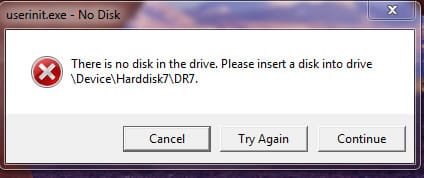
One more little glitch...When I restart, a window pops up telling me to insert a disk. I don't remember the exact wording and I can't restart until Take Ownership finishes. I simply click "ignore" and the message goes away. Any suggestion? I post the actual message when I reboot.
 

My Computer

OS
windows 7 ultimate 32bit
Take ownership worked on some, not all. Back when my original hd crashed, I had to creat a floder called windows.old. It has subfolders called programfiles, programdata, users, windows. I'm still not allowed to delete without admin permission. I don't think they do anything except take up space and I'd like to delete them. Any other suggestion?

Also, here's a snip of the message I get on a reboot.
 

Attachments

  • Capture.jpg
    Capture.jpg
    23.9 KB · Views: 0

My Computer

OS
windows 7 ultimate 32bit

My Computer

Computer Manufacturer/Model Number
HP, Dell, Gateway, Toshiba - 4 laptops and 2 desktops
OS
Vista, Windows7, Mint Mate, Zorin, Windows 8
CPU
from 1.6GHz Duo to i7
Monitor(s) Displays
2x HP w2207
Hard Drives
5x HDD, 7x SSD, 12x Externals
Keyboard
with trackball - no mices
Mouse
Trackball mice
Internet Speed
DSL 6000
As for #1, I'll keep playing with this and try to delete.

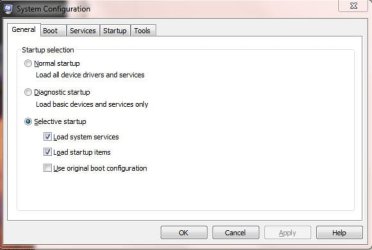
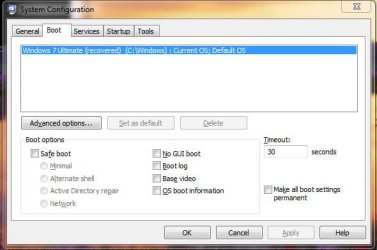
As for #2, no luck. Here are snips. When I try to switch to normal boot, msconfig quits on me
 

Attachments

  • Capture1.jpg
    Capture1.jpg
    33.4 KB · Views: 1
  • Capture2.jpg
    Capture2.jpg
    41.3 KB · Views: 1

My Computer

OS
windows 7 ultimate 32bit
Do you have DISK1 set to boot first in BIOS setup?

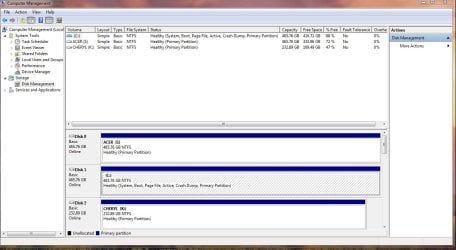
Best to post back another screenshot of your full DIsk Mgmt drive map with listings, using Snipping Tool in Start Menu.
 
No luck on the deletes. Did all the takeowns and cacls, even in safe mode. Still can't delete. Still says I need admin permissions.

Better luck on the restart issue. Ran msconfig while in safemode, rebooted in normal, and found an additional boot. Deleted it. Msconfig shows boot as selective startup, but now boots with no errors.

The second boot has to have something to do with the files I can't delete. It's just data, so I might reformat it and restore everything except the folders I can't delete.

I'll keep you posted
 

My Computer

OS
windows 7 ultimate 32bit
Reformat would be the "brutal" method and would work. Just make sure you do not have data on that partition that you first need to save. Glad the other trick worked.
 

My Computer

Computer Manufacturer/Model Number
HP, Dell, Gateway, Toshiba - 4 laptops and 2 desktops
OS
Vista, Windows7, Mint Mate, Zorin, Windows 8
CPU
from 1.6GHz Duo to i7
Monitor(s) Displays
2x HP w2207
Hard Drives
5x HDD, 7x SSD, 12x Externals
Keyboard
with trackball - no mices
Mouse
Trackball mice
Internet Speed
DSL 6000
Good call gregrocker. My bios was set to have disk 0 boot first. Thought I had corrected that. Anyways, disk 1 now boots first.

However...even after resetting the bios, when I set msconfig to boot normal, an additional boot sequence shows up. I deleted it again, but msconfig shows boot as selective startup. System boots with no errors. How can I get rid of that second boot sequence?

As you asked, here's a snip of my disk management. (The 3rd drive is external)
 

Attachments

  • Capture.jpg
    Capture.jpg
    113.4 KB · Views: 10

My Computer

OS
windows 7 ultimate 32bit
Reformat would be the "brutal" method and would work. Just make sure you do not have data on that partition that you first need to save. Glad the other trick worked.

Just did a full backup, so I'm good if I go that route.
 

My Computer

OS
windows 7 ultimate 32bit
I decided to go the re-format restore route in order to get rid of of the files I couldn't delete. I found some files in my backup that I'm choosing not to restore and see what happens. Will I have problems?

Folders I'm not restoring: $RECYCLE.bin, Boot, Documents & Settings, MSOCache, System Volume Information

Files I'm not restoring: autoexec.bat, bootmgr, ROOTSECT.bak, config.sys, hiberfil.sys, IO.sys, MSDOS.sys to name a few.

These all seem like holdovers from when this was my original startup disc.

I guess we'll see after the restore.
 

My Computer

OS
windows 7 ultimate 32bit
Ok, project completed. I re-formatted my drive and restored as above. Everything went well and I now have only the data files I want.

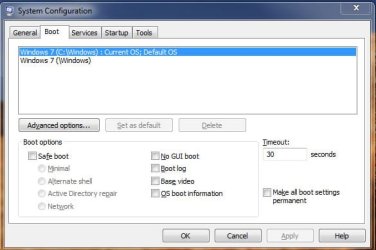
However (There's always a however)...I still have startup problems. I went to msconfig and set it for a normal startup. Upon restart, there's still that second startup sequence. Since I dumped everything off my data drive, it's got to be something on the C boot drive. Help!!! I'm frustrated. I've attached a snip on msconfig. Can all you experts shed some light????
 

Attachments

  • Capture.jpg
    Capture.jpg
    39.3 KB · Views: 141

My Computer

OS
windows 7 ultimate 32bit
Disk Management looks correct. Once System Active partition was changed to Disk 1 the only thing that can be left is a ghost listing. You can highlight and Delete the second listing here in msconfig:
 
I did as you suggested and deleted the "ghost listing" and everything works well. Just what is a "ghost listing". Other than a new install, is there any way to get rid of it. Any which drive is it on? I can live with it, I'm just curious as to where it is and how it got there.

Will I have the same problem when I transfer everything to my new ssd?
 

My Computer

OS
windows 7 ultimate 32bit
It isn't a file or anything other than just the written listing which sometimes needs to be deleted on the msconfig boot screen.

If it were any more it would appear on EasyBCD listings and can be removed in its entirety on it's Edit Boot Menu tab. But you're good now.
 
Used EasyBCD and removed it. However, on startup it still makes me select "Windows 7" even though it's the only option. How do I get it to just boot up.
 

My Computer

OS
windows 7 ultimate 32bit
How about fixing the MBR again. You could try the easy way with Partition Wizard - it is in the Disk Tab > Rebuild MBR.
 

My Computer

Computer Manufacturer/Model Number
HP, Dell, Gateway, Toshiba - 4 laptops and 2 desktops
OS
Vista, Windows7, Mint Mate, Zorin, Windows 8
CPU
from 1.6GHz Duo to i7
Monitor(s) Displays
2x HP w2207
Hard Drives
5x HDD, 7x SSD, 12x Externals
Keyboard
with trackball - no mices
Mouse
Trackball mice
Internet Speed
DSL 6000
Ok, physically have my new 128 GB SSD and ready to start the transfer process. After I install it, I plan to align it according to an earlier post. Then I'll copy my current C drive to it using Ghost or Macrium. I've got more questions.

I'll be making the new ssd drive active, correct? Is there a problem having two active drives?

My system will give the new drive a letter, let's say it's J. After the transfer, an OS and programs will be there, but they all should still recognize C drive as their "root". Can I then simply rename the current C drive to something else and make it inactive. Then rename the ssd to C. Then set the BIOS to boot from the ssd. And then finally wipe the old C drive, making it another data drive.

What problems might I have?
 

My Computer

OS
windows 7 ultimate 32bit
Yes, you have to make the SSD active - also during the installation of the image. There is no problem with 2 active drives/partitions. But you have to tell the BIOS from which one to boot (first in booting sequence after CD/DVD reader). I would keep the old C: active until you are all set with the SSD and will delete it. - Just in case you may need it again.

Do not rename any drives/partitions. It will automatically name the boot partition (now the SSD) as C: and your old C: will get another letter.

When you are all set and happy with the new SSD setup, you can go into Disk Management and delete the old C: , that is the easiest way. The freespace you can either add to another partition or create a new partition.

As a final step have a look in msconfig > Boot tab whether ther is still the old C: listed. If yes, delete it.
 

My Computer

Computer Manufacturer/Model Number
HP, Dell, Gateway, Toshiba - 4 laptops and 2 desktops
OS
Vista, Windows7, Mint Mate, Zorin, Windows 8
CPU
from 1.6GHz Duo to i7
Monitor(s) Displays
2x HP w2207
Hard Drives
5x HDD, 7x SSD, 12x Externals
Keyboard
with trackball - no mices
Mouse
Trackball mice
Internet Speed
DSL 6000
Thanks, again. I'll keep you posted.

BTW, have you heard of Paragon's new Migrate OS to SSD program. Supposed to be a program that "does it all". $20 is not a bad price if it "does it all" seemlessly
 
Last edited:

My Computer

OS
windows 7 ultimate 32bit
Back
Top