Installing driver (i.e. how force install!) Tried everything

greck0

New member
Local time
2:16 PM
Messages
8
Hey guys I am on windows 7 (home prem so cant do the group fix), atheros AR9285 802.11b/g/n and trying to install a different driver for it (net card)

Everytime i try to install the driver windows says they have the most up to date one and i cant force install. I have spent hours reading and have manually selected windows updates. I have backed up drivers and uninstalled the driver and tried to install but windows seems to find a way of getting the old driver.

I have also installed programs to override windows verification of drivers etc.... tried a lot and spent hours!! I have searched threads here and elsewhere and tried all people say but still windows thinks it is helpful...

Does any one have experience in how to do this as it is driving me insane!
Endlessly going on tangents to do something i thought would be simple and a bit of intellectual curiousity!
thanks a lot in advance!
 

My Computer

Computer Manufacturer/Model Number
Sony Vaio
OS
Windows 7
Did you uninstall the old/
If no, I will tell you how

If yes.
Download and use ccleaner to get rid of the remnants.
 

My Computer

Computer type
PC/Desktop
Computer Manufacturer/Model Number
Dell XPS 420
OS
Windows 10, Home Clean Install
CPU
Intel Core2 processsor Q8200(2.33Ghz 1333FSB) Quad Core Tech
Motherboard
Dell
Memory
6 gb
Graphics Card(s)
ATI Radeon 256MB HD3650
Sound Card
Intergrated 7.1 Channel Audio
Monitor(s) Displays
Dell SP2009W 20"
Hard Drives
640 GB Serial ATA Hard drive
Cooling
Fan
Keyboard
Dell USB Keyboard
Mouse
Dell Premium Optical USB
Internet Speed
DSL 2.85
yes uninstalled

Yes,
in driver tab have tried:
disable and install
uninstall and then try install
update driver and install...
thnks, downloading cccleaner. will try uninstall, clean and install...lets see!
thanks
 

My Computer

Computer Manufacturer/Model Number
Sony Vaio
OS
Windows 7
The only thing that I could think of is that some remnants remain; Ccleaner will take care of that.
 

My Computer

Computer type
PC/Desktop
Computer Manufacturer/Model Number
Dell XPS 420
OS
Windows 10, Home Clean Install
CPU
Intel Core2 processsor Q8200(2.33Ghz 1333FSB) Quad Core Tech
Motherboard
Dell
Memory
6 gb
Graphics Card(s)
ATI Radeon 256MB HD3650
Sound Card
Intergrated 7.1 Channel Audio
Monitor(s) Displays
Dell SP2009W 20"
Hard Drives
640 GB Serial ATA Hard drive
Cooling
Fan
Keyboard
Dell USB Keyboard
Mouse
Dell Premium Optical USB
Internet Speed
DSL 2.85
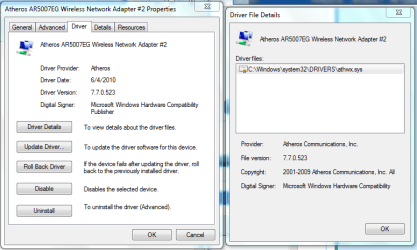
just a tip. before uninstalling look at driver details. It will say the location of the files.
Capture.PNG
then uninstall. then navigate to the driver location(s) delete the files listed and try to manualy re-install.
 

My Computer

Computer type
PC/Desktop
Computer Manufacturer/Model Number
HP Pavilion g7-1350dx
OS
Windows 7 Ultimate SP1 x64
CPU
AMD A6-3420M APU
Memory
4.0 Gb DDR3 838 MHz
Graphics Card(s)
AMD Radeon HD 6520G
Sound Card
IDT HD Audio
Screen Resolution
1600x 900
Hard Drives
500GB Hitachi HTS547550A9E384
....seriously

OMG, and they say cochroaches can live through nuclear attack...thanks you two so far..

So, this is what i did.
1. selected atheros / driver / uninstall / click delete driver software / ok
2. uninstalls
3. delete athrx.sys from sys32 but cant delete the vwifibus.sys (there are two listed - can't delete vwifibus.sys. saysi i need permission from TrustedInstaller??)
4. ran cccleaner - cleaner ex google (as it is open now, but did the first time i tried, which deleted all my history!) then registery and deleted all
5. press scan for hardware change.....windows becomes helpful again
seriously,...am i missing something?
 

My Computer

Computer Manufacturer/Model Number
Sony Vaio
OS
Windows 7
In regards to the drivers that you cannot delete. If you are sure that you do not need them, you can manually change the .exe to .bup. effectively they will not be used as the computer will not be able to find them. Word of warning if trusted installer has constrol, they are important for the OS. Using this method, you can restore them if necessary. I would not uninstall.

You did about all that you could.

Try this:
Type cmd, in search
In cmd, type driverquery. You will get a list of current drivers. Make sure the one you are trying to replace is not listed.
 

My Computer

Computer type
PC/Desktop
Computer Manufacturer/Model Number
Dell XPS 420
OS
Windows 10, Home Clean Install
CPU
Intel Core2 processsor Q8200(2.33Ghz 1333FSB) Quad Core Tech
Motherboard
Dell
Memory
6 gb
Graphics Card(s)
ATI Radeon 256MB HD3650
Sound Card
Intergrated 7.1 Channel Audio
Monitor(s) Displays
Dell SP2009W 20"
Hard Drives
640 GB Serial ATA Hard drive
Cooling
Fan
Keyboard
Dell USB Keyboard
Mouse
Dell Premium Optical USB
Internet Speed
DSL 2.85
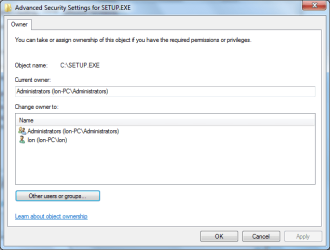
with vwifibus.sys you need to take ownership of it.
1)Right click file select properties
2)Go to security
Capture.PNG
3)select advanced
4)click owner
5)Click other users or groups
Capture1.PNG
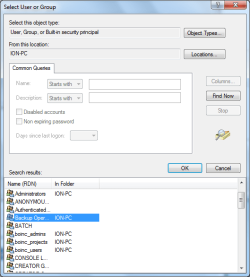
6)click advanced
7)click find now
Capture3.PNG
8)select the user(you)
9)click ok
10)click ok​
11)double click your name in the list
12)click ok - click ok - click ok (ok any remaining windows)
You should be able to delete the file now
 

My Computer

Computer type
PC/Desktop
Computer Manufacturer/Model Number
HP Pavilion g7-1350dx
OS
Windows 7 Ultimate SP1 x64
CPU
AMD A6-3420M APU
Memory
4.0 Gb DDR3 838 MHz
Graphics Card(s)
AMD Radeon HD 6520G
Sound Card
IDT HD Audio
Screen Resolution
1600x 900
Hard Drives
500GB Hitachi HTS547550A9E384
Just do added information.

Before I download and install any new drivers or applications I create a restore point.
This will allow you to do an uninstall and then do a system restore and have your system back where it was before you changed anything.
I find this useful knowing my system is now back to where it was before I made any changes, and can start over from the same point.

Have you tried using this tutorial http://www.sevenforums.com/tutorials/82137-drivers-turn-off-automatic-driver-installation.html?ltr=D

Also try to install the downloaded driver with your internet connection unplugged.
You can also try installing from device manager>go to the device>update driver software>browse my computer>let me pick>have disk>browse to the file where the driver is>either run the setup.exe file or try clicking or double clicking the.inf file and see if it will install this way.
Fabe
 

My Computer

Computer Manufacturer/Model Number
Self Built
OS
Windows 7 ultimate 64 bit / XP Home sp3
CPU
intel Core 2 Duo E8400 3.0ghz
Motherboard
Asus P5ND bios 1401
Memory
8 gigs 1066 OCZ Fata1ty
Graphics Card(s)
EVGA GTX 580 Call of Duty Black Ops Edition
Sound Card
Creative Soundblaster Audigy 2zs
Monitor(s) Displays
Asus 24in LCD's 2MS X2
Screen Resolution
1920x1080p @60Hz
Hard Drives
WD Caviar 500 Black/ WD Caviar 200 Blue
PSU
OCZ 700W GameXtreme
Case
NZXT Apollo
Cooling
Corsair H50 CPU/120mm x3 /60mm x2 /Corsair Dominator Ram
Keyboard
Logitech Bluetooth Wireless MX5000
Mouse
Logitech Bluetooth Wireless MX1000
Internet Speed
Download 19.83 Upload 0.97
Other Info
Logitech Z2300 Speakers/ Bose Noise Cancelling Headphones/Avermedia PCI-e Hybrid TV Bravo/Epson NX415 all in one/ 4 Port Powered USB Hub/ LG 10x Bluray Burner /TSST Corp DVDRW External
Back
Top