Installing motherboard drivers

andysfile

New member
Local time
1:11 AM
Messages
22
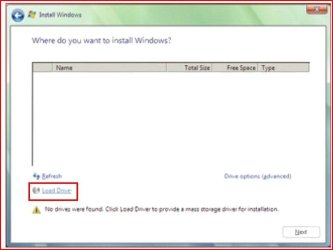
I want to install the latest motherboard drivers but Windows is not installed. The Browse button near the "device drivers were not found" message on the Win7 installation screen does not open the drivers on my USB. Is there another way?
 

My Computer

OS
Windows 7 Pro 64
Have you tried simply letting Win7 install without trying to help the install along?

After you have a working Win7, updating drivers will be simple.
 

My Computer

Computer Manufacturer/Model Number
Toshiba Satellite S875D-S7239 laptop
OS
MS Windows 7 Ultimate SP1 64-bit
CPU
AMD A10-4600M
Motherboard
AMD Pumori (Socket FT1)
Memory
6.00 GB Dual-Channel DDR3 @ 798MHz (11-11-12-28)
Graphics Card(s)
AMD Radeon HD 7660G
Sound Card
High Definition Audio Device
Monitor(s) Displays
Generic PnP Monitor (1600x900@60Hz)
Screen Resolution
1600x900@60Hz
Hard Drives
SSD 119GB Corsair CSSD-V128GB2 ATA Device
Keyboard
Standard PS/2 Keyboard
Mouse
HP Wireless Optical Mobile Mouse Model FHA-3410
Internet Speed
What the local pub, local coffee shop offers.
Other Info
Optical Drive:MATSHITA BD-CMB UJ160B ATA Device


Also have an Asus ha1002xp netbook with Win 7 Ultimate installed.
I have an error on the first step of the install saying "Device drivers were not found". I try and make the install find them but this doesn't work. I can't continue the install because of this. Because my BIOS does not currently have any mention of AHCI and I would like to see if it helps the install by turning it on/off, and because the install might not recognise the outdated motherboard (even though it's still fairly new), I want to install the drivers but do not know how without Windows.
 

My Computer

OS
Windows 7 Pro 64
before you install win7, are you sure all set default at bios??

i saw your spec hdd have 2.
 

My Computer

Computer Manufacturer/Model Number
built up
OS
windows 7
CPU
Phenom II AMD Dragon 3.5Ghz
Memory
DDR3 4GB
Graphics Card(s)
ATI Radeon 512Mb
Monitor(s) Displays
HP L1506
Screen Resolution
1152 x 864
Hard Drives
WDC 1 TB SATA-II Green Power
Keyboard
HP wireless keyboard
Mouse
HP Optic
Internet Speed
1GB
Win7 is not XP. It's not even Vista.

If you have truly done a full and complete Win7 install, then it is extremely likely that all of your hardware is functioning. Maybe not optimally but still functional.

You keep trying to install this driver and that driver with no solid reason for doing such. You are the interference and not Win7.

As you can see, I call it like I see it.

If doing a truly clean, unaltered install, and then you go to DEVICE MANAGER (devmgmt.msc), tell us what you see that has a yellow or a red icon/marking.
 

My Computer

Computer Manufacturer/Model Number
Toshiba Satellite S875D-S7239 laptop
OS
MS Windows 7 Ultimate SP1 64-bit
CPU
AMD A10-4600M
Motherboard
AMD Pumori (Socket FT1)
Memory
6.00 GB Dual-Channel DDR3 @ 798MHz (11-11-12-28)
Graphics Card(s)
AMD Radeon HD 7660G
Sound Card
High Definition Audio Device
Monitor(s) Displays
Generic PnP Monitor (1600x900@60Hz)
Screen Resolution
1600x900@60Hz
Hard Drives
SSD 119GB Corsair CSSD-V128GB2 ATA Device
Keyboard
Standard PS/2 Keyboard
Mouse
HP Wireless Optical Mobile Mouse Model FHA-3410
Internet Speed
What the local pub, local coffee shop offers.
Other Info
Optical Drive:MATSHITA BD-CMB UJ160B ATA Device


Also have an Asus ha1002xp netbook with Win 7 Ultimate installed.
I want to install the latest motherboard drivers but Windows is not installed. The Browse button near the "device drivers were not found" message on the Win7 installation screen does not open the drivers on my USB. Is there another way?

Install windows then once its installed then install the mobo drivers.
 

My Computer

OS
Windows 7 Ultimate x64 Service Pack 1 (Build 6.1.7601)
CPU
Intel Core 2 Quad Q6600 (G0 Kentsfield) LGA775 (FC-LGA6)
Motherboard
GIGABYTE GA-EP35C-DS3R (Rev. 2.1)
Memory
Corsair TW3X4G1333C9A 4GB PC-10600 (2x XMS3 2GB)
Graphics Card(s)
ASUS nVIDIA GeForce 560
Sound Card
RealTek ALC885/889A/890
Monitor(s) Displays
ChiMei CMV CT-730D 17inch (LCD Monitor)
Screen Resolution
1280-1024 60Hertz (Ture Colour 32bit)
Hard Drives
2x Barracuda 7200.10 SATA 3.0Gb/s 160-GB Hard Drive ST3160815AS (AHCI)
PSU
ANTEC 750w Earthwatts
Case
Thermaltake Shark (VA7000SWA ATX) Full Tower
Cooling
Front 120mm fan (1400 RPM) /Rear 120mm (1400 RPM) blue LED
Keyboard
Labtec Media Desktop Y-SAD65
Mouse
Razer DeathAdder 3G Infrared Sensor (1800DPI)
Internet Speed
Telstra BigPond Elite Liberty ADSL2+ 24Mbps/256kbps
Other Info
ASUS PCE-N13 802.11n Wireless LAN card
OK I'll clear this up for you:
I am trying to install Windows 7 Professional x64 off the MSDN .iso. I have downloaded this twice, both images are the same file size. I burn one using the slowest speed possible to a DVD. I did this twice and to ensure there are no errors in writing along with verifying the DVDs with the program. I have only one hard disk installed at the moment, a 750GB Seagate Barracuda 7200RPM. The BIOS is set to boot off the DVD so I can start the install.
However, when I click Start Install, it says 'Setup is starting...' then a message pops up saying "A required CD/DVD drive device driver is missing. If you have a driver floppy disk, CD, DVD, or USB flash drive, please insert it now." I click OK and another message comes up; "No device drivers were found. Make sure that the installation media contains the correct drivers, and then click OK."
After having downloaded the installation programs for the latest drivers for my motherboard and hard disk (both 32 and 64 bit) onto my flash drive and inserting it, I click the Browse button on the Windows Install screen to browse for drivers. I select the folder they are in and click OK. The message "No device drivers were found. Make sure that the installation media contains the correct drivers, and then click OK" pops up. This message also pops up if I click Rescan.
The Windows Install screen lists nothing in what is obviously meant to be a box to show drives or somewhere to install Windows.
Another step I have taken is creating a boot USB instead of a DVD yet I hit the same brick wall in the installation.
The hard disk is certainly ready for Windows to be installed on it as it is formatted NTFS and is free of any data and only has one partition.

After reading up on this, some people have fixed this problem by enabling AHCI in their BIOS but I have no such option. I was hoping to find a way to install the latest motherboard drivers to enable this option.

My hardware has worked flawlessly for the past couple of years when running Vista Home Premium 32bit.

Bit 'fused.

 

My Computer

OS
Windows 7 Pro 64
Common mistake - did you 'extract'/unzip all your downloaded drivers to usb drive?

Right @ the start of installation, WIN 7 will look for the SATA Chipset/SCSI drivers - so it can see your hard drives and format/load onto them! You also need to have the correct settings in your bios for your sata drives to fire up.

You need the exact match for your sata chipset from Promise/Silicon image website. Don't forget 32/64bit + WIN 7 specific driver either!

Dell and others often have hidden 'advanced' bios settings on their OEM spec. motherboards.

Is that what you are getting at (and i'm presuming you have sata drives coz you don't mention in specs.)
 

My Computer

Computer type
PC/Desktop
Computer Manufacturer/Model Number
D.I.Y.
OS
WIN7 Ultimate 64bit
CPU
AMD FX8150/Trinity A10-5700
Motherboard
Asus Sabertooth v.1 /Asus F2A85-M Pro
Memory
G-Skill 2400 x2 @ 1866 (both pc's)
Graphics Card(s)
Sapphire (factory OC version) AMD 7770
Sound Card
onboard
Monitor(s) Displays
T260 Samsung
Screen Resolution
1920x1080
Hard Drives
Western Digital Sata 2TB/1TB Caviar Blacks
Buffalo 1TB usb (excellent drive)
PSU
Be-Quiet 700W E-9/Be-Quiet 550W E-9(E-9 = built by FSP)
Case
Antec P183/Antec P180mini
Cooling
x2 Xigmatek SXHH7-U01 + C-Master R4-EXBB-20PK-R0 120mm Fans
Keyboard
Cherry
Mouse
MS Explorer 3.0
Other Info
LG Blu ray combo
Pioneer 207D/208 Blu ray burners
Common mistake - did you 'extract'/unzip all your downloaded drivers to usb drive?
+1! Make sure you download the floppy drivers too, and not the programs that you would run from within Windows.
 

My Computer

Computer Manufacturer/Model Number
Sony Vaio FZ21Z
OS
Windows 7 Ultimate x64 ®™
CPU
Intel Core 2 Duo (2.2 GHz)
Motherboard
Sony (Intel Chipset)
Memory
2x 2GB Corsair (667 MHz)
Graphics Card(s)
NVIDIA 8600M GS (256MB)
Sound Card
Sigmatel
Monitor(s) Displays
15.4" TFT X-Black
Screen Resolution
1280x800
Hard Drives
Western Digital 300GB Scorpio Black (7200rpm)
Mouse
Logitech Anywhere MX
Internet Speed
Sky 5MB
Common mistake - did you 'extract'/unzip all your downloaded drivers to usb drive?

Right @ the start of installation, WIN 7 will look for the SATA Chipset/SCSI drivers - so it can see your hard drives and format/load onto them! You also need to have the correct settings in your bios for your sata drives to fire up.

You need the exact match for your sata chipset from Promise/Silicon image website. Don't forget 32/64bit + WIN 7 specific driver either!

Dell and others often have hidden 'advanced' bios settings on their OEM spec. motherboards.

Is that what you are getting at (and i'm presuming you have sata drives coz you don't mention in specs.)
AHCI must be a hidden setting then.
Thanks for the answer. I have taken the driver setup files out of their zipped folders and onto the USB - is this the right thing to do?
If I download the drivers for my exact SATA hard disk model, would I just put them on the USB and stick it in while Windows is getting ready for it's install?
 

My Computer

OS
Windows 7 Pro 64
I have taken the driver setup files out of their zipped folders and onto the USB - is this the right thing to do?
Yes, as Windows needs to be able to see them.
If I download the drivers for my exact SATA hard disk model, would I just put them on the USB and stick it in while Windows is getting ready for it's install?
When it prompts you too yes.
 

My Computer

Computer Manufacturer/Model Number
Sony Vaio FZ21Z
OS
Windows 7 Ultimate x64 ®™
CPU
Intel Core 2 Duo (2.2 GHz)
Motherboard
Sony (Intel Chipset)
Memory
2x 2GB Corsair (667 MHz)
Graphics Card(s)
NVIDIA 8600M GS (256MB)
Sound Card
Sigmatel
Monitor(s) Displays
15.4" TFT X-Black
Screen Resolution
1280x800
Hard Drives
Western Digital 300GB Scorpio Black (7200rpm)
Mouse
Logitech Anywhere MX
Internet Speed
Sky 5MB
I can't seem to find anywhere the latest firmware for my Seagate Barracuda ST3750640AS 7200.10. I can see the Seagate website lists drivers for their 7200.11 and 7200.12 models though.
Could somebody point me in the right direction? :p
 

My Computer

OS
Windows 7 Pro 64

My Computer

Computer Manufacturer/Model Number
Sony Vaio FZ21Z
OS
Windows 7 Ultimate x64 ®™
CPU
Intel Core 2 Duo (2.2 GHz)
Motherboard
Sony (Intel Chipset)
Memory
2x 2GB Corsair (667 MHz)
Graphics Card(s)
NVIDIA 8600M GS (256MB)
Sound Card
Sigmatel
Monitor(s) Displays
15.4" TFT X-Black
Screen Resolution
1280x800
Hard Drives
Western Digital 300GB Scorpio Black (7200rpm)
Mouse
Logitech Anywhere MX
Internet Speed
Sky 5MB
Thanks for the link!
Windows 7 still shows me the same message when I browse for the drivers though.
I tried putting the drivers on the USB as per the Dell instructions to create a bootable driver USB. When the USB is FAT32, I get the error "Disk error" and the setup doesn't start. When the USB is NTFS, I get the error "NTLDR is missing" and the setup doesn't start.
 

My Computer

OS
Windows 7 Pro 64
Not quite sure where to go from here.
 

My Computer

Computer Manufacturer/Model Number
Sony Vaio FZ21Z
OS
Windows 7 Ultimate x64 ®™
CPU
Intel Core 2 Duo (2.2 GHz)
Motherboard
Sony (Intel Chipset)
Memory
2x 2GB Corsair (667 MHz)
Graphics Card(s)
NVIDIA 8600M GS (256MB)
Sound Card
Sigmatel
Monitor(s) Displays
15.4" TFT X-Black
Screen Resolution
1280x800
Hard Drives
Western Digital 300GB Scorpio Black (7200rpm)
Mouse
Logitech Anywhere MX
Internet Speed
Sky 5MB
Same
I made a bootable floppy disk too, I put it in a portable USB floppy drive but the BIOS doesn't detect that at all.
Also, I put them on a CD but now for some reason both of my CD drives are not being detected by the BIOS. The odd thing is that you can see them and explore the contents of them when searching for drivers in the Windows install - just that it's never detected as a boot device (not even the DVDs/CDs which worked before).
AAAAAH
 

My Computer

OS
Windows 7 Pro 64
You do not have to make a BOOTABLE Cd, just unzip your sata drivers to a CD and when prompted insert the CD and press ok.
Windows will search the Cd and install the drivers.
 

My Computer

Computer type
PC/Desktop
Computer Manufacturer/Model Number
Self Built Custom Computer.
OS
Windows 10 Pro x64
CPU
i7-4770K
Motherboard
Asus Z87 Sabertooth
Memory
16Gig DDR3-2400
Graphics Card(s)
Gigabyte GT740
Sound Card
Onboard
Monitor(s) Displays
Benq 27" - Dell 23' - Benq 22"
Screen Resolution
1680x1050
Hard Drives
Samsung 840 Pro 128g SSD
1xWestern Digital Caviar Green 1tb
2xWestern Digital Caviar Green 2 tb
PSU
Seasonic 760 watt Platinum
Case
Coolermaster Haf - X
Cooling
Noctua NH-C12P CPU Cooler
Keyboard
Logitech illuminated keyboard
Mouse
Logitech Perfomance MX
Internet Speed
Cable = speeds to 20Mbps downsteam and 512kbps upsteam
Antivirus
Avast Internet Security
Browser
Firefox
I want to install the latest motherboard drivers but Windows is not installed. The Browse button near the "device drivers were not found" message on the Win7 installation screen does not open the drivers on my USB. Is there another way?

You will need to download Sata drivers for your system.

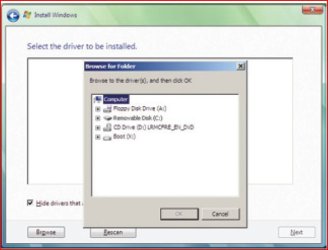
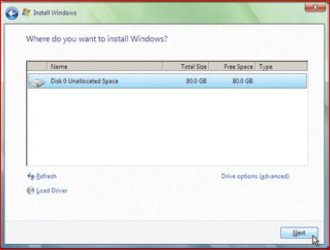
Load drivers at Picture 1.
 

Attachments

  • Capture1-1.JPG
    Capture1-1.JPG
    30.5 KB · Views: 66
  • Capture2.JPG
    Capture2.JPG
    39.2 KB · Views: 63
  • Capture3.JPG
    Capture3.JPG
    32.2 KB · Views: 67
  • Capture4.JPG
    Capture4.JPG
    32.7 KB · Views: 56

My Computer

OS
ME/XP/Vista/Win7
That's interesting, I don't even see picture one!
At picture 2, I can insert the drivers on whatever media I want and look for them in the Browse dialogue but I never see picture 3 or 4 because Windows comes up "No device drivers were found" again.
 

My Computer

OS
Windows 7 Pro 64
That's interesting, I don't even see picture one!
At picture 2, I can insert the drivers on whatever media I want and look for them in the Browse dialogue but I never see picture 3 or 4 because Windows comes up "No device drivers were found" again.

Do you unzip the downloaded drivers file & copy to disk?
 

My Computer

OS
ME/XP/Vista/Win7
Back
Top